Page 89 of 329
379
1 23456789
Knowing your vehicle
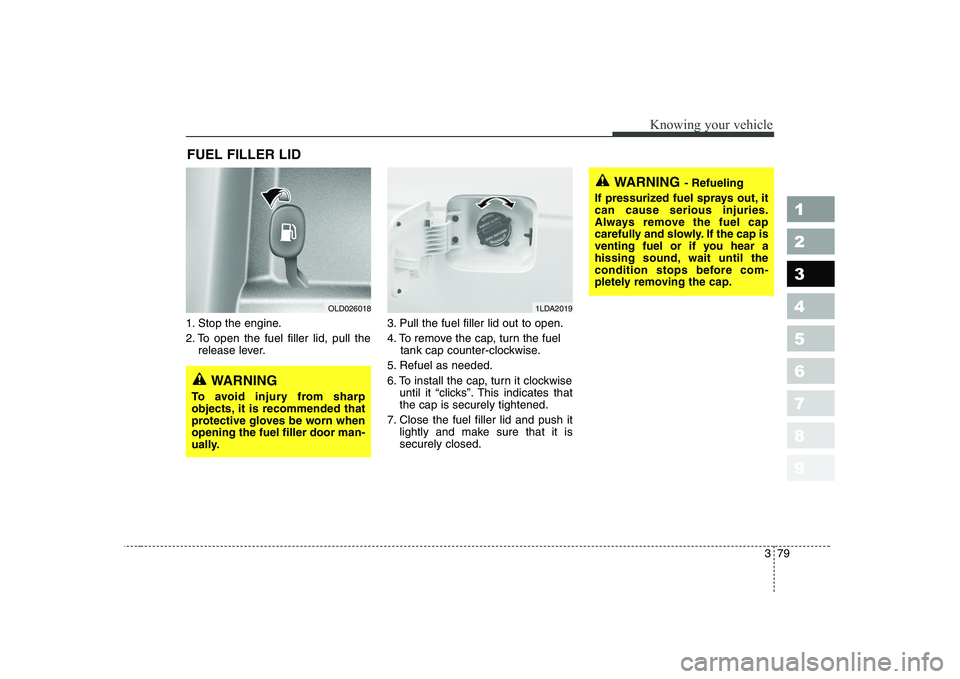
1. Stop the engine.
2. To open the fuel filler lid, pull therelease lever. 3. Pull the fuel filler lid out to open.
4. To remove the cap, turn the fuel
tank cap counter-clockwise.
5. Refuel as needed.
6. To install the cap, turn it clockwise until it “clicks”. This indicates that the cap is securely tightened.
7. Close the fuel filler lid and push it lightly and make sure that it issecurely closed.
FUEL FILLER LID
OLD0260181LDA2019
WARNING
- Refueling
If pressurized fuel sprays out, it can cause serious injuries.
Always remove the fuel cap
carefully and slowly. If the cap is
venting fuel or if you hear a
hissing sound, wait until the
condition stops before com-
pletely removing the cap.
WARNING
To avoid injury from sharp
objects, it is recommended that
protective gloves be worn whenopening the fuel filler door man-
ually.
Page 90 of 329

Knowing your vehicle
80
3
1 23456789
WARNING
Automotive fuels are flamma-
ble/explosive materials. When
refueling, please note the fol-
lowing guidelines carefully.
Failure to follow these guide-
lines may result in severe per-
sonal injury, severe burns or
death by fire or explosion.
Before refueling always note the location of the Emergency
Gasoline Shut-Off, if available,
at the gas station facility.
Before touching the fuel noz- zle or fuel filler cap, you
should eliminate potentially
dangerous static electricity
discharge by touching anoth-
er metal part of the front of the
vehicle, a safe distance away
from the fuel filler neck, noz-
zle, or other gas source.
(Continued)(Continued)
Do not get back into a vehicleonce you have begun refuel-
ing. Do not touch, rub or slide
against any item or fabric
(polyester, satin, nylon, etc.)
capable of producing static
electricity. Static electricity
discharge can ignite fuel
vapors resulting in explosion.
If you must re-enter the vehi-
cle, you should once again
eliminate potentially danger-ous static electricity dis-
charge by touching a metal
part of the vehicle, away from
the fuel filler neck, nozzle or
other gasoline source.
When using a portable fuel container be sure to place the
container on the ground prior
to refueling. Static electricity
discharge from the container
can ignite fuel vapors causing
a fire. Once refueling has
begun, contact with the vehi-
cle should be maintained until
the filling is complete.
(Continued)(Continued)
Use only portable fuel con-
tainers designed to carry and
store gasoline.
Do not use cellular phones around a gas station or while
refueling any vehicle. Electric
current and/or electronic
interference from cellular
phones can potentially ignite
fuel vapors causing a fire. If
you must use your cellular
phone use it in a place away
from the gas station.
When refueling always shut the engine off. Sparks pro-
duced by electrical compo-nents related to the engine
can ignite fuel vapors causing
a fire. Always insure that the
engine is OFF before and dur-
ing refueling. Once refueling
is complete, check to makesure the fuel filler cap and
door are securely closed,
before starting the engine.
(Continued)
Page 96 of 329
Knowing your vehicle
86
3
1 23456789
Map light
Front (if equipped)
The lights are turned ON or OFF by
pressing the corresponding switch. Dome light (if equipped)
(1) OFF - The light stays off even
when a door is open.
(2) DOOR - The light turns on when a door is opened or when a door is
unlocked by the transmitter (if
equipped). Interior light goes out
slowly after 30 seconds if the
door is closed. However if the
ignition switch is ON or all vehicle
doors are locked when the door is
closed, interior light will turn off
even within 30 seconds.
(3) ON - The light turns on and stays on even when the doors are allclosed. Door courtesy lamp (if equipped)
The door courtesy lamp comes ON when the door is opened to assist
entering or exiting the vehicle. It also
serves as a warning to passing vehi-
cles that the vehicle door is open.
INTERIOR LIGHTS
1LDA2113
OLD026111
OLD026112
Type A
Type B1LDN3202
Page 101 of 329
391
1 23456789
Knowing your vehicle
Rear (if equipped)
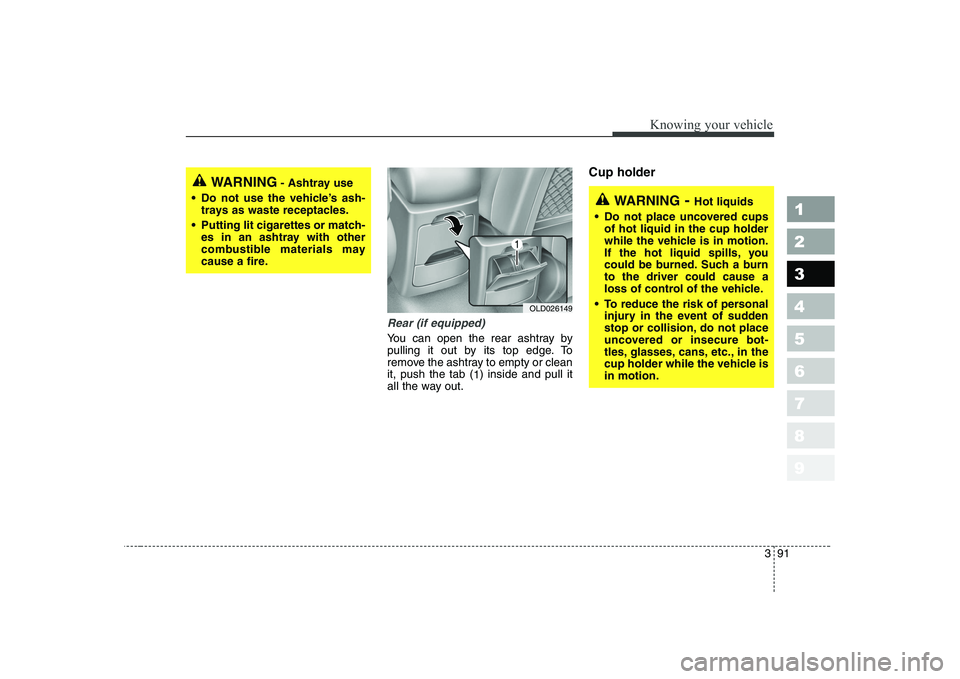
You can open the rear ashtray by
pulling it out by its top edge. To
remove the ashtray to empty or cleanit, push the tab (1) inside and pull it
all the way out. Cup holder
WARNING
- Ashtray use
Do not use the vehicle’s ash- trays as waste receptacles.
Putting lit cigarettes or match- es in an ashtray with other
combustible materials may
cause a fire.
WARNING - Hot liquids
Do not place uncovered cups of hot liquid in the cup holder
while the vehicle is in motion.
If the hot liquid spills, you
could be burned. Such a burnto the driver could cause a
loss of control of the vehicle.
To reduce the risk of personal injury in the event of sudden
stop or collision, do not place
uncovered or insecure bot-
tles, glasses, cans, etc., in the
cup holder while the vehicle isin motion.
OLD026149
Page 109 of 329
399
1 23456789
Knowing your vehicle
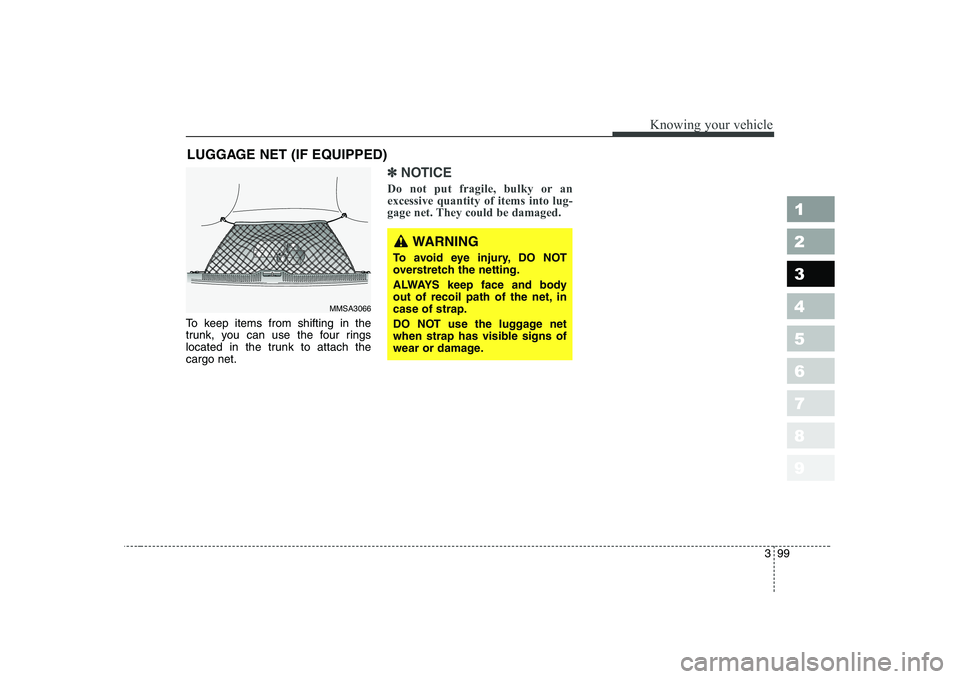
To keep items from shifting in the
trunk, you can use the four rings
located in the trunk to attach thecargo net.
✽✽NOTICE
Do not put fragile, bulky or an excessive quantity of items into lug-
gage net. They could be damaged.
LUGGAGE NET (IF EQUIPPED)
MMSA3066
WARNING
To avoid eye injury, DO NOT
overstretch the netting.
ALWAYS keep face and body
out of recoil path of the net, incase of strap.
DO NOT use the luggage net
when strap has visible signs of
wear or damage.
Page 113 of 329
3 103
Knowing your vehicle
1 23456789
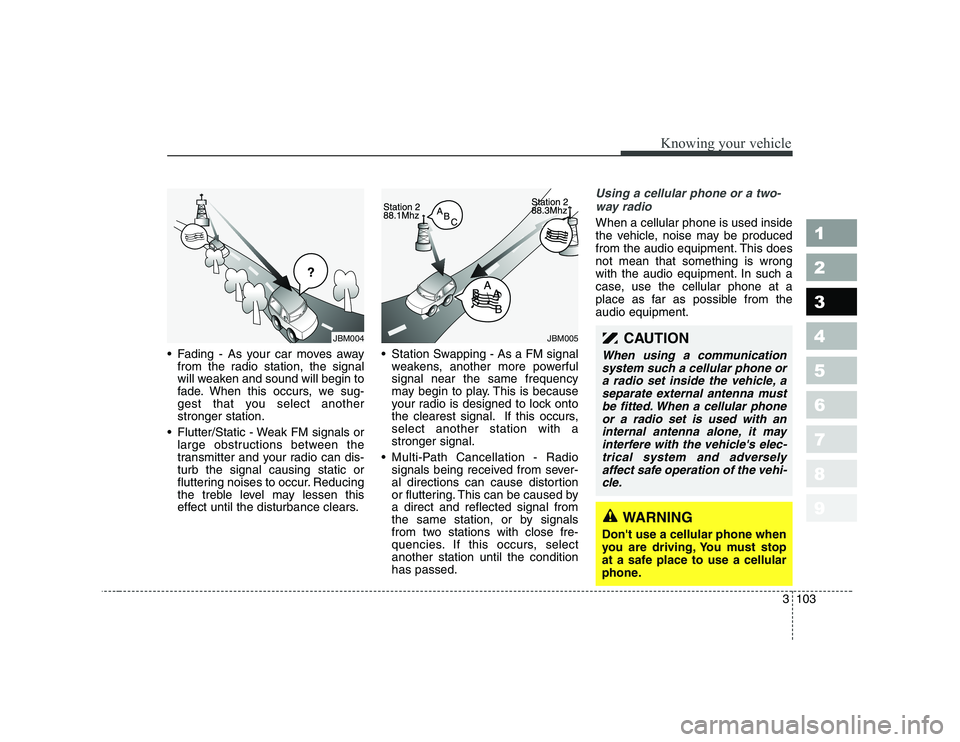
• Fading - As your car moves awayfrom the radio station, the signal
will weaken and sound will begin to
fade. When this occurs, we sug-
gest that you select anotherstronger station.
Flutter/Static - Weak FM signals or large obstructions between the
transmitter and your radio can dis-turb the signal causing static or
fluttering noises to occur. Reducing
the treble level may lessen this
effect until the disturbance clears. Station Swapping - As a FM signal
weakens, another more powerfulsignal near the same frequency
may begin to play. This is because
your radio is designed to lock onto
the clearest signal. If this occurs,select another station with astronger signal.
Multi-Path Cancellation - Radio signals being received from sever-
al directions can cause distortion
or fluttering. This can be caused bya direct and reflected signal from
the same station, or by signals
from two stations with close fre-
quencies. If this occurs, selectanother station until the conditionhas passed.
Using a cellular phone or a two-
way radio
When a cellular phone is used inside
the vehicle, noise may be produced
from the audio equipment. This doesnot mean that something is wrong
with the audio equipment. In such a
case, use the cellular phone at a
place as far as possible from theaudio equipment.
¢¢¢
JBM004JBM005CAUTION
When using a communicationsystem such a cellular phone ora radio set inside the vehicle, a separate external antenna mustbe fitted. When a cellular phoneor a radio set is used with an internal antenna alone, it mayinterfere with the vehicle's elec-trical system and adversely affect safe operation of the vehi-cle.
WARNING
Don't use a cellular phone when
you are driving, You must stop
at a safe place to use a cellular
phone.
Page 129 of 329
3 119
Knowing your vehicle
1 23456789
(Continued) Do not attempt to grab or pull the compact disc out while thedisc is being pulled into theaudio unit by the self-loadingmechanism. Damage to the audio unit and compact disccould occur.
Avoid using recorded compact discs in your audio unit.Original compact discs are recommended for best results.
WARNING
When driving your vehicle, be
sure to keep the volume of the
unit set low enough to allow you
to hear sounds coming from the
outside.
CAUTION
Do not insert warped or poor quality discs into the CD play-er as damage to the unit mayoccur.
Do not insert anything like coins into the player slot asdamage to the unit may occur.
Do not place beverages close to the audio system. The play-back mechanism may be dam- aged if you spill them.
Do not strike or allow anything to impact the audio system,damage to the system mecha- nisms could occur.
Off-road or rough surface driving may cause the com-pact disc to skip. Do not usethe compact disc when driv- ing in such conditions asdamage to the compact discface could occur.
(Continued)
Page 136 of 329
1 23456789Ignition switch / 4-2
Starting the engine / 4-4Manual transaxle / 4-7Automatic transaxle / 4-8Brake system / 4-14
Steering wheel / 4-20
Cruise control / 4-23
Traction control system / 4-27
Instrument cluster / 4-30Gauges / 4-31
Warnings and indicators / 4-37Lighting / 4-45
Wipers and washers / 4-51
Defroster / 4-53
Hazard warning flasher / 4-54
Manual climate control system / 4-55
Automatic climate control system / 4-64
Windshield defrosting and defogging / 4-76Theft-alarm system / 4-81
Driving your vehicle