Page 1227 of 1575
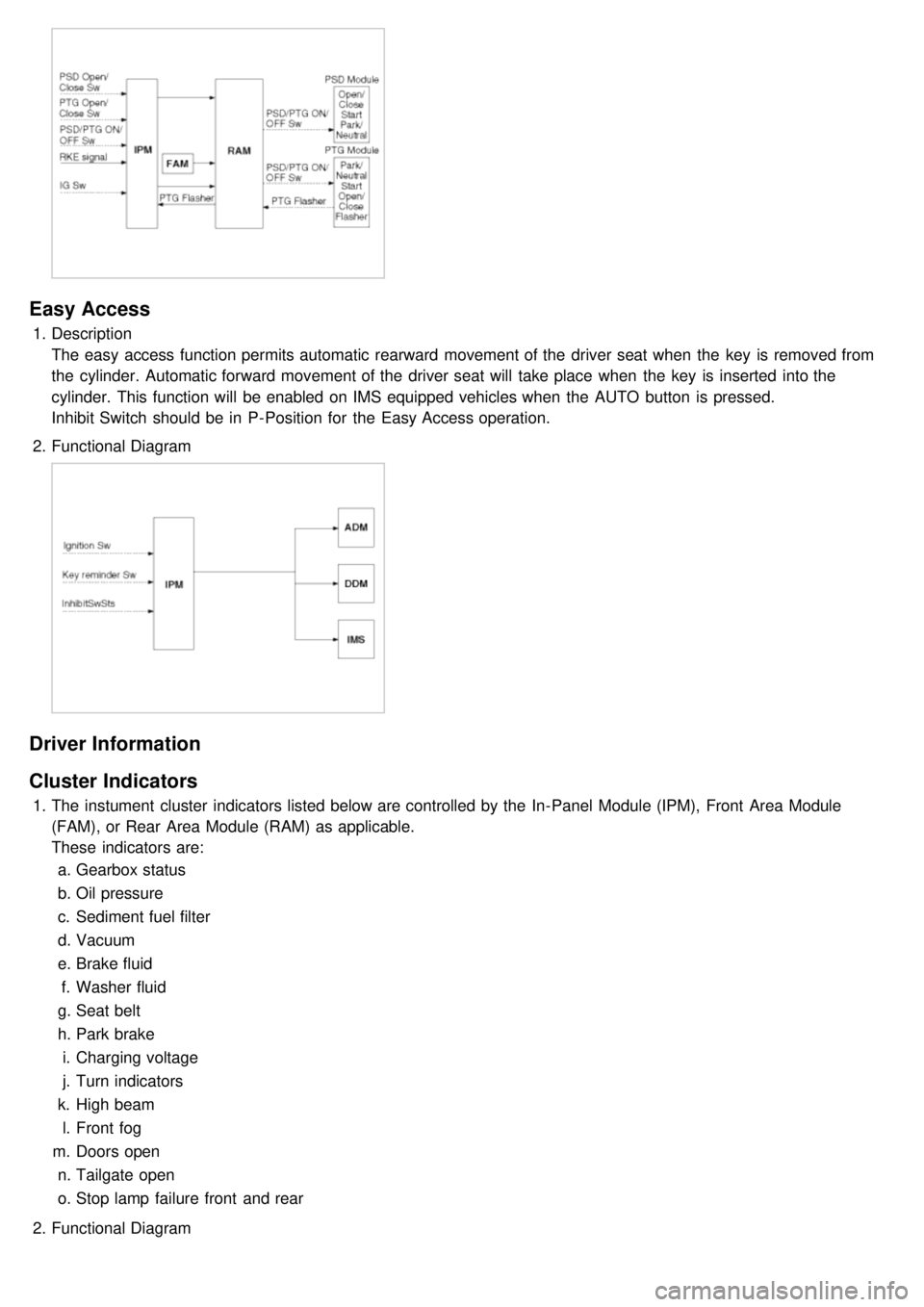
Easy Access
1.Description
The easy access function permits automatic rearward movement of the driver seat when the key is removed from
the cylinder. Automatic forward movement of the driver seat will take place when the key is inserted into the
cylinder. This function will be enabled on IMS equipped vehicles when the AUTO button is pressed.
Inhibit Switch should be in P- Position for the Easy Access operation.
2. Functional Diagram
Driver Information
Cluster Indicators
1.The instument cluster indicators listed below are controlled by the In- Panel Module (IPM), Front Area Module
(FAM), or Rear Area Module (RAM) as applicable.
These indicators are:
a. Gearbox status
b. Oil pressure
c. Sediment fuel filter
d. Vacuum
e. Brake fluid
f. Washer fluid
g. Seat belt
h. Park brake
i. Charging voltage
j. Turn indicators
k. High beam
l. Front fog
m. Doors open
n. Tailgate open
o. Stop lamp failure front and rear
2. Functional Diagram
Page 1228 of 1575
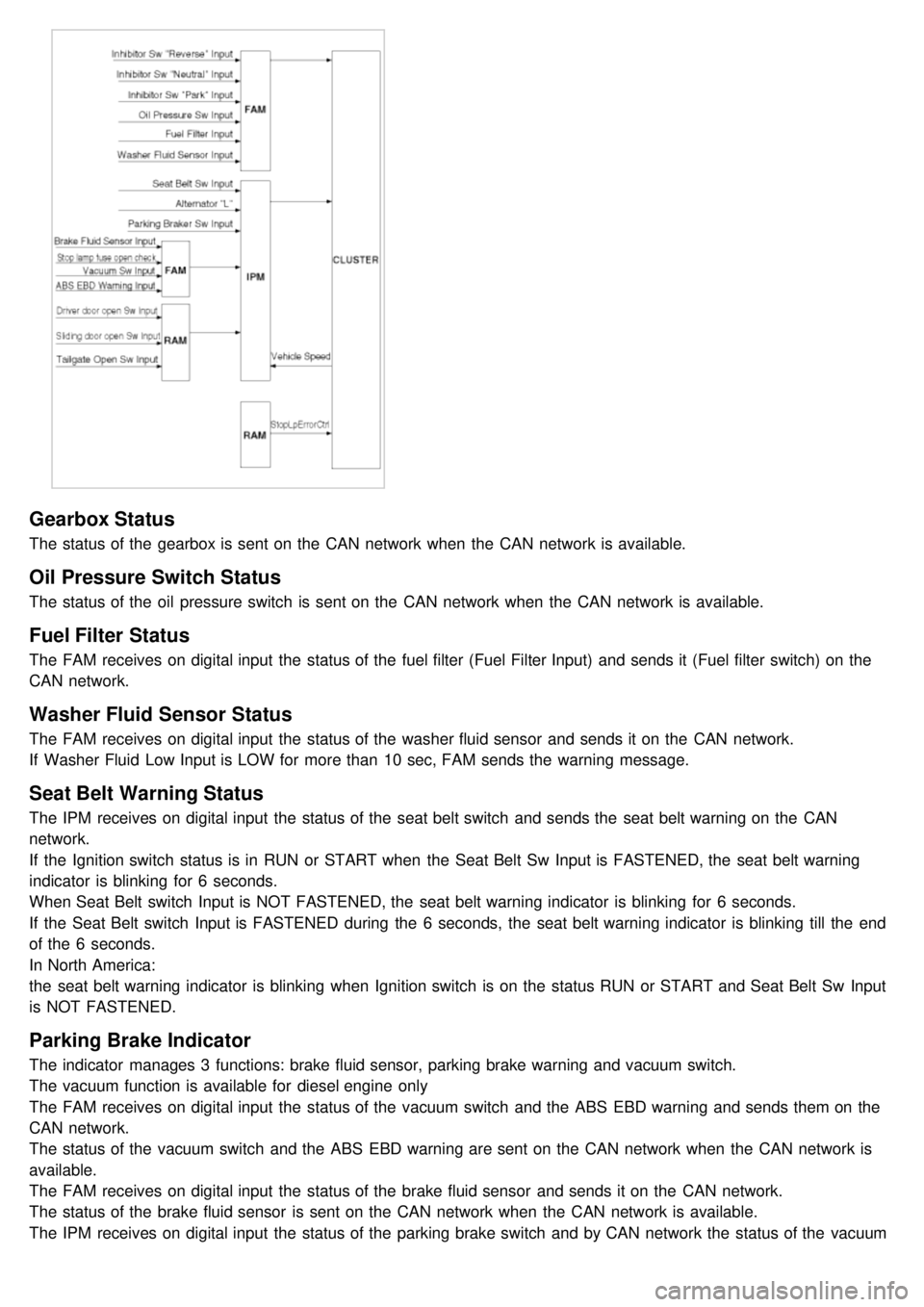
Gearbox Status
The status of the gearbox is sent on the CAN network when the CAN network is available.
Oil Pressure Switch Status
The status of the oil pressure switch is sent on the CAN network when the CAN network is available.
Fuel Filter Status
The FAM receives on digital input the status of the fuel filter (Fuel Filter Input) and sends it (Fuel filter switch) on the
CAN network.
Washer Fluid Sensor Status
The FAM receives on digital input the status of the washer fluid sensor and sends it on the CAN network.
If Washer Fluid Low Input is LOW for more than 10 sec, FAM sends the warning message.
Seat Belt Warning Status
The IPM receives on digital input the status of the seat belt switch and sends the seat belt warning on the CAN
network.
If the Ignition switch status is in RUN or START when the Seat Belt Sw Input is FASTENED, the seat belt warning
indicator is blinking for 6 seconds.
When Seat Belt switch Input is NOT FASTENED, the seat belt warning indicator is blinking for 6 seconds.
If the Seat Belt switch Input is FASTENED during the 6 seconds, the seat belt warning indicator is blinking till the end
of the 6 seconds.
In North America:
the seat belt warning indicator is blinking when Ignition switch is on the status RUN or START and Seat Belt Sw Input
is NOT FASTENED.
Parking Brake Indicator
The indicator manages 3 functions: brake fluid sensor, parking brake warning and vacuum switch.
The vacuum function is available for diesel engine only
The FAM receives on digital input the status of the vacuum switch and the ABS EBD warning and sends them on the
CAN network.
The status of the vacuum switch and the ABS EBD warning are sent on the CAN network when the CAN network is
available.
The FAM receives on digital input the status of the brake fluid sensor and sends it on the CAN network.
The status of the brake fluid sensor is sent on the CAN network when the CAN network is available.
The IPM receives on digital input the status of the parking brake switch and by CAN network the status of the vacuum
switch, the status of the ABS EBD warning, the status of the brake fluid sensor and the speed of the vehicle.
Page 1242 of 1575
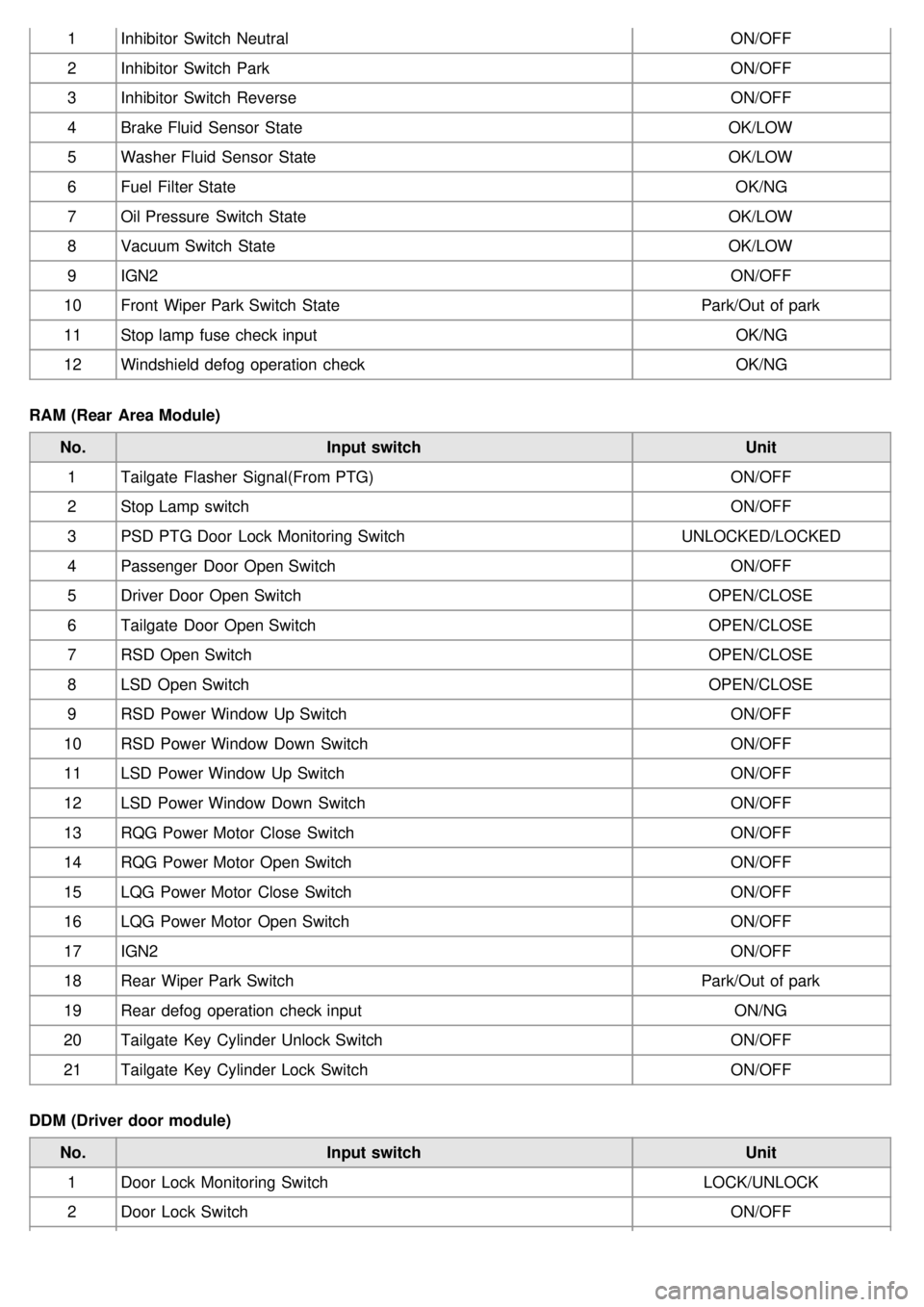
1Inhibitor Switch Neutral ON/OFF
2 Inhibitor Switch Park ON/OFF
3 Inhibitor Switch Reverse ON/OFF
4 Brake Fluid Sensor State OK/LOW
5 Washer Fluid Sensor State OK/LOW
6 Fuel Filter State OK/NG
7 Oil Pressure Switch State OK/LOW
8 Vacuum Switch State OK/LOW
9 IGN2 ON/OFF
10 Front Wiper Park Switch State Park/Out of park
11 Stop lamp fuse check input OK/NG
12 Windshield defog operation check OK/NG
RAM (Rear Area Module) No. Input switch Unit
1 Tailgate Flasher Signal(From PTG) ON/OFF
2 Stop Lamp switch ON/OFF
3 PSD PTG Door Lock Monitoring Switch UNLOCKED/LOCKED
4 Passenger Door Open Switch ON/OFF
5 Driver Door Open Switch OPEN/CLOSE
6 Tailgate Door Open Switch OPEN/CLOSE
7 RSD Open Switch OPEN/CLOSE
8 LSD Open Switch OPEN/CLOSE
9 RSD Power Window Up Switch ON/OFF
10 RSD Power Window Down Switch ON/OFF
11 LSD Power Window Up Switch ON/OFF
12 LSD Power Window Down Switch ON/OFF
13 RQG Power Motor Close Switch ON/OFF
14 RQG Power Motor Open Switch ON/OFF
15 LQG Power Motor Close Switch ON/OFF
16 LQG Power Motor Open Switch ON/OFF
17 IGN2 ON/OFF
18 Rear Wiper Park Switch Park/Out of park
19 Rear defog operation check input ON/NG
20 Tailgate Key Cylinder Unlock Switch ON/OFF
21 Tailgate Key Cylinder Lock Switch ON/OFF
DDM (Driver door module) No. Input switch Unit
1 Door Lock Monitoring Switch LOCK/UNLOCK
2 Door Lock Switch ON/OFF
Page 1243 of 1575
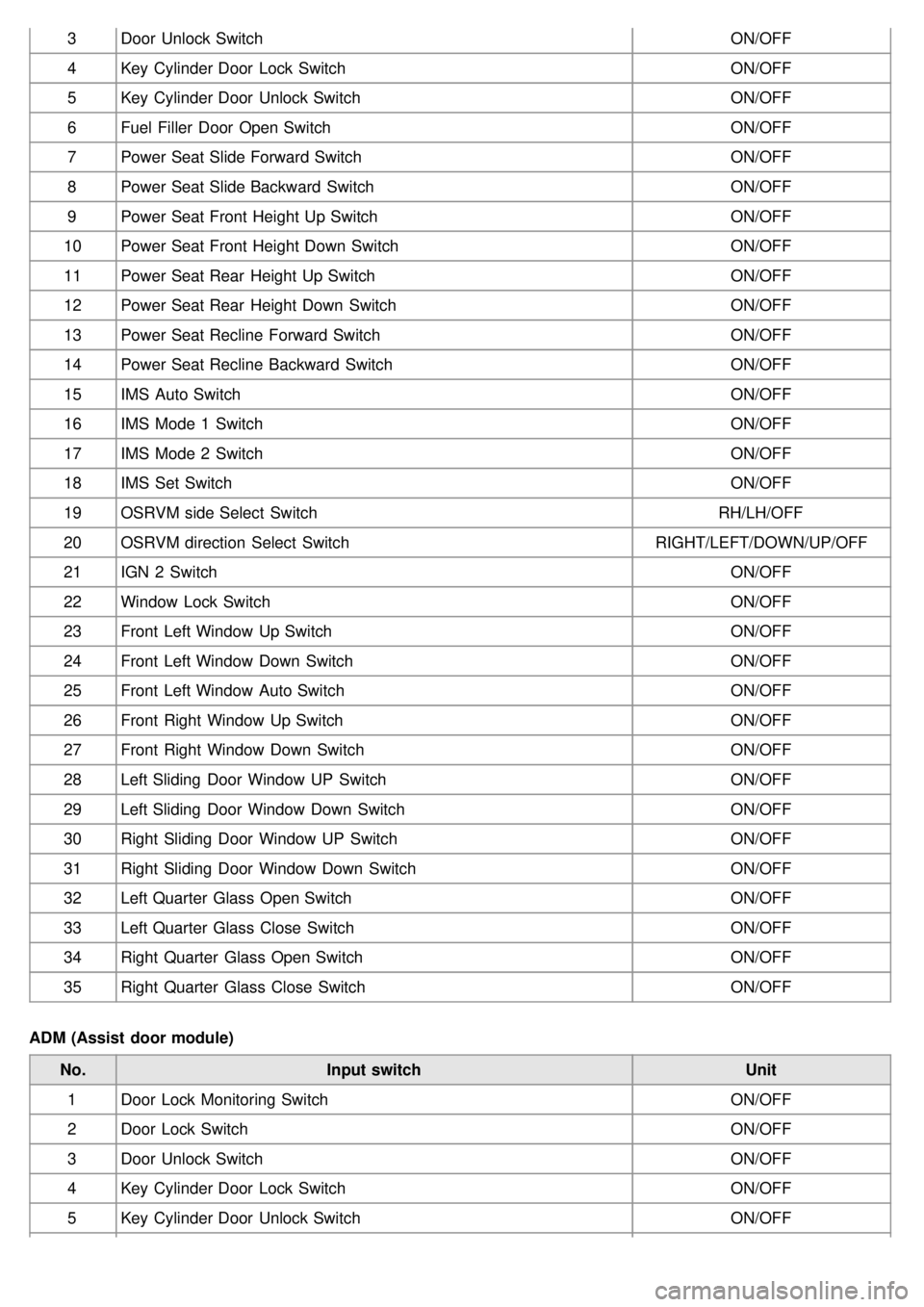
3Door Unlock Switch ON/OFF
4 Key Cylinder Door Lock Switch ON/OFF
5 Key Cylinder Door Unlock Switch ON/OFF
6 Fuel Filler Door Open Switch ON/OFF
7 Power Seat Slide Forward Switch ON/OFF
8 Power Seat Slide Backward Switch ON/OFF
9 Power Seat Front Height Up Switch ON/OFF
10 Power Seat Front Height Down Switch ON/OFF
11 Power Seat Rear Height Up Switch ON/OFF
12 Power Seat Rear Height Down Switch ON/OFF
13 Power Seat Recline Forward Switch ON/OFF
14 Power Seat Recline Backward Switch ON/OFF
15 IMS Auto Switch ON/OFF
16 IMS Mode 1 Switch ON/OFF
17 IMS Mode 2 Switch ON/OFF
18 IMS Set Switch ON/OFF
19 OSRVM side Select Switch RH/LH/OFF
20 OSRVM direction Select Switch RIGHT/LEFT/DOWN/UP/OFF
21 IGN 2 Switch ON/OFF
22 Window Lock Switch ON/OFF
23 Front Left Window Up Switch ON/OFF
24 Front Left Window Down Switch ON/OFF
25 Front Left Window Auto Switch ON/OFF
26 Front Right Window Up Switch ON/OFF
27 Front Right Window Down Switch ON/OFF
28 Left Sliding Door Window UP Switch ON/OFF
29 Left Sliding Door Window Down Switch ON/OFF
30 Right Sliding Door Window UP Switch ON/OFF
31 Right Sliding Door Window Down Switch ON/OFF
32 Left Quarter Glass Open Switch ON/OFF
33 Left Quarter Glass Close Switch ON/OFF
34 Right Quarter Glass Open Switch ON/OFF
35 Right Quarter Glass Close Switch ON/OFF
ADM (Assist door module) No. Input switch Unit
1 Door Lock Monitoring Switch ON/OFF
2 Door Lock Switch ON/OFF
3 Door Unlock Switch ON/OFF
4 Key Cylinder Door Lock Switch ON/OFF
5 Key Cylinder Door Unlock Switch ON/OFF
Page 1250 of 1575
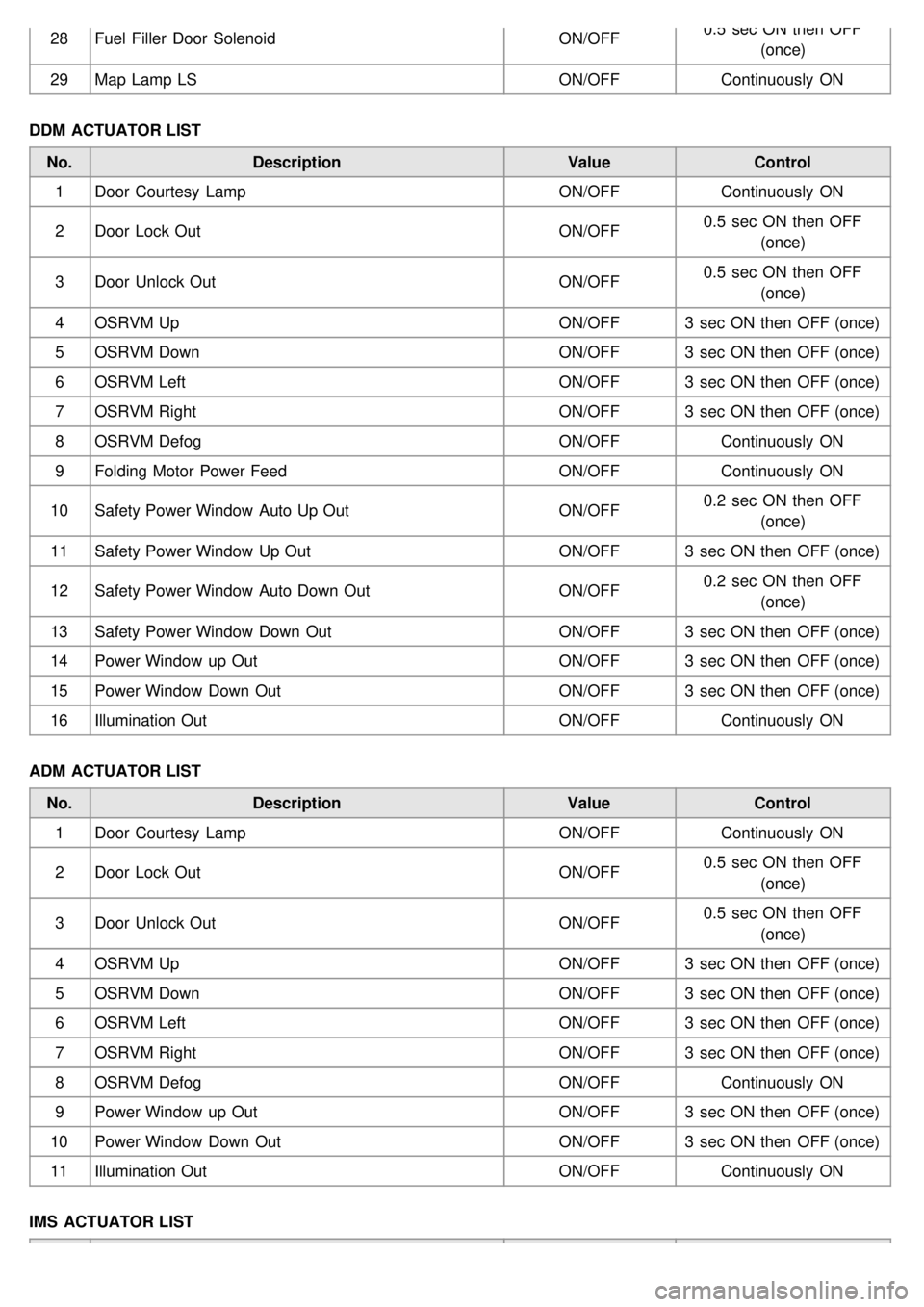
28Fuel Filler Door Solenoid ON/OFF0.5 sec ON then OFF
(once)
29 Map Lamp LS ON/OFFContinuously ON
DDM ACTUATOR LIST No. Description ValueControl
1 Door Courtesy Lamp ON/OFFContinuously ON
2 Door Lock Out ON/OFF0.5 sec ON then OFF
(once)
3 Door Unlock Out ON/OFF0.5 sec ON then OFF
(once)
4 OSRVM Up ON/OFF3 sec ON then OFF (once)
5 OSRVM Down ON/OFF3 sec ON then OFF (once)
6 OSRVM Left ON/OFF3 sec ON then OFF (once)
7 OSRVM Right ON/OFF3 sec ON then OFF (once)
8 OSRVM Defog ON/OFFContinuously ON
9 Folding Motor Power Feed ON/OFFContinuously ON
10 Safety Power Window Auto Up Out ON/OFF0.2 sec ON then OFF
(once)
11 Safety Power Window Up Out ON/OFF3 sec ON then OFF (once)
12 Safety Power Window Auto Down Out ON/OFF0.2 sec ON then OFF
(once)
13 Safety Power Window Down Out ON/OFF3 sec ON then OFF (once)
14 Power Window up Out ON/OFF3 sec ON then OFF (once)
15 Power Window Down Out ON/OFF3 sec ON then OFF (once)
16 Illumination Out ON/OFFContinuously ON
ADM ACTUATOR LIST No. Description ValueControl
1 Door Courtesy Lamp ON/OFFContinuously ON
2 Door Lock Out ON/OFF0.5 sec ON then OFF
(once)
3 Door Unlock Out ON/OFF0.5 sec ON then OFF
(once)
4 OSRVM Up ON/OFF3 sec ON then OFF (once)
5 OSRVM Down ON/OFF3 sec ON then OFF (once)
6 OSRVM Left ON/OFF3 sec ON then OFF (once)
7 OSRVM Right ON/OFF3 sec ON then OFF (once)
8 OSRVM Defog ON/OFFContinuously ON
9 Power Window up Out ON/OFF3 sec ON then OFF (once)
10 Power Window Down Out ON/OFF3 sec ON then OFF (once)
11 Illumination Out ON/OFFContinuously ON
IMS ACTUATOR LIST
Page 1279 of 1575
Page 1281 of 1575
Fuel Filler Door Release Actuator
Page 1282 of 1575
2007 > 2.7L V6 GASOLINE >
INSPECTION
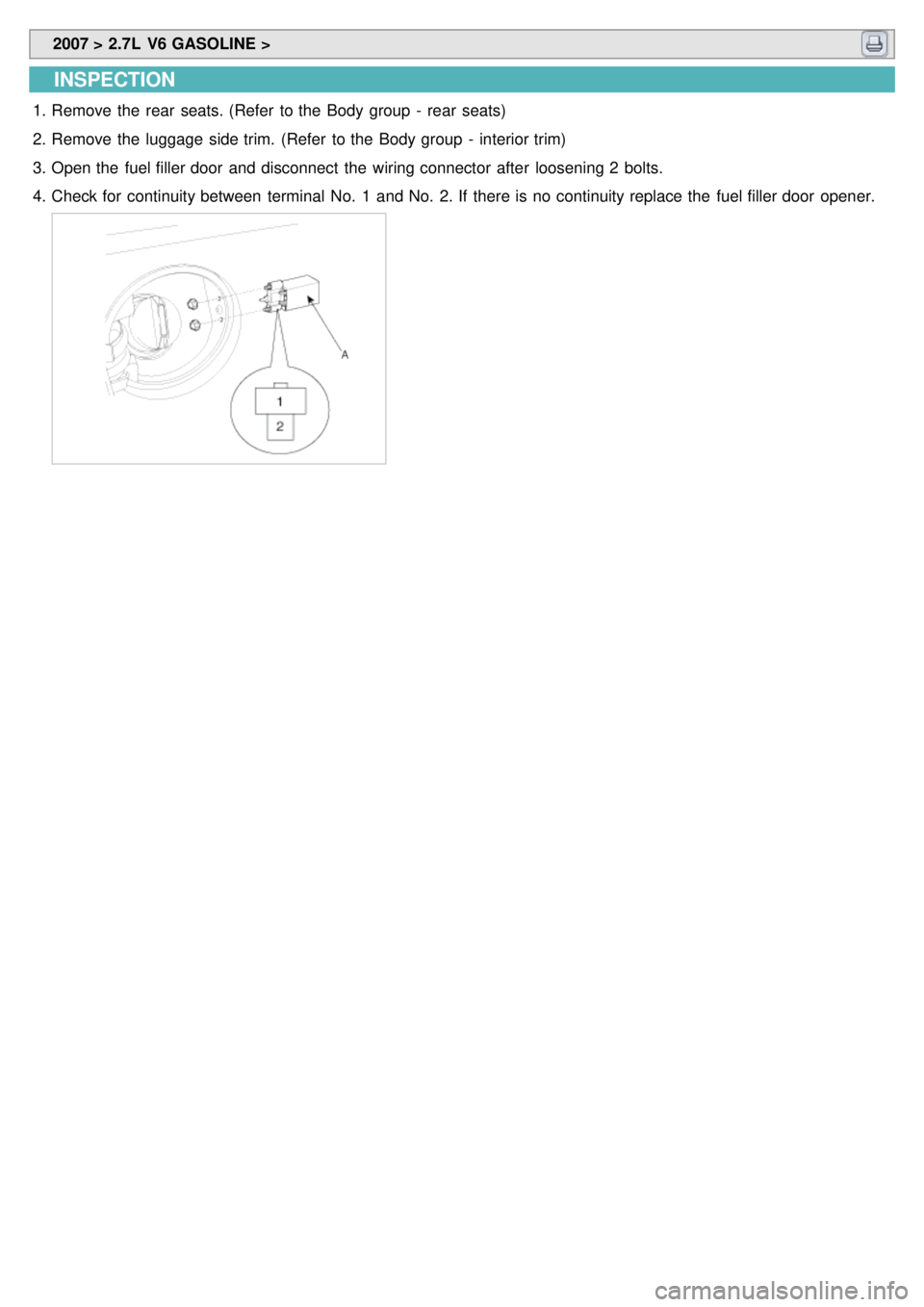
1.Remove the rear seats. (Refer to the Body group - rear seats)
2. Remove the luggage side trim. (Refer to the Body group - interior trim)
3. Open the fuel filler door and disconnect the wiring connector after loosening 2 bolts.
4. Check for continuity between terminal No. 1 and No. 2. If there is no continuity replace the fuel filler door opener.