Page 191 of 440
Electrical Disturbances
Radio waves may pick up electrical disturbances during
transmission. They mainly affect the wave amplitude,
and thus remain a part of the AM reception. They
interfere very little with the frequency variations that
carry the FM signal.
AM Reception
AM sound is based on wave amplitude, so AM reception
can be disrupted by such things as lightning, power lines
and neon signs.
FM Reception
Because FM transmission is based on frequency varia-
tions, interference that consists of amplitude variations
can be filtered out, leaving the reception relatively clear,
which is the major feature of FM radio.
NOTE:The radio, steering wheel radio controls (if
equipped), and 6 disc CD/DVD changer (if equipped)will remain active for up to 10 minutes after the ignition
switch has been turned off. Opening a vehicle front door
will cancel this feature.
ELECTRONIC DIGITAL CLOCK
The clock and radio each use the display panel built into
the radio. A digital readout shows the frequency and/or
time in hours and minutes (depending on your radio
model) whenever the ignition switch is in the ªONº or
ªACCº position.
When the ignition switch is in the ªOFFº position, or
when the radio frequency is being displayed, time keep-
ing is accurately maintained.
On the AM/FM/CD (6-disc) radio the time button alter-
nates the location of the time and frequency on the
display. On the AM/FM/CD (single-disc) radio only one
of the two, time or frequency is displayed.
190 UNDERSTANDING YOUR INSTRUMENT PANEL
Page 215 of 440
the worldwide standard for time. This makes the sys-
tem's clock very accurate once the appropriate time zone
and daylight savings information is set.
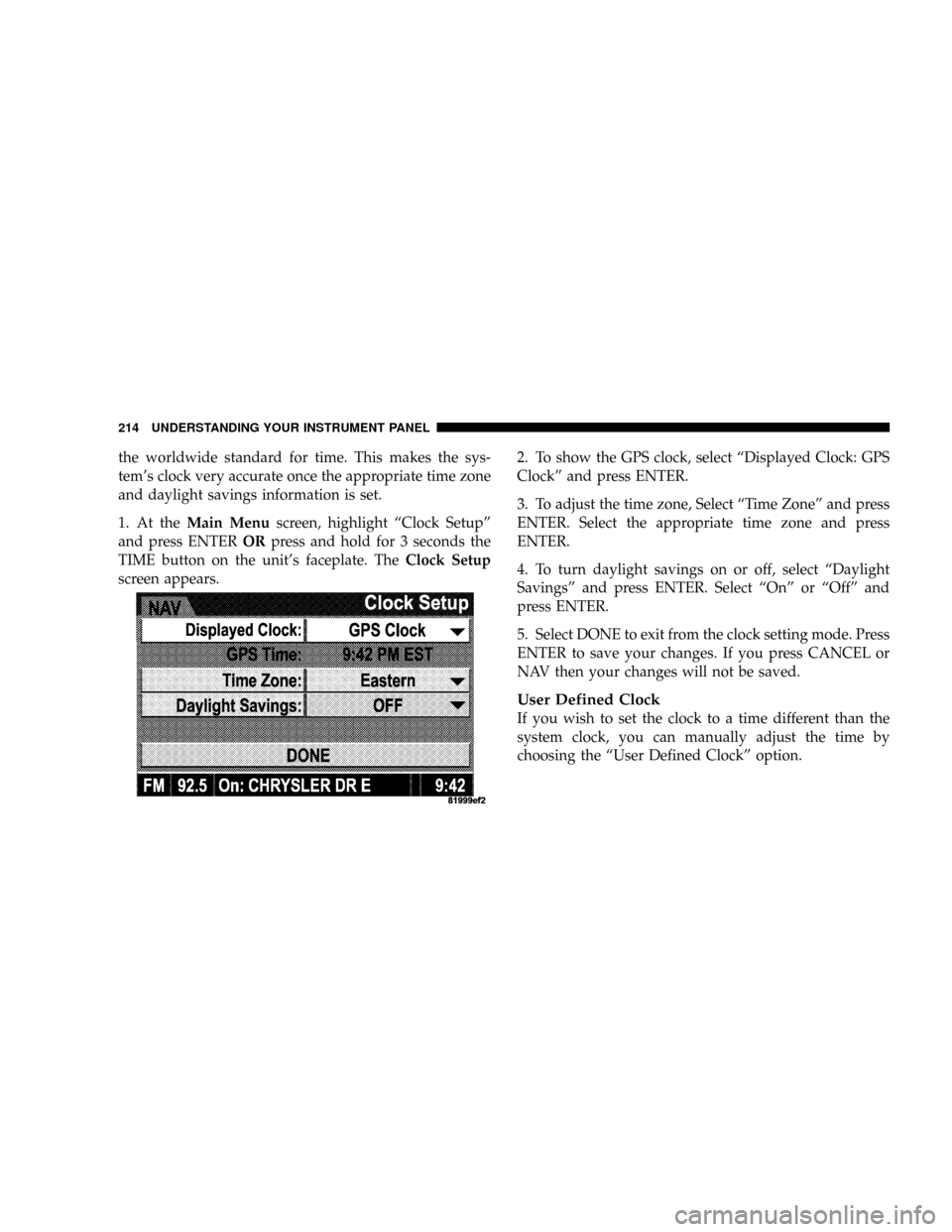
1. At theMain Menuscreen, highlight ªClock Setupº
and press ENTERORpress and hold for 3 seconds the
TIME button on the unit's faceplate. TheClock Setup
screen appears.2. To show the GPS clock, select ªDisplayed Clock: GPS
Clockº and press ENTER.
3. To adjust the time zone, Select ªTime Zoneº and press
ENTER. Select the appropriate time zone and press
ENTER.
4. To turn daylight savings on or off, select ªDaylight
Savingsº and press ENTER. Select ªOnº or ªOffº and
press ENTER.
5. Select DONE to exit from the clock setting mode. Press
ENTER to save your changes. If you press CANCEL or
NAV then your changes will not be saved.
User Defined Clock
If you wish to set the clock to a time different than the
system clock, you can manually adjust the time by
choosing the ªUser Defined Clockº option.
214 UNDERSTANDING YOUR INSTRUMENT PANEL
Page 216 of 440
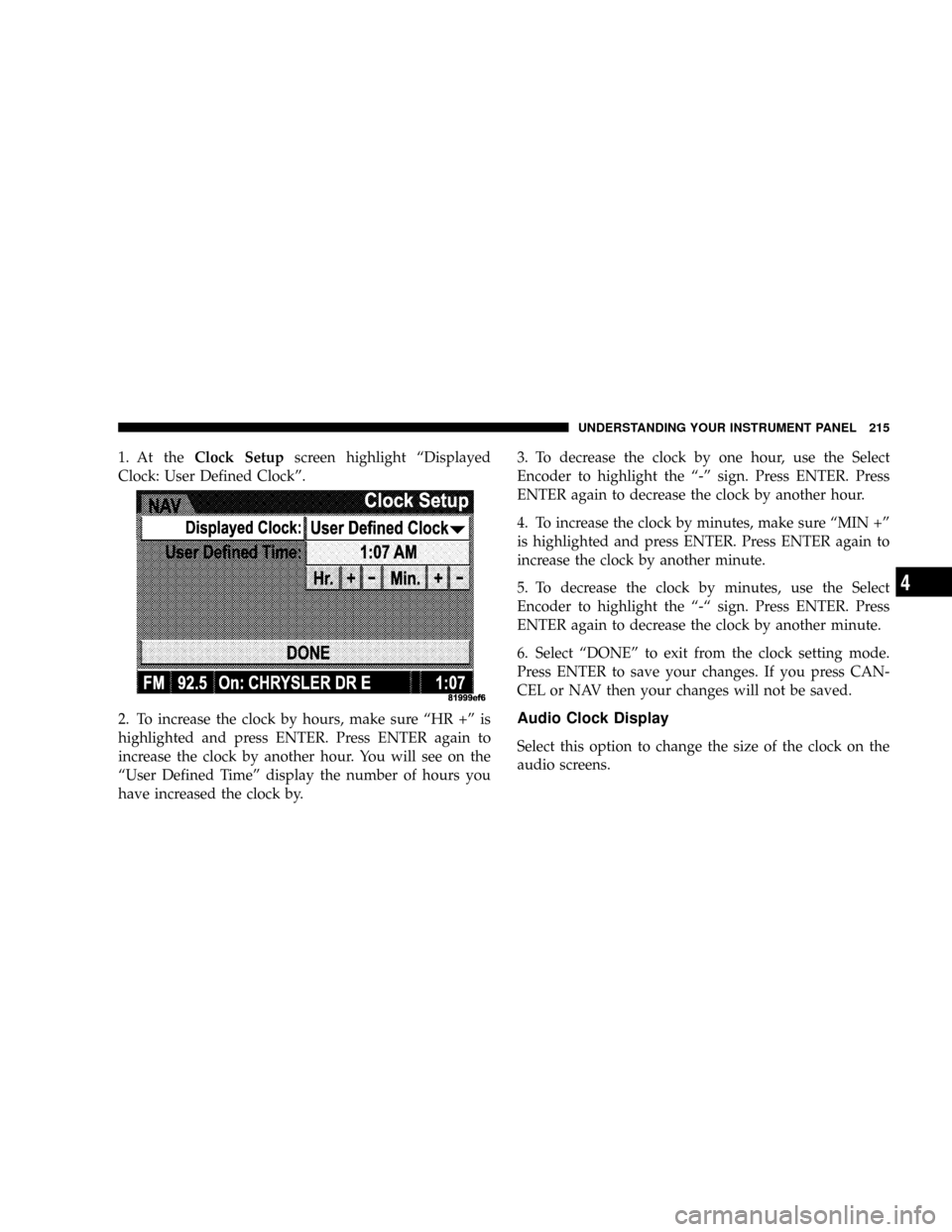
1. At theClock Setupscreen highlight ªDisplayed
Clock: User Defined Clockº.
2. To increase the clock by hours, make sure ªHR +º is
highlighted and press ENTER. Press ENTER again to
increase the clock by another hour. You will see on the
ªUser Defined Timeº display the number of hours you
have increased the clock by.3. To decrease the clock by one hour, use the Select
Encoder to highlight the ª-º sign. Press ENTER. Press
ENTER again to decrease the clock by another hour.
4. To increase the clock by minutes, make sure ªMIN +º
is highlighted and press ENTER. Press ENTER again to
increase the clock by another minute.
5. To decrease the clock by minutes, use the Select
Encoder to highlight the ª-ª sign. Press ENTER. Press
ENTER again to decrease the clock by another minute.
6. Select ªDONEº to exit from the clock setting mode.
Press ENTER to save your changes. If you press CAN-
CEL or NAV then your changes will not be saved.
Audio Clock Display
Select this option to change the size of the clock on the
audio screens.
UNDERSTANDING YOUR INSTRUMENT PANEL 215
4
Page 223 of 440
The button located in the center of the left hand control
will tune to the next pre-set station that you have
programmed in the radio pre-set push-buttons.
CD Player
Pressing the top of the switch once will go to the next
track on the CD. Pressing the bottom of the switch once
will go to the beginning of the current track or to the
beginning of the previous track if it is within one second
after the current track begins to play.
If you press the switch up or down twice it plays the
second track, three times, it will play the third, etc.
The button in the center of the left hand switch changes
CD's on the 6±Disc in-dash CD changer radio. This
button does not function for all other radios.
CD/DVD DISC MAINTENANCE
To keep the CD/DVD discs in good condition, take the
following precautions:
1. Handle the disc by its edge; avoid touching the
surface.
2. If the disc is stained, clean the surface with a soft cloth,
wiping from center to edge.
3. Do not apply paper, paper CD labels, or tape to the
disc; avoid scratching the disc.
4. Do not use solvents such as benzine, thinner, cleaners,
or antistatic sprays.
5. Store the disc in its case after playing.
6. Do not expose the disc to direct sunlight.
7. Do not store the disc where temperatures may become
too high.
222 UNDERSTANDING YOUR INSTRUMENT PANEL
Page 245 of 440
MANUAL TRANSAXLE OPERATION
WARNING!
You or others could be injured if you leave the
vehicle unattended without having the parking
brake fully applied. The parking brake should al-
ways be applied when the driver is not in the vehicle,
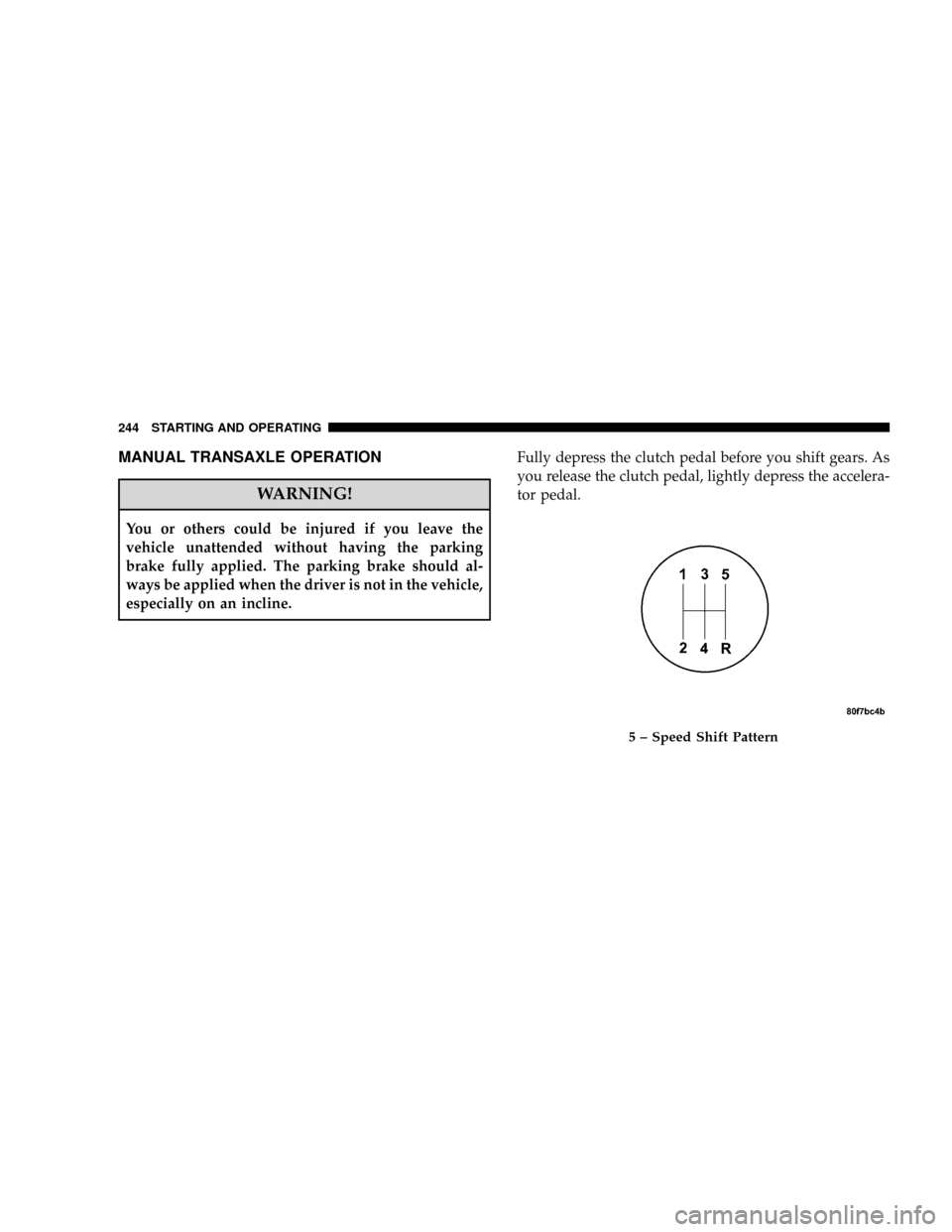
especially on an incline.Fully depress the clutch pedal before you shift gears. As
you release the clutch pedal, lightly depress the accelera-
tor pedal.
5 ± Speed Shift Pattern
244 STARTING AND OPERATING
Page 246 of 440
Use each gear in numerical order - do not skip a gear. Be
sure the transaxle is in FIRST gear, (not THIRD), when
starting from a standing position. Damage to the clutch
can result from starting in THIRD.
For most city driving you will find it easier to use only
the lower gears. For steady highway driving with light
accelerations, 5th gear is recommended.
Never drive with your foot resting on the clutch pedal, or
try to hold the vehicle on a hill with the clutch pedal
partially engaged. This will cause abnormal wear on the
clutch.
Never shift into REVERSE until the vehicle has come to a
complete stop.
NOTE:During cold weather, until the transaxle lubri-
cant is warm, you may experience slightly higher shift
efforts. This is normal and not harmful to the transaxle.Recommended Shift Speeds
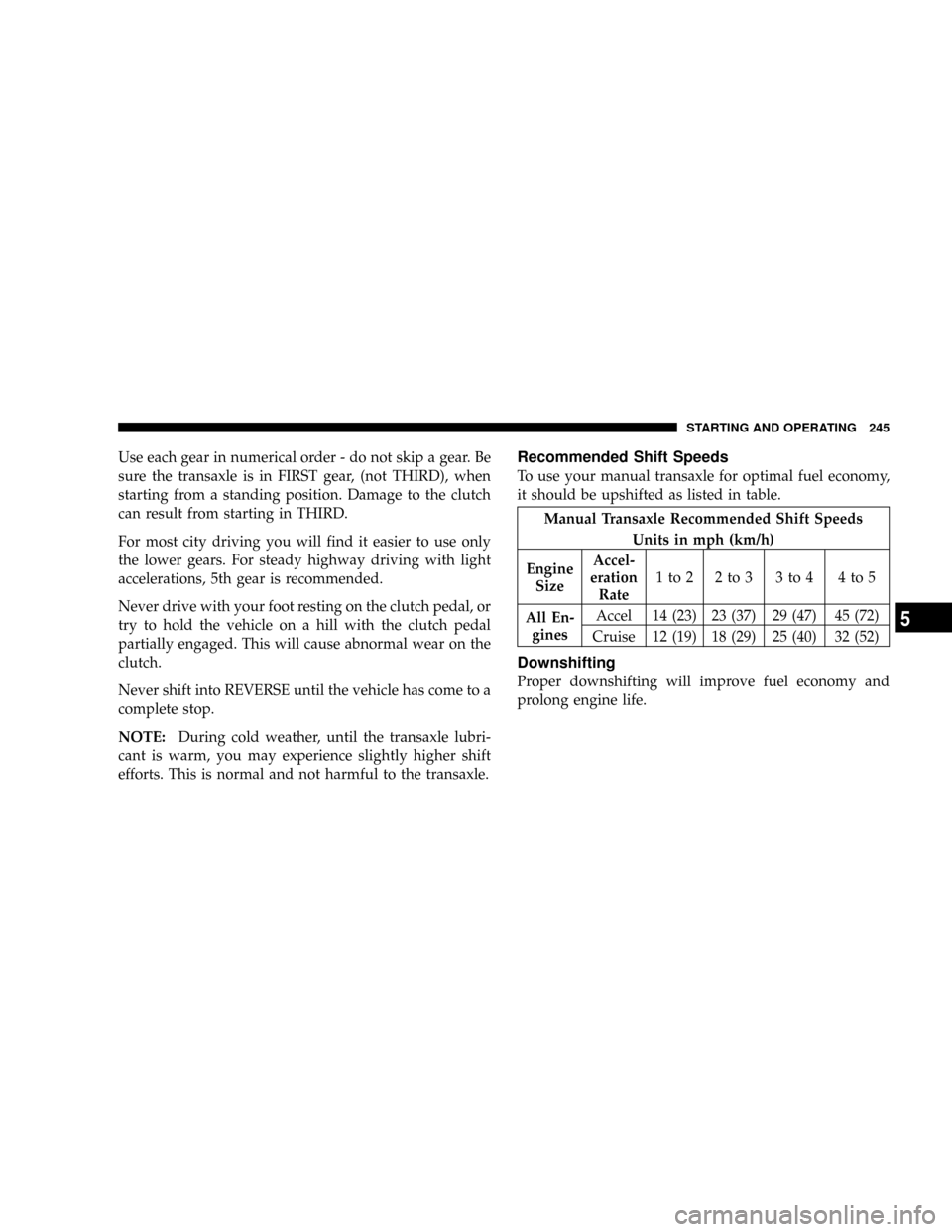
To use your manual transaxle for optimal fuel economy,
it should be upshifted as listed in table.
Manual Transaxle Recommended Shift Speeds
Units in mph (km/h)
Engine
SizeAccel-
eration
Rate1to2 2to3 3to4 4to5
All En-
ginesAccel 14 (23) 23 (37) 29 (47) 45 (72)
Cruise 12 (19) 18 (29) 25 (40) 32 (52)
Downshifting
Proper downshifting will improve fuel economy and
prolong engine life.
STARTING AND OPERATING 245
5
Page 248 of 440
traction surfaces, activate the 4WD Lock switch by pull-
ing up once and releasing. This locks the center coupling
allowing more torque to be sent to the rear wheels. The
amber94WD9light will come on in the cluster. This can be
done on the fly, at any vehicle speed. To deactivate,
simply pull on the switch one more time. The cluster light
will then go out.
NOTE:Refer to ºESP (Electronic Stability Program) in
the ªElectronic Brake Control Systemº section of this
manual for additional information.
PATRIOT FREEDOM DRIVE II ± SAFE OFF-ROAD
DRIVING
Off-Road Driving Tips and Vehicle Characteristics
The Patriot with the Freedom Drive II Off-Road package
has excellent on and off-road capabilities. These off-road
capabilities will allow you to explore those wilderness
trails where few travel, providing a source of exciting andsatisfying recreation. Before you venture out you should
contact your local governmental agency to determine
what are the designated off-road vehicle (ORV) trails or
recreation areas. You should always tread lightly and
only use established roads, trails or ORV recreational
areas. The National Forest Service, Bureau of Land Man-
agement or local Department of Natural Resources are a
wealth of information and usually have maps with
marked trails.
NOTE: For optimum off-road performance, premium
fuel is recommended. However, your vehicle is
equipped with an active spark knock system and can
adjust the engine calibration for varying range of fuel
octane levels.The Patriot's Freedom Drive II Off-Road Package
The Jeep Patriot with the Freedom Drive II has excellent
capability on and off-road.
STARTING AND OPERATING 247
5
Page 249 of 440
The package includes:
²2.4L DOHC 16-Valve I4 (172 bhp @ 6000 rpm, 165 lb-ft
@ 4400 rpm)
²Second generation continuously variable transaxle
(CVT2L) with 19:1 crawl ratio
²Tow Hooks: 2 front and 1 rear
²Front engine and transaxle skid plate
²Fuel tank skid plate
²Air filtration system
²Unique springs for a 1 inch of increased ride height
²Fog lamps
²Seat height adjust
²Three-mode Electronic Stability Program (ESP)
²Hill-descent control
²Unique off-road engine calibration for optimum off-
road performance with premium fuel
²Off-road Brake Traction Control
²Unique off-road Anti-lock brake calibration
²Heavy duty cooling package (Eng/larger CVT oil
cooler, High capacity cooling fans)
²Heavy duty alternator
²Improved body sealing and high located drivetrain
component vents
²Reinforced rear lateral links
Freedom Drive II 4WD System Operation
Under normal driving conditions, the vehicle operates in
the active four wheel drive mode. Pulling up on the 4WD
lock lever activates the 4WD system and lights the amber
4WD cluster light. This commands a higher torque to the
rear wheels, for improved traction capability on slippery
248 STARTING AND OPERATING