Page 59 of 440
Airbag Warning Light
You will want to have the airbags ready to
inflate for your protection in an impact. While
the airbag system is designed to be mainte-
nance free, if any of the following occurs, have
an authorized dealer service the system promptly:
²The Airbag Warning Light does not come on or flickers
during the 6 to 8 seconds when the ignition switch is
first turned on.
²The light remains on or flickers after the 6 to 8 second
interval.
²The light flickers or comes on and remains on while
driving.
Event Data Recorder (EDR)
In the event of an accident, your vehicle is designed to
record up to 5 - seconds of specific vehicle data param-
eters (see list below) in an event data recorder prior to the
moment of airbag deployment, or near-deployment, and
up to a quarter second of high-speed deceleration data
during and/or after air bag deployment or near-
deployment. EDR data are ONLY recorded if an airbag
deploys, or nearly deploys, and are otherwise unavail-
able.
NOTE:
1. A near-deployment event occurs when the airbag
sensor detects severe vehicle deceleration usually indica-
tive of a crash, but not severe enough to warrant airbag
deployment.
2. Under certain circumstances, EDR data may not be
recorded (e.g., loss of battery power).
58 THINGS TO KNOW BEFORE STARTING YOUR VEHICLE
Page 71 of 440
Do not run the engine in a closed garage or in confined
areas any longer than needed to move your vehicle in or
out of the area.
If it is necessary to sit in a parked vehicle with the engine
running, adjust your heating or cooling controls to force
outside air into the vehicle. Set the blower at high speed.
WARNING!
If you are required to drive with the deck lid / liftgate
open, make sure that all windows are closed, and the
climate control blower switch is set at high speed.
DO NOT use the recirculation mode.
Safety Checks You Should Make Inside The
Vehicle
Seat Belts
Inspect the belt system periodically, checking for cuts,
frays and loose parts. Damaged parts must be replaced
immediately. Do not disassemble or modify the system.
Front seat belt assemblies must be replaced after a
collision. Rear seat belt assemblies must be replaced after
a collision if they have been damaged (bent retractor, torn
webbing, etc. If there is any question regarding belt or
retractor condition, replace the belt.
Airbag Light
The light should come on and remain on for 6 to 8
seconds as a bulb check when the ignition switch is first
turned ON. If the LED is not lit during starting, have it
checked. If the light stays on or comes on while driving,
have the system checked by an authorized dealer.
70 THINGS TO KNOW BEFORE STARTING YOUR VEHICLE
Page 72 of 440
Defroster
Check operation by selecting the defrost mode and place
the blower control on high speed. You should be able to
feel the air directed against the windshield.
Periodic Safety Checks You Should Make Outside
The Vehicle
Tires
Examine tires for excessive tread wear or uneven wear
patterns. Check for stones, nails, glass, or other objects
lodged in the tread. Inspect tread and sidewall for cuts or
cracks. Check wheel nuts for tightness, and tires (includ-
ing spare) for proper pressure.
Lights
Have someone observe the operation of exterior lights
while you work the controls. Check turn signal and high
beam indicator lights on the instrument panel.
Fluid Leaks
Check area under vehicle after overnight parking for fuel,
engine coolant, oil or other fluid leaks. Also, if gasoline
fumes are detected or fuel, power steering fluid, trans-
mission fluid or brake fluid leaks are suspected, the cause
should be located and corrected immediately.
THINGS TO KNOW BEFORE STARTING YOUR VEHICLE 71
2
Page 75 of 440
NFront Seat Adjustment..................108
NManual Seat Height Adjustment Ð If
Equipped...........................109
NManual LumbarÐ If Equipped............109
NDriver's Seat Back Recline...............110
NAdjustable Head Restraints..............110
NHeated Seats Ð If Equipped.............111
NFold Flat Front Passenger Seat............113
NFolding Rear Seat.....................114
NReclining Rear Seat Ð If Equipped.........115
mTo Open And Close The Hood.............116
mLights...............................118
NMap/Reading Lights...................118NMulti-Function Control Lever.............119
NHeadlights, Parking Lights, Instrument Panel
Lights.............................119
NLights-On Reminder...................120
NFog Lights Ð If Equipped...............121
NTurn Signals.........................121
NHighbeam/Lowbeam Select Switch.........122
NPassing Light........................123
mDaytime Running Lights (DRL) Ð If Equipped . . 123
NFunctionality........................123
mWindshield Wipers And Washers...........123
NWindshield Washers...................123
NMist Feature.........................124
74 UNDERSTANDING THE FEATURES OF YOUR VEHICLE
Page 77 of 440
NHill Descent Control (HDC) ± If Equipped . . . 140
NESP (Electronic Stability Program).........141
mPower Sunroof Ð If Equipped.............146
NOpening Sunroof ± Manual..............147
NOpening Sunroof ± Express Mode..........147
NClosing Sunroof ± Manual...............147
NClosing Sunroof ± Express Mode..........147
NPinch Protect Feature...................147
NPinch Protect Override.................148
NVenting Sunroof ± Express...............148
NSunshade Operation...................148
NWind Buffeting.......................148
NSunroof Maintenance...................149NIgnition Off Operation..................149
mElectrical Power Outlets Ð If Equipped.......149
NElectrical Outlet Use With Engine Off.......151
mConsole Features.......................151
mCargo Area Features.....................152
NCargo Light/Removable Self- Recharging
Flashlight ± If Equipped................152
NRetractable Cargo Area Cover Ð If Equipped . 154
NRemovable Load Floor..................156
NCargo Tie-Down Loops.................156
NFold Down Speakers ± If Equipped.........157
mRear Window Features...................158
NRear Window Wiper/Washer.............158
76 UNDERSTANDING THE FEATURES OF YOUR VEHICLE
Page 79 of 440
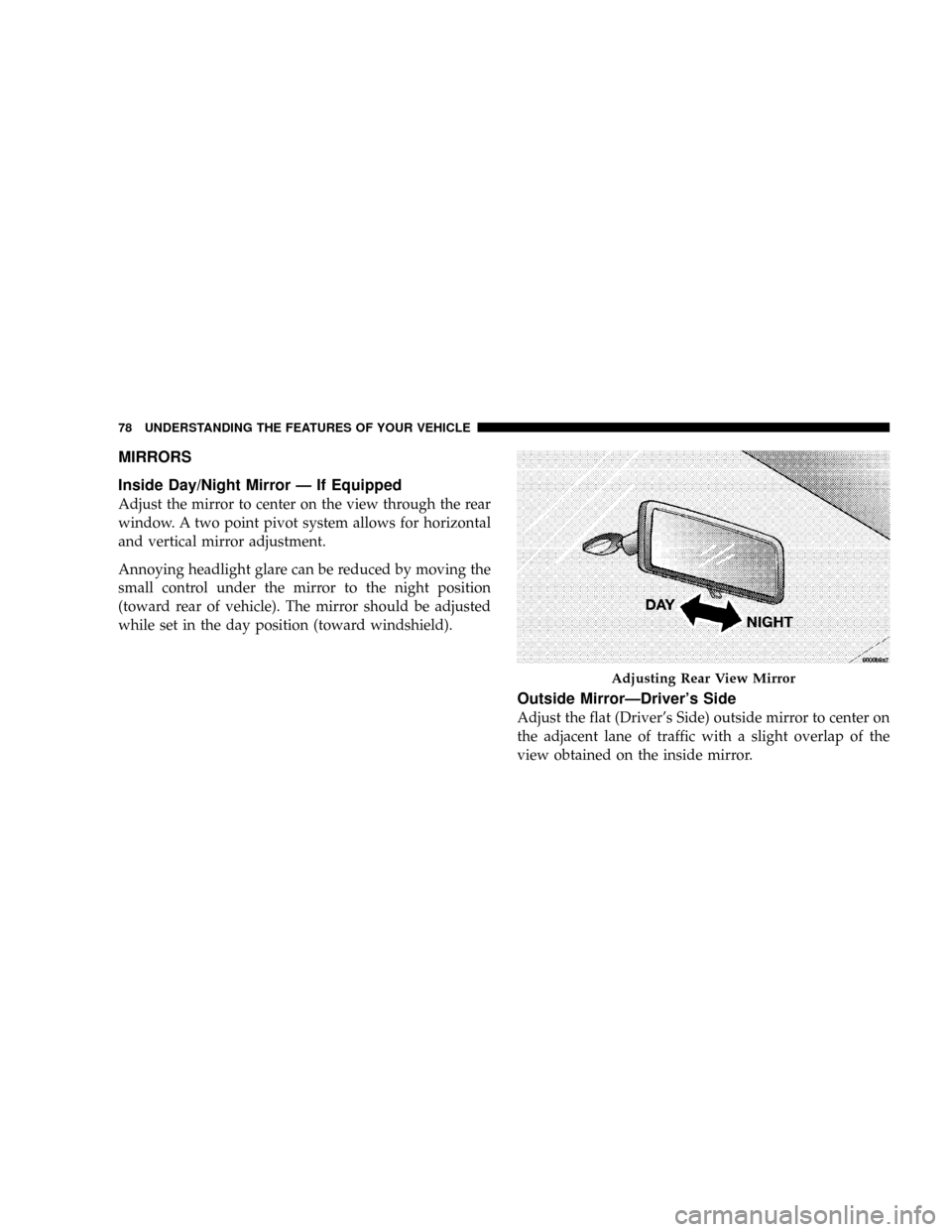
MIRRORS
Inside Day/Night Mirror Ð If Equipped
Adjust the mirror to center on the view through the rear
window. A two point pivot system allows for horizontal
and vertical mirror adjustment.
Annoying headlight glare can be reduced by moving the
small control under the mirror to the night position
(toward rear of vehicle). The mirror should be adjusted
while set in the day position (toward windshield).
Outside MirrorÐDriver's Side
Adjust the flat (Driver's Side) outside mirror to center on
the adjacent lane of traffic with a slight overlap of the
view obtained on the inside mirror.
Adjusting Rear View Mirror
78 UNDERSTANDING THE FEATURES OF YOUR VEHICLE
Page 80 of 440
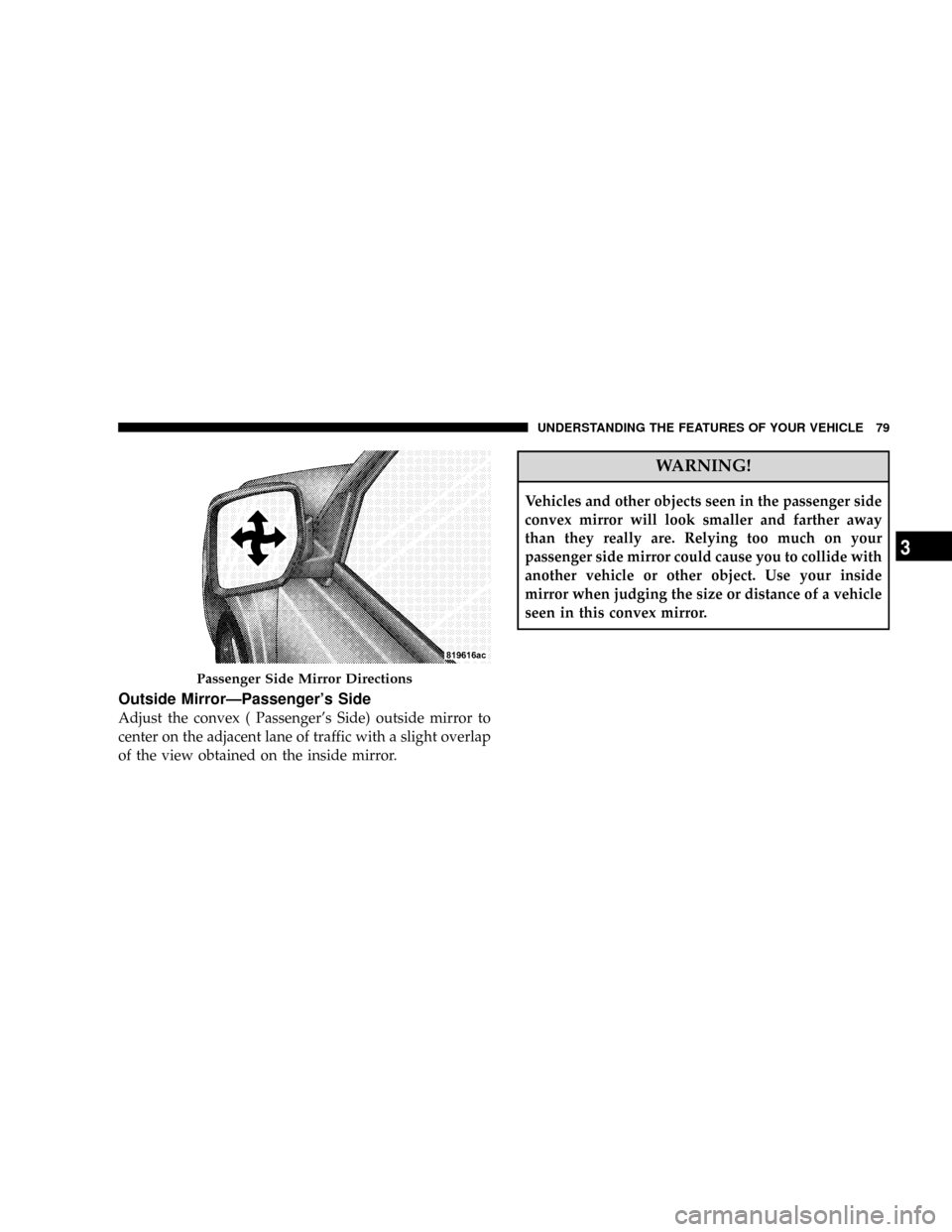
Outside MirrorÐPassenger's Side
Adjust the convex ( Passenger's Side) outside mirror to
center on the adjacent lane of traffic with a slight overlap
of the view obtained on the inside mirror.
WARNING!
Vehicles and other objects seen in the passenger side
convex mirror will look smaller and farther away
than they really are. Relying too much on your
passenger side mirror could cause you to collide with
another vehicle or other object. Use your inside
mirror when judging the size or distance of a vehicle
seen in this convex mirror.
Passenger Side Mirror Directions
UNDERSTANDING THE FEATURES OF YOUR VEHICLE 79
3
Page 95 of 440
²After the9Ready9prompt and the following beep, say
the name of the language you wish to switch to
(English, Espanol, or Francais, if so equipped).
²Continue to follow the system prompts to complete
language selection.
After selecting one of the languages, all prompts and
voice commands will be in that language.
NOTE:After every UConnectŸ language change op-
eration, only the language specific 32-name phonebook is
usable. The paired phone name is not language specific
and usable across all languages.
For command translations and alternate commands in
supported languages, refer to ªCommand Translationsº
at the end of this section.
Emergency Assistance
If you are in an emergency and the mobile phone is
reachable:
²Pick up the phone and manually dial the emergency
number for your area.
If the phone is not reachable and the UConnectŸ system
is operational, you may reach the emergency number as
follows:
²Press the 'Phone' button to begin.
²After the9Ready9prompt and the following beep, say
9Emergency9and the UConnectŸ system will instruct
the paired cellular phone to call the emergency num-
ber. This feature is only supported in the USA.
NOTE:The emergency number dialed is based on the
Country where the vehicle is purchased (911 for USA and
Canada and 060 for Mexico). The number dialed may not
be applicable with the available cellular service and area.
The UConnectŸ system does slightly lower your chances
of successfully making a phone call as compared to that
for the cell phone directly.
94 UNDERSTANDING THE FEATURES OF YOUR VEHICLE