2007 HYUNDAI ENTOURAGE fuse
[x] Cancel search: fusePage 15 of 398

Your vehicle at a glance2 2INTERIOR OVERVIEW
OVQ026001N
1. Door lock/unlock button ....................3-13
2. Driver position memory system* .......3-56
3. Seat adjust knob*..............................3-40
4. Outside rearview mirror control
switch .............................................3-105
5. Power rear quarter window
switches* ...........................................3-26
6. Power window switches ....................3-26
7. Central door lock switch....................3-13
8. Power window lock switch.................3-28
9. Fuel filler lid release button...............3-30
10. Instrument panel illumination ........3-112
11. Room light main control switch .....3-125
12. Power adjustable pedal control
switch*.............................................3-58
13. Steering wheel tilt .........................3-103
14. Parking brake release lever ............4-19
15. Fuse box .........................................6-27
16. Hood release lever .........................3-29
17. Parking brake pedal ........................4-19
18. Brake pedal .....................................4-17
19. Accelerator pedal ..............................4-6
20. Seat.................................................3-37
* : if equipped
Page 35 of 398

319
Features of your vehicle
How to reset the power sliding door
and power tailgateIf the battery has been discharged or dis-
connected, the related fuse has been
replaced or disconnected, and the power
sliding door or power tailgate doesn't
work properly, the power sliding door and
power tailgate must be reset as follows:
1. Put the shift lever in the P (Park) for
automatic transaxle.
2. Close the sliding door's windows and
fuel filler lid.3. Pull the SHUNT connector on the dri-
ver's side fuse panel and reinstall it
after 1 minute.
4. Close the sliding door or tailgate man-
ually.
5. Open the sliding door or tailgate com-
pletely using the transmitter or main
control button on the overhead con-
sole.
6. Close the sliding door or tailgate com-
pletely using the transmitter or main
control button on the overhead con-
sole.
For the left/right power sliding doors and
power tailgate, follow above steps to
reset.
If the power sliding door or power tailgate
doesn't work properly after above proce-
dure, have the system checked by an
authorized Hyundai dealer.
✽ ✽
NOTICEIf the shunt connector is pulled up from
the fuse panel, the warning chime,
audio, clock and interior lamps, etc., will
not operate. Some items must be reset
after replacement. (Refer to “Items to be
reset···.” on page 6-36)
WARNING
Never intentionally place any
object or part of your body in the
path of the power sliding door or
power tailgate.
Make sure rear passengers are
seated and there are no people or
objects near the door before
operating the power sliding door.
Make sure all faces, arms, hands,
body parts and any other obstruc-
tions are safely out of the way
before operating the power slid-
ing doors or power tailgate.
Never place any object or part of
your body in the path of the
power sliding door or power tail-
gate. This could result in serious
injury or cause damage to the
vehicle.
Make sure there are no people or
objects around the door before
operating the power sliding door
or power tailgate. Have rear pas-
sengers get in or out of the vehi-
cle after the door is opened com-
pletely and door motion has
stopped.
1VQA4005
On the driver’s side fuse panel
Page 43 of 398

327
Features of your vehicle
The ignition switch must be in the ON
position for power windows to operate.
Each door has a power window switch
that controls that door’s window. The driv-
er has a power window lock switch which
can block the operation of passenger
windows.
The power windows can be operated for
approximately 30 seconds after the igni-
tion key is removed or turned to the ACC
or LOCK position. However, if the front
doors are opened, the power windows
cannot be operated within the 30 sec-
onds after the ignition key removal.
While driving, if you notice wind buffeting
or pulsation (wind shock) with either side
window open, you should open the oppo-
site window slightly to reduce the condi-
tion.
Window opening and closingThe driver’s door has a master power
window switch that controls all the win-
dows in the vehicle.
To open or close a window, press down
(8) or pull up (8) the front portion of the
corresponding switch.
To open or close a rear quarter win-
dow, push (8) the corresponding
switch.
(Continued)
Never try to operate the main
switch on the driver's door and
the individual door window
switch in opposing directions at
the same time. If this is done, the
window will stop and cannot be
opened or closed.
WARNING -
Windows
Passengers can be injured if their
head, hands or other body parts
are trapped by a closing window.
Always check for obstructions
before raising any window.
NEVER leave the ignition key in
the vehicle.
NEVER leave any child unattend-
ed in the vehicle. Even very
young children may inadvertently
cause the vehicle to move, entan-
gle themselves in the windows, or
otherwise injure themselves or
others.
(Continued)
(Continued)
Do not attempt to operate the
main switch on the driver's door
and a switch on another door in
opposing directions at the same
time. If this is done, the window
will stop and cannot be opened or
closed.
Do not allow children to play with
the power windows. Keep the dri-
ver’s door power window lock
switch in the LOCK position
(depressed). Serious injury can
result from unintentional window
operation by the child.
Do not extend head, hands or
arms outside through the window
opening while driving.
CAUTION
To prevent the power window
system from the possibility of
damage, do not open or close two
windows at the same time. This
will also ensure the longevity of
the fuse.
(Continued)
Page 102 of 398
Features of your vehicle86 3
Occupant classification systemYour vehicle is equipped with an occu-
pant classification system in the front
passenger's seat.
The occupant classification system is
designed to detect the presence of a
properly-seated front passenger and
determine if the passenger's front air bag
should be enabled (may inflate) or not.
The driver's front air bag is not affected
or controlled by the occupant classifica-
tion system.If the front passenger seat is occupied by
a person that the system determines to
be of adult size, and he/she sits properly
(sitting upright with the seatback in an
upright position, centered on the seat
cushion with their seat belt on, legs com-
fortably extended and their feet on the
floor), the "PASSENGER AIR BAG OFF"
indicator will be turned off and the front
passenger's air bag will be able to inflate,
if necessary, in frontal crashes.
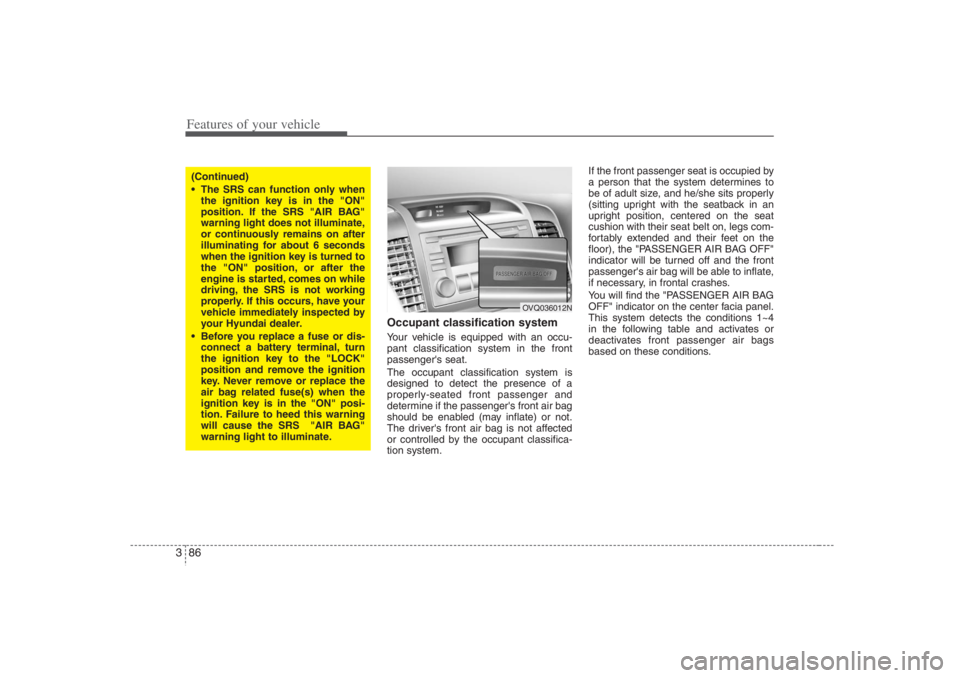
You will find the "PASSENGER AIR BAG
OFF" indicator on the center facia panel.
This system detects the conditions 1~4
in the following table and activates or
deactivates front passenger air bags
based on these conditions.
(Continued)
The SRS can function only when
the ignition key is in the "ON"
position. If the SRS "AIR BAG"
warning light does not illuminate,
or continuously remains on after
illuminating for about 6 seconds
when the ignition key is turned to
the "ON" position, or after the
engine is started, comes on while
driving, the SRS is not working
properly. If this occurs, have your
vehicle immediately inspected by
your Hyundai dealer.
Before you replace a fuse or dis-
connect a battery terminal, turn
the ignition key to the "LOCK"
position and remove the ignition
key. Never remove or replace the
air bag related fuse(s) when the
ignition key is in the "ON" posi-
tion. Failure to heed this warning
will cause the SRS "AIR BAG"
warning light to illuminate.
OVQ036012N
Page 196 of 398

Features of your vehicle180 3Digital clockWhenever the battery terminals or relat-
ed fuses are disconnected, you must
reset the time.
When the ignition switch is in the ACC or
ON position, the clock buttons operate as
follows:
HOUR:Pressing the “H” button with your fin-
ger, a pencil or similar object will
advance the time displayed by one
hour. MINUTE:Pressing the “M” button with your fin-
ger, a pencil or similar object will
advance the time displayed by one
minute. RESET:To clear the minutes display, press the
“R” button with your finger, a pencil or
similar object. Then the clock will be
set precisely on the hour.
For example, if the “R” button is
pressed while the time is between 9:01
and 9:29, the display will be reset to
9:00.
9:01 ~ 9:29 display changed to 9:00
9:30 ~ 9:59 display changed to 10:00
To change the 12 hour format to the 24
hour format, press the “R” button for
more than 5 seconds.
For example, if the “R” button is pressed
for more than 5 seconds while the time is
10:15 p.m., the display will be changed to
22:15.
Glass antennaWhen the radio power switch is turned on
while the ignition key is in either the ON
or ACC position, your car will receive
both AM and FM broadcast signals
through the antenna in the rear window
glass or quarter glass.
OVQ036092N
ANTENNA
OEP036210
CAUTION
Do not clean the inside of the rear
window glass or quarter glass
with a cleaner or use a scraper to
remove any foreign deposits as
this may cause damage to the
antenna elements.
Avoid adding metallic coating
such as Ni, Cd, and so on. These
can interfere with AM/FM recep-
tion.
Page 206 of 398

Features of your vehicle190 3✽
✽
NOTICE• To assure proper operation of the unit,
keep the vehicle interior temperature
within a normal range by using the
vehicle's air conditioning or heating
system.
• When replacing the audio unit fuse,
replace it with a fuse having the cor-
rect capacity.
• All stored stations are all erased when
the car battery is disconnected or
power to the vehicle is lost. If this
occurs, the bookmarks station presets
will have to be reset.
• This equipment is designed to be used
only in a 12 volt DC battery system
with negative ground.
• This unit is made of precision parts.
Do not attempt to disassemble or
adjust any parts.
• When driving your vehicle, be sure to
keep the volume of the unit set low
enough to allow you to hear sounds
coming from the outside.
• Do not expose this equipment (includ-
ing the speakers and CD) to water or
excessive moisture.
CAUTION
Do not insert warped or poor
quality discs into the CD player
as damage to the unit may occur.
Do not insert anything like coins
into the player slot as damage to
the unit may occur.
Do not place beverages close to
the audio system. The playback
mechanism may be damaged if
you spill them.
Do not strike or allow anything to
impact the audio system, damage
to the system mechanisms could
occur.
Off-road or rough surface driving
may cause the compact disc to
skip. Do not use the compact disc
when driving in such conditions
as damage to the compact disc
face could occur.
(Continued)
(Continued)
Do not attempt to grab or pull the
compact disc out while the disc is
being pulled into the audio unit
by the self-loading mechanism.
Damage to the audio unit and
compact disc could occur.
Avoid using home-recorded com-
pact discs in your audio unit.
Original compact discs are rec-
ommended for best results.
Page 212 of 398

Features of your vehicle196 3✽
✽
NOTICE• To assure proper operation of the unit,
keep the vehicle interior temperature
within a normal range by using the
vehicle's air conditioning or heating
system.
• When replacing the audio unit fuse,
replace it with a fuse having the cor-
rect capacity.
• The preset station frequencies are all
erased when the car battery is discon-
nected. Therefore, all data will have to
be set again if this should occur.
• Do not add any oil to the rotating
parts. Keep magnets, screwdrivers
and other metallic objects away from
the tape mechanism and head.
• This equipment is designed to be used
only in a 12 volt DC battery system
with negative ground.
• This unit is made of precision parts.
Do not attempt to disassemble or
adjust any parts.
(Continued)(Continued)
• When driving your vehicle, be sure to
keep the volume of the unit set low
enough to allow you to hear sounds
coming from the outside.
• Do not expose this equipment (includ-
ing the speakers and tape) to water or
excessive moisture.
CAUTION
Do not insert anything like coins
into the player slot as damage to
the unit may occur.
Do not place beverages close to
the audio system. The playback
mechanism may be damaged if
you spill them.
Do not strike or allow anything to
impact the audio system, damage
to the system mechanisms could
occur.
Page 216 of 398

Features of your vehicle200 3✽
✽
NOTICE• To assure proper operation of the unit,
keep the vehicle interior temperature
within a normal range by using the
vehicle's air conditioning or heating
system.
• When replacing the audio unit fuse,
replace it with a fuse having the cor-
rect capacity.
• All stored CD bookmarks are all
erased when the car battery is discon-
nected or power to the vehicle is lost.
If this occurs, the bookmarks will
have to be reset.
• This equipment is designed to be used
only in a 12 volt DC battery system
with negative ground.
• This unit is made of precision parts.
Do not attempt to disassemble or
adjust any parts.
• When driving your vehicle, be sure to
keep the volume of the unit set low
enough to allow you to hear sounds
coming from the outside.
• Do not expose this equipment (includ-
ing the speakers and tape) to water or
excessive moisture.
CAUTION
Do not insert warped or poor
quality discs into the CD player
as damage to the unit may occur.
Do not insert anything like coins
into the player slot as damage to
the unit may occur.
Do not place beverages close to
the audio system. The playback
mechanism may be damaged if
you spill them.
Do not strike or allow anything to
impact the audio system, damage
to the system mechanisms could
occur.
Off-road or rough surface driving
may cause the compact disc to
skip. Do not use the compact disc
when driving in such conditions
as damage to the compact disc
face could occur.
(Continued)
(Continued)
Do not attempt to grab or pull the
compact disc out while the disc is
being pulled into the audio unit
by the self-loading mechanism.
Damage to the audio unit and
compact disc could occur.
Avoid using recorded compact
discs in your audio unit. Original
compact discs are recommended
for best results.