2007 Hyundai Accent head
[x] Cancel search: headPage 97 of 282
1
FEATURES OF YOUR HYUNDAI
85
o"ON" In the "ON" position, the light stays on at all times.
CAUTION:
Do not leave the switch in this posi- tion for an extended period of time when the vehicle is not running.
!
!
SPECTACLE CASE
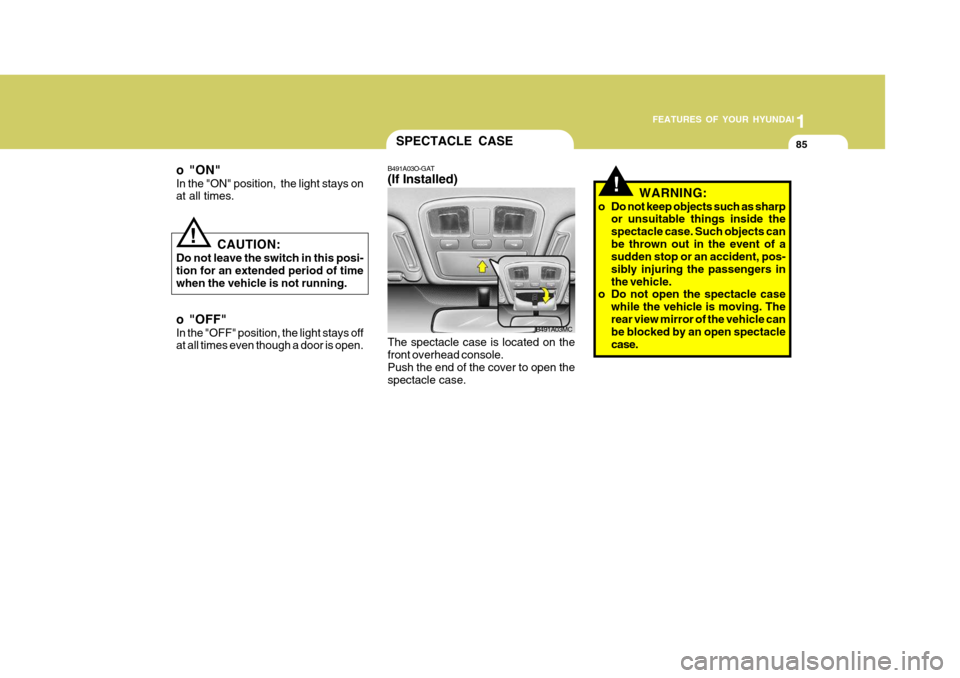
B491A03O-GAT (If Installed) The spectacle case is located on the front overhead console. Push the end of the cover to open thespectacle case. WARNING:
o Do not keep objects such as sharp or unsuitable things inside thespectacle case. Such objects canbe thrown out in the event of a sudden stop or an accident, pos- sibly injuring the passengers inthe vehicle.
o Do not open the spectacle case
while the vehicle is moving. Therear view mirror of the vehicle can be blocked by an open spectacle case.
B491A03MC
o "OFF" In the "OFF" position, the light stays off at all times even though a door is open.
Page 101 of 282
1
FEATURES OF YOUR HYUNDAI
89PARKING BRAKE
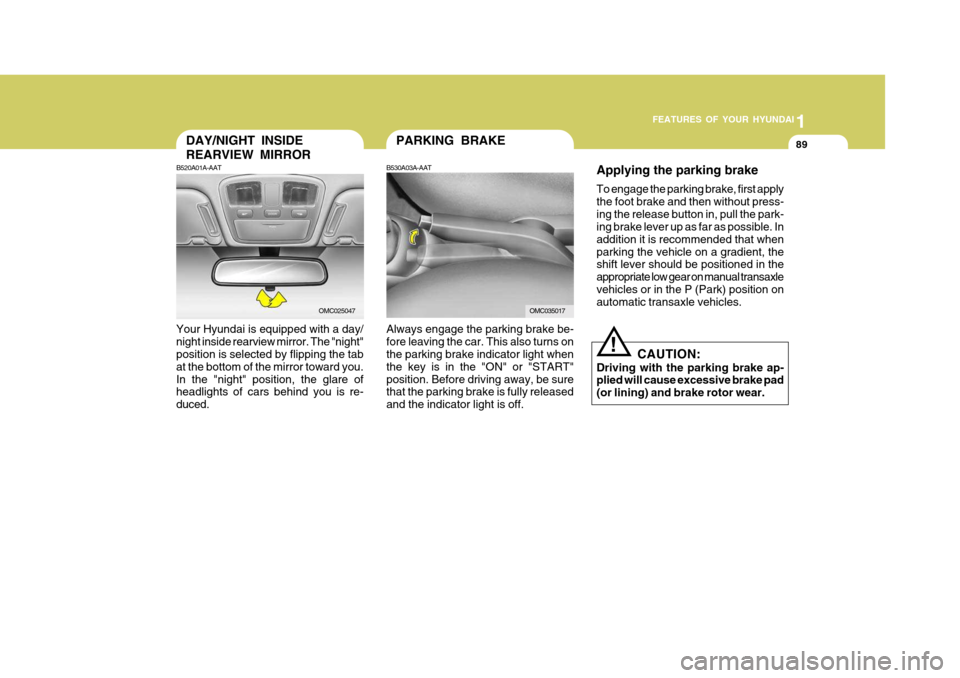
Always engage the parking brake be- fore leaving the car. This also turns on the parking brake indicator light when the key is in the "ON" or "START"position. Before driving away, be sure that the parking brake is fully released and the indicator light is off.
B530A03A-AATDAY/NIGHT INSIDE REARVIEW MIRROR
B520A01A-AAT
Your Hyundai is equipped with a day/ night inside rearview mirror. The "night" position is selected by flipping the tab at the bottom of the mirror toward you.In the "night" position, the glare of headlights of cars behind you is re- duced.
OMC025047OMC035017 Applying the parking brake To engage the parking brake, first apply the foot brake and then without press-ing the release button in, pull the park-
ing brake lever up as far as possible. In addition it is recommended that whenparking the vehicle on a gradient, the shift lever should be positioned in the appropriate low gear on manual transaxlevehicles or in the P (Park) position on automatic transaxle vehicles.
CAUTION:
Driving with the parking brake ap-plied will cause excessive brake pad (or lining) and brake rotor wear.
!
Page 118 of 282

1FEATURES OF YOUR HYUNDAI
106
B730A01L-AAT Operation Tips
o To keep dust or unpleasant fumesfrom entering the car through the ventilation system, temporarily set the air intake control at the (
)
position. Be sure to return the control to the (
) position when the
irritation has passed to keep fresh air in the vehicle. This will help keep thedriver alert and comfortable.
o Air for the heating/cooling system is
drawn in through the grilles justahead of the windshield. Care should be taken that these are not blocked by leaves, snow, ice or other ob-structions.
o To prevent interior fog on the wind-
shield, set the air intake control tothe fresh air (
) position, fan
speed to the desired position, turn on the air conditioning system, and ad-just temperature control to desired temperature.
NOTE: When the A/C is operated continu- ously on the floor-defrost level ( ) or defrost level ( ), it may causefog to form on the exterior wind- shield. If this occurs, set the air flow control to the face level posi-tion ( ) and fan speed control to the low position.
AIR CONDITIONING SYSTEM
B740A01MC
B740A01A-AAT (If Installed) Air Conditioning Switch
The air conditioning is turned on by pushing the A/C button on the heating/ air conditioning control panel.
Page 146 of 282

1FEATURES OF YOUR HYUNDAI
134
o When replacing the fuse, replaceit with a fuse having the correct capacity.
o The preset station frequencies are
all erased when the car battery isdisconnected. Therefore, all data will have to be set again if this should occur.
o Do not add any oil to the rotating parts. Keep magnets, screwdriv-ers and other metallic objects awayfrom the tape mechanism and head.
o This equipment is designed to be
used only in a 12 volt DC batterysystem with negative ground.
o This unit is made of precision
parts. Do not attempt to disas-semble or adjust any parts.
o When driving your vehicle, be sure
to keep the volume of the unit setlow enough to allow you to hear sounds coming from the outside.
o Do not expose this equipment (in- cluding the speakers and tape) towater or excessive moisture.
! CAUTION:
o Do not insert anything like coins into the player slot as damage to the unit may occur.
o Do not place beverages close to
the audio system. The playbackmechanism may be damaged if you spill them.
o Do not strike or allow anything to impact the audio system, damageto the system mechanisms could occur.
Page 159 of 282

1
FEATURES OF YOUR HYUNDAI
147
1
FEATURES OF YOUR HYUNDAI
147
1
FEATURES OF YOUR HYUNDAI
147
1
FEATURES OF YOUR HYUNDAI
147
10. REPEAT (RPT) Button
o To repeat the track you are currently listening to, press the RPT button. To cancel, press again.
o To repeat the music within selected
CD, press the RPT button for morethan 0.8 seconds. To cancel, press it again for more than 0.8 seconds.
o If you do not release RPT operation after all the tracks are played back,the unit will play back again from thefirst track.
11. RANDOM (RDM) Button With random, you can listen to the tracks in random, rather than sequen- tial order, on all of the discs or on onedisc. To use random, do the following:
o Press the RDM button to listen to recorded tracks in random sequence.Press RDM again to cancel or turnthe audio unit OFF then ON. The unit defaults to playing tracks in sequen- tial order. NOTE :
o To assure proper operation of the
unit, keep the vehicle interior tem- perature within a normal range byusing the vehicle's air condition- ing or heating system.
o When replacing the fuse, replace it with a fuse having the correctcapacity.
o All stored bookmarks are all erased when the car battery is discon-nected or power to the vehicle is lost. If this occurs, the bookmarkswill have to be reset.
o Do not add any oil to the rotating
parts. Keep magnets, screwdriv-ers and other metallic objects away from the tape mechanism and head.
! CAUTION:
o Do not insert warped or poor qual- ity discs into the CD player as damage to the unit may occur.
o Do not insert anything like coins
into the player slot as damage tothe unit may occur.
o Do not place beverages close to
the audio system. The playbackmechanism may be damaged if you spill them.
o Do not strike or allow anything to impact the audio system, damageto the system mechanisms could occur.
o Off-road or rough surface driving may cause the compact disc toskip. Do not use the compact discwhen driving in such conditions as damage to the compact disc face could occur.
o Do not attempt to grab or pull the compact disc out while the disc isbeing pulled into the audio unit bythe self-loading mechanism. Dam- age to the audio unit and compact disc could occur.
Page 162 of 282
1FEATURES OF YOUR HYUNDAI
150
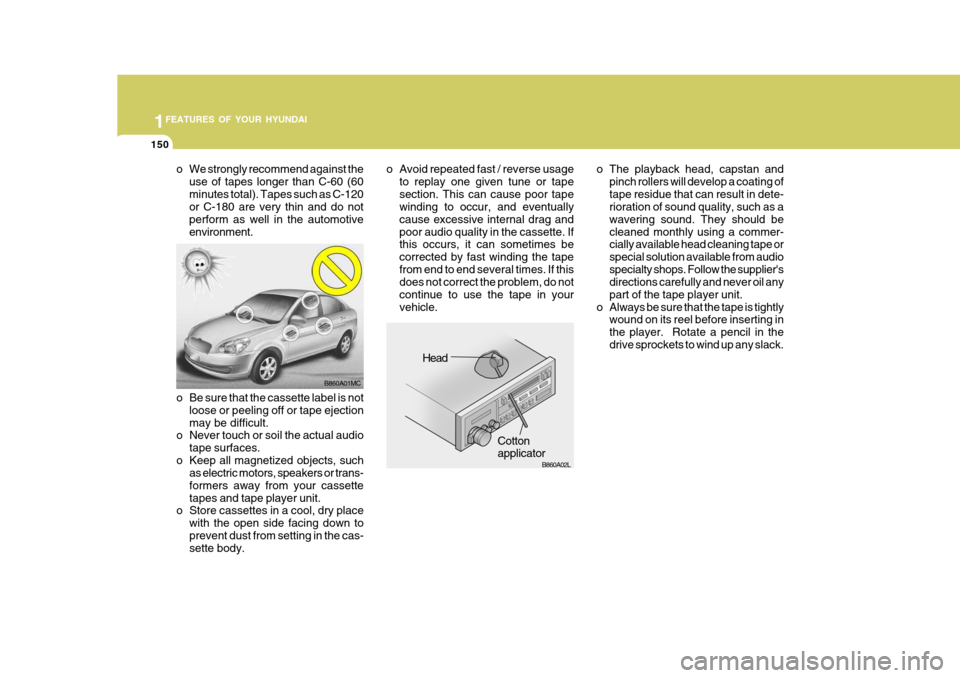
o The playback head, capstan andpinch rollers will develop a coating of tape residue that can result in dete- rioration of sound quality, such as a wavering sound. They should becleaned monthly using a commer- cially available head cleaning tape or special solution available from audiospecialty shops. Follow the supplier's directions carefully and never oil any part of the tape player unit.
o Always be sure that the tape is tightly wound on its reel before inserting inthe player. Rotate a pencil in thedrive sprockets to wind up any slack.
o Be sure that the cassette label is not loose or peeling off or tape ejectionmay be difficult.
o Never touch or soil the actual audio
tape surfaces.
o Keep all magnetized objects, such as electric motors, speakers or trans-formers away from your cassettetapes and tape player unit.
o Store cassettes in a cool, dry place
with the open side facing down toprevent dust from setting in the cas- sette body.
o We strongly recommend against the
use of tapes longer than C-60 (60 minutes total). Tapes such as C-120 or C-180 are very thin and do not perform as well in the automotiveenvironment. o Avoid repeated fast / reverse usage
to replay one given tune or tapesection. This can cause poor tape winding to occur, and eventually cause excessive internal drag andpoor audio quality in the cassette. If this occurs, it can sometimes be corrected by fast winding the tapefrom end to end several times. If this does not correct the problem, do not continue to use the tape in yourvehicle.
HLC216
Head
Cotton applicator
B860A01MC
B860A02L
Page 166 of 282

2
DRIVING YOUR HYUNDAI
3
2
DRIVING YOUR HYUNDAI
3
!
BEFORE STARTING THE EN- GINE
C020A02O-GAT Before you start the engine, you should always:
1. Look around the vehicle to be sure
there are no flat tires, puddles of oil, water or other indications of pos- sible trouble.
2. After entering the car, check to be sure the parking brake is engaged.
3. Check that all windows, and lights are clean.
4. Check that the interior and exterior
mirrors are clean and in position.
5. Check your seat, seatback and headrest to be sure they are in theirproper positions.
6. Lock all the doors.
7. Fasten your seat belt and be sure
that all other occupants have fas- tened theirs.
8. Turn off all lights and accessories
that are not needed.
9. When you turn the ignition switch to "ON", check that all appropriatewarning lights are operating andthat you have sufficient fuel.
10.Check the operation of warning
lights and all bulbs when key is inthe "ON" position. WARNING:
(Diesel Engine)
To ensure that sufficient vacuum exists within the brake system dur-ing cold weather start-up condi- tions, it is necessary to run the engine at idle for several secondsafter starting the engine.TO START THE ENGINE
C030A01A-GAT COMBINATION IGNITION SWITCH
o If your Hyundai is equipped with a manual transaxle, place the shift lever in neutral and depress the clutch pedal fully.
o If your Hyundai has an automatic
transaxle, place the shift lever in "P"(park).
o To start the engine, insert the igni- tion key and turn it to the "START"position. Release it as soon as the engine starts. Do not hold the key inthe "START" position for more than 15 seconds.
NOTE: For safety, the engine will not start if the shift lever is not in "P" or "N" position (Automatic transaxle).
!WARNING:
Always wear appropriate shoes when operating your vehicle. Unsuitable shoes (high heels, skiboots, etc.) may interfere with your ability to use the brake and accelera- tor pedal, and the clutch (if installed).
Page 176 of 282
2
DRIVING YOUR HYUNDAI
13
2
DRIVING YOUR HYUNDAI
13
!WARNING:
ABS (ESP) will not prevent accidents due to improper or dangerous driv- ing maneuvers. Even though vehiclecontrol is improved during emer- gency braking, always maintain a safe distance between you and ob-jects ahead. Vehicle speeds should always be reduced during extreme road conditions. The braking distance for cars equipped with an anti-lock braking system (Electronic Stability Program)may be longer than for those without it in the following road conditions. During these conditions, the ve-hicle should be driven at reduced speeds.
o Rough, gravel or snow-covered roads.
o With tire chains installed.
o On roads where the road surface
is pitted or has different surface height. The safety features of an ABS (ESP) equipped vehicle should not be testedby high speed driving or cornering. This could endanger the safety of yourself or others.
ANTI-LOCK BRAKE SYSTEM
C120A01FC-GAT (If Installed) The Anti-Lock Brake System (ABS) is designed to prevent wheel lock-upduring sudden braking or on hazard- ous road surfaces. The ABS control module monitors the wheel speed andcontrols the pressure applied to each brake. Thus, in emergency situations or on slick roads, ABS will increasevehicle control during braking. NOTE:
o A click sound may be heard in the engine compartment when the ve- hicle begins to move after the en- gine is started. These conditionsare normal and indicate that the anti-lock brake system (Electronic Stability Program) is functioningproperly.
o During ABS (ESP) operation, a
slight pulsation may be felt in thebrake pedal when the brakes are applied. Also, a noise may be heard in the engine compartment whilebraking. These conditions are normal and indicate that the anti- lock brake system (Electronic Sta-bility Program) is functioning prop- erly.