Page 1 of 228
 to navigate through\
this reference.
For a printed owners manual, click on authorized manuals or")
2007 Honda S2000 Online Reference Owner's Manual
Use these links (and links throughout this manual) to navigate through\
this reference.
For a printed owner's manual, click on authorized manuals or go to www.h\
elminc.com.
Contents
Owner's Identification Form
Introduction ........................................................................\
.................................................................i
A Few Words About Safe ty
........................................................................\
........................................iii
Your Vehicle at a Glance........................................................................\
.............................................3
Driver and Passenger Safety ........................................................................\
......................................5
Proper use and care of your vehicle's seat belts, and Supplemental Restr\
aint System.
Instruments and Control s........................................................................\
.........................................43
Instrume nt panel indicator and gauge, and how to use dashboard and steering colu\
mn controls.
Comfort and Convenience Features ........................................................................\
...................... 83
How to operate the climate control system, the audio system, and other c\
onvenience features.
Before Driving........................................................................\
..........................................................109
What gasoline to use, how to break -in your new vehicle, and how to load luggage and other cargo.
Driving ........................................................................\
......................................................................121
The proper way to start the engine, shift the transmission, and park, pl\
us towing a trailer.
Maintenance........................................................................\
.............................................................133
The Maintenance Schedule shows you when you need to take you r vehicle to the dealer.
Taking Care of the Unexpecte d........................................................................\
..............................173
This section covers several problems motorists sometimes experience, an d how to handle them.
Technical Informatio n........................................................................\
.............................................199
ID numbers, dimensions, capacities, and technical information.
Warranty and Customer Relations (U.S. and Canad a)................................................................211
A summary of the warranties covering your new Acura, and how to contact \
us.
Authorized Manu als (U.S. only)........................................................................\
..............................215
How to order manuals and other technical literature.
Index........................................................................\
.............................................................................. I
Service Information Summary
A summary of information you need when you pull up to the fuel pump.
Accord Value Package Audio System
Page 6 of 228
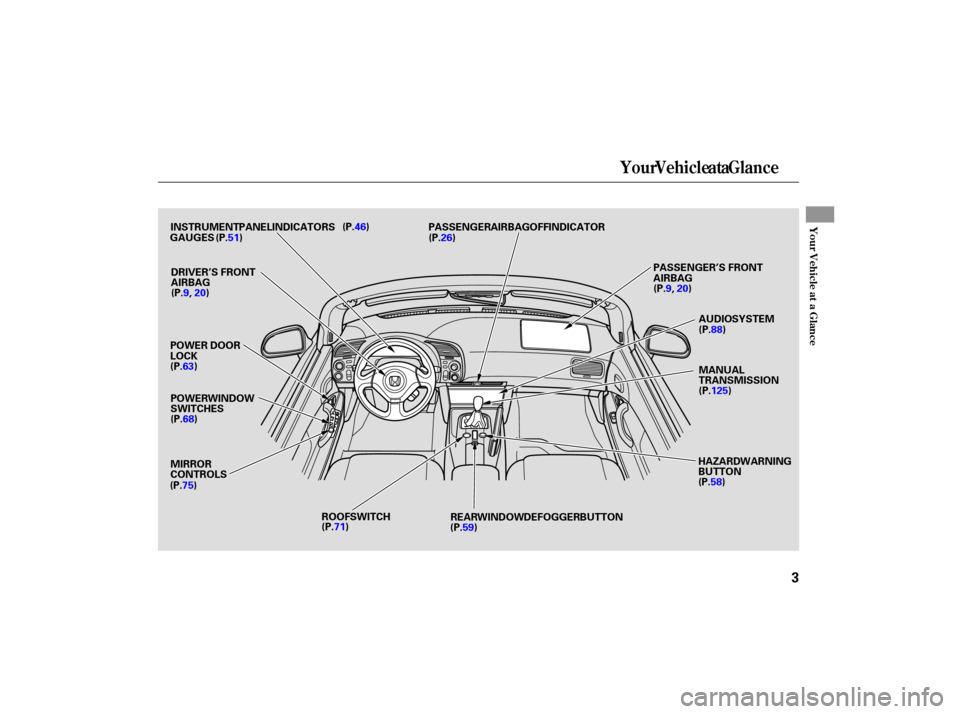
Your Vehicle at a Glance
You r Vehicle at a Glance
3
POWER WINDOW
SWITCHES
MIRROR
CONTROLS
ROOF SWITCH AUDIO SYSTEM
INSTRUMENT PANEL INDICATORS
GAUGES PASSENGER AIRBAG OFF INDICATOR
MANUAL
TRANSMISSION
REAR WINDOW DEFOGGER BUTTON HAZARD WARNING
BUTTON
(P.46)
(P.51)
(P.63) (P.68)
(P.75) (P.71) (P.59) (P.58)
POWER
DOOR
LOCK (P.26)
DRIVER’S FRONT
AIRBAG PASSENGER’S
FRONT
AIRBAG
(P.9, 20) (P.9,
20)
(P.88)
(P.125)
Page 7 of 228
Your Vehicle at a Glance
4
HOOD RELEASE HANDLE
HORNWINDSHIELD
WIPERS/
WASHERS
INSTRUMENT
PANEL BRIGHTNESS
(P.57)
(P.56)
(P.58)
VEHICLE
STABILITY ASSIST
(VSA) SYSTEM OFF SWITCH
CRUISE BUTTON
HEADLIGHTS/TURN
SIGNALS
REMOTE AUDIO
CONTROLS
CRUISE CONTROL
BUTTONS
HEATING/COOLING
CONTROLS
ENGINE START BUTTON
(P.104)
(P.124)
(P.112) (P.106) (P.106)
(P.84)
(P.131)
CLOCK
BUTTON
(P.54)
Page 46 of 228

This section gives inf ormation about
the controls and displays that
contribute to the daily operation of
your vehicle. All the essential
controls are within easy reach............................
Control Locations .44
............................
Instrument Panel .45
..........
Instrument Panel Indicators . 46
.............................................
Gauges .51
.....................................
Odometer .51
....................................
Trip meter .51
...............................
Select Button .51
..................................
Fuel Gauge .52
..........
Check Fuel Cap Message . 52
...................
Temperature Gauge . 53
Outside Temperature ...................................
Indicator .53
..................
Maintenance Minder . 54
............................................
Clock .54
Controls Near the Steering ...........................................
Wheel .55
Windshield Wipers and .......................................
Washers .56
...........
Turn Signal and Headlights . 57
........
Instrument Panel Brightness . 58
.................
Hazard Warning Button . 58
.................
Rear Window Def ogger . 59
...............................
Keys and Locks .60
........................
Immobilizer System .61
................................
Ignition Switch .62
..........................
Power Door Locks .63 ................................................
Trunk .63
........
Emergency Trunk Opener . 64
.......................
Remote Transmitter .65
.................................................
Seats .67
..............................
Power Windows .68
..............................
Convertible Top .70
.............................................
Mirrors .75
.................................
Parking Brake .76
...........
Interior Convenience Items . 77
.........................
Beverage Holder .78
...........
Accessory Power Socket . 78
.............
Console Compartments . 79
.................................
Audio Panel .79
..........
Dashboard Lower Pocket . 80
...................................
Interior Light .80
Instruments and Controls
Inst rument s and Cont rols
43
Page 47 of 228
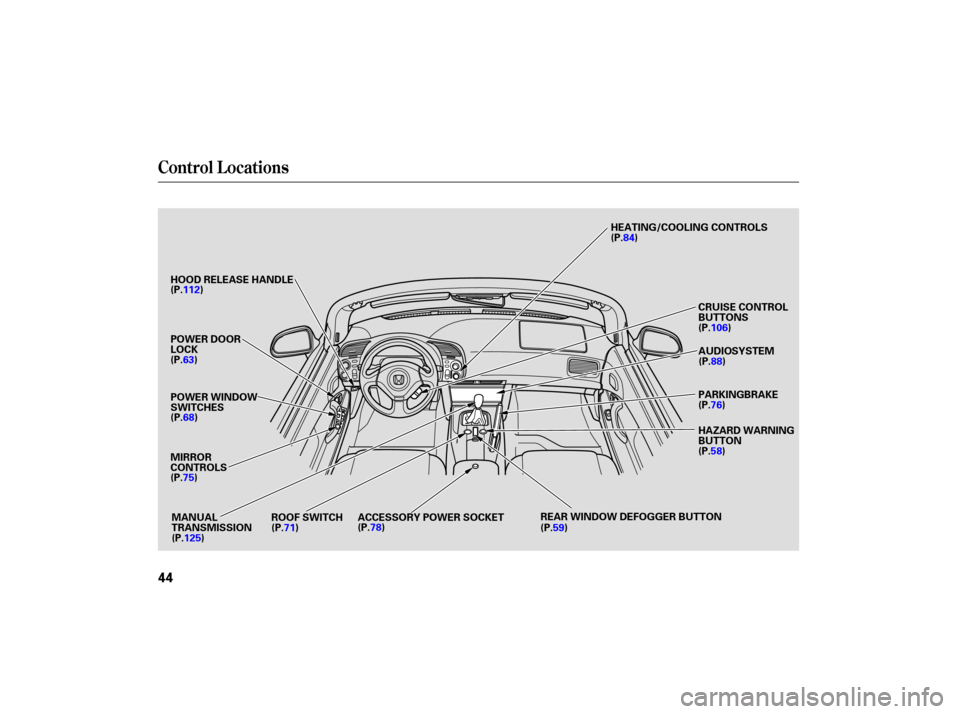
Control Locations
44
POWER WINDOW
SWITCHES
MIRROR
CONTROLS
ROOF SWITCH ACCESSORY POWER SOCKET REAR
WINDOW DEFOGGER BUTTONHAZARD
WARNING
BUTTON
(P.68)
(P.75) (P.71) (P.78)
(P.59)(P.58)
POWER
DOOR
LOCK
(P.63) AUDIO SYSTEM
PARKING BRAKE
MANUAL
TRANSMISSION CRUISE
CONTROL
BUTTONS
HOOD
RELEASE HANDLE HEATING/COOLING
CONTROLS
(P.112)
(P.125) (P.76)
(P.88)
(P.106)
(P.84)
Page 58 of 228
�Î
�ÎTo use the horn, press the pad around the ‘‘H’’ logo.
Controls Near the Steering Wheel
Instru me ntsand Cont ro ls
55
REMOTE AUDIO
CONTROLS
HOOD RELEASE
HANDLE INSTRUMENT
PANEL BRIGHTNESS
HEADLIGHTS/TURN
SIGNALS
ENGINE START BUTTON
HORNWINDSHIELD
WIPERS/WASHERS
(P.57)
(P.56)
(P.58)
VEHICLE STABILITY ASSIST (VSA)
SYSTEM OFF SWITCH
CRUISE BUTTON (P.54) CLOCK BUTTON
CRUISE CONTROL BUTTONSHEATING/COOLING
CONTROLS
(P.104)
(P.124)
(P.112) (P.106) (P.106)(P.84)
(P.131)
Page 65 of 228
�µ
�µ �µ
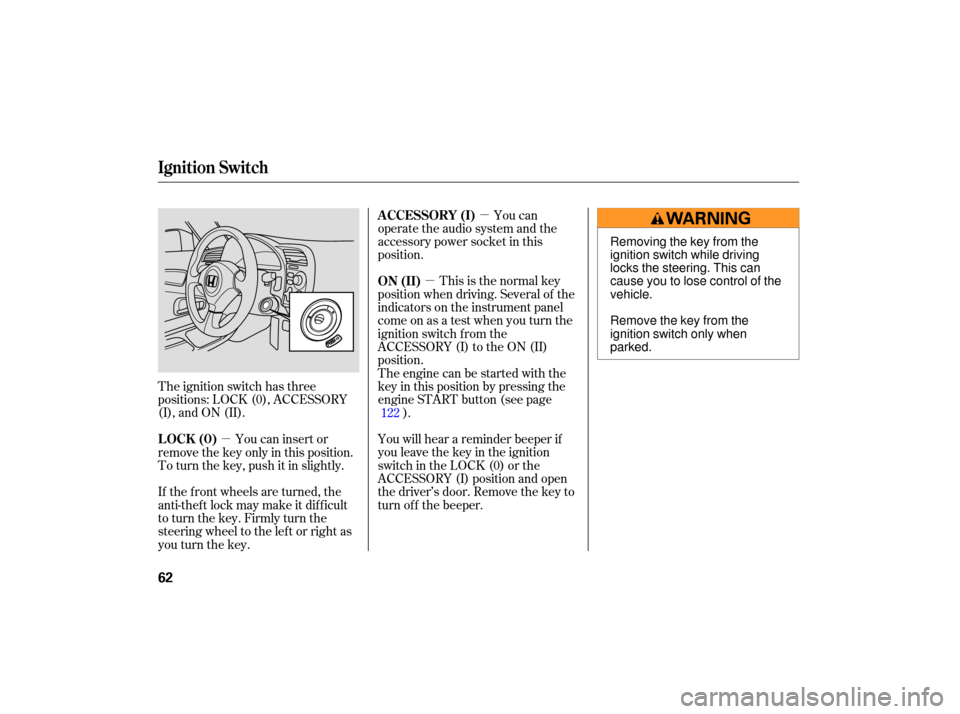
The ignition switch has three
positions: LOCK (0), ACCESSORY
(I), and ON (II). This
is the normal key
position when driving. Several of the
indicato rs on the instrument panel
come on as a test when you turn the
ignition switch from the
ACCESSORY (I) to the ON (II)
position.
The engine can be started with the
key in this position by pressing the
engine START button (see page ).
You will hear a reminder beeper if
you leave the key in the ignition
switch in the LOCK (0) or the
ACCESSORY (I) position and open
thedriver’sdoor.Removethekeyto
turn of f the beeper.
You can insert or
remove the key only in this position.
To turn the key, push it in slightly.
If the f ront wheels are turned, the
anti-theft lock may make it difficult
to turn the key. Firmly turn the
steering wheel to the lef t or right as
you turn the key. You can
operate the audio system and the
accessory power socket in this
position.
122
ON (II)
LOCK (0) A CCESSORY (I)
Ignition Switch
62
Removing the key from the
ignition switch while driving
locks the steering. This can
cause you to lose control of the
vehicle.
Remove the key from the
ignition switch only when
parked.
Page 80 of 228
Interior Convenience Items
Inst rument s and Cont rols
77
BEVERAGE HOLDER
CONSOLE COMPARTMENT
AUDIO PANEL
DASHBOARD LOWER POCKET
DRIVER’S SEAT-BACK POCKET ACCESSORY POWER SOCKET
VANITY MIRROR/SUNVISOR