Page 82 of 228
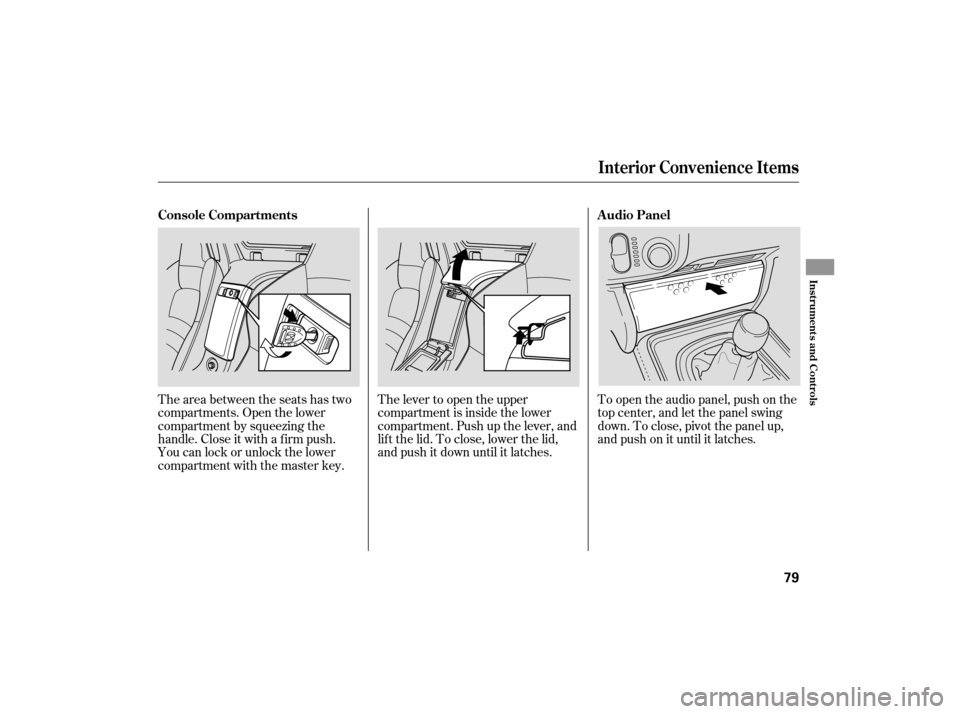
To open the audio panel, push on the
top center, and let the panel swing
down.Toclose,pivotthepanelup,
andpushonituntilitlatches.
The lever to open the upper
compartment is inside the lower
compartment. Push up the lever, and
lif t the lid. To close, lower the lid,
and push it down until it latches.
The area between the seats has two
compartments. Open the lower
compartment by squeezing the
handle. Close it with a f irm push.
You can lock or unlock the lower
compartment with the master key.
Interior Convenience Items
Audio Panel
Console Compartments
Inst rument s and Cont rols
79
Page 83 of 228
If the switch is in the center position,
the interior light will come on when
you remove the key f rom the ignition
switch.
The interior light has a three-
position switch; ON, Door Activated,
and OFF. In the Door Activated
(center) position, the light comes on
when you: Open either door.
Unlock the doors with the key or
the remote transmitter.
The dashboard lower pocket is
located next to the audio panel. Dashboard L ower Pocket
Interior L ight
Interior Convenience Items, Interior L ight
80
DOOR
ACTIVATED
Page 86 of 228
The standard audio system has
many f eatures. This section
describes those f eatures and how to
use them. (If you have an optional
audio system, ref er to the operating
instructions that came with it.) The heating and air conditioning
system in your vehicle provides a
comf ortable driving environment in
all weather conditions.
Your vehicle has an anti-theft audio
system that requires a code number
to enable it................
Vents, Heating, and A/C . 84
............
Playing the AM/FM Radio . 88
..............
AM/FM Radio Reception . 91
...
Playing the XM
Satellite Radio . 93
....................................
Playing a CD .98
...................................
CD Changer .100
....................
Protecting Your CDs .101
.........
CD Player Error Messages . 102
.....
CD Changer Error Messages . 103
................
Remote Audio Controls . 104
.................
Radio Thef t Protection . 105
...............................
Cruise Control .106
Features
Features
83
Page 89 of 228

Air conditioning places an extra load
on the engine. Watch the engine
coolant temperatu re gauge (see page
). If it moves near the red zone,
turn of f the A/C until the gauge
reading returns to normal.
you can
cool it down more rapidly by partially
opening the windows, turning on the
A/C, and setting the fan to
maximum speed in f resh air mode.
Air flows from the center
vents in the dashboard above the
audio system, the vents on both
sides of the instrument panel, and
f rom the f loor vents. Select this
position when you drive with the
convertible top f olded.
Air f lows f rom the def roster
vents at the base of the windshield
and the vents on both sides of the
instrument panel. Airf low is divided between
the f loor vents and the def roster
vents at the base of the windshield,
and the vents on both sides of the
instrument panel. Air f lows f rom the f loor
vents and the vents on both sides of
the instrument panel.
When you select or ,
the system automatically switches to
f resh air mode and turns on the A/C. Turn on the A/C by pressing the
button. The indicator in the button
comesonwhenafanspeedis
selected.
Make sure the temperature is set
to maximum cool.
Select .
If the outside air is humid, select
recirculation mode. If the outside
air is dry, select f resh air mode.
Set the f an to the desired speed.
The f low-through ventilation system
draws in outside air, circulates it
through the interior, then exhausts it
through vents behind the seat-backs.
Set the temperature to the lower
limit.
Make sure the A/C is of f .
Select and fresh air mode.
Set the f an to the desired speed.
The heater uses engine coolant to
warm the air. If the engine is cold, it
will be several minutes bef ore you
f eel warm air coming f rom the
system. Select and fresh air mode.
Set the f an to the desired speed.
Adjust the warmth of the air with
the temperature control dial.
1.
2.
3.
4.
1.
2.
3.
1.
2.
3.
4.
5.53
If the interior is very warm,
Vents, Heating, and A/C
Using the A/C
Ventilation
Using the Heater
86
Page 93 of 228

�µ�µ �µ�µ
�µ
If
you are
traveling far from home and can no
longer receive your preset stations,
you can use the auto select feature to
find stations in the local area.
Press the A. SEL button. ‘‘A. SEL’’
flashes in the display, and the system
goes into scan mode for several
seconds. It stores the frequencies of
six AM and twelve FM stations in
the preset buttons.
You will see a ‘‘0’’ displayed after
pressing a preset button if auto
select cannot find a strong station for
that preset button. ,pressthe
A. SEL (auto select) button. This
restores the presets you originally
set.
If you do not like the stations auto
select has stored, you can store
other frequencies on the preset
buttons as previously described. Tu
rn the knob to adjust the setting.
When the level reaches the center,
you will see a ‘‘C’’ in the display. The
system will return to the audio
display in about 5 seconds.
You can use the instrument panel
brightness control buttons to adjust
the illumination of the audio system
(see page ). The audio system
illuminates when the parking lights
are on, even if the radio is of f .
Press the SOUND/MODE (TUNE)
knob repeatedly to display the bass
(BAS), treble (TRE), fader (FAD),
and balance (BAL) setting. Adjusts the bass in the
sound. Adjusts the treble in the
sound. Adjusts the fader, or the
f ront-to-back strength of the sound. Adjusts the balance, or side-
to-side strength of the sound.
58To turn of f auto selectAUTO SELECT
A udio System L ighting
BAS TRE
FAD
BAL Adjusting the Sound
Playing the AM/FM Radio
90
Page 96 of 228
XMis a registered trademark of
XM Satellite Radio, Inc.
Satellite radio receives signals f rom
two satellites to produce clear, high-
quality digital reception. It of f ers
many channels in several categories.
Along with a large selection of
dif f erent types of music, satellite
radio also allows you to view channel
and category selections in the audio
display. Your vehicle is capable of receiving
XM
Satellite Radio anywhere in the
United States, except Hawaii and
Alaska.
Optional on U.S. models
Not available on Canadian models
Playing the XMSatellite Radio (Optional on U.S. Models)
Features
93
AM/FM BUTTON
SCAN BUTTONTUNE KNOB
CATEGORY BAR PRESET BUTTONS
MORE BUTTON
DISPLAY/MODE BUTTON
POWER/VOLUME
KNOB CD/XM BUTTON
Page 97 of 228

�µ�µ
�µ
�µ You may experience periods when
XM radio does not transmit the artist
name and or the song title
inf ormation. If this happens, there is
nothing wrong with your system.
This inf ormation is not available
under certain situations.
If youpressandholdtheDISP/
MODE button f or 5 seconds, it will
change between category mode and
channel mode. The display will show
CH f or the channel mode or
CATEGORY f or the category mode.
In the channel mode, you can receive
all of the available channels in all of
the dif f erent categories. In category
mode, you will receive only the
stations within the selected category.
Expands the display to
show the 6 remaining letters beyond
the first 10 letters in an artist’s name
or song title. The system is set up so
only 16 letters can be displayed f or any title or name. Press MORE to
view the next 6 letters. The system
will return to the original display
af ter 8 seconds.
Turn the TUNE knob lef t
to go down the channels or right to
go up. In the channel mode, the
TUNE knob will tune up or down
through all the channels available
from the XM radio. In the category
mode, the TUNE knob will cycle
through only the channels within the
category you have currently selected.
Use
the CATEGORY bar to select a
desired category, such as jazz, rock,
classical, etc. In both category mode
and channel mode, pressing the
category bar will change the
category up or down.
Each time the
DISP button is pressed and released,
the display inf ormation changes in
the f ollowing sequence: channel
name, channel number, category,
artist name, and music title. To listen to satellite radio, turn the
ignition switch to the ACCESSORY
(I) or the ON (II) position. Push the
PWR/VOL knob to turn on the audio
system, and press the CD/XM
button. Adjust the volume by turning
the PWR/VOL knob. The last
channel you listened to will show in
the display. Playing the Satellite Radio
MORETUNE
CA T EGORY (SEEK /SK IP)
DISPL AY/MODE
Playing the XMSatellite Radio (Optional on U.S. Models)
94
Page 100 of 228

Depending on where you drive, you
may experience reception problems.
Interf erence can be caused by any of
these conditions:Driving on a road beside a vertical
wall, steep clif f , or hill to the south
of you. Driving on the north side of a
large commercial truck on an
east/west road.
Driving in tunnels.
Driving on a single lane road
alongside dense trees taller than
50 ft. (15 m) to the south of you. Driving on the south side of an
east/west mountain road. There may also be other geographic
situations that could af f ect satellite
radio reception.
If you decide to purchase XM
satellite radio service, contact XM
Radio at
, or at1-800-852-9696. You will need to give
them your radio I.D. number and
your credit card number. To get your
radio I.D. number, turn the TUNE
knob until ‘‘0’’ appears in the display.
Your I.D. will appear in the display.
After you’ve registered with XM
Radio, keep your audio system in the
Satellite Radio mode while you wait
f or activation. This should take about
30 minutes.
While waiting for activation, make
sure your vehicle remains in an open
area with good reception. Once your
audio system is activated, ‘‘category’’
or ‘‘CH’’ will appear in the display,
andyou’llbeabletolistentoXM
Radio broadcasts. XM Radio will
continue to send an activation signal
to your vehicle for at least 12 hours
from the activation request. If the
service has not been activated after
36 hours, contact XM Radio.
Driving on the lower level of a
multi-tiered road. If your XM Radio service has expired,
or you purchased your vehicle f rom
a previous owner, you can listen to a
sampling of the broadcasts available
on XM Satellite Radio. With the
ignition switch in the ACCESSORY
(I) or the ON (II) position, push the
PWR/VOL knob to turn on the audio
system, and press the CD/XM
button. A variety of music types and
styles will play.
As required by the FCC:
Changes or modif ications not expresslyapproved by the party responsible f orcompliance could void the user’sauthority to operate the equipment.
www.xmradio.com
Playing the XMSatellite Radio (Optional on U.S. Models)
Receiving Satellite Radio Service
Features
97