Page 107 of 228
�´
�µ
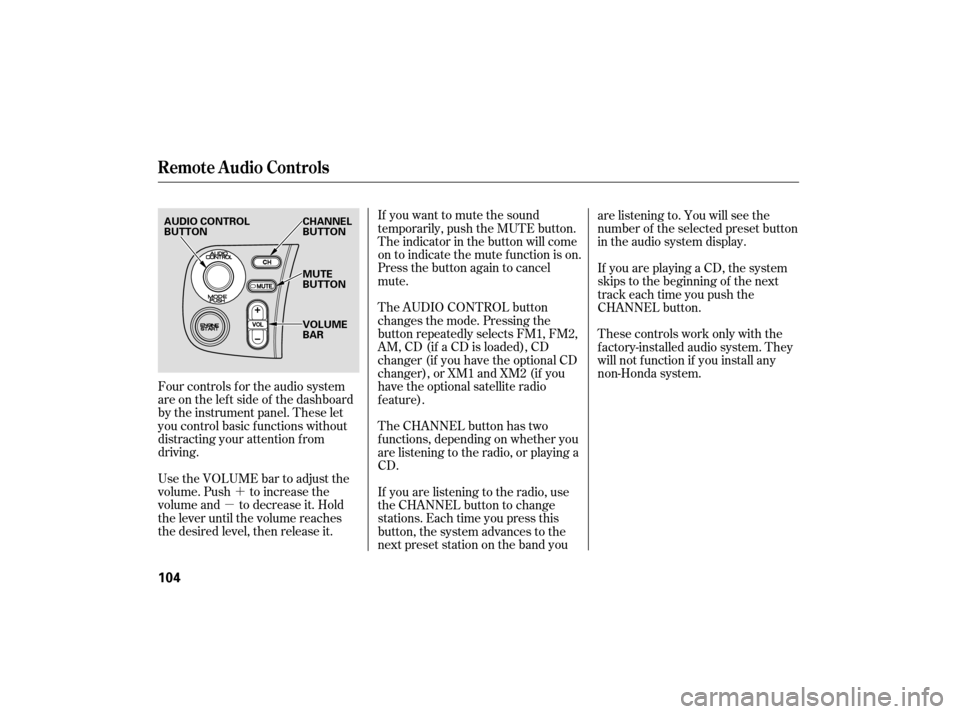
Four controls f or the audio system
areontheleftsideof thedashboard
by the instrument panel. These let
you control basic f unctions without
distracting your attention f rom
driving.
Use the VOLUME bar to adjust the
volume. Push to increase the
volume and to decrease it. Hold
the lever until the volume reaches
the desired level, then release it. If you want to mute the sound
temporarily, push the MUTE button.
The indicator in the button will come
on to indicate the mute f unction is on.
Press the button again to cancel
mute.
The AUDIO CONTROL button
changes the mode. Pressing the
button repeatedly selects FM1, FM2,
AM,CD(if aCDisloaded),CD
changer (if you have the optional CD
changer), or XM1 and XM2 (if you
have the optional satellite radio
f eature).
The CHANNEL button has two
f unctions, depending on whether you
are listening to the radio, or playing a
CD.
If you are listening to the radio, use
the CHANNEL button to change
stations. Each time you press this
button, the system advances to the
next preset station on the band youare listening to. You will see the
number of the selected preset button
in the audio system display.
If youareplayingaCD,thesystem
skips to the beginning of the next
track each time you push the
CHANNEL button.
These controls work only with the
f actory-installed audio system. They
will not f unction if you install any
non-Honda system.
Remote Audio Controls
104
AUDIO CONTROL
BUTTON
CHANNEL
BUTTON
MUTE
BUTTON
VOLUME
BAR
Page 109 of 228
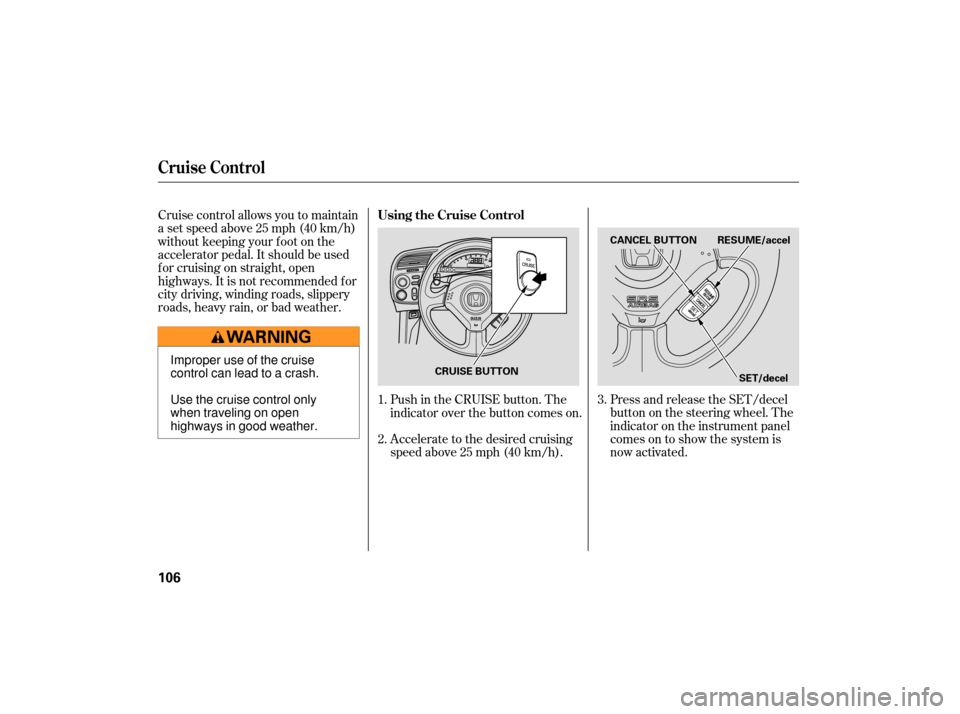
Cruise control allows you to maintain
asetspeedabove25mph(40km/h)
without keeping your f oot on the
accelerator pedal. It should be used
f or cruising on straight, open
highways. It is not recommended f or
city driving, winding roads, slippery
roads, heavy rain, or bad weather.Press and release the SET/decel
buttononthesteeringwheel.The
indicator on the instrument panel
comes on to show the system is
now activated.
Accelerate to the desired cruising
speedabove25mph(40km/h). Push in the CRUISE button. The
indicator over the button comes on.
1.
2. 3.
Cruise Control
Using the Cruise Control
106
CANCEL BUTTON
SET/decel
RESUME/accel
CRUISE BUTTON
Improper use of the cruise
control can lead to a crash.
Use the cruise control only
when traveling on open
highways in good weather.
Page 110 of 228

You can increase the set cruising
speed in any of these ways:Press and hold the RESUME/
accel button. When you reach the
desired cruising speed, release the
button.
Push on the accelerator pedal.
Accelerate to the desired cruising
speed, and press the SET/decel
button. You can decrease the set cruising
speed in any of these ways:
Press and hold the SET/decel
button. Release the button when
you reach the desired speed.
To slow down in very small
amounts, tap the SET/decel
button. Each time you do this,
your vehicle will slow down about
1 mph (1.6 km/h).
Tap the brake or clutch pedal
lightly with your f oot. The
CRUISE CONTROL indicator on
the instrument panel goes out.
When the vehicle slows to the
desired speed, press the SET/
decel button.
Cruise control may not hold the
set speed when you are going up
and down hills. If your speed
increases going down a hill, use
the brakes to slow down. This will
cancelthecruisecontrol.To
resume the set speed, press the
RESUME/accel button. The
indicator on the instrument panel
will come back on.
To increase the speed in very
small amounts, tap the RESUME/
accel button. Each time you do
this, your vehicle speeds up about
1 mph (1.6 km/h).
CONT INUED
Changing the Set Speed
Cruise Control
Features
107
Page 113 of 228

Help assure your vehicle’s f uture
reliability and perf ormance by paying
extra attention to how you drive
during the f irst 600 miles (1,000 km).
During this period:Avoid full-throttle starts and rapid
acceleration. Do not exceed 5,500
rpm f or the f irst 600 miles (1,000
km) of operation.
You should also f ollow these
recommendations with an
overhauled or exchanged engine, or
when the brakes are replaced. Avoidhardbrakingforthefirst
200 miles (300 km). Do not change the oil until the
scheduled maintenance time.
We recommend quality gasoline
containing detergent additives that
help prevent f uel system and engine
deposits.
In addition, in order to maintain good
perf ormance, f uel economy, and
emissions control, we strongly
recommend, in areas where it is
available, the use of gasoline that
does NOT contain manganese-based
f uel additives such as MMT.
Use of gasoline with these additives
may adversely af f ect perf ormance, and cause the malfunction indicator
lamp on your instrument panel to
come on. If this happens, contact
your authorized dealer f or service.
Some gasoline today is blended with
oxygenates such as ethanol or
MTBE. Your vehicle is designed to
operate on oxygenated gasoline
containing up to 10% ethanol by
volume and up to 15% MTBE by
volume. Do not use gasoline
containing methanol.
If you notice any undesirable
operating symptoms, try another
service station or switch to another
brand of gasoline.
For f urther important f uel-related
inf ormation, please ref er to your
.
Your vehicle is designed to operate
on premium unleaded gasoline with a
pump octane number of 91 or higher.
Useof aloweroctanegasolinecan
cause occasional metallic knocking
noises in the engine and will result in
decreased engine perf ormance. Use
of a gasoline with a pump octane
number less than 87 can lead to
engine damage.
Break-in Period
Fuel Recommendation
Quick Start Guide
Break-in Period, Fuel Recommendation
110
Page 126 of 228
Youshoulddothefollowingchecks
and adjustmen ts before you drive
your vehicle.
Make sure all windows, mirrors,
and outside lights are clean and
unobstructed. Remove frost, snow,
or ice. Check
that any items you may be
carrying are stored properly or
fastened down securely. Fasten
your seat belt. Check that
your passenger has fastened his or
her seat belt (see page ).
When you start the engine, check
the gauges and indicato rs in the
instrument panel (see page ).
Check
the seat adjustment (see
page ).
Check the adjustment of the
inside and outside mirrors (see
page ).
Make sure the doors are securely
closed and locked.
Check that the hood is f ully closed.
Check that the trunk is f ully
closed.
Visually check the tires. If a tire
looks low, use a gauge to check its
pressure.
1.
2.
12
3.
4. 5.
6.
7.
8.
9.
10.
67
75 45
Preparing to Drive
Driving
123
Page 140 of 228

CONT INUED
Negative mileage means your
vehicle has passed the maintenance
required point. If you do not perf orm the indicated
maintenance, negative mileage is
displayed and begins to blink af ter
the vehicle has been driven 10 miles
(10 km) or more.
Immediately have the indicated
maintenancedonebyyourdealer.
When the remaining engine oil lif e is
0 percent, the engine oil lif e indicator
will blink. The display comes on
everytimeyouturntheignition
switch to the ON (II) position. The
maintenance minder indicator
( ) also comes on and remains
on in the instrument panel. When
you see this message, immediately
have the indicated maintenance done
by your dealer.
When the remaining engine oil lif e is
5 to 1 percent, you will see a
‘‘SERVICE OIL LIFE’’ message
along with the same maintenance
item code(s), every time you turn the
ignition switch to the ON (II)
position. The maintenance minder
indicator ( ) also comes on and
remains on in the instrument panel.
Maintenance Minder
Maint enance
137
Page 172 of 228
Check the condition of the battery
monthlybylookingatthetest
indicator window. The label on the
battery explains the test indicato r’s
colors. Check
the terminals for corrosion (a
white or yellowish powder). To
remove it, cover the terminals with a
solution of baking soda and water. It
will bubble up and turn brown. When
this stops, wash it off with plain
water. Dry off the battery with a
cloth or paper towel. Coat the
terminals with grease to help prevent
future corrosion. If
your vehicle’s battery is
disconnected, or goes dead, the
clock setting in the instrument panel
will be canceled. To reset the time,
see page .
If your vehicle’s battery is
disconnected, or goes dead, the
audio system will disable itsel f. The
nexttimeyouturnontheradio,you
may see ‘‘CODE’’ (U.S. model) or
‘‘Code’’ (Canadian model) in the
f requency display. Use the preset
buttons to enter the code (see page ). 54
105
CONT INUED
Checking the Battery
Maint enance
169
TEST INDICATOR WINDOW
Page 184 of 228

If the headlights dim noticeably or
go out when you try to start the
engine, either the battery is
discharged or the connections are
co rroded. Check the condition of the
battery and terminal connections
(see page ). You can then try
jump starting the vehicle from a
booster battery (see page ). In
this case, the starter motor’s
speed sounds normal, or even faster
than normal, when you press the
ENGI NE START button, but the
engine does not run. There
may be an electrical
problem, such as no power to the
fuel pump. Check all the fuses
(see page ).
Are you using a properly coded
key? An improperly coded key will
cause the immobilizer system
indicator in the instrument panel
to blink rapidly (see page ).
Are you using the proper starting
procedure? Refer to
on page .
Do you have fuel? Check the fuel
gauge; the low fuel indicator may
not be working. Ifyoufindnothingwrong,youwill
need
a qualified mechanic to find the
problem. See
on page .
61
169
182
124 190
196
T he Starter Operates Normally
Starting the
Engine Emergency T owing
If theEngineWon’tStart
T aking Care of t he Unexpect ed
181