Page 7 of 319
�Î
�Î
If equipped.
:
Your Vehicle at a Glance
4
GAUGES
MIRROR
CONTROLS
POWER WINDOW
SWITCHES
HOOD RELEASE
HANDLE PARKING BRAKE
PEDALREAR A/C CONTROL
DRIVER’S FRONT
AIRBAG
(P.
11, 28) REAR VIEW MIRROR WITH
COMPASS
(P. 70)
(P. 82)
(P. 93)
(P. 94)
(P. 188)
(P. 187) (P. 97) (P.
113) (P.
177)
Vehicle with rear entertainment system is shown. INSTRUMENT PANEL
INDICATORS
(P.
61)
FUEL FILL DOOR
RELEASE HANDLE SHIFT LEVER
(P.
200)
ACCESSORY POWER SOCKET(P. 101) HEATING/COOLING
SYSTEM
CLIMATE CONTROL
SYSTEM AUDIO SYSTEM
(P.
115)
PASSENGER’S
FRONT AIRBAG
(P. 106)
GLOVE BOX
(P. 99)
POWER DOOR LOCK
SWITCH
(P. 11, 35)
Page 108 of 319

The heating and air conditioning
system in your vehicle provides a
comf ortable driving environment in
all weather conditions.
The standard audio system has
many f eatures. This section
describes those f eatures and how to
use them.
Your vehicle has an anti-theft audio
system that requires a code number
to enable it.
The security system helps to dis-
courage vandalism and thef t of your
vehicle..............
Vents, Heating, and A/C . 106
.......................
Air Flow Buttons .107
......
Automatic Climate Control . 112
.........
Using the Rear A/C Unit . 113
................................
Audio System .115
..........................
Playing the Radio .117
........................
Radio Reception .122
...
Playing the XM Satellite Radio . 124
................................
Playing a Disc .130
........................
Disc Changer .131, 134
...................
Protecting your Discs . 135
.......
Disc Player Error Messages . 136
Disc Changer Error ...................................
Messages .137
................
Remote Audio Controls . 138
.................
Radio Thef t Protection . 139..........................
Setting the Clock .140
........
Rear Entertainment System . 142
............................
Security System .174
...............................
Cruise Control .175
.........................................
Compass .177
.
Rear View Camera and Monitor . 180
HomeLink Universal ................................
Transceiver .181
On EX and EX-L models
Features
Features
105
Page 119 of 319
Audio System
116
On U.S. models(EX-L models)
(EX-L models)
On Canadian models
AM/FM/CD Changer Audio System
with rear entertainment system
On U.S. modelsOn Canadian models
AM/FM/CD Changer Audio System with navigation system (EX-L models)
(EX-L models)
Page 120 of 319
Playing the Radio
Features
117
PRESET BUTTONSSCAN BUTTON
AUTO SELECT BUTTON
STEREO INDICATOR
TUNE/MODE KNOB
AM/FM BUTTON
PWR/VOL KNOB
SEEK/SKIP BAR
PRESET BUTTONSSTEREO INDICATOR
TUNE/SOUND
KNOB
AM/FM BUTTON
AM BUTTON FM BUTTON
PWR/VOL KNOB
SCAN BUTTON SEEK
BUTTONS
AM BUTTON
AUTO SELECT BUTTON AUTO SELECT BUTTON
PWR/VOL KNOB
Canadian
models
U.S. EX-L
models
AM/FM
BUTTON
SCAN BUTTON
SOUND KNOB
FM BUTTON
PRESET BUTTONSSEEK
BUTTONS
EX and
Canadian
EX-L models
STEREO INDICATOR
TUNE KNOB U.S. models
(LX models)
(EX and EX-L models) (EX-L models with rear entertainment system)
Page 127 of 319
Playing the XMSatellite Radio
124
PWR/VOL
KNOBU.S. EX-L models
DISP/MODE BUTTON
CATEGORY BAR PRESET BUTTONS
SCAN BUTTON
PWR/VOL
KNOB
U.S. EX-L models with rear entertainment system
TUNE KNOB
PRESET BUTTONS
SCAN BUTTON TUNE KNOB
DISP/MODE BUTTON
CATEGORY BAR
XM BUTTON
XM BUTTON
Page 133 of 319
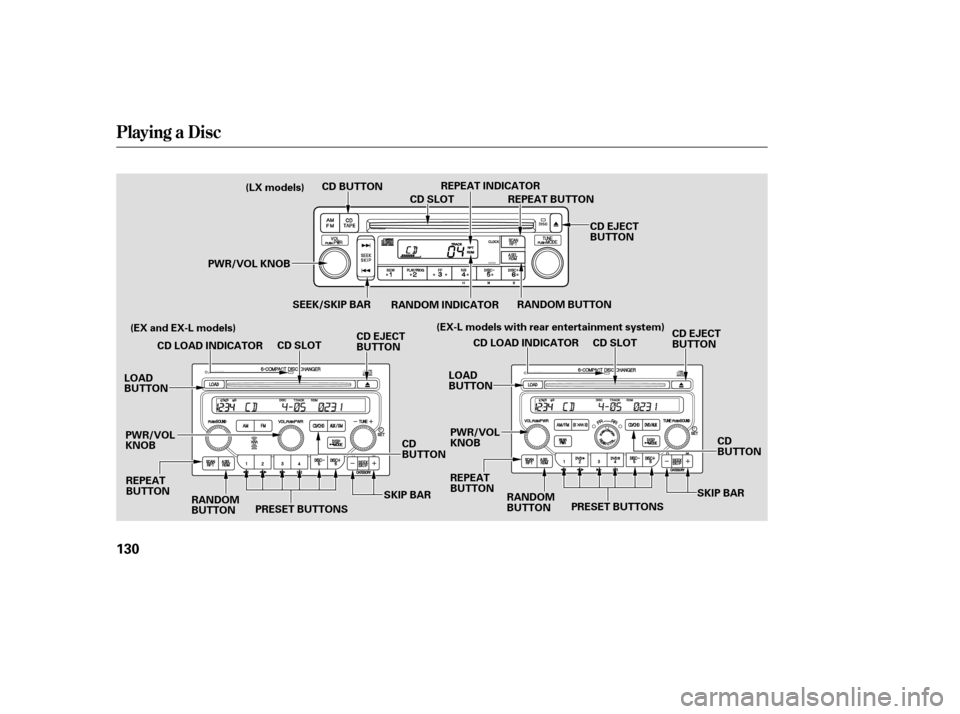
Playing a Disc
130
PWR/VOL KNOBREPEAT INDICATOR
CD SLOT
CD EJECT
BUTTON
CD SLOT
PWR/VOL
KNOB SEEK/SKIP BAR
RANDOM INDICATOR
CD BUTTON
CD EJECT
BUTTON
RANDOM BUTTON
RANDOM
BUTTON
REPEAT
BUTTON REPEAT BUTTON
CD LOAD INDICATOR
LOAD
BUTTON
CD
BUTTON
PRESET BUTTONS CD EJECT
BUTTON
CD SLOT
PWR/VOL
KNOB RANDOM
BUTTON
REPEAT
BUTTON CD LOAD INDICATOR
LOAD
BUTTON
CD
BUTTON
PRESET BUTTONS
SKIP BAR
SKIP BAR
(LX models)
(EX and EX-L models) (EX-L models with rear entertainment system)
Page 145 of 319
Rear Entertainment System
142
PAUSE
BUTTON
REAR POWER
BUTTON
REAR CONTROL OFF ICON
REAR SPEAKER OFF ICON
DVD/AUX BUTTON
REPEAT BUTTON
EX-L models
RANDOM
BUTTONPLAY
BUTTON
REAR CTRL KNOB SEEK/SKIP BAR
REAR ICON
Page 146 of 319

Your vehicle is equipped with a rear
entertainment system that includes a
DVD player f or the enjoyment of the
rear passengers.
With this system, the rear
passengers can enjoy a dif f erent
entertainment source (AM/FM
radio, XM radio, CD changer, or
DVD player) than the f ront seat
occupants. The audio is broadcast
through the supplied wireless
headphones.
The ignition switch must be in the
ACCESSORY (I) or the ON (II)
position to operate the rear
entertainment system.Press the REAR PWR button. To
turn on the rear controls (ceiling
panel/remote control), press the RR
CTRL knob. The system’s icon
shows in the upper display. Your
passengers can then operate the rear
system with the control panel in the
ceiling. The rear control panel can be
used as a remote control when it is
detached f rom the ceiling unit. Press
the RR CTRL knob again to turn the
rear controls of f . You will see the
RearControlsOff iconintheupper
display.
Whenyouturnonthesystem,the
rear speakers are automatically
turned of f if the rear system selects
a dif f erent entertainment source
than the front system. You will see
the Rear Speakers Of f icon in the
upper display. The sound f or the rear
system is sent to the wireless
headphones.
The rear speakers are
connected to the f ront system, so
they will always play the source that
the f ront system is set to. If youwanttoturntherearspeakers
on again, press and hold the REAR
PWR button until the Rear Speakers
Of f icon goes of f .
The rear system selects the source it
waslastsetto.Ifthatsourcehas
been removed (the DVD has been
ejected f rom the player, f or example),
you will see ‘‘DVD EJECT’’ in the
display. You must select another
source. To Turn On the System Rear Speakers
Rear Entertainment System
Features
143
NOTE: