Page 85 of 319

To lock the doors and the tailgate,
press the master door lock switch on
either front door, press the lock tab
down on the driver’s door, or use the
keyonthe outsidelockonthe driver’s
door.
Pressing up on either master door
lock switch will unlock all of the
doors and the tailgate. The
lock tab on any door locks and
unlocks that door. To unlock the
driver’s door from the outside, turn
the key and release it. If you turn
and hold it, all doors and the tailgate
unlock.
Keep the tailgate and the hatch glass
closed at all times while driving to
avoid damaging the tailgate and the
hatch glass, and to prevent exhaust
gas from getting into the interior.
See on
page .
With the driver’s door open and the
key in the ignition, both master door
lock switches are disabled. They are
not disabled if the driver’s door is
closed. Pushing the switch down on
the open passenger’s door will lock
all doors and the tailgate. To open the tailgate, pull the handle,
then lif t up. To close the tailgate, use
the inner handle to pull it down, then
press down on the back edge.
57
Power Door L ocks Tailgate
Carbon Monoxide Hazard
Door L ocks
L ockout Prevent ion
82
MASTER DOOR LOCK SWITCHLOCK TAB
Page 86 of 319
�µ
�µ
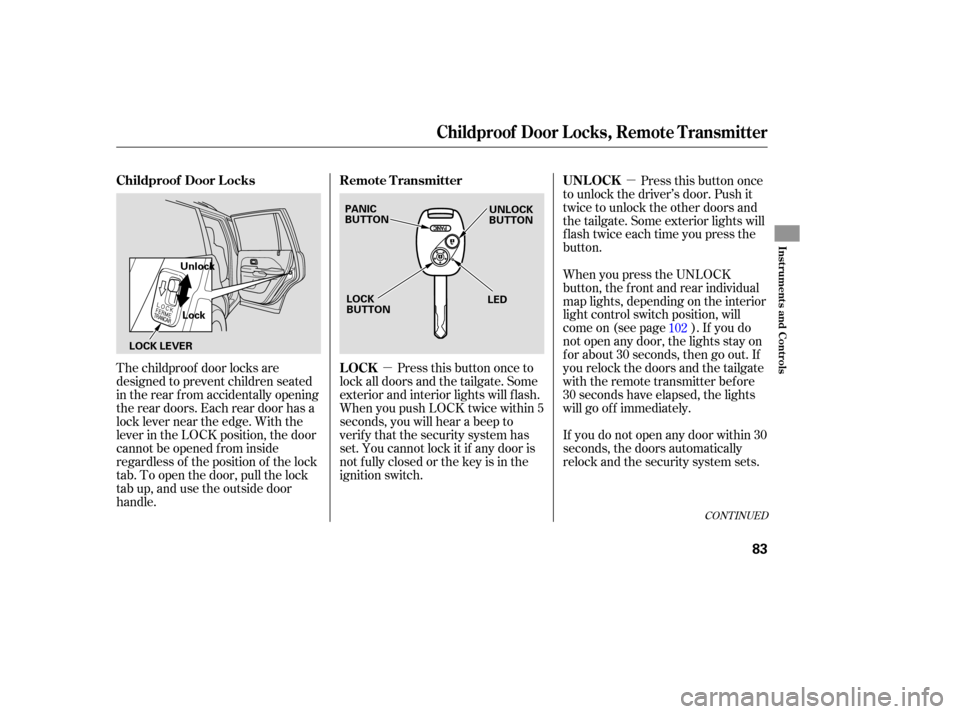
The childproof door locks are
designed to prevent children seated
in the rear from accidentally opening
the rear doors. Each rear door has a
lock lever near the edge. With the
lever in the LOCK position, the door
cannot be opened from inside
regardless of the position of the lock
tab. To open the door, pull the lock
tab up, and use the outside door
handle. Pressthisbuttononce
to unlock the driver’s door. Push it
twice to unlock the other doors and
the tailgate. Some exterior lights will
flash twice each time you press the
button.
Press this button once to
lock all doors and the tailgate. Some
exterior and interior lights will flash.
When you push LOCK twice within 5
seconds, you will hear a beep to
verify that the security system has
set. You cannot lock it if any door is
not fully closed or the key is in the
ignition switch. When
you press the UNLOCK
button, the f ront and rear individual
map lights, depending on the interior
light control switch position, will
come on (see page ). If you do
not open any door, the lights stay on
f or about 30 seconds, then go out. If
you relock the doors and the tailgate
with the remote transmitter before
30 seconds have elapsed, the lights
will go of f immediately.
If you do not open any door within 30
seconds, the doors automatically
relock and the security system sets. 102
CONT INUED
Childproof Door L ocks
UNL OCK
LOCK Remote Transmitter
Childproof Door L ocks, Remot e T ransmit t er
Inst rument s and Cont rols
83
PANIC
BUTTON LOCK
BUTTON UNLOCK
BUTTON
LED
LOCK LEVER Unlock
Lock
Page 88 of 319
�´
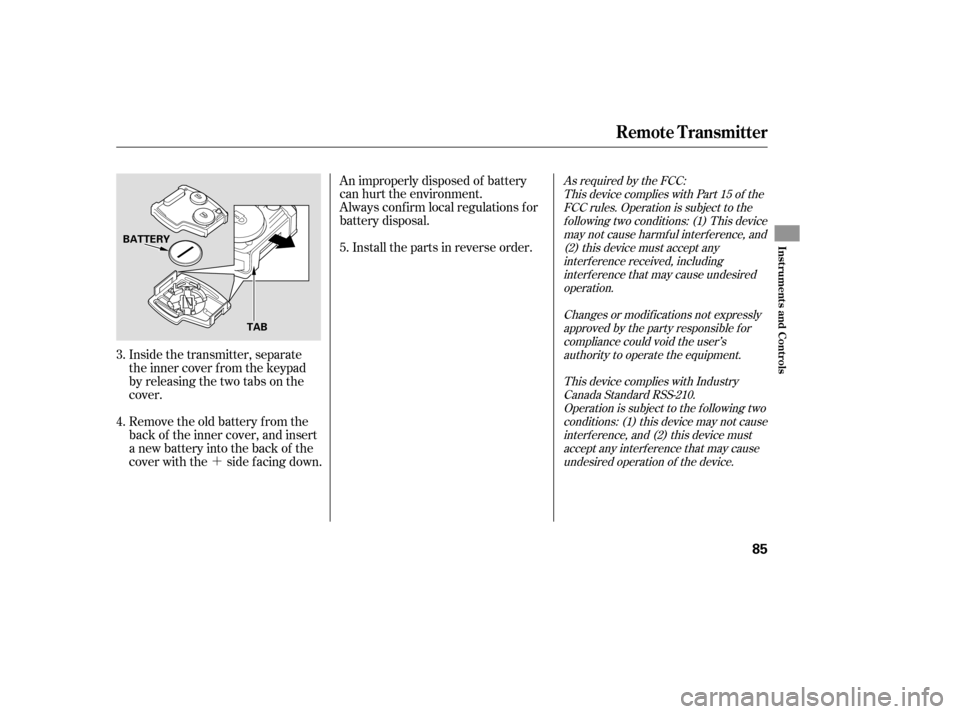
Inside the transmitter, separate
the inner cover f rom the keypad
by releasing the two tabs on the
cover.
Remove the old battery from the
back of the inner cover, and insert
a new battery into the back of the
cover with the side f acing down. An improperly disposed of battery
can hurt the environment.
Always conf irm local regulations f or
battery disposal.
Install the parts in reverse order.
3.
4. 5.
As required by the FCC:
This device complies with Part 15 of theFCC rules. Operation is subject to thef ollowing two conditions: (1) This devicemay not cause harmf ul interf erence, and(2) this device must accept anyinterf erence received, includinginterf erence that may cause undesiredoperation.
Changes or modif ications not expresslyapproved by the party responsible f orcompliance could void the user’sauthority to operate the equipment.
This device complies with IndustryCanada Standard RSS-210.Operation is subject to the f ollowing twoconditions: (1) this device may not causeinterf erence, and (2) this device mustaccept any interf erence that may causeundesired operation of the device.
Remote Transmitter
Inst rument s and Cont rols
85
BATTERY
TAB
Page 92 of 319
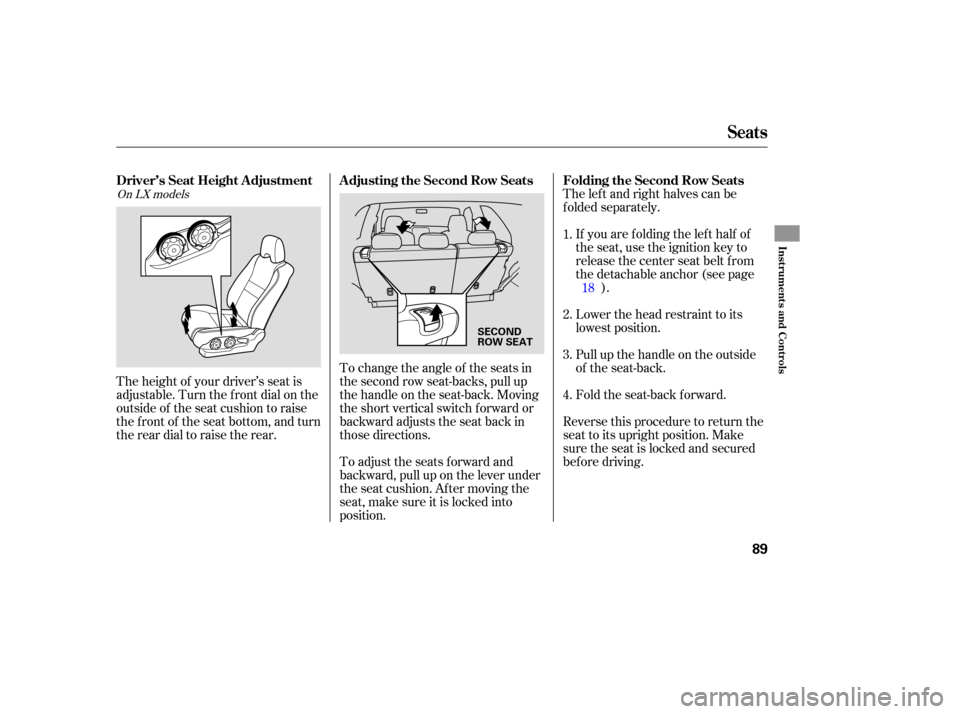
The left and right halves can be
folded separately.
If you are folding the left half of
the seat, use the ignition key to
release the center seat belt from
thedetachableanchor(seepage ).
Lower the head restraint to its
lowest position.
Pull up the handle on the outside
of the seat-back.
Fold the seat-back forward.
To change the angle of the seats in
the second row seat-backs, pull up
the handle on the seat-back. Moving
the short vertical switch f orward or
backward adjusts the seat back in
those directions.
To adjust the seats forward and
backward, pull up on the lever under
the seat cushion. Af ter moving the
seat, make sure it is locked into
position.
The height of your driver’s seat is
adjustable. Turn the front dial on the
outside of the seat cushion to raise
the front of the seat bottom, and turn
the rear dial to raise the rear.
Reverse this procedure to return the
seat to its upright position. Make
sure the seat is locked and secured
bef ore driving. 2.
3. 1.
4.18On LX models
Seats
Folding the Second Row Seats
Adjusting the Second Row Seats
Driver’s Seat Height A djustment
Inst rument s and Cont rols
89
SECOND
ROW SEAT
Page 94 of 319
They are most effective when you
adjust them so the back of the
occupant’s head rests against the
center of the restraint.
Your vehicle is equipped with head
restraints in all seating positions to
help protect you and your
passengers from whiplash and other
injuries.
Use
the ignition key to release the
seat belt from the detachable
anchor (see page ).
Unlock the seat-back by pulling
the handle. Push the seat-back
forward.
Make sure you clip the small latch
plate of each outer shoulder belt to
the seat belt webbing whenever the
third seat is folded.
Reverse this procedure to return the
seat to its upright position.
Reinstall the head restraints,
reconnect the seat belts, and make
sure the seats are secured before
driving.
Ma ke sure all items in the cargo area
are secured. Loose items can fly
forward and cause injury if you have
to brake hard (See
on page ). The
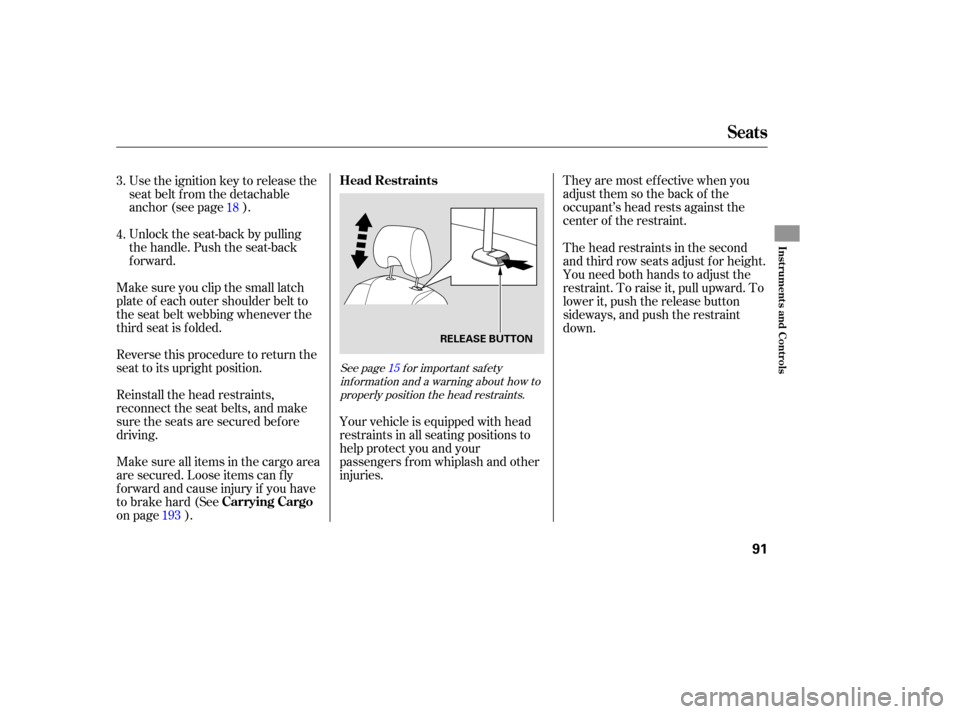
head restraints in the second
and third row seats adjust for height.
You need both hands to adjust the
restraint. To raise it, pull upward. To
lower it, push the release button
sideways, and push the restraint
down.
3.
4.
18
193
See page f or important saf ety inf ormation and a warning about how toproperly position the head restraints. 15
Seats
Head Restraints
Carrying Cargo
Inst rument s and Cont rols
91
RELEASE BUTTON
Page 99 of 319
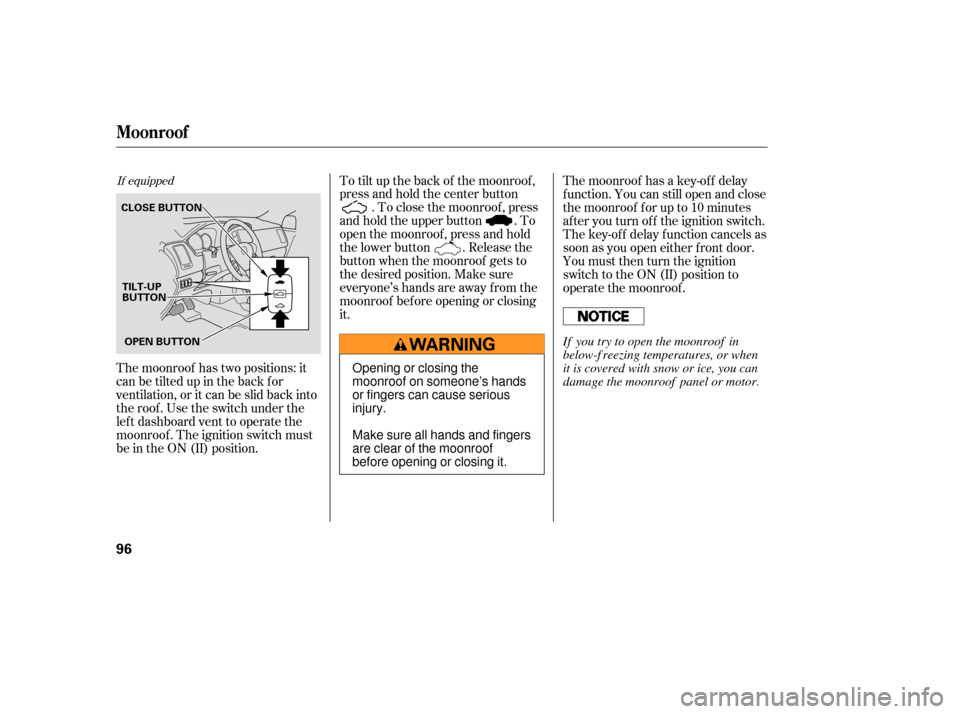
The moonroof has two positions: it
can be tilted up in the back f or
ventilation, or it can be slid back into
the roof . Use the switch under the
lef t dashboard vent to operate the
moonroof . The ignition switch must
be in the ON (II) position.To tilt up the back of the moonroof ,
press and hold the center button
. To close the moonroof , press
and hold the upper button . To
open the moonroof , press and hold
the lower button . Release the
button when the moonroof gets to
the desired position. Make sure
everyone’s hands are away f rom the
moonroof bef ore opening or closing
it. The moonroof has a key-of f delay
f unction. You can still open and close
the moonroof f or up to 10 minutes
after you turn off the ignition switch.
The key-of f delay f unction cancels as
soon as you open either f ront door.
You must then turn the ignition
switch to the ON (II) position to
operate the moonroof .
If equipped
Moonroof
96
CLOSE BUTTON
OPEN BUTTON
TILT-UP
BUTTON
Opening or closing the
moonroof on someone’s hands
or fingers can cause serious
injury.
Make sure all hands and fingers
are clear of the moonroof
before opening or closing it. If you try to open the moonroof in
below-f reezing temperatures, or when
it is covered with snow or ice, you can
damage the moonroof panel or motor.
Page 102 of 319
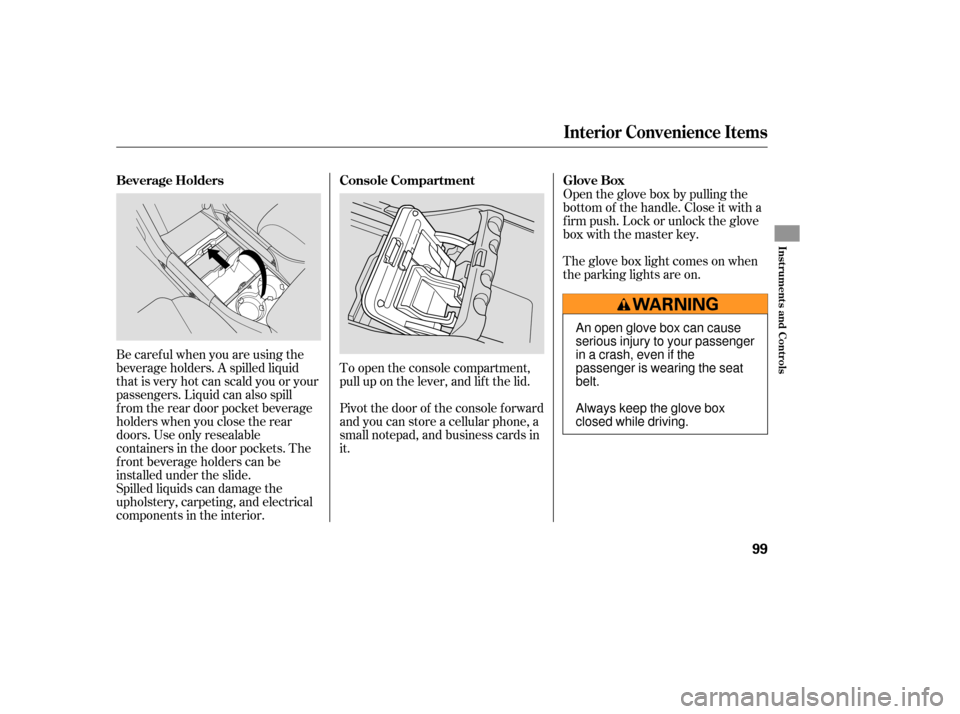
Be caref ul when you are using the
beverage holders. A spilled liquid
that is very hot can scald you or your
passengers. Liquid can also spill
f rom the rear door pocket beverage
holders when you close the rear
doors. Use only resealable
containers in the door pockets. The
f ront beverage holders can be
installed under the slide.
Spilled liquids can damage the
upholstery, carpeting, and electrical
components in the interior.Open the glove box by pulling the
bottom of the handle. Close it with a
f irm push. Lock or unlock the glove
box with the master key.
To open the console compartment,
pull up on the lever, and lif t the lid.
Pivot the door of the console f orward
and you can store a cellular phone, a
small notepad, and business cards in
it. The glove box light comes on when
the parking lights are on.
Interior Convenience Items
Beverage Holders
Console Compartment Glove Box
Inst rument s and Cont rols
99
An open glove box can cause
serious injury to your passenger
inacrash,evenifthe
passenger is wearing the seat
belt.
Always keep the glove box
closed while driving.
Page 158 of 319
NumInput
A numerical command can be issued
to a DVD by inputting a two digit
number, and a button number can be
selected on the screen.Select and enter the second digit
number the same way. The cursor
will automatically move to the ‘‘ENT’’
icon when you press the ENT button.
Press the ENT button to enter the
number command. To go back to the
DVD screen, press the RETURN
button.
Select the f irst digit number using
the , , , or
button, and enter it by pressing
the ENT button. If you want to
change the number, select ‘‘DEL,’’
and press the ENT button, then
select and enter the new number.
Select the ‘‘Num Input’’ f rom the play
mode setup menu. The screen will
change as shown above. If you select
the ‘‘Move Key’’ using the ,
, , or button, and
press the ENT button, the Num
Input display on the screen will changefromtheleftsidetoright
side or right to lef t.
CONT INUED
Rear Entertainment System
Features
155
