Page 60 of 304
�Î
�Î
The U.S. instrument panel is shown. Dif f erences f or Canadian models are noted in the text.
Instrument Panel
Inst rument s and Cont rols
DX, DX-G (Canada),LX, EX
57
IMMOBILIZER SYSTEM
INDICATOR
LOW OIL PRESSURE
INDICATOR SEAT BELT REMINDER
INDICATOR
MAINTENANCE MINDER INDICATOR SUPPLEMENTAL
RESTRAINT SYSTEM
INDICATOR
LIGHTS ON
INDICATOR
CRUISE CONTROL
INDICATOR
CRUISE MAIN
INDICATOR SECURITY SYSTEM INDICATOR
LOW FUEL
INDICATOR
SIDE AIRBAG
OFF INDICATOR
DOOR-OPEN
INDICATOR
TRUNK-OPEN
INDICATOR
ANTI-LOCK BRAKE
SYSTEM INDICATOR
HIGH BEAM
INDICATOR
(P. 62)
(P. 62)
DAYTIME RUNNING
LIGHTS
INDICATOR
(P. 65)
(P. 60) (P. 61)
(P. 61) (P. 60) (P. 64)
(P. 60) (P. 59)
(P. 61)
(P. 64)
(P. 64)
(P. 60)
(P. 65, 267)
(P. 65, 267) (P. 64, 213)
CHARGING
SYSTEM
INDICATOR
MALFUNCTION INDICATOR LAMP (P. 65, 268) PARKING BRAKE AND BRAKE SYSTEM
INDICATOR
(P. 59)
�����—�����—�����y���������������y���
�(�#�����
���y���������y
Page 61 of 304

�Î
�Î�Î
The U.S. instrument panel is shown. Dif f erences f or Canadian models are noted in the te
xt.
:
Instrument Panel
U.S. Si
58
LOW OIL PRESSURE
INDICATOR SECURITY SYSTEM INDICATOR
LOW FUEL
INDICATOR
SEAT BELT REMINDER
INDICATOR
IMMOBILIZER SYSTEM INDICATOR
LIGHTS ON
INDICATOR
SUPPLEMENTAL
RESTRAINT SYSTEM
INDICATOR
SIDE AIRBAG
OFF INDICATOR
CRUISE CONTROL
INDICATOR
ELECTRIC POWER STEERING
(EPS) INDICATOR
CRUISE MAIN
INDICATOR
HIGH BEAM
INDICATOR
CHARGING SYSTEM
INDICATOR ANTI-LOCK BRAKE
SYSTEM INDICATOR
DOOR-OPEN
INDICATOR
TRUNK-OPEN
INDICATOR
REV LIMIT INDICATOR
(P. 61) (P. 61)PARKING BRAKE AND BRAKE SYSTEM
INDICATOR
MAINTENANCE MINDER INDICATOR
DAYTIME RUNNING
LIGHTS INDICATOR
VSA ACTIVATION
INDICATOR
VEHICLE STABILITY ASSIST
(VSA) SYSTEM INDICATOR (P. 65)
(P. 60) (P. 61)
(P. 60)(P. 59)
(P. 60) (P. 64)
(P. 63)
(P. 62)
(P. 62)
(P. 64)
(P. 63)
(P. 65, 267)
(P. 65, 267) (P. 60)
(P. 64, 213) (P. 62)
(P. 62)
(P. 59)
(P. 64)
MALFUNCTION INDICATOR LAMP (P. 65, 268)
�����—�����—�����y���������������y���
�(�#�����
���y���������y
Page 62 of 304

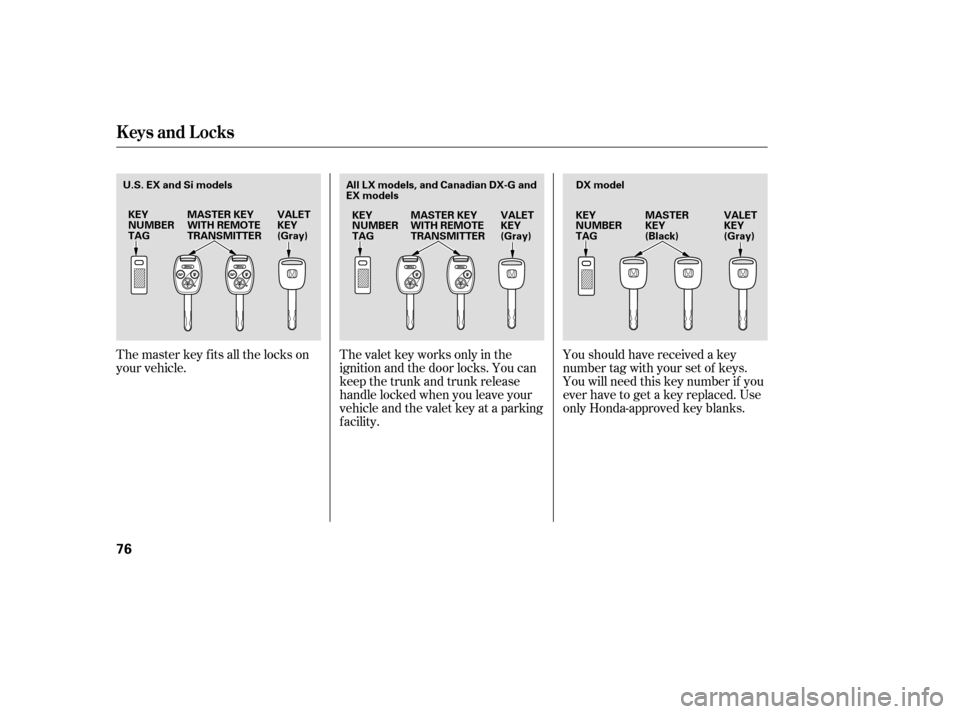
This indicator has two f unctions:Itcomesonwhenyouturnthe
ignition switch to the ON (II)
position. It is a reminder to check
the parking brake. A beeper
sounds if you drive with the
parking brake not f ully released.
Driving with the parking brake not
fully released can damage the
brakes and tires.
If it stays on after you have fully
released the parking brake while
the engine is running, or if it
comes on while driving, there
could be a problem with the brake
system. For more inf ormation, see
page .
The instrument panel has many
indicators to give you important
inf ormation about your vehicle.
If your f ront passenger does not
f asten their seat belt, the indicator
comes on about 6 seconds af ter the
ignition switch is turned to the ON
(II) position.
This indicator reminds you and your
passengers to f asten your seat belts.
If either of you do not f asten your
seat belt while driving, the beeper
will sound and the indicator will f lash
again at regular intervals. For more
inf ormation, see page .
If you turn the ignition switch to the
ON (II) position bef ore f astening
your seat belt, the beeper sounds,
and the indicator f lashes. If you do
notfastenyourseatbeltbeforethe
beeper stops, the indicator stops
f lashing but remains on.
1. 2.
18 269Parking Brake
and Brake
System
Indicator
Seat Belt Reminder
Indicator
Instrument Panel Indicators
Inst rument s and Cont rols
59
U.S. Canada
�����—�����—�����y�����������
�
�y���
�(�#�����
���y���������y
Page 64 of 304

This indicator reminds you that the
exterior lights are on. It comes on
when the light switch is in either theor position. If you turn the
ignition switch to the ACCESSORY
(I) or LOCK (0) position without
turning of f the light switch, this
indicator will stay on. A reminder
chime will also sound when you open
the driver’s door.
When you press the hazard warning
button, both turn signal indicators
and all turn signals on the outside of
the vehicle f lash. If this indicator comes on when the
ignition switch is turned to the ON
(II) position and the parking brake is
released, it means there is a problem
in a circuit. Have your vehicle
checked by your dealer.
This indicator comes on with the
high beam headlights. For more
inf ormation, see page .
This indicator also comes on with
reduced brightness when the
daytime running lights (DRL) are on
(see page ).
The lef t or right turn signal indicator
blinks when you signal a lane change
or turn. If an indicator does not blink
or blinks rapidly, it usually means
one of the turn signal bulbs is
burned out (see page ). Replace
the bulb as soon as possible, since
other drivers cannot see that you are
signaling.
238
72
73
Turn Signal and
Hazard Warning
Indicators
Lights On Indicator
‘‘Daytime Running
Lights’’ Indicator
High Beam Indicator
Instrument Panel Indicators
Inst rument s and Cont rols
61
�����—�����—�����y���������������y���
�(�#�����
���y���������y
Page 75 of 304
�µ�µ �µ
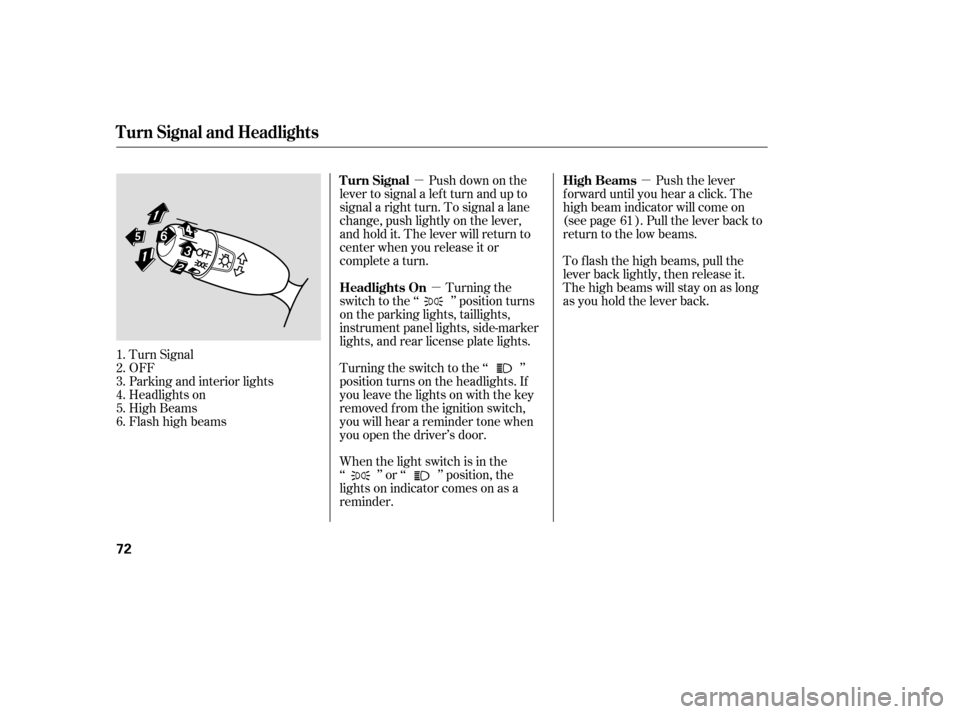
Push down on the
lever to signal a lef t turn and up to
signal a right turn. To signal a lane
change, push lightly on the lever,
and hold it. The lever will return to
center when you release it or
complete a turn.
Turn Signal
OFF
Parking and interior lights
Headlights on
High Beams
Flashhighbeams When the light switch is in the
‘‘ ’’ or ‘‘ ’’ position, the
lights on indicator comes on as a
reminder.Turning the
switch to the ‘‘ ’’ position turns
on the parking lights, taillights,
instrument panel lights, side-marker
lights, and rear license plate lights.
Turning the switch to the ‘‘ ’’
position turns on the headlights. If
you leave the lights on with the key
removed f rom the ignition switch,
you will hear a reminder tone when
you open the driver’s door. Push the lever
f orward until you hear a click. The
high beam indicator will come on
(see page ). Pull the lever back to
return to the low beams.
To f lash the high beams, pull the
lever back lightly, then release it.
The high beams will stay on as long
as you hold the lever back.
1.2.3.4.5.6. 61
Turn Signal
Headlights On High Beams
Turn Signal and Headlights
72
�����—�����—�����y���������������y���
�(�#�����
���y���������y
Page 76 of 304
�´�µ
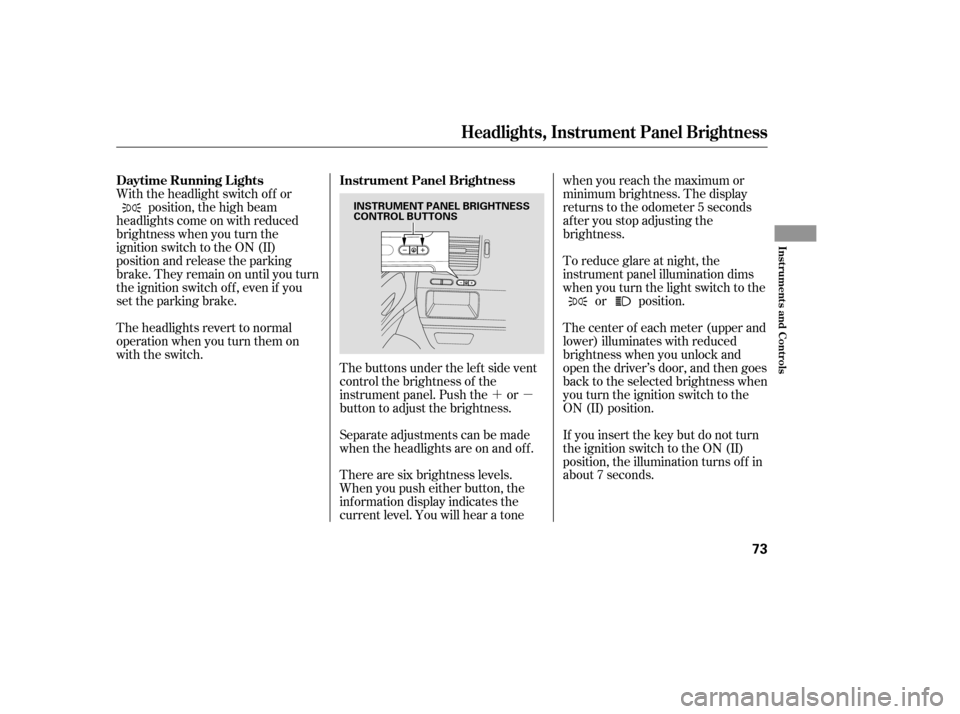
The buttons under the lef t side vent
control the brightness of the
instrument panel. Push the or
button to adjust the brightness.
Separate adjustments can be made
when the headlights are on and of f .
With the headlight switch of f or
position, the high beam
headlights come on with reduced
brightness when you turn the
ignition switch to the ON (II)
position and release the parking
brake. They remain on until you turn
the ignition switch of f , even if you
set the parking brake.
The headlights revert to normal
operation when you turn them on
with the switch.
There are six brightness levels.
When you push either button, the
inf ormation display indicates the
current level. You will hear a tonewhen you reach the maximum or
minimum brightness. The display
returns to the odometer 5 seconds
af ter you stop adjusting the
brightness.
To reduce glare at night, the
instrument panel illumination dims
when you turn the light switch to the
or position.
The center of each meter (upper and
lower) illuminates with reduced
brightness when you unlock and
open the driver’s door, and then goes
back to the selected brightness when
you turn the ignition switch to the
ON (II) position.
If you insert the key but do not turn
the ignition switch to the ON (II)
position, the illumination turns of f in
about 7 seconds.
Daytime Running L ights Instrument Panel Brightness
Headlights, Instrument Panel Brightness
Inst rument s and Cont rols
73
INSTRUMENT PANEL BRIGHTNESS
CONTROL BUTTONS
�����—�����—�����y�����������
�
�y���
�(�#�����
���y���������y
Page 79 of 304
Youshouldhavereceivedakey
number tag with your set of keys.
You will need this key number if you
ever have to get a key replaced. Use
only Honda-approved key blanks.
The valet key works only in the
ignition and the door locks. You can
keep the trunk and trunk release
handle locked when you leave your
vehicle and the valet key at a parking
f acility.
The master key fits all the locks on
your vehicle.
Keys and Locks
76
KEY
NUMBERTAG
MASTER KEY
WITH REMOTE
TRANSMITTER VALET
KEY
(Gray)KEY
NUMBERTAGDX model
VALET
KEY
(Gray)
MASTER
KEY
(Black)
All LX models, and Canadian DX-G and
EX models
U.S. EX and Si models
KEY
NUMBERTAG MASTER KEY
WITH REMOTE
TRANSMITTER VALET
KEY
(Gray)
�����—�����—�����y���������������y���
�(�#�����
���y�������
�y
Page 84 of 304
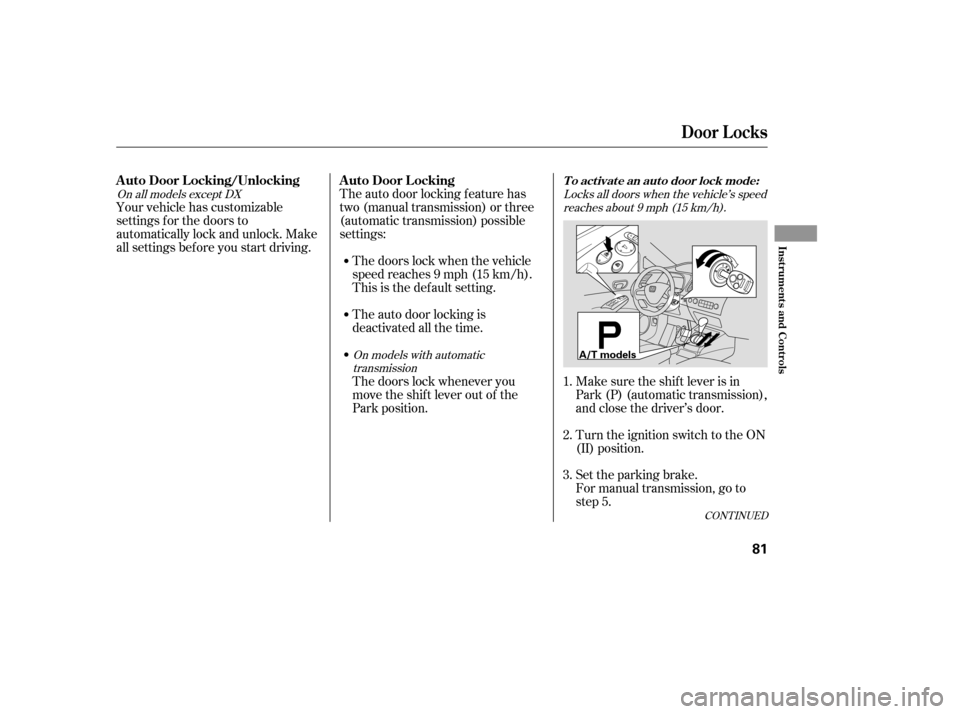
CONT INUED
Locks all doors when the vehicle’s speedreaches about 9 mph (15 km/h).
On models with automatic transmission
On all models except DX
For manual transmission, go to
step 5.
Set the parking brake.
Make sure the shif t lever is in
Park (P) (automatic transmission),
and close the driver’s door.
Turn the ignition switch to the ON
(II) position.
Your vehicle has customizable
settings f or the doors to
automatically lock and unlock. Make
all settings bef ore you start driving.
The auto door locking f eature has
two (manual transmission) or three
(automatic transmission) possible
settings:
The doors lock when the vehicle
speed reaches 9 mph (15 km/h).
This is the def ault setting.
The auto door locking is
deactivated all the time.
The doors lock whenever you
move the shift lever out of the
Park position. 1. 2. 3.
Door L ocks
To activate an auto door lock mode:A uto Door L ocking/Unlocking A uto Door L ocking
Inst rument s and Cont rols
81
A/T models
�����—�����—�����y�������������
�y���
�(�#�����
���y���������y