Page 100 of 292
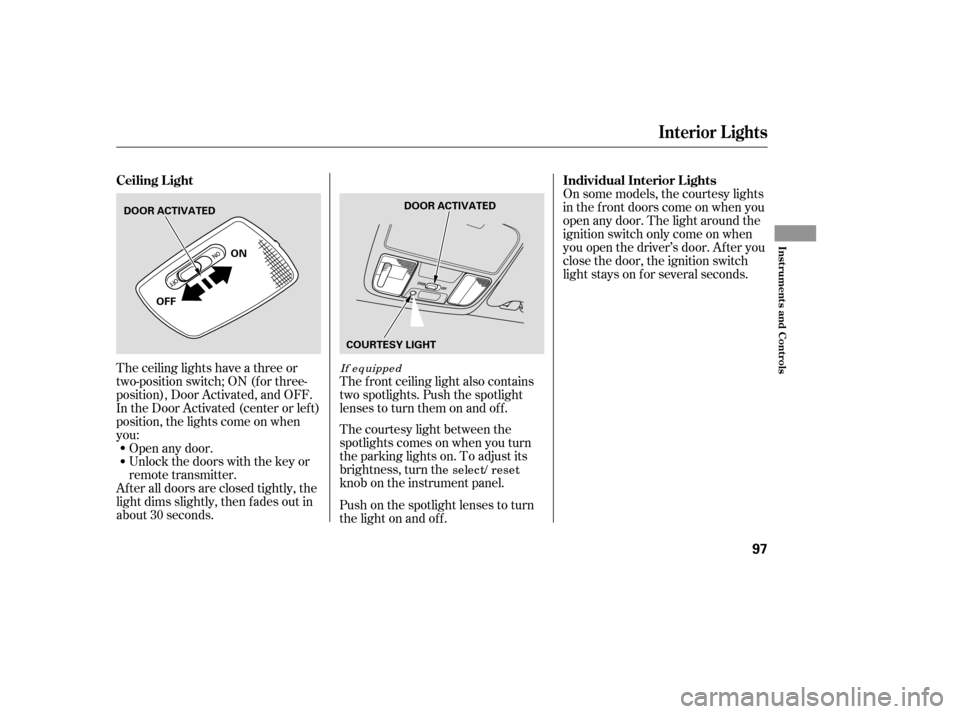
The ceiling lights have a three or
two-position switch; ON (f or three-
position), Door Activated, and OFF.
In the Door Activated (center or left)
position, the lights come on when
you:
After all doors are closed tightly, the
light dims slightly, then f ades out in
about 30 seconds.Open any door.
Unlock the doors with the key or
remote transmitter.
The courtesy light between the
spotlights comes on when you turn
the parking lights on. To adjust its
brightness, turn th
e select/ reset
knob on the instrument panel.
The f ront ceiling light also contains
two spotlights. Push the spotlight
lenses to turn them on and off.
Push on the spotlight lenses to turn
the light on and of f . On some models, the courtesy lights
in the f ront doors come on when you
open any door. The light around the
ignition switch only come on when
you open the driver’s door. Af ter you
close the door, the ignition switch
light stays on f or several seconds.
If equipped
Ceiling L ight
Individual Interior L ights
Interior Lights
Inst rument s and Cont rols
97
DOOR ACTIVATED
ON
OFF DOOR ACTIVATED
COURTESY LIGHT
�����—�����—�
���y�
����
��������y���
�(�����������y���
�����y
Page 103 of 292
Open the glove box by pulling the
handle to the lef t. Close it with a f irm
push. Lock or unlock the glove box
with the master key.
The glove box light comes on when
the parking lights are on.
To open the sunglasses holder, push
on the f ront edge. Make sure the
holder is closed while you are driving.If equipped
Sunglasses Holder Glove Box
Interior Convenience Items
100
GLOVE BOX
An open glove box can cause
serious injury to your passenger
inacrash,evenifthe
passenger is wearing the seatbelt.
Always keep the glove box
closed while driving.
�����—�����—�
���y�
����
��������y���
�(�����������y���
�����y
Page 106 of 292

�Û�Ý
The climate control system can also
be operated by voice control. See the
Navi section in your quick start
guide f or an overview of this system,
and the navigation system manual
f or complete details.
You can manually select the f an
speed by pressing the f an control
buttons. The f an speed is
represented by vertical bars in the
display. Press the DUAL button. The
indicator in the button will come on.
The driver and passenger can each
select the temperature control
buttons ( or ) to the
desired setting.
When the indicator in the DUAL
button is off, both sides adjust to the
driver’s side temperature.
Turn this dial to increase or decrease
the fan speed and airflow. You can manually select the f an
speed by pressing the A/C button
next to the display, and then
pressing the f an control icons.
Turning this dial clockwise increases
the temperature of the airflow.
The driver and passenger can select
independent temperature settings by
selecting the DUAL button.
Push the DUAL button. When the
indicator in the button is on, turn the
dials to adjust the temperature.
Only o n mo dels equipped with
Navig atio n system
Exc ept EX-L and EX-V6 with navig atio n
system
EX-L and EX-V6
EX-L and EX-V6 witho ut navig atio nsystem EX-L and EX-V6 with navig atio n system
EX-L and EX-V6
EX-L and EX-V6 with navig atio n system
EX-L and EX-V6 witho ut navig atio n system
U.S. VP, LX, SE, EX, LX-V6, and SE-V6
Canadian DX-G, SE, and SE-V6
Vents, Heating, and A/C
Voice Control System
Fan Control T emperature Control
104
�����—�����—�
���y�
����
������
�y���
�(�����������y���
�����y
Page 139 of 292

�µ�µ�µ
CONT INUED
The
seek/skip f unction selects the
various categories in XM, such as
Jazz/Blues, Rock, Classical, etc.
Push the to change the
category f orward. Push the to
change the category backward. To
search f or channels within a
category, turn the TUNE knob
clockwiseorpresstheTUNEbar . The scan f unction samples
all channels f or 5 seconds. To
activate the f unction, push the SCAN
button. Push it again to get out of the
sequence.
Each preset icon or button
canstoreonechannelinXM1and
one in XM2.
Use the TUNE, SEEK or SCAN
function to tune the radio to a
desired channel.
Pick a preset icon or button and
hold it until you hear a beep.
Repeat steps 1 to 3 to store a total
of six stations on XM1 and XM2. Once your XM channels are preset,
pressing the CH DISC button will
select your preset channels.
Push the CD/AUX XM button.
(You will see XM1 or XM2.)
1. 2. 3. 4.With navig atio n systemSEEK /SK IP (CA T EGORY) SCA N
Preset
Playing t he XMSatellite Radio
Features
137
�����—�����—�
���y�
����
��������y���
�(�����������y���
�����y
Page 140 of 292
Satellite radio receives signals f rom
two satellites to produce clear, high-
quality digital reception. It of f ers
many channels in several categories.
Along with a large selection of
dif f erent types of music, satellite
radio also allows you to view channel
and category selections in the audio
display.
The XM satellites are in orbit over
the equator; therefore, objects south
of the vehicle may cause satellite
reception interruptions. To help
compensate f or this, ground-based
repeaters are placed in major
metropolitan areas. Satellite signals
aremorelikelytobeblockedbytall
buildings and mountains the f arther
north you travel f rom the equator.
Satellite Radio Signals
Playing t he XMSatellite Radio
138
Signal may be
blocked by
mountains or
large obstacles
to the south.
SATELLITE
GROUND
REPEATER
�����—�����—�
���y�
����
��������y���
�(�����������y���
�����y
Page 145 of 292

You can quickly set the time to the
nearest hour. Pressing and holding
the SOUND button, then pressing
theR(Preset6)sideof thebarsets
the clock back to the previous hour.
If the displayed time is after the half
hour, the clock sets the clock
f orward to the beginning of the next
hour.For example:
1:06 would RESET to 1:00.
1:52 would RESET to 2:00.
Ref er to the Navigation System
Owner’s Manual to set up the time.
Press and hold the SOUND button
until you hear a beep. The displayed
time begins to blink. Press on the H
(Preset 4) side of the bar until the
numbers advance to the desired time.
Change the minutes by pressing the
M (Preset 5) side of the bar until the
numbers advance to the desired time.
When you are f inished, press the
SOUND button again to set the time.
If your vehicle’s battery is
disconnected or goes dead, you will
need to set the clock.
With navig atio n system
With navig atio n system
Setting the Clock
Features
143
DIGITAL CLOCKSOUND BUTTON PRESET BARS
W it hout navigat ion syst em
�����—�����—�
���y�
����
��������y���
�(�����������y���
�����y
Page 146 of 292

The security system automatically
sets 15 seconds after you lock the
doors, hood, and trunk. For the
system to activate, you must lock the
doors f rom the outside with the key,
lock tab, door lock switch, or remote
transmitter. The security system
light on the instrument panel starts
blinking immediately to show you
the system is setting itself.Once the security system is set,
opening any door (without using the
key or the remote transmitter), the
hood, or the trunk will cause it to
sound. It also sounds if the radio is
removed f rom the dashboard or the
wiring is cut.
The security system will not set if
the hood, trunk, or any door is not
f ully closed. If the system will not set,
check the Door Monitor on the
instrument panel (see page ), to
see if the doors and trunk are f ully
closed. Since it is not part of the
monitor display, manually check thehood.
Do not attempt to alter this system
or add other devices to it.
The security system helps to protect
your vehicle and valuables f rom thef t.
The horn sounds and a combination
of headlights, parking lights, side
marker lights and taillights f lashes if
someone attempts to break into your
vehicleorremovetheradio.This
alarm continues f or two minutes,
then the system resets. To reset an
alarming system before the two
minutes have elapsed, unlock either
f ront door with the key or the
remote transmitter.
With the system set, you can still
open the trunk with the remote
transmitter without triggering the
alarm. The alarm will sound if the
trunk lock is f orced, or the trunk is
opened with the trunk release lever
or the emergency trunk opener.
60
U.S. EX, EX-L, and V6 mo delsCanadian SE, EX-L, and V6 mo dels
Security System
144
SECURITY SYSTEM INDICATOR
�����—�����—�
���y�
����
����
���y���
�(�����������y���
�����y
Page 150 of 292

�µ
Todothis,pressandholdthetwo
outside buttons on the HomeLink
transceiver for about 20 seconds,
until the red indicator f lashes.
Release the buttons, then proceed to
step 1.
The HomeLinkuniversal
transceiver built into your vehicle
canbeprogrammedtooperateupto
three remotely controlled devices
around your home, such as garage
doors, lighting, or home security
systems.
If you are training HomeLink to
operate a garage door or gate, you
should unplug the motor f or that
device during training. Repeatedly
pressing the remote control button
could burn out the motor.
HomeLink stores the code in a
permanent memory. There should
be no need to retrain HomeLink if
your vehicle’s battery goes dead or is
disconnected. If your garage door
opener was manuf actured bef ore
April 1982, you may not be able to
program HomeLink to operate it.
They do not have the saf ety f eature that causes the motor to stop and
reverse if an obstacle is detected
during closing, increasing the risk of
injury.
Always ref er to the opening
instructions and saf ety inf ormation
that came with your garage door
opener or other equipment you
intend to operate with HomeLink. If
you do not have this inf ormation,
contact the manuf acturer of the
equipment.
For quick and accurate training,
make sure the remote transmitter
for the device (garage door,
automatic gate, security system, etc.)
has a fresh battery.
If you just
received your vehicle and have not
trained any of the buttons in
HomeLink bef ore, you should erase
any previously learned codes bef ore
training the first button.
If you are training the second or
third buttons, go directly to step 1.
Unplug the garage door opener
motor f rom the electrical outlet.
Holdtheendof thegaragedoor
opener remote 2 to 5 inches f rom
HomeLink.Makesureyouarenot
blocking your view of the red
indicator in HomeLink.
1. 2.
EX-V6T raining HomeL ink
General Inf ormation Important Saf ety Precautions
Bef ore you begin
HomeL ink Universal T ransceiver
148
�����—�����—�
���y�
����
��������y���
�(�����������y���
�����y

