Page 95 of 292

�µIf the driver’s
window senses any obstacle while it
is closing automatically, it will
reverse direction, and then stop. To
close the window, remove the
obstacle, then use the window switch
again.
Auto reverse stops sensing when the
window is almost closed. You should
always check that all passengers and
objects are away from the window
bef ore closing it.If yo ur vehic le’s battery is
disc o nnec ted o r g o es dead, o r the
driver’s windo w fuse is remo ved, the
AUT O func tio n may be disabled. If
the AUTO func tio n is disabled, the
po wer windo w system will need to be
reset after rec o nnec ting the battery
Start the engine. Push down and
hold the driver’s window switch
until the window is f ully open.
Pull and hold the driver’s window
switch to close the window
completely, then hold the switch
f or about 2 seconds.
If the power windows do not operate
properly af ter resetting, have your
vehicle checked by your dealer.
To open or close the driver’s window
partially, push down or pull back on
the window switch lightly and hold it.
The window will stop when you
release the switch.
The passenger windows cannot be
raised or lowered if the MAIN switch
is OFF. Keep the MAIN switch off
whenyouhavechildreninthe
vehicle so they do not injure
themselves by operating the
windows unintentionally.
1. 2.
AUTO REVERSE
Power Windows
92
�����—�����—�
���y�
���������
���y���
�(�����������y���������y
o r installing the fuse.
Page 98 of 292
To apply the parking brake, pull the
lever up f ully. To release it, pull up
slightly, push the button, and lower
the lever. The parking brake light on
the instrument panel should go out
when the parking brake is f ully
released with the engine running
(see page ).
The moonroof has a key-of f delay
f unction. You can still open and close
the moonroof f or up to 10 minutes
after you turn off the ignition switch.
The key-of f delay f unction cancels as
soon as you open either f ront door.
You must then turn the ignition
switch to the ON (II) position to
operate the moonroof .
59
Parking Brake
Moonroof , Parking Brake
Inst rument s and Cont rols
95
PARKING BRAKE LEVERIf you try to open the moonroof in
below-f reezing temperatures, or when
it is covered with snow or ice, you can
damage the moonroof panel or motor.
Driving the vehicle with the parking
brake applied can damage the rear
brakes and hubs.
�����—�����—�
���y�
�������������y���
�(�����������y���
�����y
Page 100 of 292
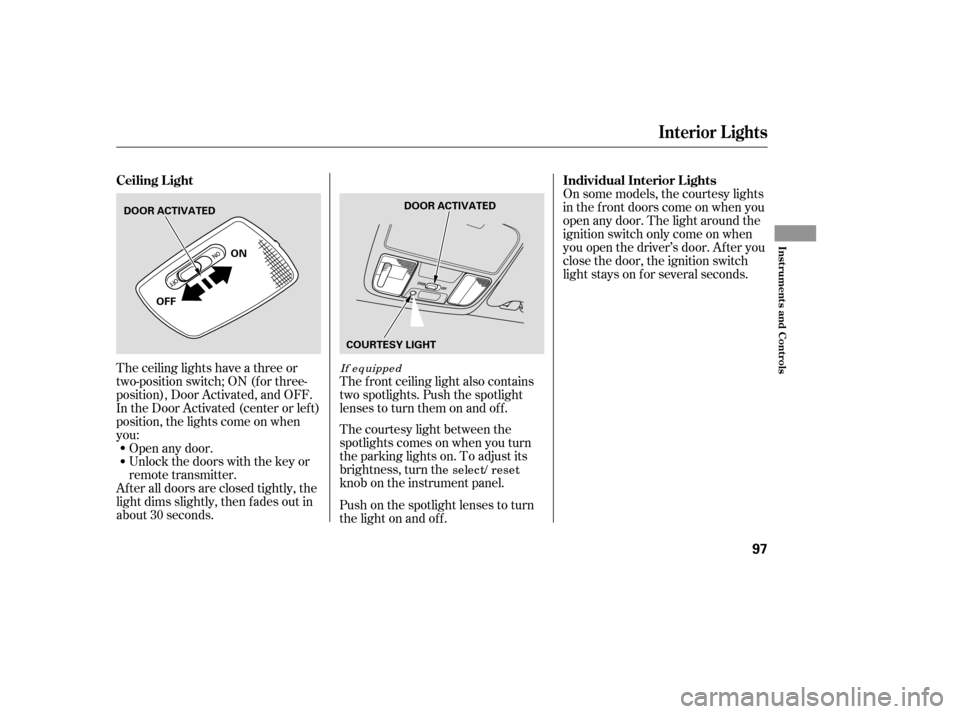
The ceiling lights have a three or
two-position switch; ON (f or three-
position), Door Activated, and OFF.
In the Door Activated (center or left)
position, the lights come on when
you:
After all doors are closed tightly, the
light dims slightly, then f ades out in
about 30 seconds.Open any door.
Unlock the doors with the key or
remote transmitter.
The courtesy light between the
spotlights comes on when you turn
the parking lights on. To adjust its
brightness, turn th
e select/ reset
knob on the instrument panel.
The f ront ceiling light also contains
two spotlights. Push the spotlight
lenses to turn them on and off.
Push on the spotlight lenses to turn
the light on and of f . On some models, the courtesy lights
in the f ront doors come on when you
open any door. The light around the
ignition switch only come on when
you open the driver’s door. Af ter you
close the door, the ignition switch
light stays on f or several seconds.
If equipped
Ceiling L ight
Individual Interior L ights
Interior Lights
Inst rument s and Cont rols
97
DOOR ACTIVATED
ON
OFF DOOR ACTIVATED
COURTESY LIGHT
�����—�����—�
���y�
����
��������y���
�(�����������y���
�����y
Page 102 of 292

Be caref ul when you are using the
beverage holders. A spilled liquid
that is very hot can scald you or your
passengers. Liquid can also spill
f rom the door pocket beverage
holders when you close the doors.
Useonlyresealablecontainersinthe
door pockets.
Spilled liquids can damage the
upholstery, carpeting, and electrical
components in the interior.To open the console compartment,
pull up on the right lever and lif t the
armrest.
To close, lower the armrest, and
push it down until it latches.You can put small items in the tray
located in the console compartment
lid. To use the tray, pull up on the
lef t lever and lif t up the armrest.
These sockets are intended to supply
power f or 12 volt DC accessories
that are rated 120 watts or less (10
amps). None of the sockets will
power an automotive type cigarette
lighter element. When more than
one socket is being used, the
combined power rating of the
accessories should be 120 watts or
less (10 amps).
On so me mo dels, the c o nso le
c o mpartment is
equipped with
a c o in ho lder.
Except U.S. VP and Canadian DX-G
Beverage Holders
A ccessory Power Sockets Console Compartment
Interior Convenience Items
Inst rument s and Cont rols
99
CONSOLE COMPARTMENT
RIGHT LEVER
LEFT LEVER
�����—�����—�
���y�
����
����
���y���
�(�����������y���
�����y
Page 103 of 292
Open the glove box by pulling the
handle to the lef t. Close it with a f irm
push. Lock or unlock the glove box
with the master key.
The glove box light comes on when
the parking lights are on.
To open the sunglasses holder, push
on the f ront edge. Make sure the
holder is closed while you are driving.If equipped
Sunglasses Holder Glove Box
Interior Convenience Items
100
GLOVE BOX
An open glove box can cause
serious injury to your passenger
inacrash,evenifthe
passenger is wearing the seatbelt.
Always keep the glove box
closed while driving.
�����—�����—�
���y�
����
��������y���
�(�����������y���
�����y
Page 115 of 292
Theclimatecontrolsystemhastwo
sensors. A sunlight sensor is in the
top of the dashboard, and a
temperature sensor is next to the
steering column. Do not cover the
sensors or spill any liquid on them.
If your vehicle has a climate controlsystem
Sunlight Sensor/T emperature
Sensor
Climat e Cont rol Sensors
Features
113
SUNLIGHT SENSOR TEMPERATURE SENSOR
�����—�����—�
���y�
����
��������y���
�(�����������y���
�
���y
Page 127 of 292

�µ�µ�´
�Û
�Ý
Press the LOAD button until you
hear a beep and see ‘‘LOAd’’ in the
display.
The disc number f or an empty
position is highlighted and the red
light starts blinking.
When the CD load indicator turns
green and ‘‘LOAD’’ appears in the
screen again, insert the next CD in
the slot.
Repeat steps 1 through 3 until all
six positions are loaded. If you are
not loading all six positions, the
system begins playing the last CD
loaded. You can also load a CD into an empty
position while a CD is playing. Select
the empty position (the disc number
indicator is not highlighted) and
press the appropriate preset bar or
touch a disc icon. The current CD
stops playing and starts the loading
sequence. The CD just loaded will
play.
You operate the CD changer with
the same controls used f or the radio.
The numbers of the disc and track
playingareshowninthedisplay.On
vehicles with navigation system,
these numbers also appear in the
upper display.
To select a dif f erent disc, press the
appropriate side of a preset bar
(1 6) or use the Preset 5 (DISC )
to select the previous disc or Preset
6 (DISC ) to select the next disc in
sequence. On vehicles with
navigation system, touch the
appropriate disc icon or press the
or side of the CH/DISC bar. If
youselectanemptypositioninthe
CD changer, the system will try to
load the CD in the next available slot.
Insert the disc into the CD slot
when the green CD load indicator
comes on. Insert it only about
half way; the drive will pull it in the
rest of the way. You will see
‘‘BUSY’’ in the display as the CD
load indicator turns red and blinks
as the CD is loaded.
1. 2.3. 4. 5.
CONT INUED
Vehic les with in-dash CD c hang er
Vehic les with in-dash CD c hang er
Playing a CD, CD Changer
Features
125
�����—�����—�
���y�
����
��������y���
�(�����������y���
�����y
Page 132 of 292

When using CD-R discs, use only
high quality CDs labeled f or audio
use.
When recording a CD-R, the
recording must be closed f or it to
be used by the system.
CD-RW discs will not work in this
unit.
Play only standard round CDs.
Odd-shaped CDs may jam in the
driveorcauseotherproblems.When a CD is not being played, store
it in its case to protect it f rom dust
and other contamination. To prevent
warpage, keep CDs out of direct
sunlight and extreme heat.
To clean a CD, use a clean sof t cloth.
Wipe across the CD f rom the center
to the outside edge.
AnewCDmayberoughonthe
inner and outer edges. The small
plastic pieces causing this roughness
can f lake of f and f all on the re-
cording surf ace of the CD, causing
skipping or other problems. Remove
these pieces by rubbing the inner
and outer edges with the side of a
pencil or pen.
Never try to insert f oreign objects in
the CD player or the magazine.
Handle a CD by its edges; never
touch either surf ace. Do not place
stabilizer rings or labels on the CD.
These, along with contamination
f rom f ingerprints, liquids, and f elt-tip
pens, can cause the CD to not play
properly or possibly jam in the drive.
Handle your CDs properly to
prevent damage and skipping. See
this page.
General Inf ormation Protecting CDs
Protecting Your CDs
130
�����—�����—�
���y�
����
������
�y���
�(�����������y���
�����y


