2007 GMC SIERRA CLASSIC manual transmission
[x] Cancel search: manual transmissionPage 207 of 674

Instrument Panel Overview........................ 210
Hazard Warning Flashers.......................... 212
Other Warning Devices............................. 213
Horn.......................................................... 213
Tilt Wheel.................................................. 213
Turn Signal/Multifunction Lever.................. 214
Turn and Lane-Change Signals................. 214
Headlamp High/Low-Beam Changer.......... 215
Flash-to-Pass............................................ 216
Windshield Wipers..................................... 216
Windshield Washer.................................... 217
Cruise Control........................................... 217
Headlamps................................................ 221
Headlamps on Reminder........................... 222
Daytime Running Lamps (DRL)................. 222
Automatic Headlamp System..................... 223
Fog Lamps................................................ 225
Auxiliary Roof Mounted Lamp.................... 226
Instrument Panel Brightness...................... 226
Dome Lamps............................................. 226
Dome Lamp Override................................ 227
Entry Lighting............................................ 227
Exit Lighting.............................................. 227Front Reading Lamps................................ 227
Cargo Lamp.............................................. 228
Accessory Power Outlet(s)........................ 228
Ashtray(s) and Cigarette Lighter................ 229
Climate Controls......................................... 230
Climate Control System............................. 230
Dual Climate Control System..................... 231
Dual Automatic Climate Control System.... 235
Outlet Adjustment...................................... 243
Warning Lights, Gages, and Indicators..... 244
Instrument Panel Cluster........................... 245
Speedometer and Odometer...................... 246
Trip Odometer........................................... 246
Tachometer............................................... 246
Safety Belt Reminder Light........................ 247
Airbag Readiness Light............................. 247
Airbag Off Light......................................... 248
Passenger Airbag Status Indicator............. 250
Battery Warning Light................................ 253
Voltmeter Gage......................................... 253
Up-Shift Light (Manual Transmission)........ 254
Brake System Warning Light..................... 254
Section 3 Instrument Panel
207
Page 210 of 674
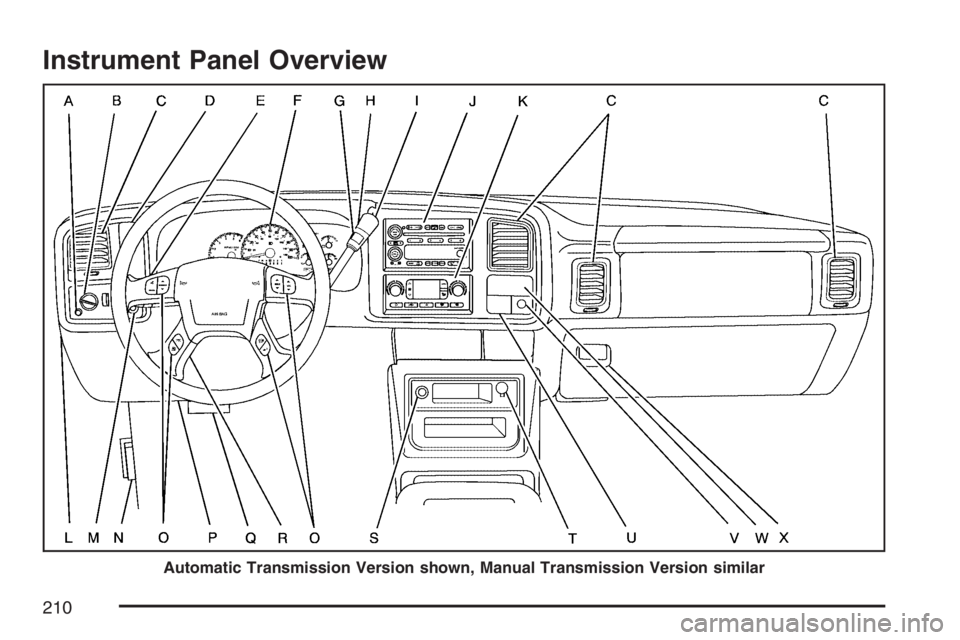
Instrument Panel Overview
Automatic Transmission Version shown, Manual Transmission Version similar
210
Page 211 of 674

The main components of your instrument panel are the following:
A. Dome Lamp Override Button. SeeDome Lamp
Override on page 227.
B. Headlamp Controls. SeeHeadlamps on
page 221.
C. Air Outlets. SeeOutlet Adjustment on
page 243.
D. Automatic Transfer Case/Electronic Transfer
Case/Traction Assist System (TAS). See
Four-Wheel Drive on page 153andTraction
Assist System (TAS) on page 363.
E. Multifunction Lever. SeeTurn
Signal/Multifunction Lever on page 214.
F. Instrument Panel Cluster. SeeInstrument Panel
Cluster on page 245.
G. Range Selection Mode (Allison Transmission
®
only) Button (If Equipped). SeeAutomatic
Transmission Operation on page 140.
H. Shift Lever. SeeAutomatic Transmission
Operation on page 140orManual Transmission
Operation on page 149for manual
transmissions.
I. Tow/Haul Selector Button (If Equipped). See
Tow/Haul Mode on page 147.J. Audio System. SeeAudio System(s) on
page 289.
K. Climate Control System. SeeClimate Control
System on page 230,Dual Climate Control
System on page 231andDual Automatic
Climate Control System on page 235.
L. Instrument Panel Fuse Block.Instrument Panel
Fuse Block on page 600.
M. Cargo Lamp Button. SeeCargo Lamp on
page 228.
N. Hood Release. SeeHood Release on
page 479.
O. Steering Wheel Control Buttons (If Equipped).
SeeDriver Information Center (DIC) on
page 265orAudio Steering Wheel Controls on
page 349.
P. Center Instrument Panel Fuse Block. See
Center Instrument Panel Fuse Block on
page 602.
Q. Parking Brake Release. SeeParking Brake on
page 169.
R. Tilt Wheel Lever. SeeTilt Wheel on page 213.
211
Page 245 of 674
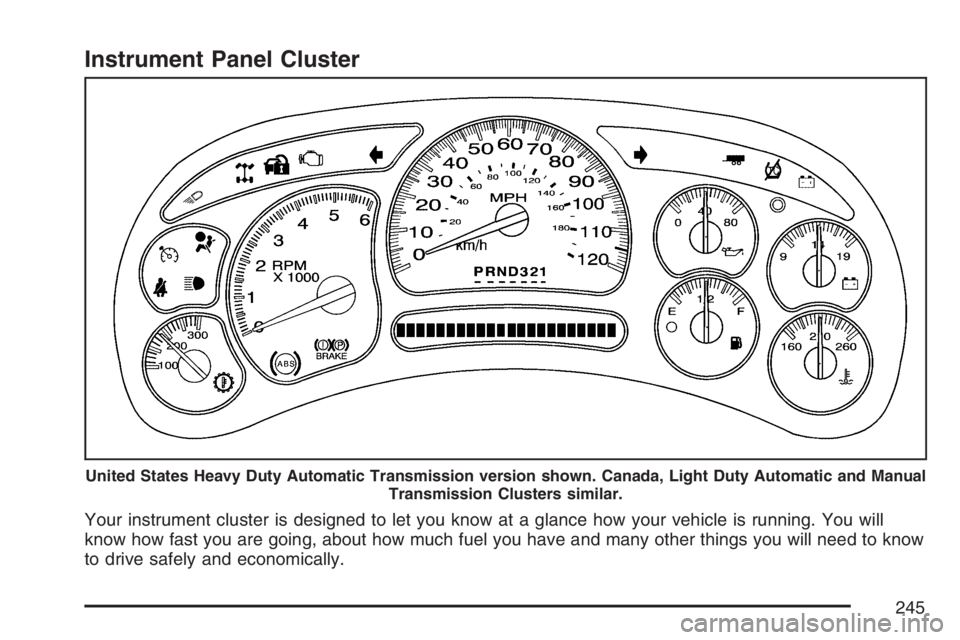
Instrument Panel Cluster
Your instrument cluster is designed to let you know at a glance how your vehicle is running. You will
know how fast you are going, about how much fuel you have and many other things you will need to know
to drive safely and economically.
United States Heavy Duty Automatic Transmission version shown. Canada, Light Duty Automatic and Manual
Transmission Clusters similar.
245
Page 254 of 674
This condition is normal since the charging system
is not able to provide full power at engine idle.
As engine speeds are increased, this condition
should correct itself as higher engine speeds allow
the charging system to create maximum power.
You can only drive for a short time with the reading
in either warning zone. If you must drive, turn off
all unnecessary accessories.
Readings in either warning zone indicate a
possible problem in the electrical system. Have
the vehicle serviced as soon as possible.
Up-Shift Light
(Manual Transmission)
Your vehicle may have
an up-shift light.
It will come on when you should shift to the next
highest gear. It will help the vehicle get the
best fuel economy.
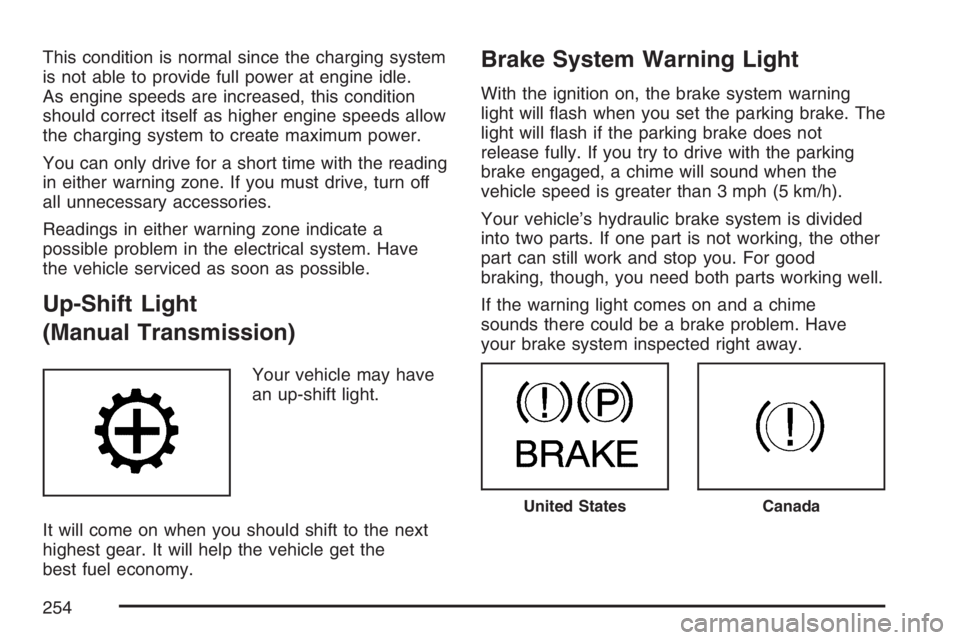
Brake System Warning Light
With the ignition on, the brake system warning
light will ash when you set the parking brake. The
light will ash if the parking brake does not
release fully. If you try to drive with the parking
brake engaged, a chime will sound when the
vehicle speed is greater than 3 mph (5 km/h).
Your vehicle’s hydraulic brake system is divided
into two parts. If one part is not working, the other
part can still work and stop you. For good
braking, though, you need both parts working well.
If the warning light comes on and a chime
sounds there could be a brake problem. Have
your brake system inspected right away.
United StatesCanada
254
Page 266 of 674

If your vehicle has an Allison Transmission®and
the shift lever is in the MANUAL MODE (M)
position, the DIC will display the current gear
range. The DIC will also display the gear range as
it is shifted up or down. For example, if the gear
range is currently set to 6, the DIC will display
(6)54321. When thegear range is shifted down
one time, the DIC will display 6 (5)4321. See
Automatic Transmission Operation on page 140for
more information.
3(Trip Information):Press this button to
display the odometer, trip odometers, timer, engine
hours, and selected range if your vehicle has an
Allison Transmission
®.
t(Fuel Information):Press this button to
display the current range, fuel used, average fuel
economy, and engine oil life.
4(Customization):Press this button to access
the vehicle settings menu and customize the
personal settings on your vehicle.
r(Select):Press this button to reset certain
DIC functions and set your customization settings.
Pressing any of the four DIC buttons will
acknowledge DIC messages and clear them from
the DIC display.
DIC Operation and Displays
The Driver Information Center (DIC) comes on
when the ignition is on. After a short delay, the DIC
will display the information that was last displayed
before the engine was turned off.
The DIC has different modes which can be
accessed by pressing the four DIC buttons located
on the steering wheel. These buttons are trip
information, fuel information, customization, and
select. The button functions are detailed in
the following pages.
266
Page 268 of 674
Engine Hours:Press the trip information button
until ENGINE HOURS appears on the display.
This mode shows the total number of hours
the engine has run. Pressing and holding the reset
stem located on the instrument cluster for about
four seconds will also display the engine hour
information after the odometer is displayed when
the vehicle is off.
Selected Range:If your vehicle has an Allison
Transmission
®and the vehicle is in the MANUAL
MODE (M) position, press the trip information
button until SELECTED RANGE: M# appears on
the display. The DIC will display the current
gear range. For example, if the gear range is set
to 6, the DIC will display SELECTED RANGE: M6.
SeeAutomatic Transmission Operation on
page 140for more information.
Fuel Information Button
t
(Fuel Information):Press the fuel information
button to scroll through the range, fuel used,
average fuel economy, and the engine oil
life system.Fuel Range:Press the fuel information button
until RANGE appears on the display. This
mode shows the remaining distance you can drive
without refueling. It is based on fuel economy
and the fuel remaining in the fuel tank. The display
will show LOW if the fuel level is low.
The fuel economy data used to determine fuel
range is an average of recent driving conditions.
As your driving conditions change, this data is
gradually updated. Fuel range cannot be reset.
Fuel Used:Press the fuel information button until
FUEL USED appears on the display. This mode
shows the number of gallons or liters of fuel used
since the last reset of this menu item. To reset
the fuel used information, press and hold the select
button for one second while FUEL USED is
displayed.
Average Fuel Economy:Press the fuel
information button until AVG ECON appears on
the display. This mode shows how many miles per
gallon (MPG) or liters per 100 kilometers
(L/100 km) your vehicle is getting based on
current and past driving conditions.
268
Page 273 of 674

DRIVER DOOR AJAR
If the driver’s door is not fully closed, this message
will appear on the display and you will hear a
chime. Stop and turn off the vehicle, check
the door for obstructions, and close the door again.
Check to see if the message still appears on the
DIC. Pressing any of the four DIC buttons will
acknowledge the message and clear it from the
DIC display. If your vehicle does not have the four
DIC buttons, pressing the trip odometer reset
stem will acknowledge the message and clear it
from the DIC display.
ENGINE COOLANT HOT
If the cooling system temperature gets hot, this
message will appear in the DIC. Turn off the
air conditioning. If the message is still on, or if the
engine coolant temperature gage continues to
rise, pull the vehicle over when it is safe to do so.
SeeEngine Coolant Temperature Gage on
page 256for more information. Stop the vehicle
and let the engine idle in PARK (P) for a few
minutes, or NEUTRAL with the parking brake set
for manual transmissions, to allow the coolant
to reach a safe temperature. This message
will clear when the coolant temperature drops to
safe operating temperature.
ENGINE OVERHEATED
Notice:If you drive your vehicle while the
engine is overheating, severe engine damage
may occur. If an overheat warning appears
on the instrument panel cluster and/or
DIC, stop the vehicle as soon as possible.
Do not increase the engine speed above
normal idling speed. SeeEngine Overheating
on page 505for more information.
If the engine cooling system reaches unsafe
temperatures for operation, this message
will appear in the DIC and you will hear a chime.
Stop and turn off the vehicle as soon as it is
safe to do so to avoid severe damage. This
message will clear when the engine has cooled to
a safe operating temperature.
273