2007 GMC SIERRA CLASSIC horn
[x] Cancel search: hornPage 284 of 674
Press the customization button until DOOR LOCK
DELAY appears in the display. To select your
preference for delayed locking, press the select
button while DOOR LOCK DELAY is displayed on
the DIC. Pressing the select button will scroll
through the following choices:
DOOR LOCK DELAY: OFF (default):The doors
will lock immediately when pressing the power
lock switch or the lock button on the RKE
transmitter.
DOOR LOCK DELAY: ON:The doors will not
lock until ve seconds after the last door is closed.
You will hear three chimes to signal that the
delayed locking feature is in use. You can
temporarily override delayed locking by pressing
the lock button on the door or the RKE transmitter
a second time.
Choose one of the available options and press the
customization button while it is displayed on the
DIC to select it and move on to the next feature.
This feature will not operate if the key is in
the ignition.Lock Feedback
Press the customization button until LOCK
FEEDBACK appears in the display. To select your
preference for the feedback you receive when
locking the vehicle with the Remote Keyless Entry
(RKE) transmitter, press the select button while
LOCK FEEDBACK is displayed on the DIC.
Pressing the select button will scroll through the
following choices:
LOCK FEEDBACK: BOTH (default):The parking
lamps will ash each time you press the button with
the lock symbol on the RKE transmitter and the
horn will chirp the second time you press the lock
button.
LOCK FEEDBACK: LAMPS:The parking lamps
will ash each time you press the button with
the lock symbol on the RKE transmitter.
LOCK FEEDBACK: HORN:The horn will chirp
the second time you press the button with the lock
symbol on the RKE transmitter.
LOCK FEEDBACK: OFF:There will be no
feedback when locking the vehicle.
284
Page 285 of 674
Choose one of the available options and press the
customization button while it is displayed on the
DIC to select it and move on to the next feature.
Unlock Feedback
Press the customization button until UNLOCK
FEEDBACK appears in the display. To select your
preference for the feedback you will receive
when unlocking the vehicle with the Remote
Keyless Entry (RKE) transmitter, press the select
button while UNLOCK FEEDBACK is displayed
on the DIC. Pressing the select button will
scroll through the following choices:
UNLOCK FEEDBACK: LAMPS (default):The
parking lamps will ash each time you press
the button with the unlock symbol on the RKE
transmitter.
UNLOCK FEEDBACK: HORN:The horn will
chirp the second time you press the button with the
unlock symbol on the RKE transmitter.
UNLOCK FEEDBACK: BOTH:The parking
lamps will ash each time you press the button
with the unlock symbol on the RKE transmitter and
the horn will chirp the second time you press
the unlock button.UNLOCK FEEDBACK: OFF:There will be no
feedback when unlocking the vehicle.
Choose one of the available options and press the
customization button while it is displayed on the
DIC to select it and move on to the next feature.
Headlamp Delay
Press the customization button until HEADLAMP
DELAY appears in the display. To select your
preference for how long the headlamps will stay
on when you turn off the vehicle, press the
select button while HEADLAMP DELAY is
displayed on the DIC. Pressing the select button
will scroll through the following choices:
HEADLAMP DELAY: 10 SEC (Seconds)
(default)
HEADLAMP DELAY: 20 SEC
HEADLAMP DELAY: 40 SEC
HEADLAMP DELAY: 1 MIN (Minute)
HEADLAMP DELAY: 2 MIN
HEADLAMP DELAY: 3 MIN
HEADLAMP DELAY: OFF
285
Page 287 of 674
Curb View
Press the customization button until CURB VIEW
appears in the display. To select your preference
for curb view, press the select button while CURB
VIEW is displayed on the DIC. Pressing the select
button will scroll through the following choices:
CURB VIEW: OFF (default):Neither outside
mirror will be tilted down when the vehicle
is shifted into REVERSE (R).
CURB VIEW: PASSENGER:The passenger’s
outside mirror will be tilted down when the vehicle
is shifted into REVERSE (R).
CURB VIEW: DRIVER:The driver’s outside
mirror will be tilted down when the vehicle
is shifted into REVERSE (R).
CURB VIEW: BOTH:The driver’s and
passenger’s outside mirror will be tilted down
when the vehicle is shifted into REVERSE (R).
Choose one of the available options and press the
customization button while it is displayed on the
DIC to select it and move on to the next feature.
For more information on tilt mirror in reverse,
seeOutside Curb View Assist Mirrors on
page 187.
Alarm Warning
Press the customization button until ALARM
WARNING appears in the display. To select your
preference for alarm warning, press the select
button while ALARM WARNING is displayed on
the DIC. Pressing the select button will scroll
through the following choices:
ALARM WARNING: BOTH (default):The
headlamps will ash and the horn will chirp when
the alarm is active.
ALARM WARNING: OFF:There will be no alarm
warning on activation.
ALARM WARNING: HORN:The horn will chirp
when the alarm is active.
ALARM WARNING: LAMPS:The headlamps will
ash when the alarm is active.
Choose one of the available options and press the
customization button while your choice is displayed
on the DIC to select it and move on to the next
feature. For more information on alarm warning
type, seeContent Theft-Deterrent on page 131.
287
Page 382 of 674
Driving Uphill
Once you decide you can safely drive up the hill,
you need to take some special steps.
Use a low gear and get a rm grip on the
steering wheel.
Get a smooth start up the hill and try to
maintain your speed. Do not use more power
than you need, because you do not want
your wheels to start spinning or sliding.
Try to drive straight up the hill if at all possible.
If the path twists and turns, you might want to
nd another route.
{CAUTION:
Turning or driving across steep hills can
be dangerous. You could lose traction,
slide sideways, and possibly roll over.
You could be seriously injured or killed.
When driving up hills, always try to go
straight up.
Ease up on your speed as you approach the
top of the hill.
Attach a ag to the vehicle to make you more
visible to approaching traffic on trails or hills.
Sound the horn as you approach the top of the
hill to let opposing traffic know you are there.
Use your headlamps even during the day.
They make you more visible to oncoming traffic.
{CAUTION:
Driving to the top (crest) of a hill at full
speed can cause an accident. There could
be a drop-off, embankment, cliff, or even
another vehicle. You could be seriously
injured or killed. As you near the top of a
hill, slow down and stay alert.
382
Page 607 of 674
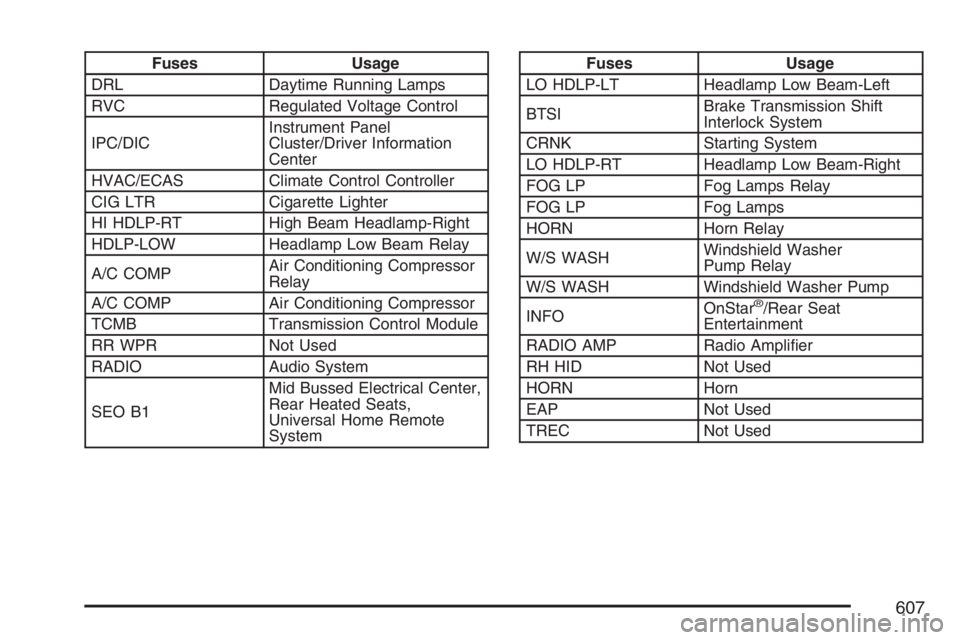
Fuses Usage
DRL Daytime Running Lamps
RVC Regulated Voltage Control
IPC/DICInstrument Panel
Cluster/Driver Information
Center
HVAC/ECAS Climate Control Controller
CIG LTR Cigarette Lighter
HI HDLP-RT High Beam Headlamp-Right
HDLP-LOW Headlamp Low Beam Relay
A/C COMPAir Conditioning Compressor
Relay
A/C COMP Air Conditioning Compressor
TCMB Transmission Control Module
RR WPR Not Used
RADIO Audio System
SEO B1Mid Bussed Electrical Center,
Rear Heated Seats,
Universal Home Remote
SystemFuses Usage
LO HDLP-LT Headlamp Low Beam-Left
BTSIBrake Transmission Shift
Interlock System
CRNK Starting System
LO HDLP-RT Headlamp Low Beam-Right
FOG LP Fog Lamps Relay
FOG LP Fog Lamps
HORN Horn Relay
W/S WASHWindshield Washer
Pump Relay
W/S WASH Windshield Washer Pump
INFOOnStar
®/Rear Seat
Entertainment
RADIO AMP Radio Amplier
RH HID Not Used
HORN Horn
EAP Not Used
TREC Not Used
607
Page 666 of 674

Horn............................................................ 213
How to Use This Manual................................ 4
How to Wear Safety Belts Properly............... 27
Hydraulic Clutch.......................................... 501
I
Ignition Positions......................................... 135
Infants and Young Children, Restraints.......... 47
Ination - Tire Pressure............................... 551
Instrument Panel
Overview.................................................. 210
Instrument Panel (I/P)
Brightness................................................ 226
Cluster..................................................... 245
J
Jump Starting.............................................. 521
K
Keyless Entry System................................. 116
Keys........................................................... 115
L
Labeling, Tire Sidewall................................. 544
Lamps
Auxiliary Roof Mounted Lamp.................. 226
Cargo...................................................... 228
Dome....................................................... 226
Dome Lamp Override............................... 227
Fog .......................................................... 225
Front Reading.......................................... 227
LATCH System
Child Restraints......................................... 58
Latches, Seatback......................................... 18
License Plate Lamps................................... 541
Light
Airbag Off................................................ 248
Airbag Readiness..................................... 247
Anti-Lock Brake System Warning............. 255
Battery Warning....................................... 253
Brake System Warning............................. 254
Cruise Control.......................................... 263
Four-Wheel-Drive..................................... 263
Highbeam On.......................................... 263
Low Fuel Warning.................................... 265
Malfunction Indicator................................ 258
666