2007 GMC ACADIA lock
[x] Cancel search: lockPage 187 of 554
Entry Lighting
Your vehicle may have courtesy lamps that will
come on and stay on for a set time whenever
the unlock symbol is pressed on the Remote
Keyless Entry (RKE) Transmitter, if the vehicle
has one.
If a door is opened, the lamps will stay on while
it is open and then turn off automatically about
25 seconds after the door is closed. If the
unlock symbol is pressed and you do not
open a door, the lamps will turn off after about
20 seconds.
Entry lighting includes a feature called theater
dimming. With theater dimming, the lamps do not
turn off at the end of the delay time. Instead,
they slowly dim after the delay time until they go
out. The delay time is canceled if you turn the
ignition key to ON or press the power door
lock switch. The lamps will dim right away.
When the ignition is on, illuminated entry is
inactive, which means the courtesy lamps will
not come on unless a door is opened.
Delayed Entry Lighting
Delayed entry lighting illuminates the interior for
a period of time after all the doors have been
closed.
The ignition must be off for delayed entry lighting
to work. Immediately after all the doors have
been closed, the delayed entry lighting feature
will continue to work until one of the following
occurs:
The ignition is in ON.
The doors are locked.
An illumination period of 25 seconds
has elapsed.
If during the illumination period a door is opened,
the timed illumination period will be canceled
and the interior lamps will remain on because a
door is open.
187
Page 188 of 554
Delayed Exit Lighting
This feature illuminates the interior for a period of
time after the key is removed from the ignition.
The ignition must be off for delayed exit lighting to
work. When the key is removed, interior illumination
will activate and remain on until one of the following
occurs:
The ignition is in ON.
The power door locks are activated.
An illumination period of 20 seconds
has elapsed.
If during the illumination period a door is opened,
the timed illumination period will be canceled
and the interior lamps will remain on because a
door is open.
Parade Dimming
The instrument panel has an added feature called
parade mode. It automatically prohibits the
dimming of the instrument panel displays during
the daylight while the headlamps are on so
that you will still be able to see the displays.
Reading Lamps
The vehicle has reading lamps that also act as the
dome lamp. Press the button to turn them on and off.
Electric Power Management
The vehicle has Electric Power Management (EPM)
that estimates the battery’s temperature and state
of charge. It then adjusts the voltage for best
performance and extended life of the battery.
When the battery’s state of charge is low, the
voltage is raised slightly to quickly put the charge
back in. When the state of charge is high, the
voltage is lowered slightly to prevent overcharging.
If the vehicle has a voltmeter gage or voltage
display on the Driver Information Center (DIC),
you may see the voltage move up or down. This
is normal. If there is a problem, an alert will be
displayed.
The battery can be discharged at idle if the
electrical loads are very high. This is true for all
vehicles. This is because the generator (alternator)
may not be spinning fast enough at idle to
produce all the power that is needed for very
high electrical loads.
188
Page 192 of 554

The HUD control is
located to the right of
the steering wheel.
To adjust the HUD image so that items are
properly displayed, do the following:
1. Adjust the driver’s seat to a comfortable
position.
2. Start the engine.
3. Adjust the HUD controls.
Use the following settings to adjust the HUD.
9(Off):To turn HUD off, rotate the dimming
knob fully counterclockwise until the HUD display
turns off.Brightness:Turn the knob on the HUD control
clockwise to brighten the display and
counterclockwise to dim it.
w(Up):x(Down):Press the up or down
arrows to center the HUD image in your view. The
HUD image can only be adjusted up and down,
not side to side.
?(Page):Press this button to select the display
formats. Release the page button when the
format number with the desired display is shown
on the HUD.
The three formats are as follows:
Format One:This display gives the speedometer
reading (in English or metric units), turn signal
indication, high beam indication, transmission
positions, and the outside air temperature.
192
Page 194 of 554

If You Cannot See the HUD Image
When the Ignition Is On
Is anything covering the HUD lens?
Is the HUD dimmer setting bright enough?
Is the HUD image adjusted to the proper
height?
Are you wearing polarized sunglasses?
Still no HUD image? Check the fuse in the
instrument panel fuse block. SeeInstrument
Panel Fuse Block on page 490.
If the HUD Image Is Not Clear
Is the HUD image too bright?
Are the windshield and HUD lens clean?
If the HUD image is not correct, contact your
dealer/retailer.
Keep in mind that the windshield is part of the
HUD system.
Ultrasonic Rear Parking
Assist (URPA)
If your vehicle has the Ultrasonic Rear Parking
Assist (URPA) system it is designed to help
you park while in Reverse (R). It operates only
at speeds less than 5 mph (8 km/h). URPA
helps make parking easier and helps you avoid
colliding with objects such as parked vehicles.
The URPA system detects objects that are close
to the rear of the vehicle which are at least
10 inches (25.4 cm) off the ground and below
hood or trunk level. The system detects objects
up to 8 feet (2.5 m) behind your vehicle. The
URPA sensors determine how close these objects
are from your bumper within this area.
194
Page 198 of 554
Certain electrical accessories may not be
compatible with the accessory power outlets and
could result in blown vehicle or adapter fuses.
If you experience a problem, see your dealer/
retailer for additional information on the
accessory power outlet.
Notice:Adding any electrical equipment to
your vehicle may damage it or keep other
components from working as they should. The
repairs would not be covered by your
warranty. Do not use equipment exceeding
maximum amperage rating of 20 amperes.
Check with your dealer/retailer before adding
electrical equipment.
When adding electrical equipment, be sure to
follow the installation instructions included with the
equipment.
Notice:Improper use of the power outlet can
cause damage not covered by your warranty.
Do not hang any type of accessory or
accessory bracket from the plug because the
power outlets are designed for accessory
power plugs only.Power Outlet 115 Volt Alternating
Current
Your vehicle may have a power outlet that can
be used to plug in auxiliary electrical equipment
with a maximum limit of 150 watts. If you try to
use equipment that requires more than the limit,
a protection circuit will cut the power supply.
To reset the outlet, unplug the item and plug
it back in or turn the ignition to LOCK or
ACCESSORY and then back on. The power will
automatically restart when equipment that operates
within the limit is plugged into the outlet.
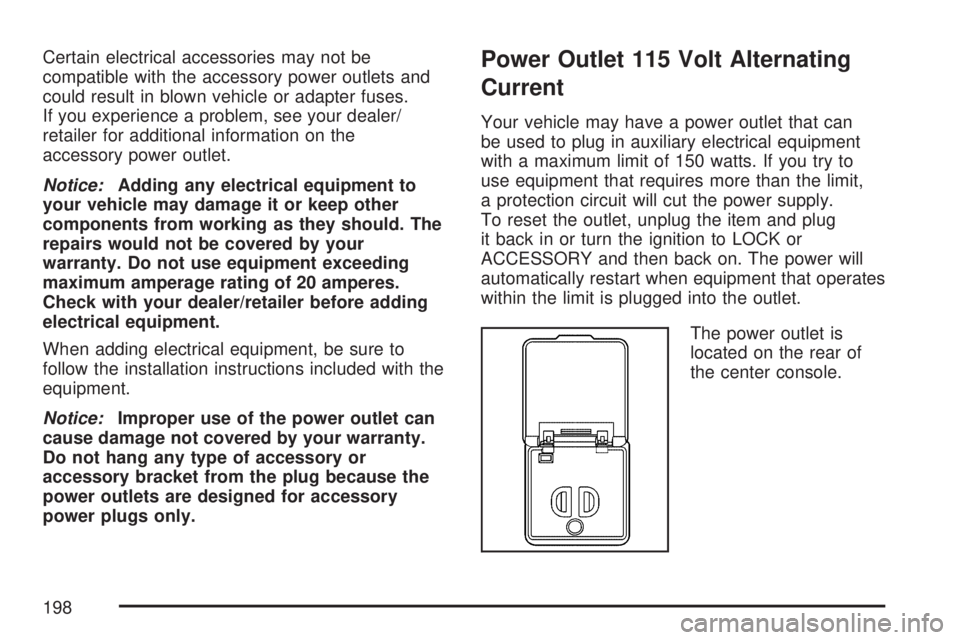
The power outlet is
located on the rear of
the center console.
198
Page 199 of 554

The indicator on the inner outlet face will come on
when 115 volt AC power is available. The AC
power is available when the ignition is turned to
ACCESSORY or ON, and electrical equipment
is plugged into the outlet. The AC power is
not available in the outlet when the ignition is
turned to OFF.
The power outlet is not designed for the following
electrical equipment and may not work properly
if these items are plugged into the power outlet:
Equipment with high initial peak wattage
such as: compressor-driven refrigerators
and electric power tools.
Other equipment requiring an extremely
stable power supply such as:
microcomputer-controlled electric blankets,
touch sensor lamps, etc.
SeeHigh Voltage Devices and Wiring on
page 489.
Climate Controls
Climate Control System
With this system you can control the heating,
cooling, defrost, defog, and ventilation of
the vehicle.
Manual Operation
9
(Fan):Turn the left knob clockwise or
counterclockwise to increase or decrease the fan
speed. Turn the knob all the way counterclockwise
to turn the front system off.
199
Page 200 of 554

Temperature Control:Turn the center knob
clockwise or counterclockwise to increase
or decrease the temperature of the air owing
from the system.
Airow Mode Control:Turn the right knob
clockwise or counterclockwise to direct the airow
inside of the vehicle.
To change the current mode, select one of the
following:
H(Vent):This mode directs air to the instrument
panel outlets.
)(Bi-Level):This mode directs about half of
the air to the instrument panel outlets and
half to the oor outlets. A little air is directed
towards the windshield and side window outlets.
Cooler air is directed to the upper outlets and
warmer air to the oor outlets.
6(Floor):This mode directs most of the air to
the oor outlets, with some of the air directed
to the windshield, side window outlets, and
second row oor outlets. In this mode, the system
automatically selects outside air. Recirculation
cannot be selected when in Floor Mode.The right knob can also be used to select defog
or defrost mode. For more information, see
“Defogging and Defrosting” later in this section.
By positioning the right knob between two modes,
a combination of those two modes is selected.
@(Recirculation):Press this button to turn the
recirculation mode on or off. The indicator light
on the button turns on when this mode is selected.
This mode keeps outside air from entering the
vehicle. It can be used to reduce the outside air
and odors entering the vehicle. Recirculation
may also help cool the air inside the vehicle more
quickly once the temperature inside the vehicle
is less than the outside temperature.
The recirculation mode can be turned off in vent
and bi-level modes by pressing the button
again. Recirculation mode automatically turns off
when the engine is turned off and must be
re-selected when the engine is turned on again.
The recirculation mode cannot be used with
oor, defrost, or defogging modes. If you try to
select recirculation in one of those modes,
the indicator ashes three times and turns off.
200
Page 202 of 554

Defogging and Defrosting
Fog on the inside of the windows is a result of
high humidity (moisture) condensing on the
cool window glass. This can be minimized if the
climate control system is used properly. There
are two modes to clear fog or frost from the
windshield. Turn the right knob clockwise to
select the defog or defrost mode.
-(Defog):The defog mode is used to clear
the windows of fog or moisture and warm
the passengers. This mode directs air to the
windshield, oor outlets, and side window vents.
When you select this mode, the system turns
off recirculation and runs the air conditioning
compressor unless the outside temperature is less
than 40°F (4°C). The recirculation mode cannot
be selected while in the defog mode. Do not drive
the vehicle until all the windows are clear.
0(Defrost):The defrost mode is used to
remove fog or frost from the windshield more
quickly. This mode directs most of the air to the
windshield and side window vents and some
to the oor vents. In this mode, the system will
automatically force outside air into your vehicle.
The recirculation mode cannot be selected while in
the defrost mode. The air conditioning compressor
will run automatically in this setting, unless the
outside temperature is less than 40°F (4°C).
Do not drive the vehicle until all the windows
are clear.
AUX (Auxiliary):Press this button to turn the
rear heating and air conditioning on. SeeRear Air
Conditioning and Heating System on page 211
orRear Air Conditioning and Heating System and
Electronic Climate Controls on page 212.
202