2007 GMC ACADIA battery
[x] Cancel search: batteryPage 124 of 554

Ignition Positions
With the key in the ignition, you can turn it to four
different positions.
A (OFF):This is the only position in which you
can remove the key. This position locks the ignition
and transmission.
Notice:Using a tool to force the key from the
ignition switch could cause damage or
break the key. Use the correct key and turn the
key only with your hand. Make sure the key
is all the way in. If none of this works,
then your vehicle needs service.B (ACCESSORY):This position allows you to use
things like the radio and the windshield wipers
while the engine is off. This position will also allow
you to turn off the engine. Use ACCESSORY if
you must have your vehicle in motion while
the engine is off, for example, if your vehicle is
being pushed or towed.
C (ON):This is the position that the switch
returns to after you start your engine and release
the key. The switch stays in ON when the
engine is running. But even when the engine is
not running, you can use ON to operate your
electrical power accessories, and to display some
instrument panel warning lights.
The battery could be drained if you leave the key
in the ACCESSORY or ON position with the
engine off. You may not be able to start your
vehicle if the battery is allowed to drain for
an extended period of time.
D (START):This position starts the engine. When
the engine starts, release the key. The ignition
switch will return to ON for normal driving.
124
Page 125 of 554
Key In the Ignition
Never leave your vehicle with the keys inside, as it
is an easy target for joy riders or thieves. If you
leave the key in the ignition and park your vehicle,
a chime will sound when you open the driver’s
door. Always remember to remove your key from
the ignition and take it with you. This will lock
your ignition and transmission. Also, always
remember to lock the doors.
The battery could be drained if you leave the key
in the ignition while your vehicle is parked.
You may not be able to start your vehicle after it
has been parked for an extended period of time.
Retained Accessory Power (RAP)
These vehicle accessories can be used for up to
10 minutes after the ignition key is turned off:
Audio System
Power Windows
Sunroof (if equipped)
Power to the windows and sunroof will work up to
10 minutes or until a door is opened.
The radio continues to work for 10 minutes or until
the driver’s door is opened.
For an additional 10 minutes of operation, close all
the doors and turn the key to ON and then back
to OFF.
All these features will work when the key is in the
ON or ACCESSORY positions.
125
Page 126 of 554

Starting the Engine
Place the transmission in the proper gear.
Move your shift lever to PARK (P) or
NEUTRAL (N). Your engine will not start
in any other position – this is a safety feature.
To restart when you are already moving, use
NEUTRAL (N) only.
Notice:Do not try to shift to PARK (P) if your
vehicle is moving. If you do, you could
damage the transmission. Shift to PARK (P)
only when your vehicle is stopped.
Starting Procedure
1. With your foot off the accelerator pedal, turn
the ignition key to START. When the engine
starts, let go of the key. The idle speed will go
down as your engine gets warm. Do not
race the engine immediately after starting it.
Operate the engine and transmission gently to
allow the oil to warm up and lubricate all
moving parts.Your vehicle has a Computer-Controlled
Cranking System. This feature assists
in starting the engine and protects
components. If the ignition key is turned to the
START position, and then released when
the engine begins cranking, the engine
will continue cranking for a few seconds or
until the vehicle starts. If the engine does not
start and the key is held in START for
many seconds, cranking will be stopped after
15 seconds to prevent cranking motor
damage. To prevent gear damage, this system
also prevents cranking if the engine is
already running. Engine cranking can be
stopped by turning the ignition switch to the
ACCESSORY or OFF position.
Notice:Cranking the engine for long periods
of time, by returning the key to the START
position immediately after cranking has ended,
can overheat and damage the cranking
motor, and drain the battery. Wait at least
15 seconds between each try, to allow
the cranking motor to cool down.
126
Page 148 of 554

How OnStar®Service Works
In order to provide you with OnStar®services, your
vehicle’s OnStar®system has the capability of
recording and transmitting vehicle information. This
information is automatically sent to an OnStar
®Call
Center at the time of an OnStar®button press,
Emergency button press or if your airbags or AACN
system deploys. The vehicle information usually
includes your GPS location and, in the event of a
crash, additional information regarding the accident
that your vehicle has been involved in (e.g. the
direction from which your vehicle was hit). When
you use the Virtual Advisor feature of OnStar
®
Hands-Free Calling, your vehicle also sends
OnStar®your GPS location so that we can provide
you with location-based services.
OnStar
®service cannot work unless your vehicle is
in a place where OnStar®has an agreement with a
wireless service provider for service in that area.
OnStar
®service also cannot work unless you are in
a place where the wireless service provider
OnStar
®has hired for that area has coverage,
network capacity and reception when the service is
needed, and technology that is compatible with theOnStar
®service. Not all services are available
everywhere, particularly in remote or enclosed
areas, or at all times.
OnStar
®service that involves location information
about your vehicle cannot work unless GPS
satellite signals are unobstructed and available in
that place as well.
Your vehicle must have a working electrical system
(including adequate battery power) for the OnStar
®
equipment to operate. There are other problems
OnStar®cannot control that may prevent OnStar®
from providing OnStar®service to you at any
particular time or place. Some examples are
damage to important parts of your vehicle in an
accident, hills, tall buildings, tunnels, weather or
wireless phone network congestion.
Your Responsibility
You may need to increase the volume of your radio
to hear the OnStar®advisor. If the light next to the
OnStar®buttons is red, this means that your system
is not functioning properly and should be checked
by your dealer/retailer. If the light appears clear (no
light is appearing), your OnStar
®subscription has
expired. You can always press the OnStar®button
to conrm that your OnStar®equipment is active.
148
Page 151 of 554

Read the instructions completely before attempting
to program the Universal Home Remote. Because
of the steps involved, it may be helpful to have
another person available to assist you in the
programming steps
Keep the original hand-held transmitter for use in
other vehicles as well as for future Universal Home
Remote programming. It is also recommended that
upon the sale of the vehicle, the programmed
Universal Home Remote buttons should be erased
for security purposes. See “Erasing Universal
Home Remote Buttons” later in section.
When programming a garage door, it is advised to
park outside of the garage. Be sure that people
and objects are clear of the garage door or
gate operator you are programming.
It is recommended that a new battery be installed
in your hand-held transmitter for quicker and
more accurate transmission of the radio-frequency
signal.Programming the Universal Home
Remote System
Follow these steps to program up to three
devices:
1. Press and hold down the two outside
Universal Home Remote buttons, releasing
only when the Universal Home Remote
indicator light begins to ash, after
20 seconds. Do not hold down the buttons for
longer than 30 seconds and do not repeat
this step to program a second and/or
third hand-held transmitter to the remaining
two Universal Home Remote buttons.
2. Hold the end of your hand-held transmitter
about 1 to 3 inches (3 to 8 cm) away from
the Universal Home Remote buttons
while keeping the indicator light in view.
3. At the same time, press and hold both the
desired Universal Home Remote button and
the hand-held transmitter button. Do not
release the buttons until Step 4 has been
completed.
151
Page 157 of 554
Programming Universal Home
Remote — Fixed Code
Most garage door openers sold before 1996 are
Fixed Code units.
Programming a garage door opener involves
time-sensitive actions, so read the entire procedure
before you begin. If you do not follow these
actions, the device will time out and you will have
to repeat the procedure.Follow these steps to program up to three
devices:
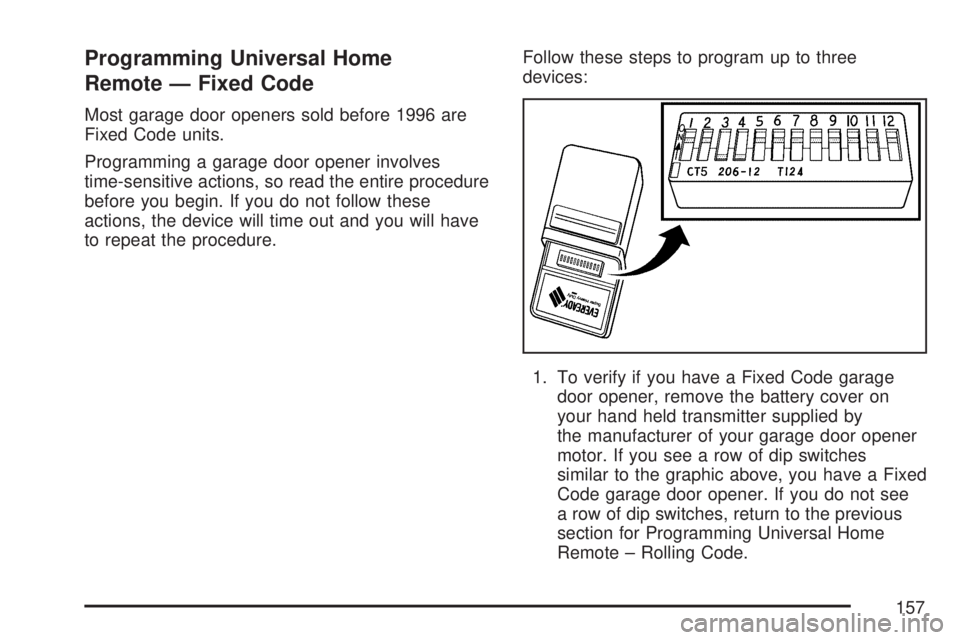
1. To verify if you have a Fixed Code garage
door opener, remove the battery cover on
your hand held transmitter supplied by
the manufacturer of your garage door opener
motor. If you see a row of dip switches
similar to the graphic above, you have a Fixed
Code garage door opener. If you do not see
a row of dip switches, return to the previous
section for Programming Universal Home
Remote – Rolling Code.
157
Page 167 of 554
Instrument Panel Overview........................ 170
Hazard Warning Flashers.......................... 172
Other Warning Devices............................. 173
Horn.......................................................... 173
Tilt and Telescopic Steering Wheel............ 173
Power Tilt Wheel and Telescopic
Steering Column.................................... 174
Turn Signal/Multifunction Lever.................. 174
Turn and Lane-Change Signals................. 175
Headlamp High/Low-Beam Changer.......... 176
Flash-to-Pass............................................ 176
Windshield Wipers..................................... 176
Windshield Washer.................................... 177
Rear Window Wiper/Washer...................... 179
Cruise Control........................................... 180
Exterior Lamps.......................................... 183
Delayed Headlamps.................................. 184
Daytime Running Lamps (DRL)/
Automatic Headlamp System.................. 185
Fog Lamps................................................ 186
Instrument Panel Brightness...................... 186
Courtesy Lamps........................................ 186Entry Lighting............................................ 187
Delayed Entry Lighting.............................. 187
Delayed Exit Lighting................................. 188
Parade Dimming........................................ 188
Reading Lamps......................................... 188
Electric Power Management...................... 188
Battery Run-Down Protection..................... 189
Head-Up Display (HUD)............................ 190
Ultrasonic Rear Parking Assist (URPA)...... 194
Accessory Power Outlet(s)........................ 197
Power Outlet 115 Volt Alternating
Current.................................................. 198
Climate Controls......................................... 199
Climate Control System............................. 199
Dual Automatic Climate Control System.... 203
Outlet Adjustment...................................... 210
Rear Air Conditioning and Heating
System.................................................. 211
Rear Air Conditioning and Heating
System and Electronic Climate
Controls................................................. 212
Section 3 Instrument Panel
167
Page 188 of 554
Delayed Exit Lighting
This feature illuminates the interior for a period of
time after the key is removed from the ignition.
The ignition must be off for delayed exit lighting to
work. When the key is removed, interior illumination
will activate and remain on until one of the following
occurs:
The ignition is in ON.
The power door locks are activated.
An illumination period of 20 seconds
has elapsed.
If during the illumination period a door is opened,
the timed illumination period will be canceled
and the interior lamps will remain on because a
door is open.
Parade Dimming
The instrument panel has an added feature called
parade mode. It automatically prohibits the
dimming of the instrument panel displays during
the daylight while the headlamps are on so
that you will still be able to see the displays.
Reading Lamps
The vehicle has reading lamps that also act as the
dome lamp. Press the button to turn them on and off.
Electric Power Management
The vehicle has Electric Power Management (EPM)
that estimates the battery’s temperature and state
of charge. It then adjusts the voltage for best
performance and extended life of the battery.
When the battery’s state of charge is low, the
voltage is raised slightly to quickly put the charge
back in. When the state of charge is high, the
voltage is lowered slightly to prevent overcharging.
If the vehicle has a voltmeter gage or voltage
display on the Driver Information Center (DIC),
you may see the voltage move up or down. This
is normal. If there is a problem, an alert will be
displayed.
The battery can be discharged at idle if the
electrical loads are very high. This is true for all
vehicles. This is because the generator (alternator)
may not be spinning fast enough at idle to
produce all the power that is needed for very
high electrical loads.
188