2007 FORD SUPER DUTY radio
[x] Cancel search: radioPage 1 of 312
Introduction 4
Instrument Cluster 12
Warning lights and chimes 12
Gauges 16
Entertainment Systems 20
AM/FM stereo 20
AM/FM stereo with CD 22
AM/FM stereo with in-dash six CD 27
Satellite radio information 32
Climate Controls 36
Heater only 36
Manual heating and air conditioning 37
Automatic temperature control 39
Lights 42
Headlamps 42
Turn signal control 48
Bulb replacement 48
Driver Controls 57
Windshield wiper/washer control 57
Steering wheel adjustment 57
Power windows 60
Mirrors 61
Speed control 64
Upfitter controls 67
Moon roof 69
Message center 70
Tailgate 81
Table of Contents
1
2007 F-250/350/450/550(f23)
Owners Guide (post-2002-fmt)
USA(fus)
Page 7 of 312

Vehicle Modification Data Recording
Some aftermarket products may cause severe engine and/or transmission
damage; refer to theWhat is not coveredsection inThe new vehicle
limited warranty for your vehiclechapter of your vehicle’sWarranty
Guidefor more information. Some vehicles are equipped with
Powertrain Control Systems that can detect and store information about
vehicle modifications that increase horsepower and torque output; this
information cannot be erased and will stay in the system’s memory even
if the modification is removed. When a dealer or repair facility works on
your vehicle, it may be necessary for them to access the information in
the Powertrain Control System. This information will likely identify if any
unauthorized modifications have been made to the system and may be
used to determine if repairs will be covered by warranty.
Special instructions
For your added safety, your vehicle is fitted with sophisticated electronic
controls.
Please read the sectionSupplemental restraint system (SRS)
in theSeating and Safety Restraintschapter. Failure to follow
the specific warnings and instructions could result in personal injury.
Front seat mounted rear-facing child or infant seats should
NEVERbe placed in front of an active passenger airbag.
Cell phone use
The use of Mobile Communications Equipment has become increasingly
important in the conduct of business and personal affairs. However,
drivers must not compromise their own or others’ safety when using
such equipment. Mobile Communications can enhance personal safety
and security when appropriately used, particularly in emergency
situations. Safety must be paramount when using mobile communications
equipment to avoid negating these benefits.
Mobile Communication Equipment includes, but is not limited to cellular
phones, pagers, portable email devices, in-vehicle communications
systems, telematics devices and portable two-way radios.
A driver’s first responsibility is the safe operation of the vehicle.
The most important thing you can do to prevent a crash is to
avoid distractions and pay attention to the road. Wait until it is safe to
operate Mobile Communications Equipment.
2007 F-250/350/450/550(f23)
Owners Guide (post-2002-fmt)
USA(fus)
Introduction
7
Page 20 of 312
AUDIO SYSTEMS
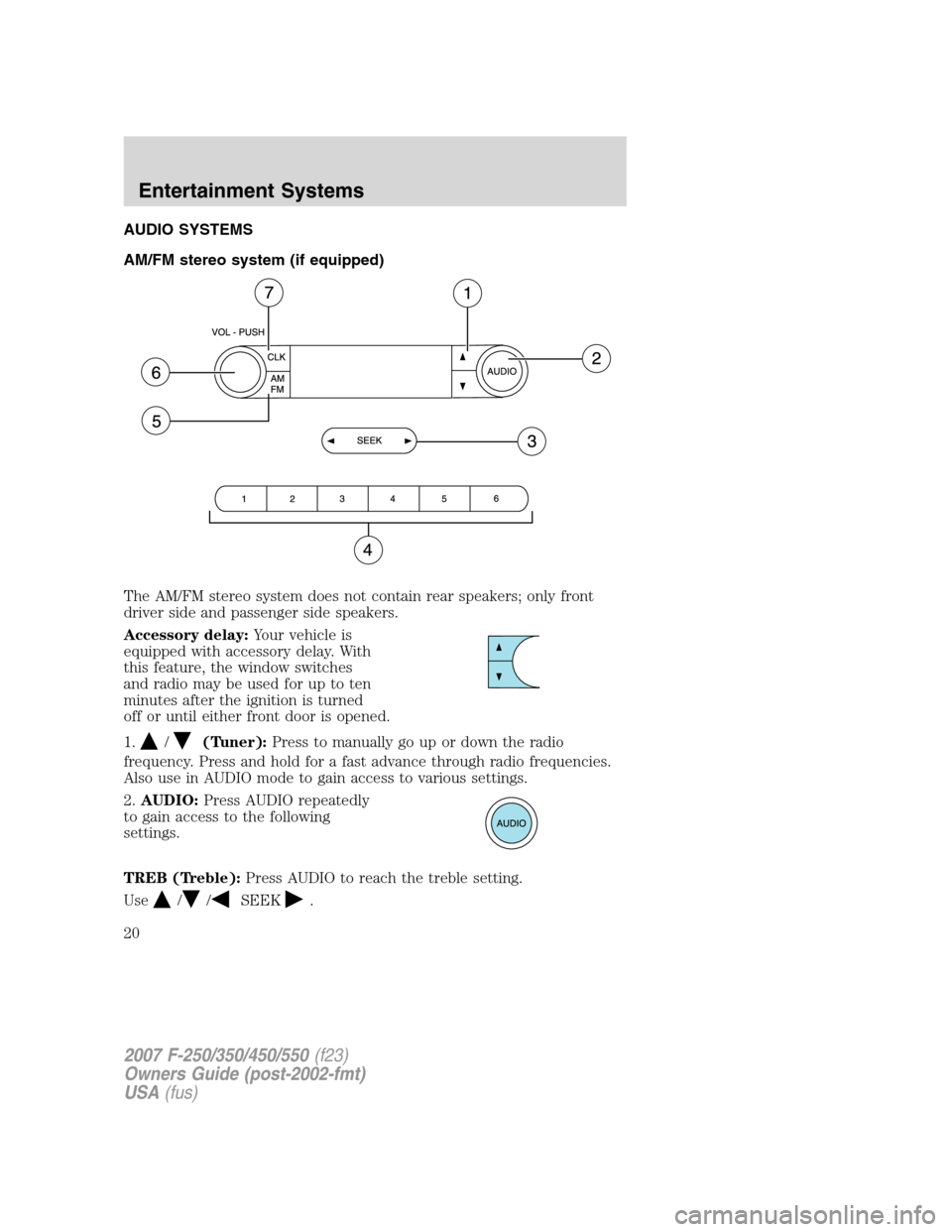
AM/FM stereo system (if equipped)
The AM/FM stereo system does not contain rear speakers; only front
driver side and passenger side speakers.
Accessory delay:Your vehicle is
equipped with accessory delay. With
this feature, the window switches
and radio may be used for up to ten
minutes after the ignition is turned
off or until either front door is opened.
1.
/(Tuner):Press to manually go up or down the radio
frequency. Press and hold for a fast advance through radio frequencies.
Also use in AUDIO mode to gain access to various settings.
2.AUDIO:Press AUDIO repeatedly
to gain access to the following
settings.
TREB (Treble):Press AUDIO to reach the treble setting.
Use
//SEEK.
2007 F-250/350/450/550(f23)
Owners Guide (post-2002-fmt)
USA(fus)
Entertainment Systems
20
Page 21 of 312
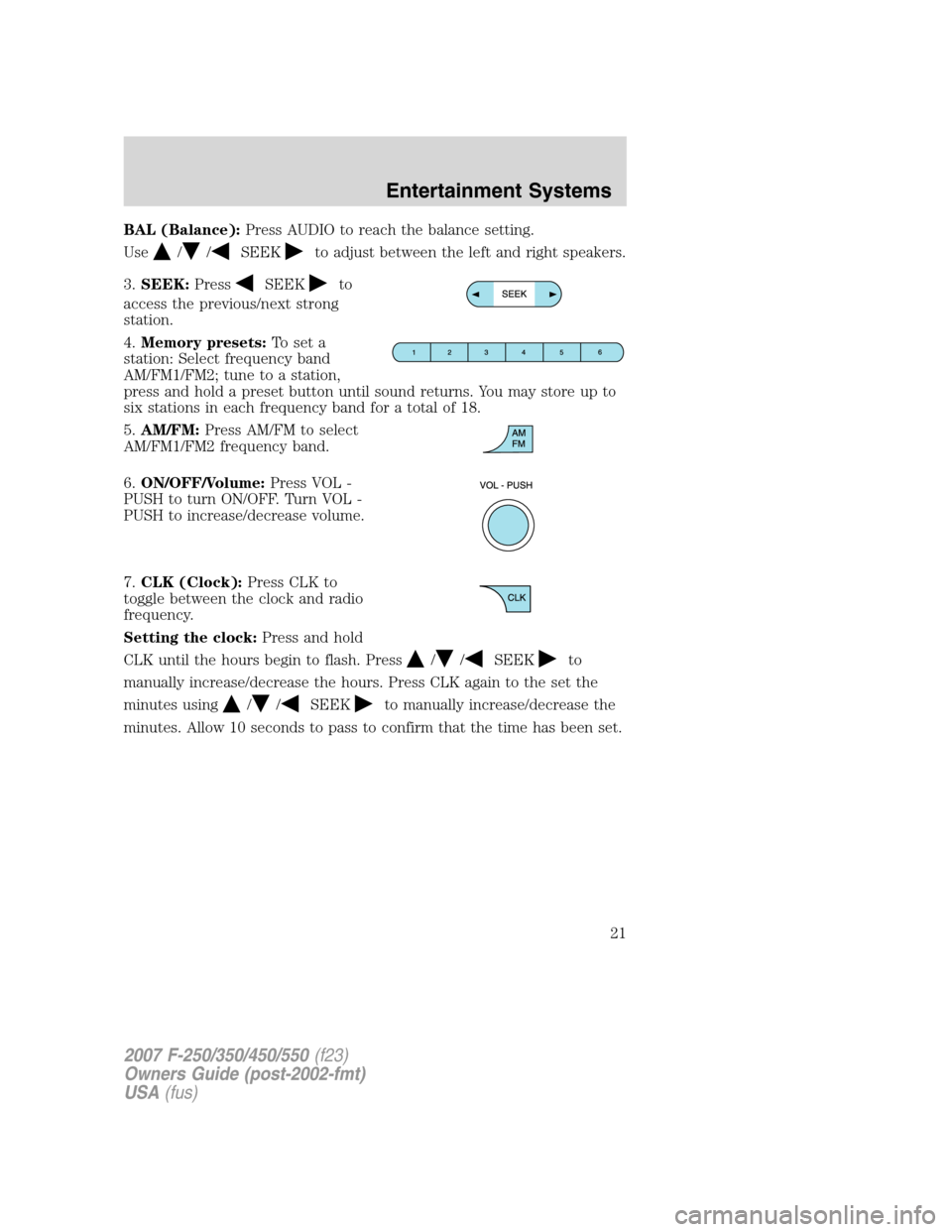
BAL (Balance):Press AUDIO to reach the balance setting.
Use
//SEEKto adjust between the left and right speakers.
3.SEEK:Press
SEEKto
access the previous/next strong
station.
4.Memory presets:To set a
station: Select frequency band
AM/FM1/FM2; tune to a station,
press and hold a preset button until sound returns. You may store up to
six stations in each frequency band for a total of 18.
5.AM/FM:Press AM/FM to select
AM/FM1/FM2 frequency band.
6.ON/OFF/Volume:Press VOL -
PUSH to turn ON/OFF. Turn VOL -
PUSH to increase/decrease volume.
7.CLK (Clock):Press CLK to
toggle between the clock and radio
frequency.
Setting the clock:Press and hold
CLK until the hours begin to flash. Press
//SEEKto
manually increase/decrease the hours. Press CLK again to the set the
minutes using
//SEEKto manually increase/decrease the
minutes. Allow 10 seconds to pass to confirm that the time has been set.
2007 F-250/350/450/550(f23)
Owners Guide (post-2002-fmt)
USA(fus)
Entertainment Systems
21
Page 22 of 312
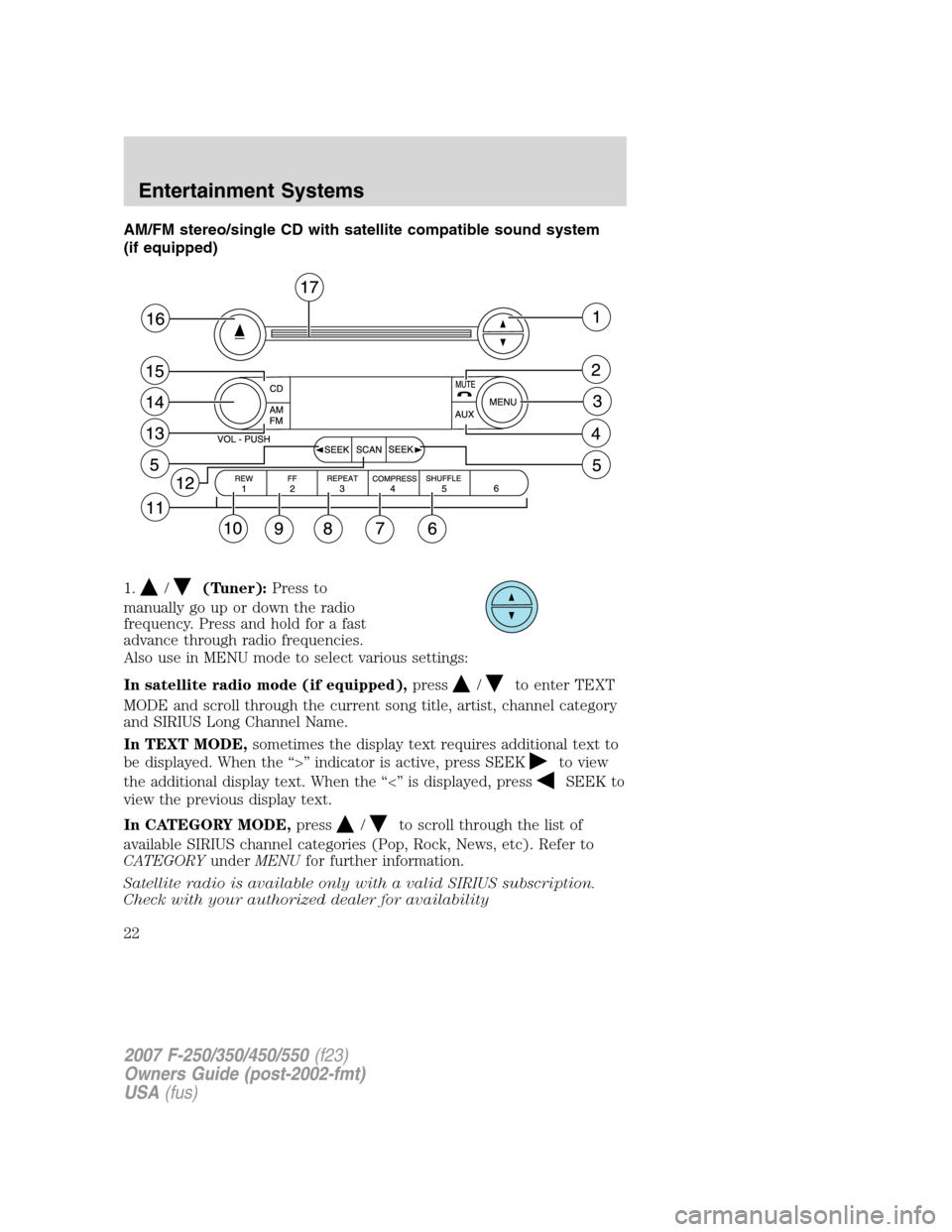
AM/FM stereo/single CD with satellite compatible sound system
(if equipped)
1.
/(Tuner):Press to
manually go up or down the radio
frequency. Press and hold for a fast
advance through radio frequencies.
Also use in MENU mode to select various settings:
In satellite radio mode (if equipped),press
/to enter TEXT
MODE and scroll through the current song title, artist, channel category
and SIRIUS Long Channel Name.
In TEXT MODE,sometimes the display text requires additional text to
be displayed. When the “>” indicator is active, press SEEK
to view
the additional display text. When the “<” is displayed, press
SEEK to
view the previous display text.
In CATEGORY MODE,press
/to scroll through the list of
available SIRIUS channel categories (Pop, Rock, News, etc). Refer to
CATEGORYunderMENUfor further information.
Satellite radio is available only with a valid SIRIUS subscription.
Check with your authorized dealer for availability
2007 F-250/350/450/550(f23)
Owners Guide (post-2002-fmt)
USA(fus)
Entertainment Systems
22
Page 23 of 312
2.MUTE/:Press to mute the
playing media. Press again to return
to the playing media.
3.MENU:Press MENU repeatedly
to gain access to the following
settings:
CATEGORY (satellite radio, if equipped):Press MENU until the
currently active category appears in the display (CATEGORY MODE). In
CATEGORY MODE, press
/to scroll through the lists of available
SIRIUS channel categories (Pop, Rock, News, etc). Press
SEEK,
SEEK
or SCAN to select the category. After a category is selected,
press
SEEK, SEEKto search for that specific category of
channels only (i.e. ROCK). To select a different category, press MENU
until the category appears in the display. Press
/to select a
different category. You may also select CATEGORY ALL to seek all
available SIRIUS categories and channels.
Satellite radio is available only with a valid SIRIUS subscription.
Check with your authorized dealer for availability
AUTOSET:Press MENU until display reaches autoset. Use
the
//SEEK, SEEKto set.
Allows you to set the strongest local radio stations without losing your
original manually set preset stations for AM/FM1/FM2. When the six
strongest stations are filled, the station stored in preset 1 will begin
playing. If there are less than six strong stations, the system will store
the last one in the remaining presets.
TREB (Treble):Press MENU to reach the treble setting.
Use
//SEEK, SEEKto adjust.
BASS (Bass):Press MENU to reach the bass setting. Use
//
SEEK, SEEK to adjust.
BAL (Balance):Press MENU to reach the balance setting.
Use
//SEEK, SEEKto adjust the audio between the left
and right speakers.
2007 F-250/350/450/550(f23)
Owners Guide (post-2002-fmt)
USA(fus)
Entertainment Systems
23
Page 24 of 312
FADE (Fade):Press MENU to reach the fade setting. Use//
SEEK, SEEKto adjust the audio between the front and rear
speakers.
SPEEDVOL (Speed sensitive volume) (if equipped):Press MENU
to reach the SPEEDVOL setting. Radio volume automatically changes
slightly with vehicle speed to compensate for road and wind noise. Use
the
//SEEK, SEEKto adjust.
The default setting isoff; increasing your vehicle speed will not change
the volume level.
Adjust1–7:Increasing this setting from 1 (lowest setting) to 7 (highest
setting) allows the radio volume to automatically change slightly with
vehicle speed to compensate for road and wind noise.
Recommended level is1–3;level 0 turns the feature off and level 7 is the
maximum setting.
Setting the clock:Press MENU to reach SELECT HOUR or SELECT
MINS. Use
SEEK, SEEKto adjust the hours/minutes. Press
MENU again to disengage clock mode.
4.AUX:Press the AUX button to
toggle between FES/DVD (if
equipped), and SAT1, SAT2 and
SAT3 modes (satellite radio, if equipped). If no auxiliary sources are
available, NO AUX AUDIO will be displayed.
Satellite radio is available only with a valid SIRIUS subscription.
Check with your authorized dealer for availability
5.SEEK:
In radio mode,press the
SEEK, SEEKbutton to access
the previous/next strong station.
In CD mode,press
SEEK,
SEEK
button access the previous/next track.
In satellite radio mode (if equipped),press
SEEK, SEEKto
seek to the previous/next channel. If a specific category is selected,
(Jazz, Rock, News, etc.), press
SEEK, SEEKto seek to the
previous/next channel in the selected category. Press and hold
SEEK, SEEKto fast seek through the previous/next channels.
2007 F-250/350/450/550(f23)
Owners Guide (post-2002-fmt)
USA(fus)
Entertainment Systems
24
Page 25 of 312
In TEXT MODE,pressSEEK, SEEKto view the
previous/additional display text.
In CATEGORY MODE,press
SEEK, SEEKto select a category.
Satellite radio is available only with a valid SIRIUS subscription.
Check with your authorized dealer for availability
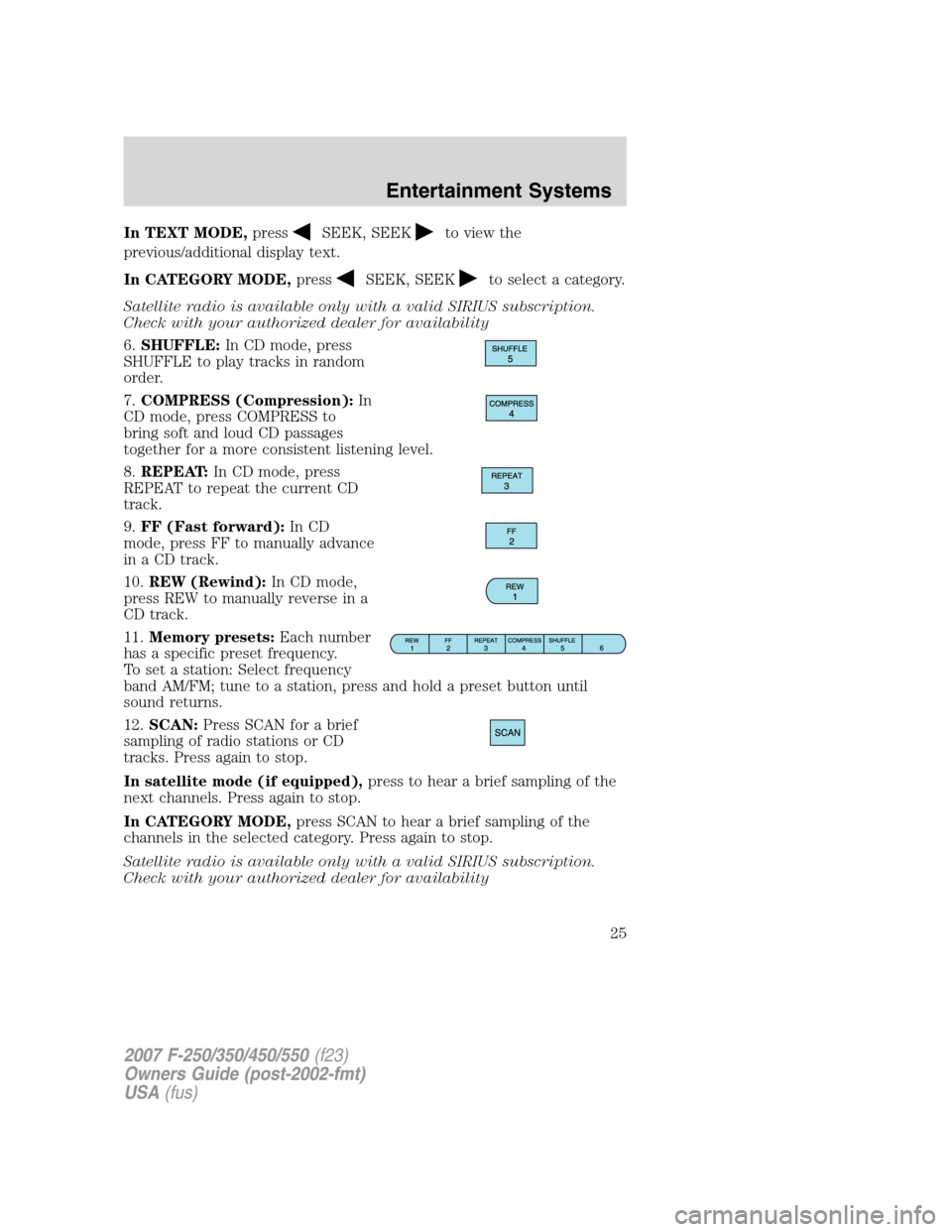
6.SHUFFLE:In CD mode, press
SHUFFLE to play tracks in random
order.
7.COMPRESS (Compression):In
CD mode, press COMPRESS to
bring soft and loud CD passages
together for a more consistent listening level.
8.REPEAT:In CD mode, press
REPEAT to repeat the current CD
track.
9.FF (Fast forward):In CD
mode, press FF to manually advance
in a CD track.
10.REW (Rewind):In CD mode,
press REW to manually reverse in a
CD track.
11.Memory presets:Each number
has a specific preset frequency.
To set a station: Select frequency
band AM/FM; tune to a station, press and hold a preset button until
sound returns.
12.SCAN:Press SCAN for a brief
sampling of radio stations or CD
tracks. Press again to stop.
In satellite mode (if equipped),press to hear a brief sampling of the
next channels. Press again to stop.
In CATEGORY MODE,press SCAN to hear a brief sampling of the
channels in the selected category. Press again to stop.
Satellite radio is available only with a valid SIRIUS subscription.
Check with your authorized dealer for availability
2007 F-250/350/450/550(f23)
Owners Guide (post-2002-fmt)
USA(fus)
Entertainment Systems
25