2007 FORD SUPER DUTY display
[x] Cancel search: displayPage 29 of 312
FADE (Fade):Press MENU to reach the fade setting. Use//
SEEK, SEEKto adjust the audio between the front and rear
speakers.
SPEEDVOL (Speed sensitive volume) (if equipped):Press MENU
to reach the SPEEDVOL setting. Radio volume automatically changes
slightly with vehicle speed to compensate for road and wind noise. Use
the
//SEEK, SEEKto adjust.
The default setting isoff; increasing your vehicle speed will not change
the volume level.
Adjust1–7:Increasing this setting from 1 (lowest setting) to 7 (highest
setting) allows the radio volume to automatically change slightly with
vehicle speed to compensate for road and wind noise.
Recommended level is1–3;level 0 turns the feature off and level 7 is the
maximum setting.
Setting the clock:Press MENU to reach SELECT HOUR or SELECT
MINS. Use
SEEK, SEEKto adjust the hours/minutes. Press
MENU again to disengage clock mode.
4.AUX:Press the AUX button to
toggle between FES/DVD (if
equipped), and SAT1, SAT2 and
SAT3 modes (satellite radio, if equipped). If no auxiliary sources are
available, NO AUX AUDIO will be displayed.
5.SEEK:
In radio mode,press the
SEEK, SEEKbutton to access
the previous/next strong station.
In CD mode,press
SEEK, SEEKbutton access the
previous/next track.
In satellite radio mode (if equipped),press
SEEK, SEEKto
seek to the previous/next channel. If a specific category is selected,
(Jazz, Rock, News, etc.), press
SEEK, SEEKto seek to the
previous/next channel in the selected category. Press and hold
SEEKto fast seek through the previous/next channels.
In TEXT MODE,press
SEEK, SEEKto view the
previous/additional display text.
2007 F-250/350/450/550(f23)
Owners Guide (post-2002-fmt)
USA(fus)
Entertainment Systems
29
Page 32 of 312
•Terrain: Hills, mountains, tall buildings, power lines, electric fences,
traffic lights and thunderstorms can interfere with your reception.
•Station overload: When you pass a broadcast tower, a stronger signal
may overtake a weaker one and play while the weak station frequency
is displayed.
CD/CD player care
Do:
•Handle discs by their edges only. Never touch the playing surface.
•Inspect discs before playing. Clean only with an approved CD cleaner
and wipe from the center out.
Don’t:
•Expose discs to direct sunlight or heat sources for extended periods
of time.
•Insert more than one disc into each slot of the CD changer magazine.
•Clean using a circular motion.
CD units are designed to only play commercially manufactured,
round (4.75 in / 12 cm) audio compact discs. Due to technical
incompatibility, certain homemade compact discs may not
function correctly when used in Ford CD players. Irregular
shaped CDs, CDs with a scratch protection film attached, and CDs
with homemade paper (adhesive) labels should not be inserted
into the CD player. The label may peel and cause the CD to
become jammed. It is recommended that homemade CDs be
identified with permanent felt tip marker rather than adhesive
labels.
Audio system warranty and service
Refer to theWarranty Guidefor audio system warranty information. If
service is necessary, see your authorized dealer.
Satellite radio information (if equipped)
Satellite radio channels:Satellite radio frequencies are established by
the Federal Communications Commission (FCC). SIRIUS Satellite Radio
broadcasts within a frequency range of 2320.0 MHz-2332.5 MHz. This
frequency range is sub-divided into over 120 channels of music, news,
sports, weather and traffic programming. For a complete set of SIRIUS
Satellite Radio channels, visit www.sirius.com or call SIRIUS at
1–888–539–7474. For a quick reference of the SIRIUS Satellite Radio
channel guide, refer to theSirius Welcome Kit.
2007 F-250/350/450/550(f23)
Owners Guide (post-2002-fmt)
USA(fus)
Entertainment Systems
32
Page 33 of 312
Satellite radio reception factors:To receive the satellite signal, your
vehicle has been equipped with a satellite radio antenna located on the
roof of your vehicle. The vehicle roof provides the best location for an
unobstructed, open view of the sky, a requirement of a satellite radio
system. Like AM/FM, there are several factors that can affect satellite
radio reception performance:
•Antenna Obstructions: For optimal reception performance, keep the
antenna clear of snow and ice build-up and keep luggage and other
material as far away from the antenna as possible.
•Terrain: Hills, mountains, tall buildings, bridges, tunnels, freeway
overpasses, parking garages, dense tree foliage and thunderstorms can
interfere with your reception.
•Station overload: When you pass a ground based broadcast repeating
tower, a stronger signal may overtake a weaker one and result in an
audio mute.
Unlike AM/FM audible static, you will hear an audio mute when there is
a satellite radio signal interference. Your radio display may display NO
SIGNAL to indicate the interference.
SIRIUS satellite radio service:SIRIUS Satellite Radio is a continental
U.S. based satellite radio service that broadcasts over 120 channels of
music, sports, news and entertainment coast-to-coast. A service fee is
required in order to receive SIRIUS service. Vehicles that are equipped
with a factory installed SIRIUS Satellite Radio system include:
•Hardware and limited subscription term, which begins on the date of
sale or lease of the vehicle.
•SIRIUS online media player access: providing access to all 100%
commercial-free music channels over the internet. Call SIRIUS at
1–888–539–7474 to obtain login instructions and your password.
For information on extended subscription terms, contact SIRIUS at
1–888–539–7474.
Note:SIRIUS reserves the unrestricted right to change, rearrange, add
or delete programming including canceling, moving or adding particular
channels, and its prices, at any time, with or without notice to you. Ford
Motor Company shall not be responsible for any such programming
changes.
2007 F-250/350/450/550(f23)
Owners Guide (post-2002-fmt)
USA(fus)
Entertainment Systems
33
Page 34 of 312
Satellite Radio Electronic Serial Number (ESN):This12digit
Satellite Serial Number is needed to activate, modify or track your
satellite radio account. You will need this number when communicating
with SIRIUS. While in Satellite Radio mode, you can view this number on
the radio display by pressing AUX and Preset 1 control simultaneously.
Radio Display Condition Action Required
ACQUIRING Radio requires more
than two seconds to
produce audio for the
selected channel.No action required. This
message should
disappear shortly.
SAT FAULT Internal module or
system failure present.If this message does not
clear within a short
period of time, or with
an ignition key cycle,
your receiver may have
a fault. See your
authorized dealer for
service.
INVALID CHNL Channel no longer
available.This previously available
channel is no longer
available. Tune to
another channel. If the
channel was one of your
presets, you may choose
another channel for that
preset button.
UNSUBSCRIBED Subscription not
available for this
channel.Contact SIRIUS at
1–888–539–7474 to
subscribe to the channel,
or tune to another
channel.
NO TEXT Artist information not
available.Artist information not
available at this time on
this channel. The system
is working properly.
2007 F-250/350/450/550(f23)
Owners Guide (post-2002-fmt)
USA(fus)
Entertainment Systems
34
Page 35 of 312
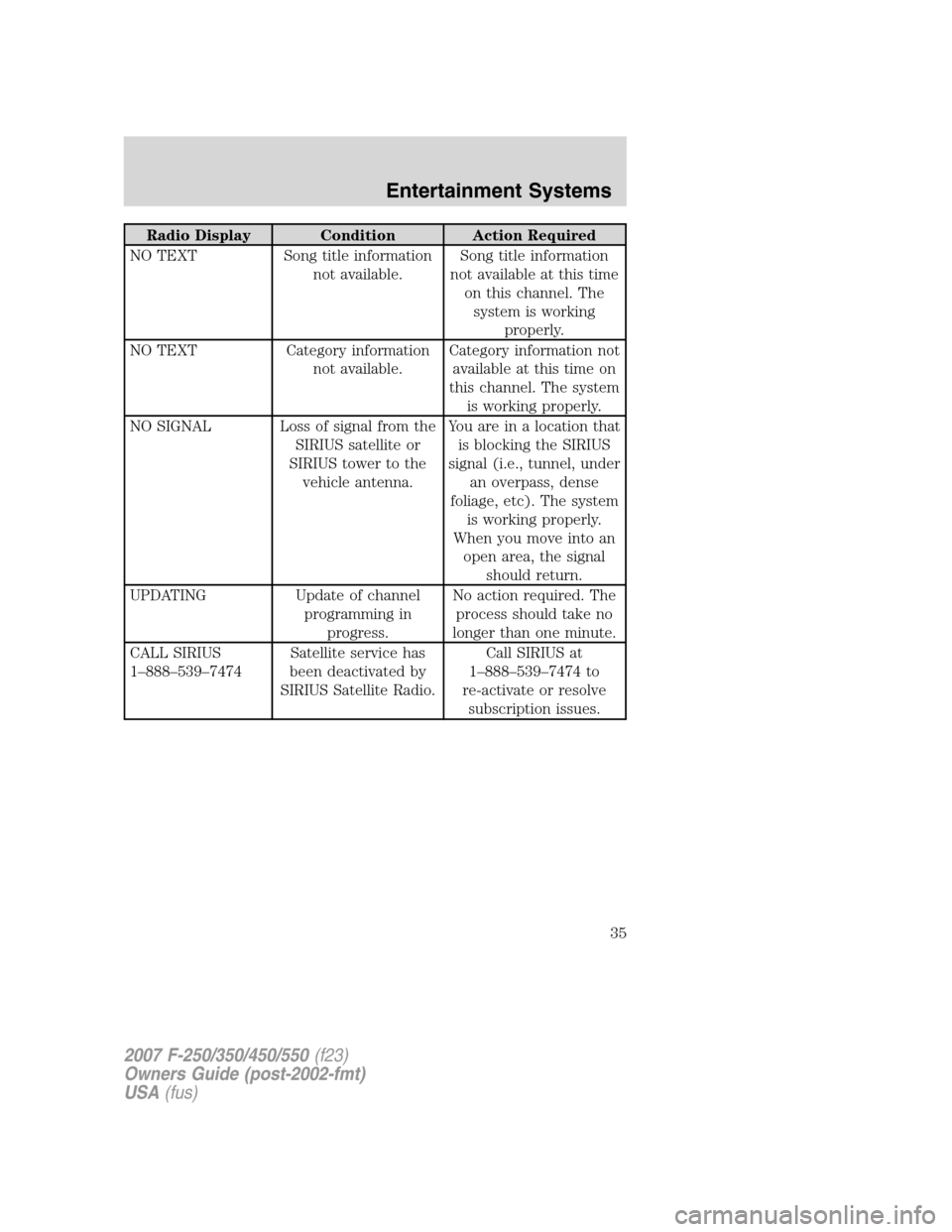
Radio Display Condition Action Required
NO TEXT Song title information
not available.Song title information
not available at this time
on this channel. The
system is working
properly.
NO TEXT Category information
not available.Category information not
available at this time on
this channel. The system
is working properly.
NO SIGNAL Loss of signal from the
SIRIUS satellite or
SIRIUS tower to the
vehicle antenna.Youareinalocationthat
is blocking the SIRIUS
signal (i.e., tunnel, under
an overpass, dense
foliage, etc). The system
is working properly.
When you move into an
open area, the signal
should return.
UPDATING Update of channel
programming in
progress.No action required. The
process should take no
longer than one minute.
CALL SIRIUS
1–888–539–7474Satellite service has
been deactivated by
SIRIUS Satellite Radio.Call SIRIUS at
1–888–539–7474 to
re-activate or resolve
subscription issues.
2007 F-250/350/450/550(f23)
Owners Guide (post-2002-fmt)
USA(fus)
Entertainment Systems
35
Page 40 of 312
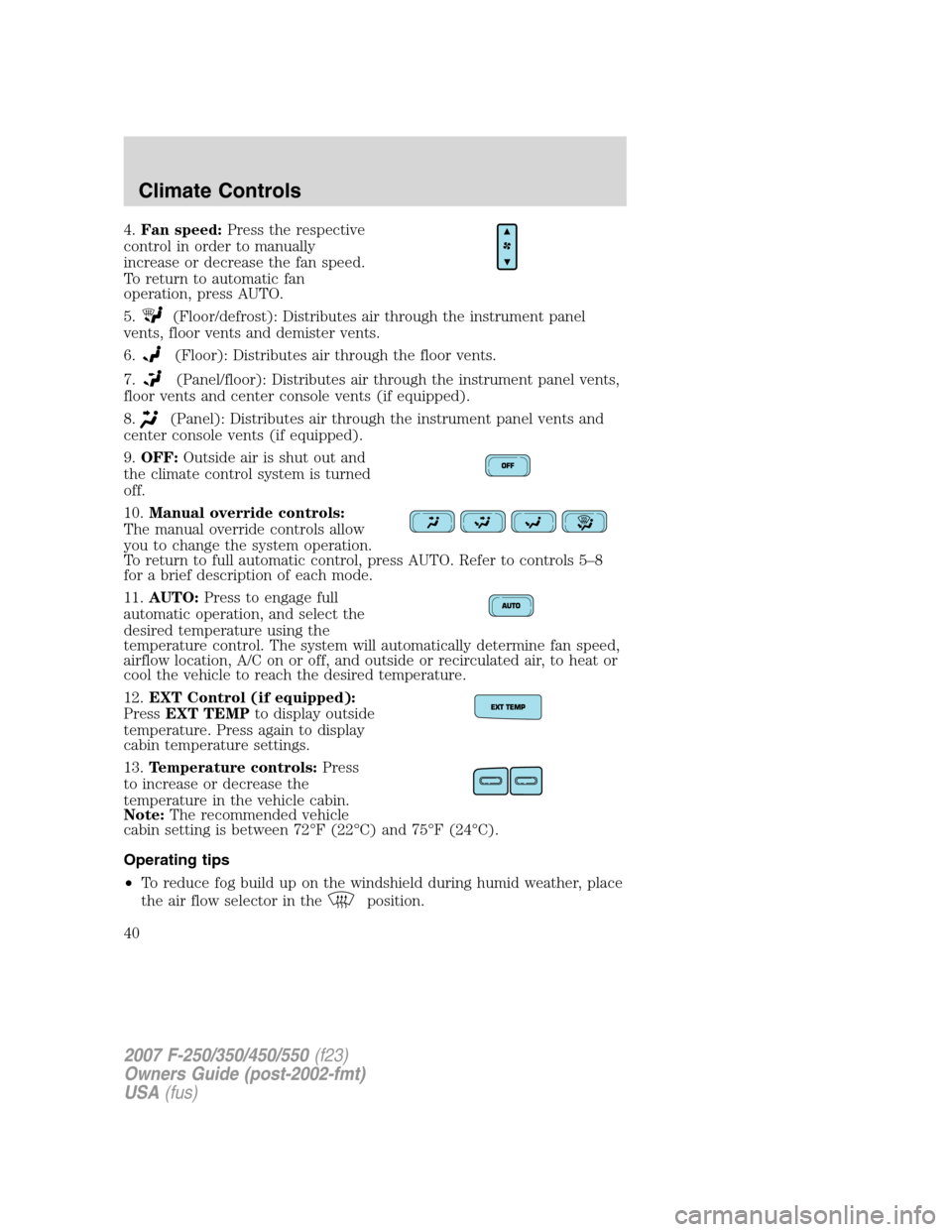
4.Fan speed:Press the respective
control in order to manually
increase or decrease the fan speed.
To return to automatic fan
operation, press AUTO.
5.
(Floor/defrost): Distributes air through the instrument panel
vents, floor vents and demister vents.
6.
(Floor): Distributes air through the floor vents.
7.
(Panel/floor): Distributes air through the instrument panel vents,
floor vents and center console vents (if equipped).
8.
(Panel): Distributes air through the instrument panel vents and
center console vents (if equipped).
9.OFF:Outside air is shut out and
the climate control system is turned
off.
10.Manual override controls:
The manual override controls allow
you to change the system operation.
To return to full automatic control, press AUTO. Refer to controls 5–8
for a brief description of each mode.
11.AUTO:Press to engage full
automatic operation, and select the
desired temperature using the
temperature control. The system will automatically determine fan speed,
airflow location, A/C on or off, and outside or recirculated air, to heat or
cool the vehicle to reach the desired temperature.
12.EXT Control (if equipped):
PressEXT TEMPto display outside
temperature. Press again to display
cabin temperature settings.
13.Temperature controls:Press
to increase or decrease the
temperature in the vehicle cabin.
Note:The recommended vehicle
cabin setting is between 72°F (22°C) and 75°F (24°C).
Operating tips
•To reduce fog build up on the windshield during humid weather, place
the air flow selector in the
position.
2007 F-250/350/450/550(f23)
Owners Guide (post-2002-fmt)
USA(fus)
Climate Controls
40
Page 70 of 312
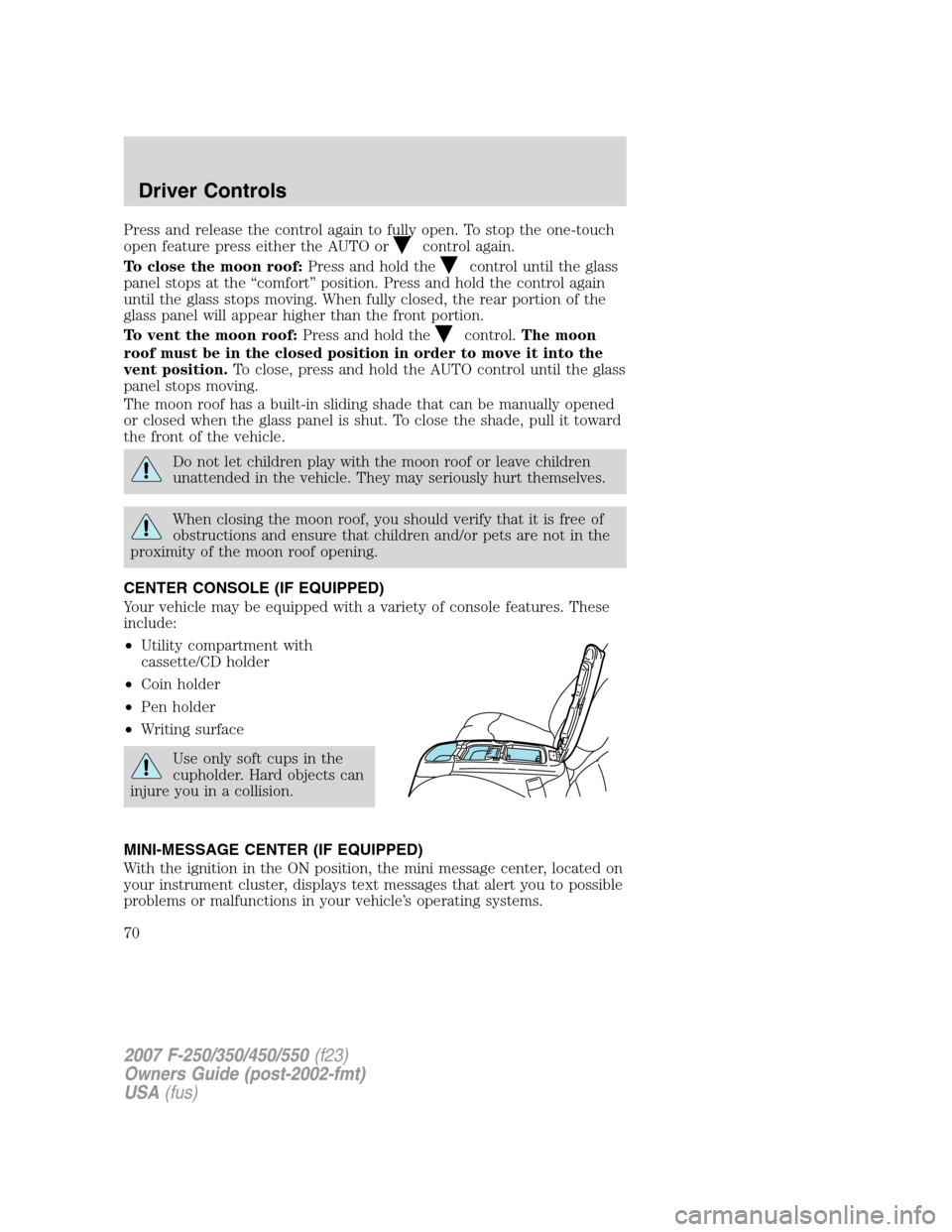
Press and release the control again to fully open. To stop the one-touch
open feature press either the AUTO or
control again.
To close the moon roof:Press and hold the
control until the glass
panel stops at the “comfort” position. Press and hold the control again
until the glass stops moving. When fully closed, the rear portion of the
glass panel will appear higher than the front portion.
To vent the moon roof:Press and hold the
control.The moon
roof must be in the closed position in order to move it into the
vent position.To close, press and hold the AUTO control until the glass
panel stops moving.
The moon roof has a built-in sliding shade that can be manually opened
or closed when the glass panel is shut. To close the shade, pull it toward
the front of the vehicle.
Do not let children play with the moon roof or leave children
unattended in the vehicle. They may seriously hurt themselves.
When closing the moon roof, you should verify that it is free of
obstructions and ensure that children and/or pets are not in the
proximity of the moon roof opening.
CENTER CONSOLE (IF EQUIPPED)
Your vehicle may be equipped with a variety of console features. These
include:
•Utility compartment with
cassette/CD holder
•Coin holder
•Pen holder
•Writing surface
Use only soft cups in the
cupholder. Hard objects can
injure you in a collision.
MINI-MESSAGE CENTER (IF EQUIPPED)
With the ignition in the ON position, the mini message center, located on
your instrument cluster, displays text messages that alert you to possible
problems or malfunctions in your vehicle’s operating systems.
2007 F-250/350/450/550(f23)
Owners Guide (post-2002-fmt)
USA(fus)
Driver Controls
70
Page 71 of 312
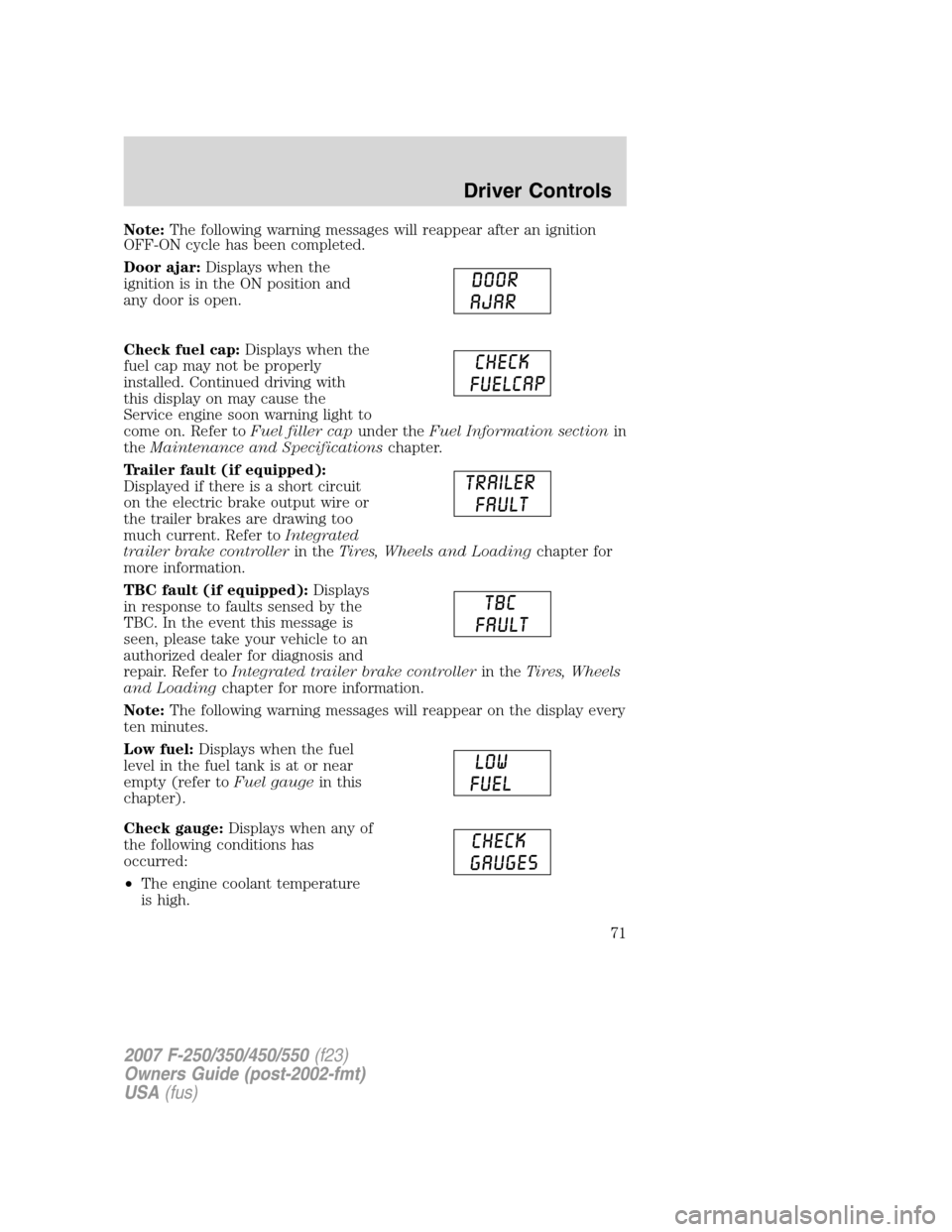
Note:The following warning messages will reappear after an ignition
OFF-ON cycle has been completed.
Door ajar:Displays when the
ignition is in the ON position and
any door is open.
Check fuel cap:Displays when the
fuel cap may not be properly
installed. Continued driving with
this display on may cause the
Service engine soon warning light to
come on. Refer toFuel filler capunder theFuel Information sectionin
theMaintenance and Specificationschapter.
Trailer fault (if equipped):
Displayed if there is a short circuit
on the electric brake output wire or
the trailer brakes are drawing too
much current. Refer toIntegrated
trailer brake controllerin theTires, Wheels and Loadingchapter for
more information.
TBC fault (if equipped):Displays
in response to faults sensed by the
TBC. In the event this message is
seen, please take your vehicle to an
authorized dealer for diagnosis and
repair. Refer toIntegrated trailer brake controllerin theTires, Wheels
and Loadingchapter for more information.
Note:The following warning messages will reappear on the display every
ten minutes.
Low fuel:Displays when the fuel
level in the fuel tank is at or near
empty (refer toFuel gaugein this
chapter).
Check gauge:Displays when any of
the following conditions has
occurred:
•The engine coolant temperature
is high.
2007 F-250/350/450/550(f23)
Owners Guide (post-2002-fmt)
USA(fus)
Driver Controls
71