2007 DODGE SPRINTER wheel
[x] Cancel search: wheelPage 128 of 393

127 Controls in detail
Good visibility
3
Wiping with washer fluid
\1Press the combination switch beyond
the pressure point in the direction of
arrow1.
The windshield wiper will wipe with
windshield washer fluid.
Vehicles with headlamp cleaning sys-
tem*:
If the low-beam headlamps have been
switched on, a high-pressure water jet
also cleans the headlamps.
Intermittent wipe
Only switch on intermittent wipe in damp
weather conditions or when it is raining.
Vehicles with rain sensor*:
The a rain sensor is activated when you
switch on intermittent wipe. The appropri-
ate wiping frequency is set automatically
according to the rain falling on the sensor.The switch is in the combination switch on
the left of the steering wheel.
1Switch
2To wipe with windshield washer fluid
3Intermittent wipe
4To switch off the wiper
5To wipe with windshield washer fluid
\1Turn key to position1 in the ignition
lock (\2page 67).Switching on intermittent wipe
\1Turn switch1 to 3.
Switching off intermittent wipe
\1Turn switch1 to 4.
Wiping with washer fluid
\1Turn switch1 to 5or 2 and keep it
pressed until the window is clean.
The windshield heating is operational while
the engine is running.
The windshield heating consumes a lot of
energy. You should therefore switch the
heating off as soon as the windshield is
clear.
The heating switches off automatically af-
ter approximately 5 minutes.
iWipe with windshield washer fluid even
when it is raining. By doing so you can
prevent smears on the windshield.
Rear window wiper*iThe rear window wiper switches on au-
tomatically if you engage reverse gear
and the windshield wipers are on.
N54.25-2924-31
Windshield heating*
Page 131 of 393

130 Controls in detailTempmatic
3
Tempmatic is only operational while the
engine is running. You can use Tempmatic
to regulate or control the temperature au-
tomatically. The vehicle is either heated or
cooled, depending on the temperature se-
lected and the outside temperature.
The combination filter removes most dust
particles, pollen and unpleasant odors
from the outside air.
The interval for replacing the filter depends
on environmental factors, e.g. high air pol-
lution. The interval may be shorter than
that indicated in the Service Booklet.
Function
Page
1
Side window defroster
vents
135
2
Thumbwheel for air vents
3
Side air vents
4
Thumbwheel for side air
vents and defroster vents
135
5
Swiveling center air vents
6
Thumbwheel for center air
vents
7
Control panel\4Tempmatic
\4Rear heating/rear cool-
ing*
131
136
8
Switch\4Rear window heating*
\4Windshield heating*
128
127
9
Auxiliary heating switch*
Heater booster switch*
140
137
iCondensation may collect under the
vehicle while Tempmatic is in opera-
tion.
Warning
G
Follow the settings recommended on the
following pages for heating or cooling. The
windows could otherwise fog up. As a result,
you could be distracted from road and traffic
conditions and cause an accident.Warning
G
Air flowing out of the air vents in the footwell
when Tempmatic is in operation may be very
hot or very cold. There is therefore a risk of
frostbite or burns to bare skin in the imme-
diate proximity of these outlets. Keep bare
skin away from these air outlets. If neces-
sary, direct the airflow into a different area
of the vehicle interior using the air distribu-
tion control.
Page 136 of 393
135 Controls in detail
Tempmatic
3
The indicator lamp in the switch comes
on.
\1Turn airflow control2 (\2page 131)
to a higher blower speed, but do not
turn the control below second speed.
\1Turn temperature selector control1
(\2page 131) to a higher temperature.
\1Turn air distribution control5
to‚P.
\1Close the center air vents and the air
outlets for the head area and the rear
compartment.
\1Open the side air vents and direct them
at the side windows.
\1If the windshield is fogged up on the
outside, switch on the windshield wip-
ers (\2page 126).Defrosting
The following settings can be used to clear
the windshield and the side windows, e.g.
if covered with frost.
\1Set temperature selector control 1 to
P.
\1Turn airflow control2 to fourth speed.
\1Turn air distribution control5
to‚P.
\1Close the center air vents and the air
vents for the head area and the rear
compartment.
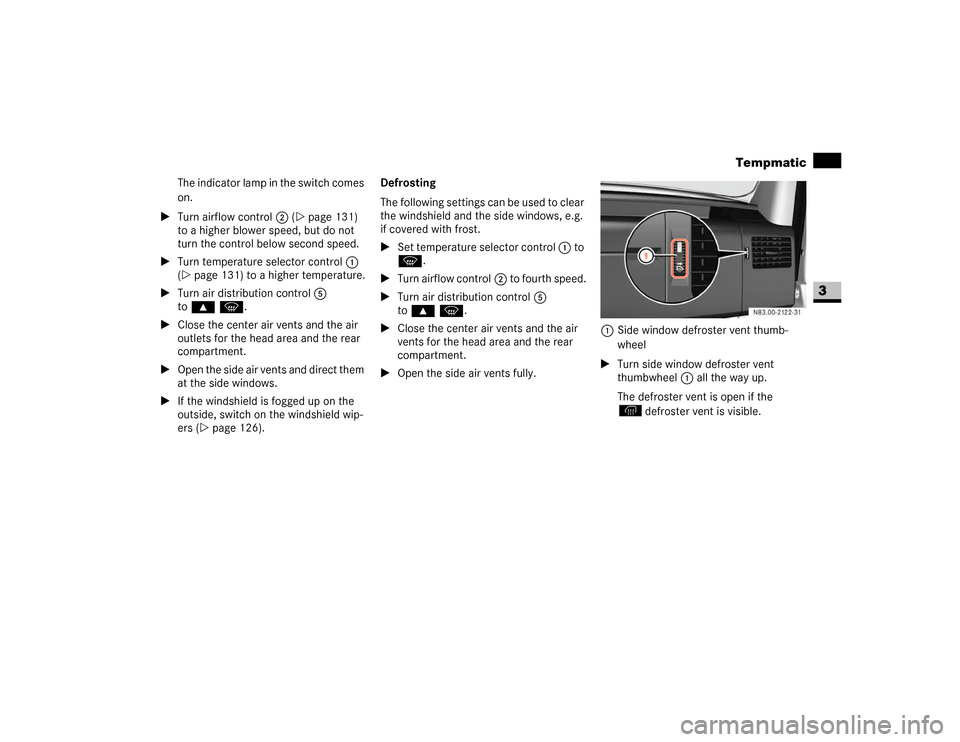
\1Open the side air vents fully.1Side window defroster vent thumb-
wheel
\1Turn side window defroster vent
thumbwheel1 all the way up.
The defroster vent is open if the
defroster vent is visible.
Page 138 of 393

137 Controls in detail
Tempmatic
3
\1To reduce: turn the temperature selec-
tor control counterclockwise.
Air vents in the roof air duct
Adjustable air vents are integrated in the
roof air duct.
1Air vents
\1Adjust the airflow by opening / closing
the air flaps.
Alter the air distribution by turning the
air vents.The fuel-fired heater booster system heats
the vehicle interior as quickly as possible
while the engine is running.
The switch for the heater booster function
is between the light switch and the steer-
ing wheel.
Vehicles with auxiliary heatingVehicles without auxiliary heating*
1To switch the auxiliary heating on / off
(\2page 140)
2To switch the heater booster function
on / off
!
CAUTION
Never close all the air vents, otherwise
there is a risk of damage to the air-
conditioning system in the rear com-
partment.
Heater booster function*iThe auxiliary heating automatically
switches to heater booster mode after
the engine is started.
N54.25-2926-31
N54.25-2927-31
Page 141 of 393

140 Controls in detailAuxiliary heating/ventilation*
3
You can switch the auxiliary heating / ven-
tilation on and off immediately using:
\4the auxiliary heating / heater booster
switch (\2page 140)
\4the auxiliary heating remote control*
(\2page 141)
Before switching on
\1Adjust the heat output to the desired
temperature using the temperature
control (\2page 131).
\1Set the air distribution as required.Operation using the switch
The switch for the auxiliary heating / venti-
lation is between the light switch and the
steering wheel.
1To switch the auxiliary heating on / off
2To switch the heater booster function
on / off (\2page 137)
\1To switch the auxiliary heating on:
press and hold theö switch for
more than 2 seconds:
\4The auxiliary heating / ventilation
heats or ventilates the interior to a
temperature that you have set.
\4The blower switches to the first
speed.\4The red indicator lamp in the switch
comes on.
\1To switch the auxiliary heating off:
press theö switch.
or
\1Turn the key to position0 in the igni-
tion lock (\2page 67).
The red indicator lamp in the switch
goes out.
The auxiliary heating operates for
around a further 2 minutes and then
switches off automatically.
!
CAUTION
Switch on the auxiliary heating at regu-
lar intervals (at least once a month) for
approximately 10 minutes.
Make sure that the hot air flow is not
obstructed. The auxiliary heating would
otherwise overheat and switch off.
N54.25-2928-31
iYou cannot use the auxiliary ventilation
to cool the vehicle interior to a lower
temperature than the outside tempera-
ture.
The heating or ventilation period is lim-
ited to 60 minutes.
Page 143 of 393

142 Controls in detailAuxiliary heating/ventilation*
3
Selecting a switch-on time
You can use the operating system to define
up to 3 switch-on times, one of which can
be selected to switch on the auxiliary
heating / ventilation.
Operating system without steering
wheel buttons
\1Switch on the ignition (\2page 67).
\1Press theö switch.
Theö symbol in the display flashes.
or
\1Press the menu button on the in-
strument cluster repeatedly until the
ö symbol in the display flashes.
\1Use the or button on the instru-
ment cluster to select desired switch-
on time
1 to
3.
The switch-on time selected is dis-
played.\1Wait 10 seconds for the standard dis-
play to appear.
The switch-on time is selected.
The yellow indicator lamp in theö
switch comes on.
If you have not selected a switch-on time
and
--:--
appears in the display, the auto-
matic switch-on is deactivated. The yellow
indicator lamp in theö switch goes
out.Operating system with steering wheel
buttons*
\1Switch on the ignition (\2page 67).
\1Briefly press theö switch.
The
Aux. heat.
submenu is shown in
the display.
The selected switch-on time is high-
lighted or
Timer off
is highlighted if no
switch-on time has been selected.
\1Press theæ orç button to se-
lect the desired switch-on time. The au-
tomatic switch-on is deactivated if the
Timer off
setting is selected.
iIf you turn the key to position0 in the
ignition lock, the yellow indicator lamp
in theö switch goes out after
30 minutes.
The red indicator lamp in theö
switch comes on when the auxiliary
heating switches on.
iYou can reach the
Aux. heat.
submenu
via the
Settings
menu (\2page 96).
N54.32-2277-31
\2\2
Page 144 of 393

143 Controls in detail
Auxiliary heating/ventilation*
3
\1Press the è button.
The switch-on time is selected.
The yellow indicator lamp in theö
switch comes on.
Setting the switch-on time
Operating system without steering
wheel buttons
\1Select a switch-on time as described
under “Selecting a switch-on time”
(\2page 142).\1Press the reset button on the instru-
ment cluster to set the selected switch-
on time.
The hours figure flashes and the”
symbol appears in the display.
\1Set the hours using the or am
button on the instrument cluster.
\1Press the reset button.
The minute display flashes.
\1Set the minutes using the or
button.Operating system with steering wheel
buttons
\1Select a switch-on time as described
under “Selecting a switch-on time”
(\2page 142).
\1Press thej button.
The
Hours
menu appears in the display.
\1Set the hours using theæ orç
button.
\1Press thej button.
The
Minutes
menu appears in the dis-
play.
\1Set the minutes using theæ
orç button.
\1Press the è button.
The switch-on time is set and selected.
iIf you turn the key to position0 in the
ignition lock, the yellow indicator lamp
in theö switch goes out after
30 minutes.
The red indicator lamp in theö
switch comes on when the auxiliary
heating switches on.
iIf you keep the button pressed, the val-
ues will change continuously.
To return to the standard display:
\4press and hold the button on
the instrument cluster for more
than 1 second
\4do not press a button for
10 seconds
iTo return to the standard display, press
theè or ÿ button repeatedly
until the standard display appears.
Page 147 of 393

146 Controls in detailOpen air
3
Resetting the sliding sunroof
The sliding sunroof must be reset after:
\4the sunroof has been closed manually
using the emergency operation key
(\2page 304)
\4the sunroof has opened with a jerk
\4a malfunction
\1Switch on the ignition (\2page 67).
\1Press the sliding sunroof switch in the
direction of arrow2 (\2page 145).
\1Wait until the sliding sunroof is closed
and then keep the sliding sunroof
switch pressed for approximately
3seconds.
The sliding sunroof is reset.The roof ventilator can be used to ventilate
or remove air from the load compartment.
The switch is between the light switch and
the steering wheel.
1To ventilate the load compartment
(air out)
2To ventilate the load compartment
(air in)\1Switch on the ignition (\2page 67).
\1Air out: press upper part 1 of the
switch.
The roof ventilator removes used air
from the load compartment.
\1Air in: press lower part 2 of the
switch.
The roof ventilator feeds fresh air into
the load compartment.
\1To switch off: set the switch to the
center position.
Roof ventilator in the load compart-
ment*
N54.25-2929-31