2007 DODGE SPRINTER wheel
[x] Cancel search: wheelPage 79 of 393

78 Controls in detailLighting
3
\1Turn key to position1 in ignition lock
(\2page 67).
\1Turn light switch to B.
\1Press combination switch forward 1.
The indicator lampA in the instru-
ment cluster lights up.
Headlamp flasher
\1Turn key to position1 in ignition lock
(\2page 67).
\1Pull combination switch briefly in
direction2.
Constant headlamp mode*
On vehicles with steering wheel buttons,
you can set constant headlamp mode
(\2page 102). This does not apply to coun-
tries in which there is a legal requirement
to use constant headlamp mode.\1Turn light switch to M.
The low-beam headlamps, parking
lamps and license plate lamp are
switched on when the engine is
running.
TheB indicator lamp in the instru-
ment cluster lights up.
Automatic headlamp control*
The parking lamps, low-beam headlamps
and license plate lamp are switched on au-
tomatically when the brightness of ambi-
ent light falls below a predetermined level.\1Turn light switch toU.
The parking lamps are switched on / off
automatically when the key is in posi-
tion 1 (\2page 67) in the ignition lock.
The parking lamps, low-beam head-
lamps and license plate lamp are
switched on / off automatically when
the engine is running, depending on the
ambient light conditions.
Only use manual headlamp mode when
you are driving in countries where driving
with the low-beam headlamps switched on
is required by law.
\1In this case, turn the light switch to
B.
Warning
G
If the light switch is atU:
\4the headlamps could switch off tempo-
rarily due to extreme glare, e.g. from on-
coming traffic
\4the lights do not switch on automatically
in foggy conditions
Set the light switch to B. Otherwise you
are endangering yourself and others.
If it is dark, only turn the light switch from
U toB when the vehicle is stationary.
You could otherwise cause an accident if the
headlamps were to switch off briefly.
Automatic headlamp mode is only a driving
aid. You are responsible for the vehicle’s
lighting at all times.
Page 80 of 393
79 Controls in detail
Lighting
3
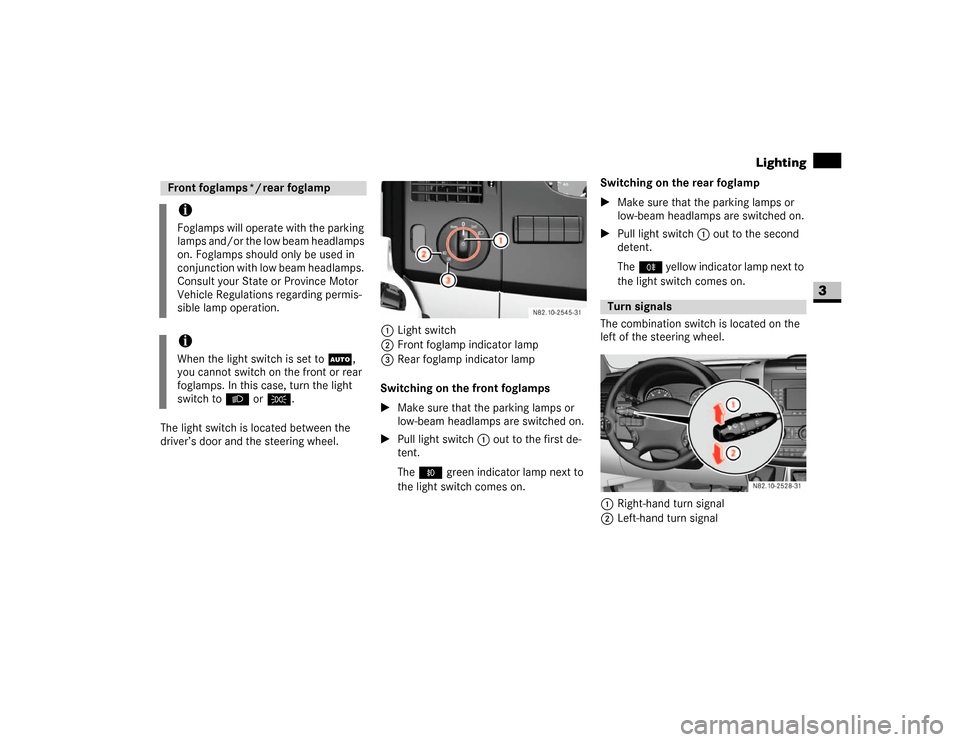
The light switch is located between the
driver’s door and the steering wheel.1Light switch
2Front foglamp indicator lamp
3Rear foglamp indicator lamp
Switching on the front foglamps
\1Make sure that the parking lamps or
low-beam headlamps are switched on.
\1Pull light switch1 out to the first de-
tent.
The‡ green indicator lamp next to
the light switch comes on.Switching on the rear foglamp
\1Make sure that the parking lamps or
low-beam headlamps are switched on.
\1Pull light switch1 out to the second
detent.
The† yellow indicator lamp next to
the light switch comes on.
The combination switch is located on the
left of the steering wheel.
1Right-hand turn signal
2Left-hand turn signalFront foglamps */ rear foglampiFoglamps will operate with the parking
lamps and/or the low beam headlamps
on. Foglamps should only be used in
conjunction with low beam headlamps.
Consult your State or Province Motor
Vehicle Regulations regarding permis-
sible lamp operation.iWhen the light switch is set toU,
you cannot switch on the front or rear
foglamps. In this case, turn the light
switch to B orC.
Turn signals
N82.10-2528-31
Page 81 of 393

80 Controls in detailLighting
3
\1Push combination switch up1 or
down 2 until it engages.
The combination switch moves back
automatically if the steering wheel is
turned sufficiently.The hazard warning lamps still operate if
the ignition is switched off and the key is
removed.
The switch is located on the center con-
sole.
1Hazard warning lamps switch
\1To switch on: press the switch.
All turn signals and the switch flash.
\1To switch off: press the switch again.Standard front interior lighting
1To switch on the interior lighting
2Automatic control
3To switch off the interior lighting
iTo indicate minor directional changes
such as changing lanes, press the com-
bination switch only to point of resis-
tance and release. The corresponding
turn signals will flash three times.
Hazard warning lampsWarning
G
The rear lamps are concealed when the rear
doors are opened 90° (detent position).
N54.25-2919-31
The vehicle is then not sufficiently safe-
guarded at the rear and may only be seen by
other road users when they are close to the
vehicle. This could lead to an accident.
Make sure, therefore, that the vehicle is
safeguarded at the rear in accordance with
national legal requirements, e.g. with a
warning triangle.Front interior lighting
Page 83 of 393
82 Controls in detailLighting
3
Switching the standard rear interior
lighting on / off
On panel vans / crewbuses equipped with
the standard rear interior lighting, the
switch for the rear interior lighting is on the
rear lamp in the load / passenger compart-
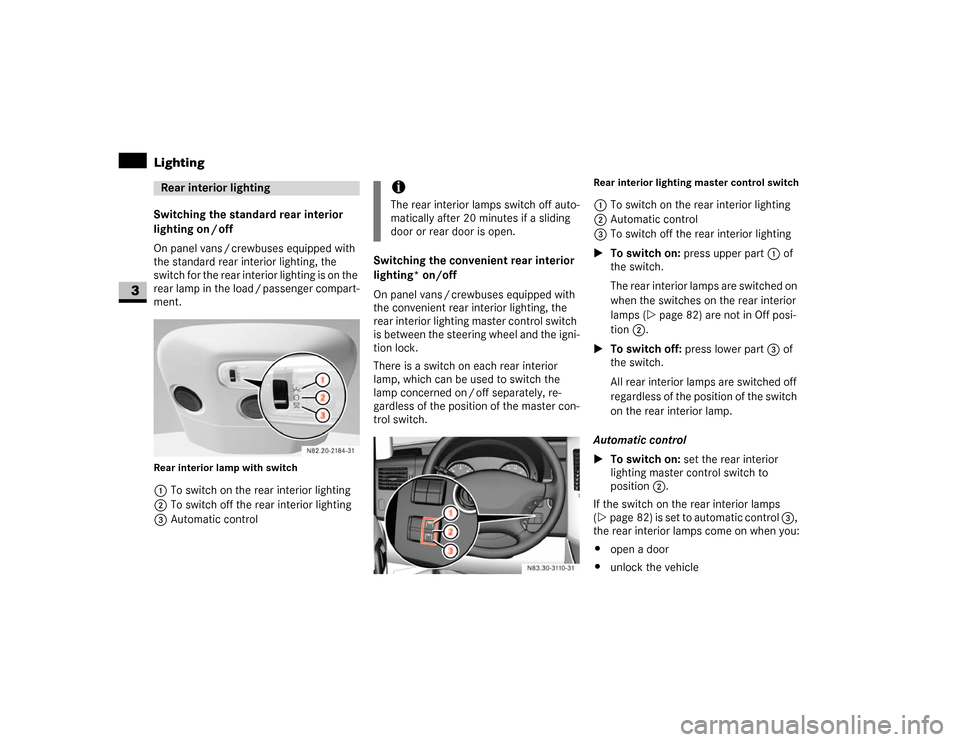
ment.Rear interior lamp with switch1To switch on the rear interior lighting
2To switch off the rear interior lighting
3Automatic controlSwitching the convenient rear interior
lighting* on/off
On panel vans / crewbuses equipped with
the convenient rear interior lighting, the
rear interior lighting master control switch
is between the steering wheel and the igni-
tion lock.
There is a switch on each rear interior
lamp, which can be used to switch the
lamp concerned on / off separately, re-
gardless of the position of the master con-
trol switch.
Rear interior lighting master control switch1To switch on the rear interior lighting
2Automatic control
3To switch off the rear interior lighting
\1To switch on: press upper part 1 of
the switch.
The rear interior lamps are switched on
when the switches on the rear interior
lamps (\2page 82) are not in Off posi-
tion 2.
\1To switch off: press lower part3 of
the switch.
All rear interior lamps are switched off
regardless of the position of the switch
on the rear interior lamp.
Automatic control
\1To switch on: set the rear interior
lighting master control switch to
position2.
If the switch on the rear interior lamps
(\2page 82) is set to automatic control 3,
the rear interior lamps come on when you:
\4open a door
\4unlock the vehicle
Rear interior lighting
iThe rear interior lamps switch off auto-
matically after 20 minutes if a sliding
door or rear door is open.
N83.30-3110-31
Page 85 of 393

84 Controls in detailLighting
3
\3 Instrument clusterYou will find a full overview of the instru-
ment cluster in the “At a glance” section
(\2page 14).The display in the instrument cluster is ac-
tivated when you:
\4open the driver’s door
\4switch on the ignition
\4press the reset button
\4switch on the lights
The display switches off automatically af-
ter approximately 30 seconds if:
\4there is no vehicle lighting switched on
\4the key is in position 0 in the ignition
lock (\2page 67)
iDo not hang any objects (e.g. coats) in
the load compartment. This will help to
prevent the motion detector from inad-
vertently switching on the rear interior
lamps.
N54.32-2279-31
Instrument cluster1
Vehicles without steering wheel
buttons
2
Vehicles with steering wheel but-
tons*
3
Adjustment buttons
button buttonMenu buttonReset buttonTo check the engine oil level
(\2page 187)
Page 86 of 393

85 Controls in detail
Lighting
3
With the lights switched on, you can adjust
the brightness of the instrument lighting
using the and buttons.
\1Brighter: press the button.
\1Dimmer: press the button.The red band in the tachometer indicates
the engine’s overrevving range.
To protect the engine, the fuel supply is in-
terrupted when the red band is reached.
Warning
G
No messages can be displayed if the instru-
ment cluster and / or the display is malfunc-
tioning.
You will not then be able to see information
about the vehicle status, such as speed and
outside temperature, warning and indicator
lamps, malfunction and warning messages
or the malfunction of systems. Handling
characteristics may be affected.
Contact a qualified specialist workshop im-
mediately which has the necessary special-
ist knowledge and tools to carry out the
work required.
The manufacturer recommends that you use
an authorized Sprinter Dealer for this pur-
pose. In particular, work relevant to safety
or on safety-related systems must be car-
ried out at a qualified specialist workshop.
Only use adjustment buttons , , ,
or when traffic conditions permit.
You will otherwise be unable to observe road
and traffic conditions and could cause an ac-
cident.
Do not reach through the steering wheel to
press the adjustment buttons. This will
make the steering wheel much more difficult
to control. Your attention will also be divert-
ed from the road and traffic conditions. This
could cause you to lose control of the vehi-
cle and could lead to an accident.
Do not rest your head or chest on the steer-
ing wheel or dashboard when operating the
adjustment buttons. See the safety precau-
tions for airbags (\2page 31).Instrument lightingiVehicles with automatic headlamp
mode*:
The instrument lighting also adjusts in
line with the automatic headlamp
mode.
Tachometer!
CAUTION
Do not drive in the overrevving range.
Doing so could damage the engine.
Environmental note
H
Avoid high engine speeds. These could in-
crease your vehicle’s fuel consumption un-
necessarily and damage the environment
through increased pollutant emissions.SpeedometeriIn some countries, a signal sounds
when the vehicle reaches the maximum
speed limit, e.g. at 75 mph
(120 km/h).
Page 87 of 393

86 Controls in detailLighting
3
\1Vehicles with steering wheel buttons*:
Make sure that the display is showing
the trip meter (\2page 93).
\1Keep reset button pressed until the
trip meter is set to
0.0
.
Fuel gaugeFuel gauge1
Vehicles without steering wheel
buttons
2
Vehicles with steering wheel but-
tons*
3
Fuel filler flap location indicator
Ö: The fuel filler cap is on the
left-hand side
4
Reserve fuel warning lamp
(\2page 276)
Resetting the trip meter
Page 88 of 393

87 Controls in detail
Operating system without steering wheel buttons
3
\3 Operating system without steering wheel buttonsThe operating system is activated as soon
as you switch on the ignition. You may per-
form the following using the operating sys-
tem:
\4Call up vehicle information
\4Make settingsThe operating system shows the informa-
tion in the display.
You can control the display and the set-
tings in the operating system using the
adjustment buttons on the instrument
cluster.Changing the standard display
\1Switch on the ignition (\2page 67).
\1Press and hold the menu button for
more than 1 second.
The information shown in the display
changes from the outside temperature
to the digital speedometer.
Outside temperature display*Warning
G
Only use adjustment buttons , ,
or
when traffic conditions permit. You will oth-
erwise be unable to observe road and traffic
conditions and could cause an accident.
Do not reach through the steering wheel to
press the adjustment buttons. This will
make the steering wheel much more difficult
to control. Your attention will also be divert-
ed from the road and traffic conditions. This
could cause you to lose control of the vehi-
cle and could lead to an accident.
Do not rest your head or chest on the steer-
ing wheel or dashboard when operating the
adjustment buttons.
See the safety precautions for airbags
(\2page 31).
Standard display1
Odometer
2
Trip meter
3
Time
4
Outside temperature* or digital
speedometer
5
Fuel gauge (\2page 86)
6
Selector lever position or current
shift rangeN54.32-2281-31
Warning
G
Even if the temperature displayed is just
above freezing point, the road surface may
still be icy, especially in wooded areas or on
bridges. You could skid if you do not adopt a
suitable driving style. You should therefore al-
ways adapt your driving style and speed to
suit the weather conditions.