2007 DODGE SPRINTER window
[x] Cancel search: windowPage 37 of 393
36 SafetyOccupant safety
2
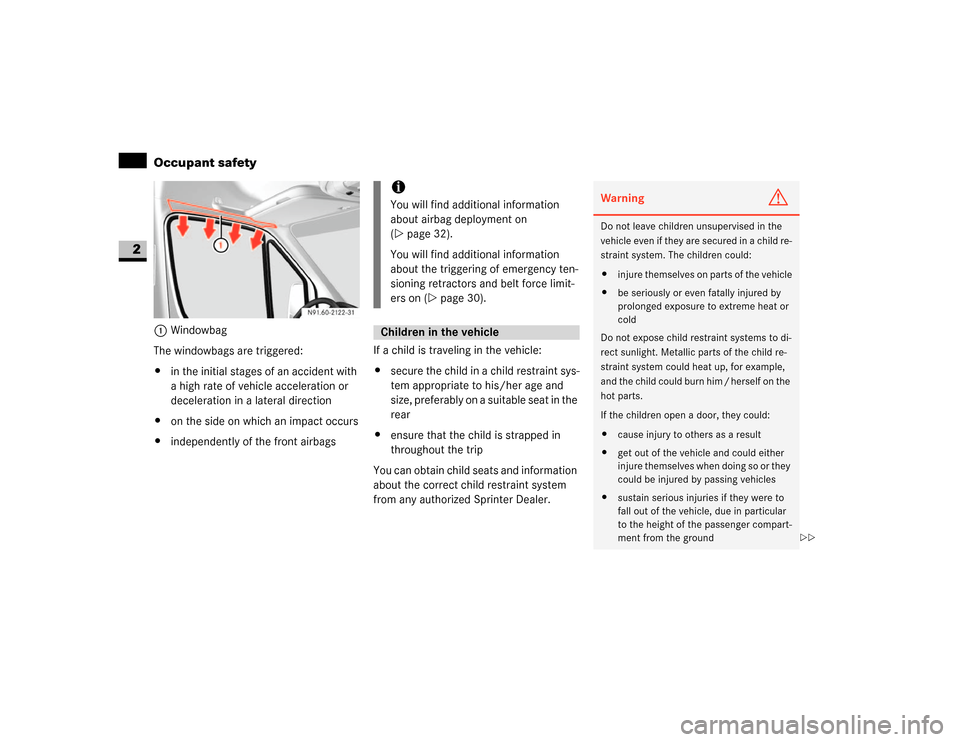
1Windowbag
The windowbags are triggered:
\4in the initial stages of an accident with
a high rate of vehicle acceleration or
deceleration in a lateral direction
\4on the side on which an impact occurs
\4independently of the front airbagsIf a child is traveling in the vehicle:
\4secure the child in a child restraint sys-
tem appropriate to his/her age and
size, preferably on a suitable seat in the
rear
\4ensure that the child is strapped in
throughout the trip
You can obtain child seats and information
about the correct child restraint system
from any authorized Sprinter Dealer.
iYou will find additional information
about airbag deployment on
(\2page 32).
You will find additional information
about the triggering of emergency ten-
sioning retractors and belt force limit-
ers on (\2page 30).Children in the vehicle
Warning
G
Do not leave children unsupervised in the
vehicle even if they are secured in a child re-
straint system. The children could:
\4injure themselves on parts of the vehicle
\4be seriously or even fatally injured by
prolonged exposure to extreme heat or
cold
Do not expose child restraint systems to di-
rect sunlight. Metallic parts of the child re-
straint system could heat up, for example,
and the child could burn him / herself on the
hot parts.
If the children open a door, they could:
\4cause injury to others as a result
\4get out of the vehicle and could either
injure themselves when doing so or they
could be injured by passing vehicles
\4sustain serious injuries if they were to
fall out of the vehicle, due in particular
to the height of the passenger compart-
ment from the ground
\2\2
Page 50 of 393
49 Safety
Anti-theft systems
2
If the anti-theft alarm system is enabled
and the vehicle is locked, a visual and au-
dible alarm is triggered if one of the side
windows or the rear window on your vehi-
cle is smashed and someone reaches into
the interior, for example.
Enabling the interior motion sensor
\1Close:
\4the side windows
\4the sliding sunroof
This will prevent false alarms.
\1Lock your vehicle.
The interior motion sensor is enabled
after approximately 40 seconds.Deactivating the interior motion sensor
Deactivate the interior motion sensor if
people or animals remain in the locked ve-
hicle. This will prevent false alarms.
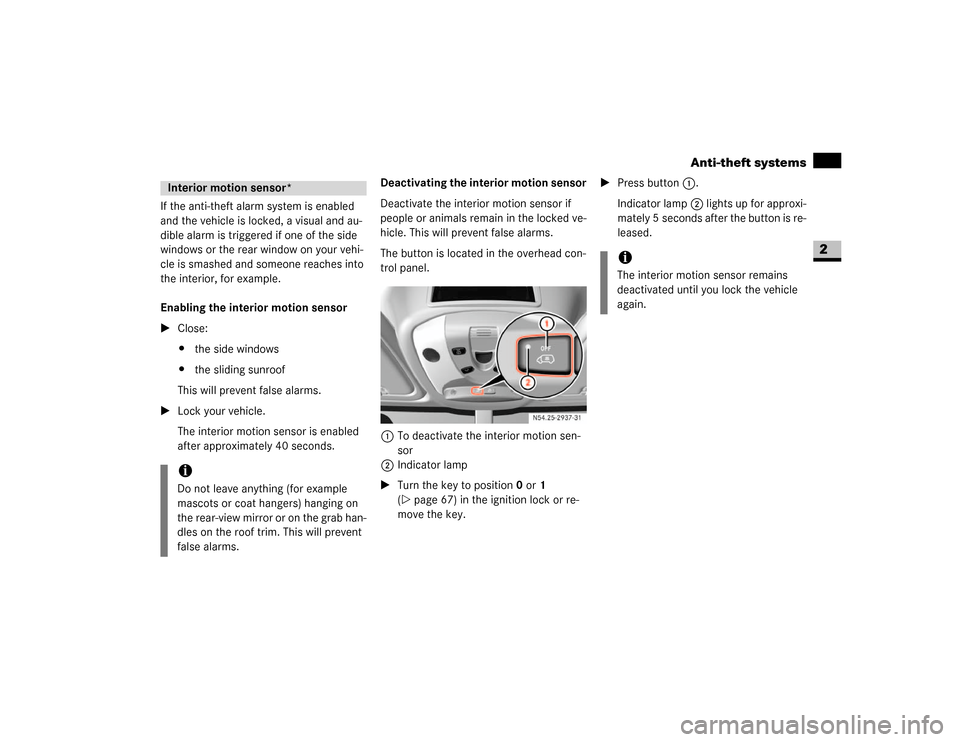
The button is located in the overhead con-
trol panel.
1To deactivate the interior motion sen-
sor
2Indicator lamp
\1Turn the key to position0 or1
(\2page 67) in the ignition lock or re-
move the key.\1Press button1.
Indicator lamp2 lights up for approxi-
mately 5 seconds after the button is re-
leased.Interior motion sensor*iDo not leave anything (for example
mascots or coat hangers) hanging on
the rear-view mirror or on the grab han-
dles on the roof trim. This will prevent
false alarms.
iThe interior motion sensor remains
deactivated until you lock the vehicle
again.
Page 128 of 393

127 Controls in detail
Good visibility
3
Wiping with washer fluid
\1Press the combination switch beyond
the pressure point in the direction of
arrow1.
The windshield wiper will wipe with
windshield washer fluid.
Vehicles with headlamp cleaning sys-
tem*:
If the low-beam headlamps have been
switched on, a high-pressure water jet
also cleans the headlamps.
Intermittent wipe
Only switch on intermittent wipe in damp
weather conditions or when it is raining.
Vehicles with rain sensor*:
The a rain sensor is activated when you
switch on intermittent wipe. The appropri-
ate wiping frequency is set automatically
according to the rain falling on the sensor.The switch is in the combination switch on
the left of the steering wheel.
1Switch
2To wipe with windshield washer fluid
3Intermittent wipe
4To switch off the wiper
5To wipe with windshield washer fluid
\1Turn key to position1 in the ignition
lock (\2page 67).Switching on intermittent wipe
\1Turn switch1 to 3.
Switching off intermittent wipe
\1Turn switch1 to 4.
Wiping with washer fluid
\1Turn switch1 to 5or 2 and keep it
pressed until the window is clean.
The windshield heating is operational while
the engine is running.
The windshield heating consumes a lot of
energy. You should therefore switch the
heating off as soon as the windshield is
clear.
The heating switches off automatically af-
ter approximately 5 minutes.
iWipe with windshield washer fluid even
when it is raining. By doing so you can
prevent smears on the windshield.
Rear window wiper*iThe rear window wiper switches on au-
tomatically if you engage reverse gear
and the windshield wipers are on.
N54.25-2924-31
Windshield heating*
Page 129 of 393

128 Controls in detailGood visibility
3
The switch for the windshield heating is on
the center console.
1To switch on / off\1To switch on: press upper part of
theP switch.
The indicator lamp in the switch comes
on.
\1To switch off: press upper part of
theP switch again.
\1The indicator lamp in the switch goes
out.
The rear window heating is operational
while the engine is running.
The rear window heating consumes a lot of
energy. You should therefore switch the
rear window heating off as soon as the win-
dow is clear. The heating switches off auto-
matically after a maximum of 12 minutes.The switch for the rear window heating is
on the center console.
1To switch on / off
\1To switch on: press upper part of
theF switch.
The indicator lamp in the switch comes
on.
\1To switch off: press upper part of
theF switch again.
The indicator lamp in the switch goes
out.Warning
G
Clear ice or snow from the windshield before
commencing a journey. Iced-up windows re-
strict your view. You could cause an acci-
dent and endanger yourself and others. Do
not start the vehicle if the windows are iced
up, fogged up or covered in snow.
N54.25-2920-31
Rear window heating*N54.25-2921-31
Page 131 of 393

130 Controls in detailTempmatic
3
Tempmatic is only operational while the
engine is running. You can use Tempmatic
to regulate or control the temperature au-
tomatically. The vehicle is either heated or
cooled, depending on the temperature se-
lected and the outside temperature.
The combination filter removes most dust
particles, pollen and unpleasant odors
from the outside air.
The interval for replacing the filter depends
on environmental factors, e.g. high air pol-
lution. The interval may be shorter than
that indicated in the Service Booklet.
Function
Page
1
Side window defroster
vents
135
2
Thumbwheel for air vents
3
Side air vents
4
Thumbwheel for side air
vents and defroster vents
135
5
Swiveling center air vents
6
Thumbwheel for center air
vents
7
Control panel\4Tempmatic
\4Rear heating/rear cool-
ing*
131
136
8
Switch\4Rear window heating*
\4Windshield heating*
128
127
9
Auxiliary heating switch*
Heater booster switch*
140
137
iCondensation may collect under the
vehicle while Tempmatic is in opera-
tion.
Warning
G
Follow the settings recommended on the
following pages for heating or cooling. The
windows could otherwise fog up. As a result,
you could be distracted from road and traffic
conditions and cause an accident.Warning
G
Air flowing out of the air vents in the footwell
when Tempmatic is in operation may be very
hot or very cold. There is therefore a risk of
frostbite or burns to bare skin in the imme-
diate proximity of these outlets. Keep bare
skin away from these air outlets. If neces-
sary, direct the airflow into a different area
of the vehicle interior using the air distribu-
tion control.
Page 132 of 393
131 Controls in detail
Tempmatic
3
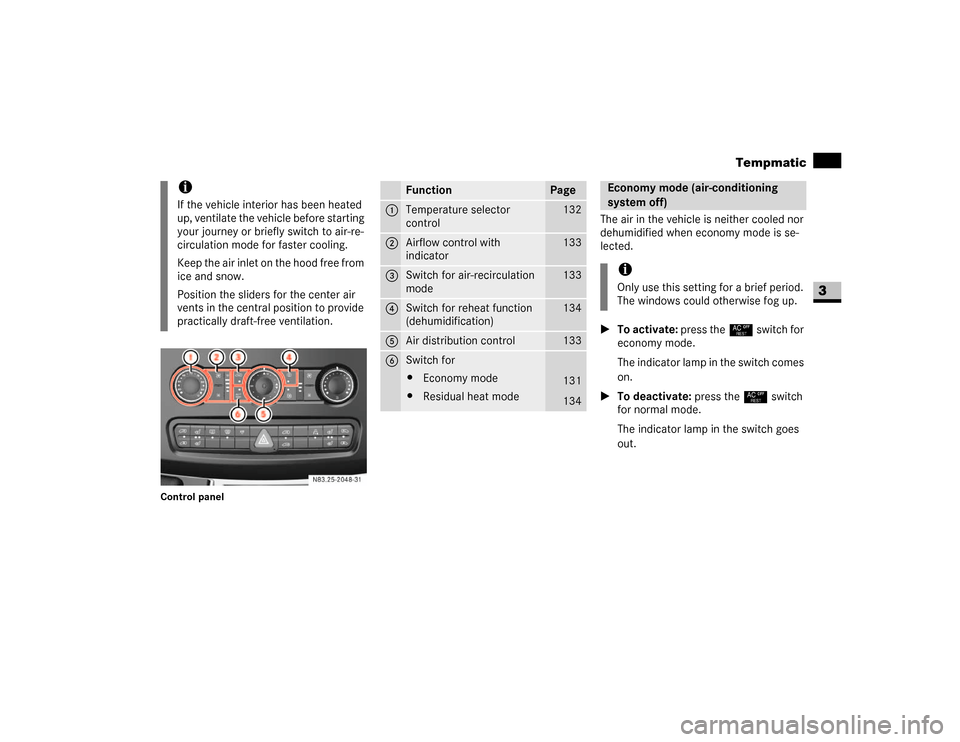
Control panel
The air in the vehicle is neither cooled nor
dehumidified when economy mode is se-
lected.
\1To activate: press the° switch for
economy mode.
The indicator lamp in the switch comes
on.
\1To deactivate: press the° switch
for normal mode.
The indicator lamp in the switch goes
out.
iIf the vehicle interior has been heated
up, ventilate the vehicle before starting
your journey or briefly switch to air-re-
circulation mode for faster cooling.
Keep the air inlet on the hood free from
ice and snow.
Position the sliders for the center air
vents in the central position to provide
practically draft-free ventilation.
N83.25-2048-31
Function
Page
1
Temperature selector
control
132
2
Airflow control with
indicator
133
3
Switch for air-recirculation
mode
133
4
Switch for reheat function
(dehumidification)
134
5
Air distribution control
133
6
Switch for
\4Economy mode
\4Residual heat mode
131
134
Economy mode (air-conditioning
system off)iOnly use this setting for a brief period.
The windows could otherwise fog up.
Page 133 of 393

132 Controls in detailTempmatic
3
Heating
\1Set temperature selector control 1
(\2page 131) as required, but do not
turn the control below the middle posi-
tion.
\1Set airflow control2 (\2page 131) as
required, but do not turn the control
below the second speed.
\1Set the air distribution control as
shown.
\1Close the center air vents.
\1Close the air vents.
\1Open the side air vents half-way and di-
rect them at the side windows.Ventilation
This setting rapidly ventilates the vehicle
interior.
\1Turn temperature selector control 1
(\2page 131) to the lowest setting
(maximum cooling).
\1Set airflow control2 (\2page 131) as
required, but do not turn the control
below the second speed.
\1Set air distribution control5
(\2page 131) to h.
\1Open as required:
\4the center air vents
\4the side air vents
\4the ventilation vents
\1Press the° switch.
The indicator lamp in the switch comes
on. The air-conditioning system is
switched off.The temperature is set using temperature
selector control1 in the control panel
(\2page 131).
The recommended setting for the target
temperature is 72.0 °F (22.2 °C) under
normal conditions, to which Tempmatic
adjusts as rapidly and as comfortably as
possible.
Only change the temperature in small in-
crements.
\1To increase: turn the temperature se-
lector control clockwise.
\1To reduce: turn the temperature selec-
tor control slightly counterclockwise.Basic setting
N83.40-2060-31
Setting the temperatureiIf you use the basic settings for heating
or ventilating the vehicle, you will only
rarely need to adjust the temperature,
airflow and air distribution
(\2page 132).
Page 134 of 393

133 Controls in detail
Tempmatic
3
1Airflow control
\1To increase: press theQ airflow
control.
\1To reduce: press the airflow
control.
The display next to the airflow controls
indicates the speed of the airflow.The air distribution is set using the air dis-
tribution control in the control panel
(\2page 131).
The markings on the air distribution control
have the following meanings:You can switch off the flow of outside air if
unpleasant odors are entering the vehicle
from outside, e.g. before driving through a
tunnel. No more outside air is taken in and
the air inside the vehicle is recirculated.
The switch for air-recirculation mode is in
the control panel (\2page 131).
\1To switch on: press theÄ switch.
The indicator lamp in the switch comes
on.Setting the airflowiThe blower switches off if you press the
ß airflow control again after the slowest
speed has been reached.N83.00-2125-31
Setting the air distributionMark
Meaning
h
\4Air from the air vents
ÔP
\4Air to the windshield
\4Air from the air vents
Ò
\4Air to the windshield
\4Air from the air vents
\4Air to the footwell
Ó
\4Air from the air vents
\4Air to the footwell
Air-recirculation modeWarning
G
Only switch over to air-recirculation mode
briefly if outside temperatures are low. The
windows could otherwise fog up. As a result,
you could be distracted from road and traffic
conditions and cause an accident.