Page 169 of 568
Multifunction Control Lever
The multifunction control lever is located on the left side
of the steering column.
Turn Signals
Move the lever up or down to signal a right-hand or
left-hand turn.
The arrow on either side of the instrument cluster flashes
to indicate the direction of the turn, and proper operation
of the front and rear turn signal lights. If a defective bulb
or wiring circuit is detected for the turn signal system, the
arrow indicators will flash at a faster rate. If an indicator
fails to light when the lever is moved, it would suggest
that the switch or indicator lamp is defective.
You can signal a lane change by moving the lever
partially up or down.
Turn Signal Auto-Mode
Tap the multi-function control lever once and the turn
signal (left or right) will flash 3 times, and automatically
turn off.
Turn Signal Lever
UNDERSTANDING THE FEATURES OF YOUR VEHICLE 169
3
Page 170 of 568
Passing Light
You can signal another vehicle with your headlights by
partially pulling the multifunction lever toward the steer-
ing wheel. This will cause the high beam headlights to
turn on until the lever is released.
High Beam / Low Beam Select Switch
Pull the multifunction control lever fully toward the
steering wheel to switch the headlights from HIGH or
LOW beam.
High Beam / Low Beam
170 UNDERSTANDING THE FEATURES OF YOUR VEHICLE
Page 173 of 568
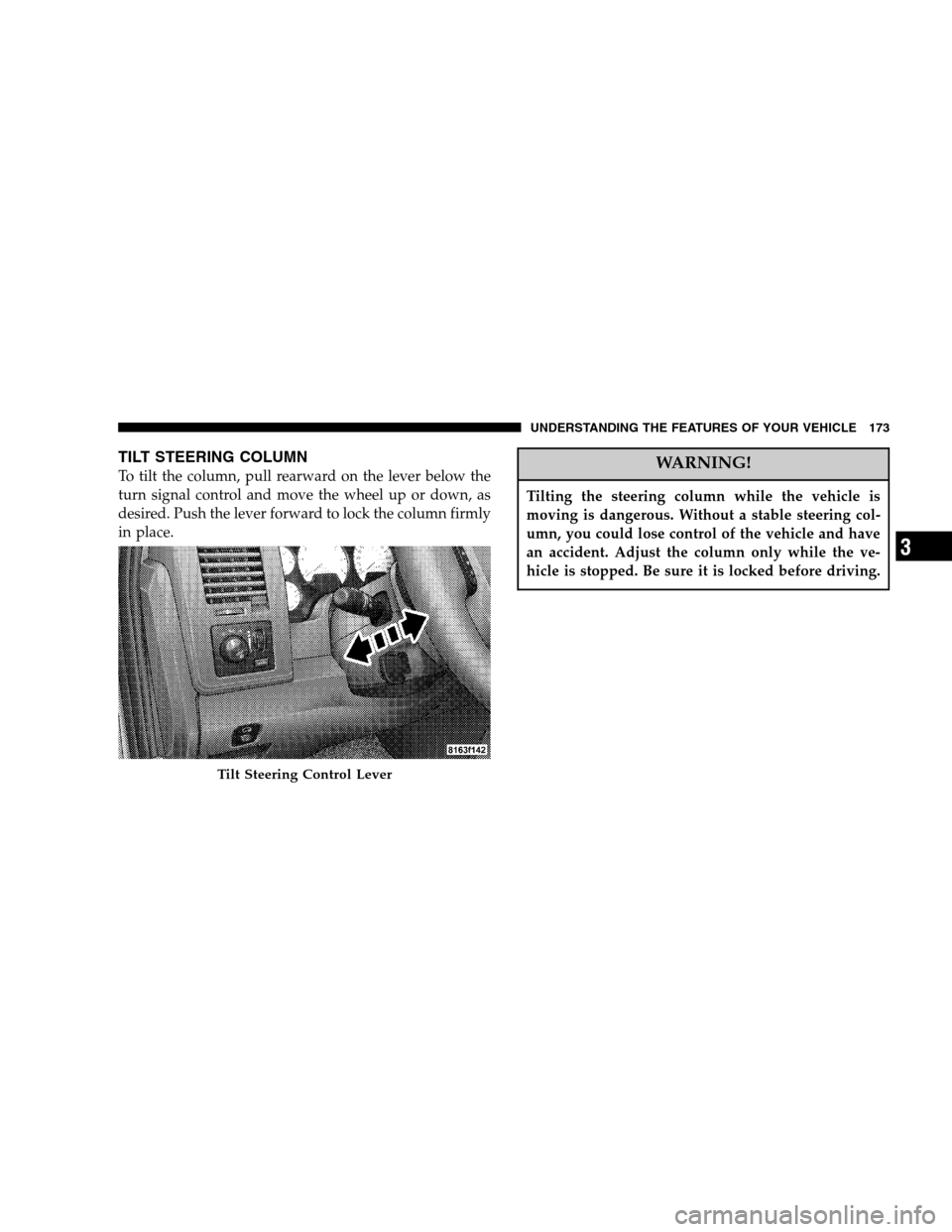
TILT STEERING COLUMN
To tilt the column, pull rearward on the lever below the
turn signal control and move the wheel up or down, as
desired. Push the lever forward to lock the column firmly
in place.WARNING!
Tilting the steering column while the vehicle is
moving is dangerous. Without a stable steering col-
umn, you could lose control of the vehicle and have
an accident. Adjust the column only while the ve-
hicle is stopped. Be sure it is locked before driving.
Tilt Steering Control Lever
UNDERSTANDING THE FEATURES OF YOUR VEHICLE 173
3
Page 174 of 568
DRIVER ADJUSTABLE PEDALS — IF EQUIPPED
The power adjustable accelerator and brake pedals allow
the driver to establish a comfortable position relative to
the steering wheel and pedals.
Adjustment
1. Position the driver seat so that you are at least 10
inches (254 mm) away from the airbag located in the
center of the steering wheel.
2. Fasten and adjust the seatbelts.
3. Move the adjustable pedal switch, located to the left of
the steering column near the parking brake release, in the
direction you desire to move the pedals.
4. The pedalscannotbe adjusted when the vehicle is in
R (Reverse) or when the Speed Control is SET.
Adjustable Pedals Switch
174 UNDERSTANDING THE FEATURES OF YOUR VEHICLE
Page 175 of 568
CAUTION!
Do not place any article under the adjustable pedals
or impede its ability to move as it may cause damage
to the pedal controls. Pedal travel may become
limited if movement is stopped by an obstruction in
the adjustable pedal’s path.
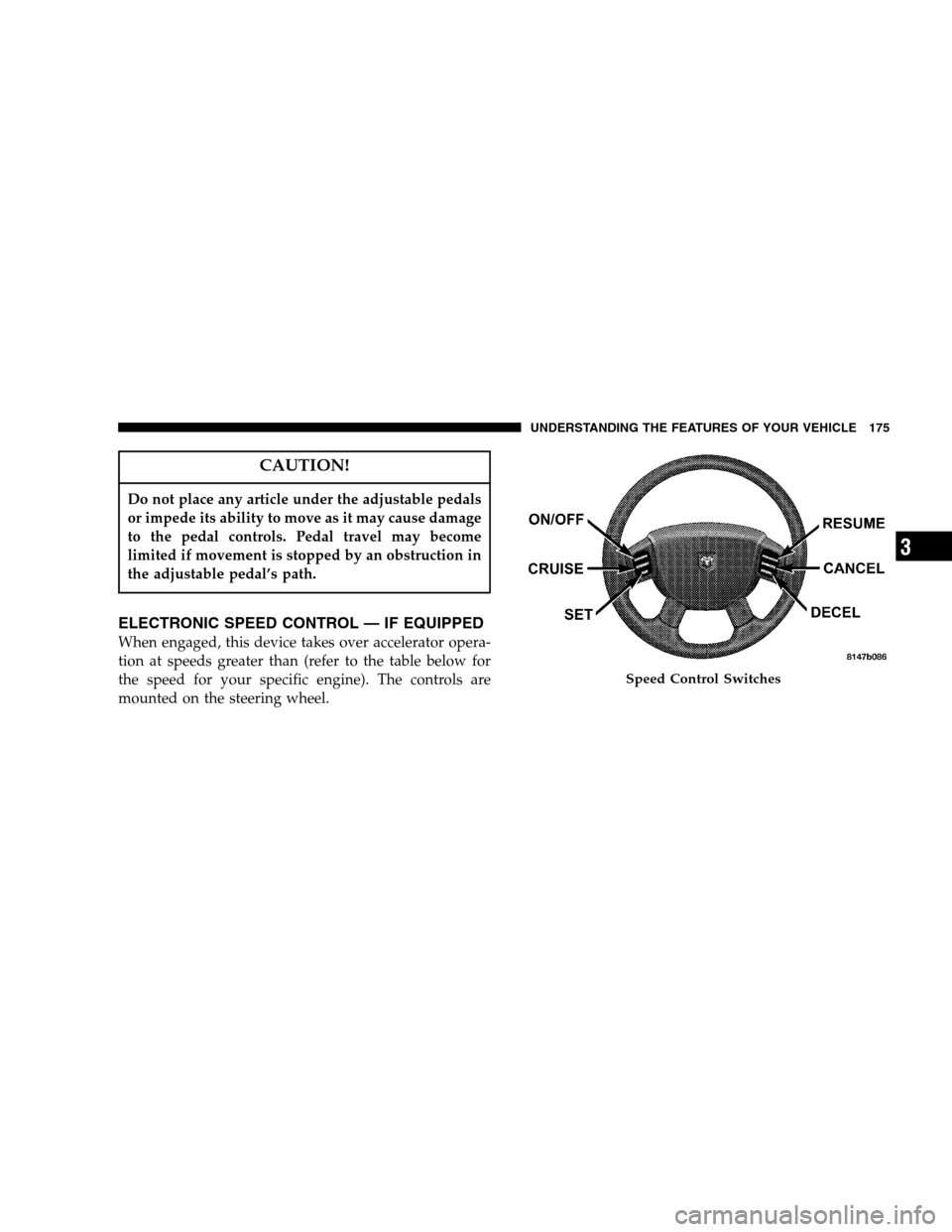
ELECTRONIC SPEED CONTROL — IF EQUIPPED
When engaged, this device takes over accelerator opera-
tion at speeds greater than (refer to the table below for
the speed for your specific engine). The controls are
mounted on the steering wheel.
Speed Control Switches
UNDERSTANDING THE FEATURES OF YOUR VEHICLE 175
3
Page 238 of 568
NOTE:The radio, steering wheel radio controls (if
equipped), and 6 disc CD/DVD changer (if equipped)
will remain active for up to 10 minutes after the ignition
switch has been turned off. Opening a vehicle front door
will cancel this feature.
SALES CODE REF — AM/FM/CD (SINGLE DISC)
RADIO WITH OPTIONAL SATELLITE RADIO AND
HANDS FREE PHONE CAPABILITY
NOTE:The radio sales code is located on the lower right
side of your radio faceplate.
Operating Instructions - Radio Mode
NOTE:The ignition switch must be in the ON or ACC
position to operate the radio.
REF Radio
238 UNDERSTANDING YOUR INSTRUMENT PANEL
Page 280 of 568

REMOTE SOUND SYSTEM CONTROLS — IF
EQUIPPED
The remote sound system controls are located on the rear
surface of the steering wheel. Reach behind the wheel to
access the switches.The right hand control is a rocker type switch with a
button in the center. Pressing the top of the switch will
increase the volume and pressing the bottom of the
switch will decrease the volume. The center button of the
right hand control will allow you to change the mode.
The left hand control is a rocker type switch with a push
button in the center. The function of the left hand control
is different depending on which mode you are in.
The following describes the left hand control operation in
each mode.
Radio Operation
Pressing the top of the left side switch will SEEK up for
the next listenable station and pressing the bottom of the
switch will SEEK down for the next listenable station.
The button located in the center of the left hand control
will tune to the next pre-set station that you have
programmed in the radio pre-set push-buttons.
Remote Sound System Controls
280 UNDERSTANDING YOUR INSTRUMENT PANEL
Page 298 of 568

▫Shifting Procedure - Manually Shifted Transfer
Case..............................319
▫Transfer Case Reminder Light............320
▫Electronically Shifted Transfer Case Operating
Information/Precautions (5 Position Switch)—
If Equipped.........................321
▫Shifting Procedure - Electronically Shifted
Transfer Case........................326
▫Electronically Shifted Transfer Case Operating
Information/Precautions (4 Position Switch)—
If Equipped.........................329
▫Shifting Procedure - Electronically Shifted
Transfer Case........................333
�Limited-Slip Differential — If Equipped.......336
�Driving On Slippery Surfaces..............337�Driving Off-Road.......................337
�Parking Brake.........................338
�Brake System..........................340
▫3500 Dual Rear Wheel Models Only........340
▫Brake Noise.........................340
▫Rear Wheel Anti-Lock Brake System —
RWAL .............................341
▫Four-Wheel Anti-Lock Brake System —
If Equipped.........................341
�Power Steering........................343
�Electronic Brake Control System
(ABS/TCS/BAS/Hsa/ERM/ESP) –
If Equipped...........................344
▫ABS (Anti-Lock Brake System)............344
298 STARTING AND OPERATING