Page 143 of 492

3. Simultaneously press and hold both the HomeLink
button that you want to train and the hand-held trans-
mitter buttons.Do not release the buttons until step 4
has been completed.
NOTE:Some gate operators and garage door openers
may require you to replace this Programming Step 3 with
procedures noted in the9Gate Operator/Canadian Pro-
gramming9section.
4. The HomeLink indicator light will flash slowly and
then rapidly after HomeLink successfully receives the
frequency signal from the hand-held transmitter. Release
both buttons after the indicator light changes from the
slow to the rapid flash.
5. Press and hold the just trained HomeLink button and
observe the indicator light. If the indicator lightstays on
constantly, programming is completeand your device
should activate when the HomeLink button is pressed
and released.NOTE:To program the remaining two HomeLink but-
tons, begin with9Programming9step two. Do not repeat
step one.
If the indicator light blinksrapidly for two seconds and
then turns to a constant light, continue with(Program-
ming(steps 6-8to complete the programming of a rolling
code equipped device (most commonly a garage door
opener).
6. At the garage door opener receiver (motor-head unit)
in the garage, locate the9learn9or9smart9button. This
can usually be found where the hanging antenna wire is
attached to the motor-head unit.
7. Firmly press and release the9learn9or9smart9button.
(The name and color of the button may vary by manu-
facturer.)
NOTE:There are 30 seconds in which to initiate step
eight.
142 UNDERSTANDING THE FEATURES OF YOUR VEHICLE
Page 144 of 492

8. Return to the vehicle and firmlypress, hold for two
seconds and releasethe programmed HomeLink button.
Repeat the(press/hold/release(sequence a second time,
and, depending on the brand of the garage door opener
(or other rolling code equipped device), repeat this
sequence a third time to complete the programming.
HomeLink should now activate your rolling code
equipped device.
NOTE:To program the remaining two HomeLink but-
tons, begin with9Programming9step two. Do not repeat
step one. For questions or comments, please contact
HomeLink atwww.homelink.com or 1-800-355-3515.
Canadian Programming/Gate Programming
Canadian radio-frequency laws require transmitter sig-
nals to9time-out9(or quit) after several seconds of
transmission which may not be long enough for
HomeLink to pick up the signal during programming.Similar to this Canadian law, some U.S. gate operators are
designed to9time-out9in the same manner.
If you live in Canada or you are having difficulties
programming a gate operator by using the9Program-
ming9procedures (regardless of where you live),replace
(Programming HomeLink(step 3with the following:
NOTE:If programming a garage door opener or gate
operator, it is advised to unplug the device during the
9cycling9process to prevent possible overheating.
3. Continue to press and hold the HomeLink button
while youpress and release every two seconds(9cycle9)
your hand-held transmitter until the frequency signal has
successfully been accepted by HomeLink. (The indicator
light will flash slowly and then rapidly.) Proceed with
9Programming9step four to complete.
UNDERSTANDING THE FEATURES OF YOUR VEHICLE 143
3
Page 145 of 492

Using HomeLink
To operate, simply press and release the programmed
HomeLink button. Activation will now occur for the
trained device (i.e. garage door opener, gate operator,
security system, entry door lock, home/office lighting,
etc.). For convenience, the hand-held transmitter of the
device may also be used at any time. In the event that
there are still programming difficulties or questions,
contact HomeLink at:www.homelink.com or 1-800-355-
3515.
Erasing HomeLink Buttons
To erase programming from the three buttons (individual
buttons cannot be erased but can be9reprogrammed9-
note below), follow the step noted:
²Press and hold the two outer HomeLink buttons until
the indicator light begins to flash-after 20 seconds.
Release both buttons. Do not hold for longer that 30seconds. HomeLink is now in the train (or learning)
mode and can be programmed at any time beginning
with9Programming9- step 2.
Reprogramming a Single HomeLink Button
To program a device to HomeLink using a HomeLink
button previously trained, follow these steps:
1. Press and hold the desired HomeLink button.DO
NOTrelease the button.
2. The indicator light will begin to flash after 20 seconds.
Without releasing the HomeLink button, proceed with
9Programming9step 2
For questions or comments, contact HomeLink at:
www.homelink.com or 1-800-355-3515.
144 UNDERSTANDING THE FEATURES OF YOUR VEHICLE
Page 146 of 492

Security
If you sell your vehicle, be sure to erase the frequencies.
To erase all of the previously trained frequencies, hold
down both outside buttons until the green light begins to
flash.
This device complies with part 15 of FCC rules and with
RSS-210 of Industry Canada. Operation is subject to the
following conditions:
²This device may not cause harmful interference.
²This device must accept any interference that may be
received including interference that may cause undes-
ired operation.
NOTE:Changes or modifications not expressly ap-
proved by the party responsible for compliance could
void the user's authority to operate the equipment.HomeLinktis a trademark owned by Johnson Controls,
Inc.
POWER SUNROOF Ð IF EQUIPPED
The power sunroof switch is located between the sun
visors on the overhead console.
NOTE:The Power Accessory Delay feature will allow
the power sunroof to operate for ten minutes after the
ignition is turned off.
UNDERSTANDING THE FEATURES OF YOUR VEHICLE 145
3
Page 149 of 492

Wind Buffeting
Wind buffeting can be described as the perception of
pressure on the ears or a helicopter type sound in the
ears. Your vehicle may exhibit wind buffeting with the
windows down, or the sunroof (if equipped) in certain
open or partially open positions. This is a normal occur-
rence and can be minimized. If the buffeting occurs with
the rear windows open, open the front and rear windows
together to minimize the buffeting. If the buffeting occurs
with the sunroof open, adjust the sunroof opening to
minimize the buffeting or open any window.
Sunroof Maintenance
Use only a non-abrasive cleaner and a soft cloth to clean
the glass panel.
Sunroof Fully Closed
Press the switch forward and release to ensure that the
sunroof is fully closed.
ELECTRICAL POWER OUTLETS
The auxiliary electrical outlet can provide power for in
cab accessories designed for use with the standard ªcigar
lighterº plug. The outlet is located in the instrument
panel below and to the right of the Climate Control
Panel. A cap is attached to the outlet base indicating
ªPower Outletº 12V-20A.
There is an additional Power Outlet in the center console
of a 40/20/40 seat (if equipped).
The outlet(s) has/have a fused direct feed from the
battery so it/they receive power whether the ignition is
ON or OFF.
148 UNDERSTANDING THE FEATURES OF YOUR VEHICLE
Page 150 of 492

All accessories connected to this/these outlet(s) should
be removed or turned OFF when the vehicle is not in use
to protect the battery against discharge.
NOTE:If desired, all of the power outlets can be
converted by your authorized dealer to provide power
with the ignition switch in the ON position only.CAUTION!
Electrical Outlet Use With Engine Off
²Many accessories that can be plugged in draw
power from the vehicle's battery, even when not
in use (i.e. cellular phones, etc.). Eventually, if
plugged in long enough, the vehicle's battery will
discharge sufficiently to degrade battery life
and/or prevent engine starting.
²Accessories that draw higher power (i.e. coolers,
vacuum cleaners, lights, etc.), will discharge the
battery even more quickly. Only use these inter-
mittently and with greater caution.
²After the use of high power draw accessories, or
long periods of the vehicle not being started (with
accessories still plugged in), the vehicle must be
driven a sufficient length of time to allow the
generator to recharge the vehicle's battery.
UNDERSTANDING THE FEATURES OF YOUR VEHICLE 149
3
Page 151 of 492
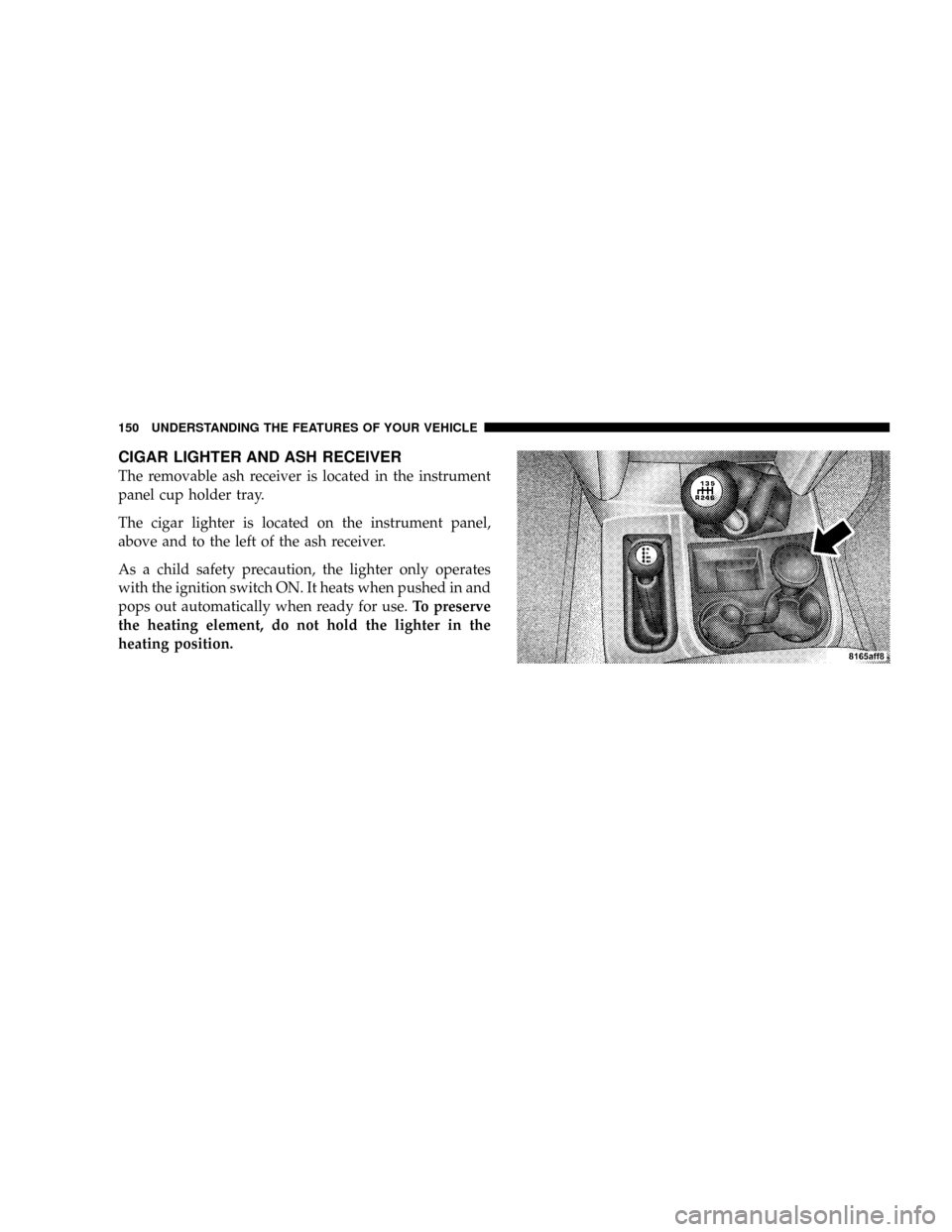
CIGAR LIGHTER AND ASH RECEIVER
The removable ash receiver is located in the instrument
panel cup holder tray.
The cigar lighter is located on the instrument panel,
above and to the left of the ash receiver.
As a child safety precaution, the lighter only operates
with the ignition switch ON. It heats when pushed in and
pops out automatically when ready for use.To preserve
the heating element, do not hold the lighter in the
heating position.
150 UNDERSTANDING THE FEATURES OF YOUR VEHICLE
Page 162 of 492
Raise the right side of the tailgate until the right side
pivot clears the hanger bracket. Slide the entire tailgate to
the right to free the left side pivot. Remove the tailgate
from the vehicle entirely. Do not carry the tailgate loose in
the truck pickup box.
NOTE:Dual rear wheel pickup models require properly
spaced rear clearance lights. If such a vehicle is operated
without a tailgate, suitable lights must be installed.
UNDERSTANDING THE FEATURES OF YOUR VEHICLE 161
3