Page 121 of 400
CUP HOLDERS
Front Seat Cup Holders
The cup holders are located in the forward edge of the
center console.
Rear Seat Cup Holders
The rear seat cup holders are located in the center armrest
between the rear seats. The cup holders are positioned
forward in the armrest and side-by-side to provide
convenient access to beverage cans or bottles while
maintaining a resting place for the rear occupants’ el-
bows.
Front Seat Cup Holders
Rear Seat Cup Holders
UNDERSTANDING THE FEATURES OF YOUR VEHICLE 121
3
Page 123 of 400

The 60/40 split-folding rear seat provides cargo-carrying
versatility. The seatbacks fold down easily by pulling
nylon tabs between the seatbacks and the bolsters. When
the seats are folded down, they provide a continuous,
nearly flat extension of the removable tri-fold load floor.
Tri-Fold Upper Load Floor
The removable tri-fold upper load floor has two different
surfaces for increased utility. One side is carpeted for a
plush appearance and the other side is covered with
vinyl for easy cleaning. The panel, sandwiched between
the carpet and the washable-vinyl, is constructed from a
strong lightweight material that gives the floor its load-
bearing strength.
You can place the load floor in a partially folded position,
a fully folded position, or a flat position. You can also
remove it from the vehicle. Folding and/or removing the
load floor will add four inches to the height of the cargo
area for increased utility. Use the handle to adjust the
position of the load floor. The load floor positions are
shown in the following illustrations.
Load Floor Handle
UNDERSTANDING THE FEATURES OF YOUR VEHICLE 123
3
Page 125 of 400
Rollaway Tonneau Cover — If Equipped
The removable rollaway tonneau cover mounts in the
cargo area behind the top of the rear seats.
The tonneau cover, when extended, covers the cargo area
to keep items out of sight. Notches in the trim panels near
the liftgate opening secure the extended tonneau cover in
place.The tonneau cover rolls away neatly inside its housing
when not in use. You can also remove the tonneau cover
from the vehicle to make more room in the cargo area.
UNDERSTANDING THE FEATURES OF YOUR VEHICLE 125
3
Page 129 of 400
•Place as much cargo as possible in front of the rear
axle. Too much weight or improperly placed weight
over or behind the rear axle can cause the rear of the
vehicle to sway.
•Do not pile luggage or cargo higher than the top of the
seatback. This could impair visibility or become a
dangerous projectile in a sudden stop or collision.
WARNING!
To help protect against personal injury, passengers
should not be seated in the rear cargo area. The rear
cargo space is intended for load carrying purposes
only, not for passengers, who should sit in seats and
use seat belts.
ROOF LUGGAGE RACK — IF EQUIPPED
The roof luggage rack consists of side rails and adjustable
crossbars. The roof luggage rack is designed to carry up
to 150 lbs (68 kg) of cargo uniformly distributed over
both crossbars.
When loading cargo on the roof luggage rack, distribute
the cargo weight evenly on the crossbars. The roof
luggage rack does not increase the total load carrying
capacity of the vehicle.Be sure that the total load of
cargo inside the vehicle plus that on the external rack
does not exceed the maximum vehicle load capacity.
Refer to the “Tire and Loading Information” placard for
more information about cargo and load capacity. The
placard is located on either the driver’s side “B” pillar or
the driver door.
UNDERSTANDING THE FEATURES OF YOUR VEHICLE 129
3
Page 192 of 400

Temperature Control
The rotary knob in the center controls
air temperature. Rotate the control to
the left for cooler air temperature and
to the right for warmer air tempera-
ture. Rotating the control to the ex-
treme left provides the coldest setting.
Rotating the control to the extreme
right provides the warmest setting.
Mode Control
The rotary knob on the right controls
airflow distribution. Dots between
each of the mode selections identify
intermediate modes that allow the op-
erator to fine-tune airflow distribu-
tion. The mode settings are as follows:
•Defrost
Air is directed to the windshield through the
outlets at the base of the windshield. Air is
also directed to the front door windows through the
side window demister grilles.NOTE:
To improve fuel economy, leave in defrost only
when necessary.
•Defrost/Floor
Air flows through the front and rear floor
outlets and the outlets at the base of the
windshield. Air is also directed to the front
door windows through the side window demister
grilles.
•
Floor
Air flows through the floor outlets located
under the instrument panel and into the rear
seating area through vents under the front seats.
•
Bi-Level
Air flows through the outlets located in the
instrument panel and through the outlets lo-
cated on the floor. Air flows through the registers in
the back of the center console to the rear seat
passengers. These registers can be closed to par-
tially block airflow.
192 UNDERSTANDING YOUR INSTRUMENT PANEL
Page 197 of 400

The operator can override the AUTO mode setting to
change airflow distribution by rotating the Mode Control
knob (on the right) to one of the following positions.
•Defrost
Air is directed to the windshield through the
outlets at the base of the windshield. Air is
also directed to the front door windows through the
side window demister grilles.
•
Defrost/Floor
Air flows through the front and rear floor
outlets and the outlets at the base of the
windshield. Air is also directed to the front
door windows through the side window demister
grilles.
•
Floor
Air flows through the floor outlets located
under the instrument panel and into the rear
seating area through vents under the front seats.•
Bi-Level
Air flows through the outlets located in the
instrument panel and through the outlets lo-
cated on the floor. Air flows through the registers in
the back of the center console to the rear seat
passengers. These registers can be closed to block
airflow.
•
Panel
Air flows through the outlets located in the
instrument panel. Air flows through the regis-
ters in the back of the center console to the rear seat
passengers. These registers can be closed to block
airflow.
•
Air Conditioning Control
Press this button to turn on the air condition-
ing during manual operation only. When the
air conditioning is turned on, cool dehumidi-
fied air will flow through the outlets selected with
the Mode control dial. Press this button a second
time to turn off the air conditioning. An LED in the
button illuminates when manual compressor opera-
tion is selected.
UNDERSTANDING YOUR INSTRUMENT PANEL 197
4
Page 340 of 400
Cavity Car-
tridge
FuseMini
FuseDescription
1 60 Amp
Yellow— Ignition Off Draw (IOD)
2 40 Amp
Green— Battery
3———
4 40 Amp
Green— Battery
5 30 Amp
Pink— Heated Seats - if
equipped
6 — 20 Amp
YellowFuel Pump
7———
8 — 15 Amp
BlueIgnition Switch/Airbag
Control Module (ACM)
9 — 20 Amp
YellowConsole Power Outlet
10 — — —
11*———
12*———
Rear Power Distribution Center
340 MAINTAINING YOUR VEHICLE
Page 342 of 400
Cavity Car-
tridge
FuseMini
FuseDescription
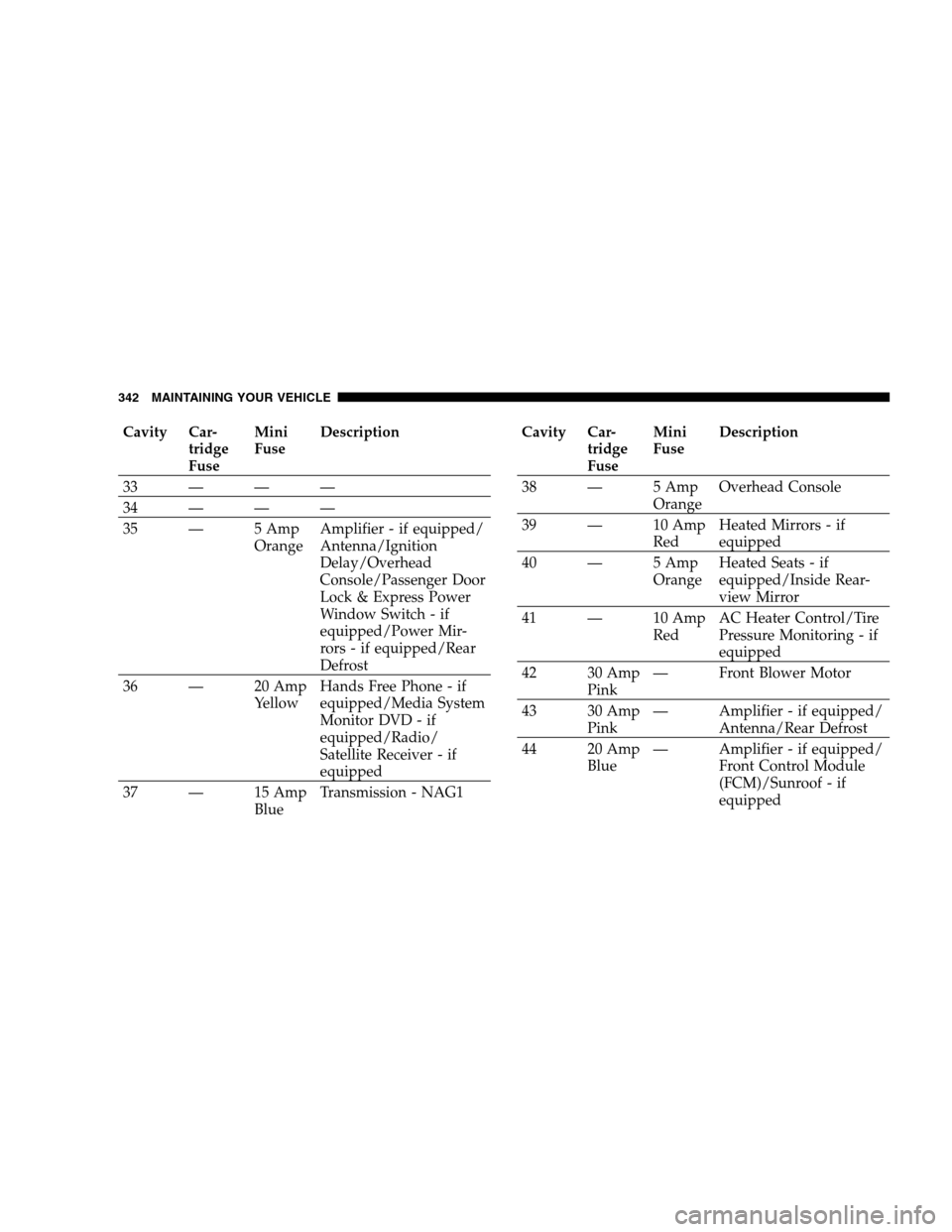
33 — — —
34 — — —
35 — 5 Amp
OrangeAmplifier - if equipped/
Antenna/Ignition
Delay/Overhead
Console/Passenger Door
Lock & Express Power
Window Switch - if
equipped/Power Mir-
rors - if equipped/Rear
Defrost
36 — 20 Amp
YellowHands Free Phone - if
equipped/Media System
Monitor DVD - if
equipped/Radio/
Satellite Receiver - if
equipped
37 — 15 Amp
BlueTransmission - NAG1Cavity Car-
tridge
FuseMini
FuseDescription
38 — 5 Amp
OrangeOverhead Console
39 — 10 Amp
RedHeated Mirrors - if
equipped
40 — 5 Amp
OrangeHeated Seats - if
equipped/Inside Rear-
view Mirror
41 — 10 Amp
RedAC Heater Control/Tire
Pressure Monitoring - if
equipped
42 30 Amp
Pink— Front Blower Motor
43 30 Amp
Pink— Amplifier - if equipped/
Antenna/Rear Defrost
44 20 Amp
Blue— Amplifier - if equipped/
Front Control Module
(FCM)/Sunroof - if
equipped
342 MAINTAINING YOUR VEHICLE