Page 76 of 400

�To Open And Close The Hood..............88
�Lights................................90
▫Interior Lights........................90
▫Battery Saver.........................91
▫Headlamp Delay.......................92
▫Headlights, Parking Lights, Panel Lights......92
▫Daytime Running Lights (Canada Only)......93
▫Lights-On Reminder....................93
▫Fog Lights — If Equipped................93
▫Cargo Light — If Equipped...............94
▫Multifunction Control Lever...............94
�Windshield Wipers And Washers.............96
▫Windshield Wipers.....................96▫Windshield Washers....................97
�Tilt Steering Column.....................98
�Electronic Speed Control — If Equipped.......99
▫ToActivate ...........................99
▫To Set At A Desired Speed...............100
▫To Deactivate........................100
▫To Resume Speed.....................100
▫To Vary The Speed Setting...............100
▫To Accelerate For Passing...............102
�Overhead Console......................103
▫Courtesy/Reading Lights................103
�Compass/Temperature Mini-Trip Computer....104
▫US/M Button........................104
76 UNDERSTANDING THE FEATURES OF YOUR VEHICLE
Page 94 of 400
CARGO Light — If Equipped
The cargo lights are turned on by pressing on the
CARGO button. The interior lights will also turn on
when the cargo lights are on. The cargo lights will also
turn on for 30 seconds when a key fob Unlock is pressed,
as part of the illuminated entry feature.
Multifunction Control Lever
The multifunction control lever is located on the left side
of the steering column.
Turn Signals
Move the lever up or down to signal a right-hand or
left-hand turn.
94 UNDERSTANDING THE FEATURES OF YOUR VEHICLE
Page 96 of 400
High Beam / Low Beam Select Switch
Pull the multifunction control lever fully toward the
steering wheel to switch the headlights from HIGH or
LOW beam.
WINDSHIELD WIPERS AND WASHERS
The multifunction control lever is located on the left side
of the steering column.
Windshield Wipers
The wipers and washers are operated by a switch in the
multifunction control lever. Turn the end of the handle to
select the desired wiper speed.
96 UNDERSTANDING THE FEATURES OF YOUR VEHICLE
Page 98 of 400
after the washer knob is released. It will then resume the
intermittent interval previously selected. If the washer
knob is pushed, for a period greater than 1 second, while
in the OFF position, the wiper will wipe approximately
three wipes, after the wash knob is released.
To prevent freeze-up of your windshield washer system
in cold weather, select a solution or mixture that meets or
exceeds the temperature range of your climate. This
rating information can be found on most washer fluid
containers.
TILT STEERING COLUMN
To tilt the column, pull rearward on the lever below the
turn signal control and move the wheel up or down, as
desired. Push the lever forward to lock the column firmly
in place.Tilt Steering Column Lever
98 UNDERSTANDING THE FEATURES OF YOUR VEHICLE
Page 99 of 400
WARNING!
Tilting the steering column while the vehicle is
moving is dangerous. Without a stable steering col-
umn, you could lose control of the vehicle and have
an accident. Adjust the column only while the ve-
hicle is stopped. Be sure it is locked before driving.
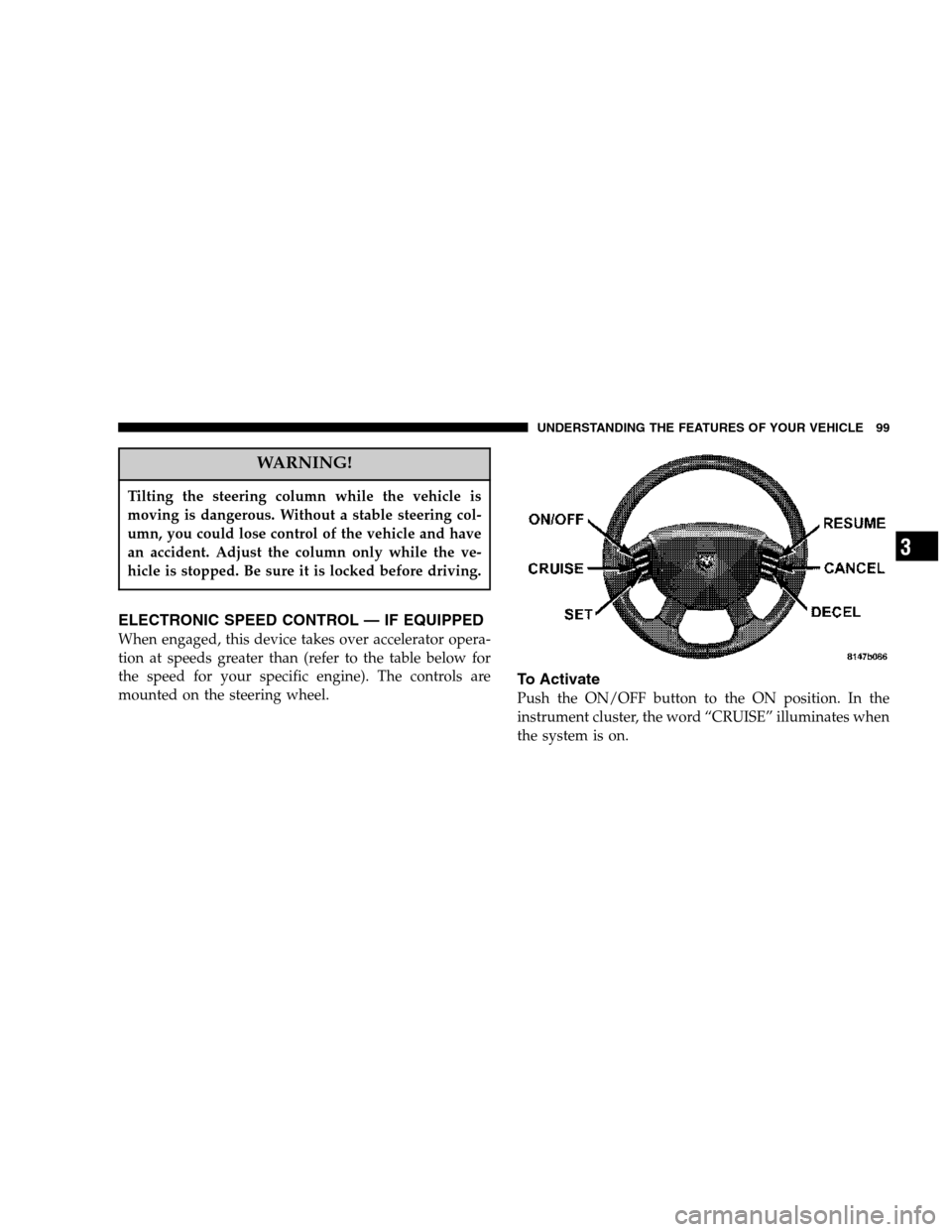
ELECTRONIC SPEED CONTROL — IF EQUIPPED
When engaged, this device takes over accelerator opera-
tion at speeds greater than (refer to the table below for
the speed for your specific engine). The controls are
mounted on the steering wheel.
To Activate
Push the ON/OFF button to the ON position. In the
instrument cluster, the word “CRUISE” illuminates when
the system is on.
UNDERSTANDING THE FEATURES OF YOUR VEHICLE 99
3
Page 145 of 400
Electrical Disturbances
Radio waves may pick up electrical disturbances during
transmission. They mainly affect the wave amplitude,
and thus remain a part of the AM reception. They
interfere very little with the frequency variations that
carry the FM signal.
AM Reception
AM sound is based on wave amplitude, so AM reception
can be disrupted by such things as lightning, power lines
and neon signs.
FM Reception
Because FM transmission is based on frequency varia-
tions, interference that consists of amplitude variations
can be filtered out, leaving the reception relatively clear,
which is the major feature of FM radio.
NOTE:The radio, steering wheel radio controls (if
equipped), and 6 disc CD/DVD changer (if equipped)
will remain active for up to 10 minutes after the ignition
switch has been turned off. Opening a vehicle front door
will cancel this feature.
INSTRUMENT PANEL AND CONTROLS 145
4
Page 172 of 400
REMOTE SOUND SYSTEM CONTROLS — IF
EQUIPPED
The remote sound system controls are located on the rear
surface of the steering wheel. Reach behind the wheel to
access the switches.The right hand control is a rocker type switch with a push
button in the center. Pressing the top of the switch will
increase the volume and pressing the bottom of the
switch will decrease the volume.
The button located in the center of the right hand control
will switch modes to Radio or CD.
The left hand control is a rocker type switch with a push
button in the center. The function of the left hand control
is different depending on which mode you are in.
The following describes the left hand control operation in
each mode.
Radio Operation
Pressing the top of the switch will SEEK up for the next
listenable station and pressing the bottom of the switch
will SEEK down for the next listenable station.
172 INSTRUMENT PANEL AND CONTROLS
Page 184 of 400

▫NV 244 Generation II Transfer Case Operating
Information / Precautions...............205
▫Shifting Procedure - NV 244 Generation II Transfer
Case..............................209
�Limited-Slip Rear Axle Differential— If Equipped 210
�Driving On Slippery Surfaces..............211
�Parking Brake.........................212
�Brake System..........................213
▫Rear Wheel Anti-Lock Brake System –
If Equipped.........................213
▫Four-Wheel Anti-Lock Brake System........214
�Power Steering........................216
�Rocking The Vehicle.....................217
�Tire Safety Information...................218▫Tire Markings........................218
▫Tire Identification Number (TIN)..........221
▫Tire Loading And Tire Pressure...........222
�Tires — General Information...............226
▫Tire Pressure.........................226
▫Tire Inflation Pressures.................227
▫Radial-Ply Tires......................229
▫Compact Spare Tire — If Equipped.........230
▫Limited Use Spare — If Equipped.........231
▫Tire Spinning........................231
▫Tread Wear Indicators..................232
▫LifeOfTire .........................233
▫Replacement Tires.....................233
184 STARTING AND OPERATING