2007 DODGE CHARGER ignition
[x] Cancel search: ignitionPage 27 of 384

To Engage the Child Protection Door Lock
1. Open the rear door.
2. Insert the tip of the vehicle’s ignition key or alike into
the child lock control and pull it upward.
3. Repeat Steps 1 and 2 on the opposite rear door.
NOTE:When the child lock system is engaged, the door
can be opened only by using the outside door handle
even though the inside door lock is in the unlocked
position.
WARNING!
Avoid trapping anyone in a vehicle in a collision.
Remember that the rear doors can only be opened
from the outside when the child protection locks are
engaged.
NOTE:
•
After engaging the child protection door lock system,
always test the door from the inside to make certain it
is in the desired position.
•For emergency exit with the system engaged, move
the door lock switch to the UNLOCK position, roll
down the window and open the door with the outside
door handle.Child Lock Control
THINGS TO KNOW BEFORE STARTING YOUR VEHICLE 27
2
Page 28 of 384
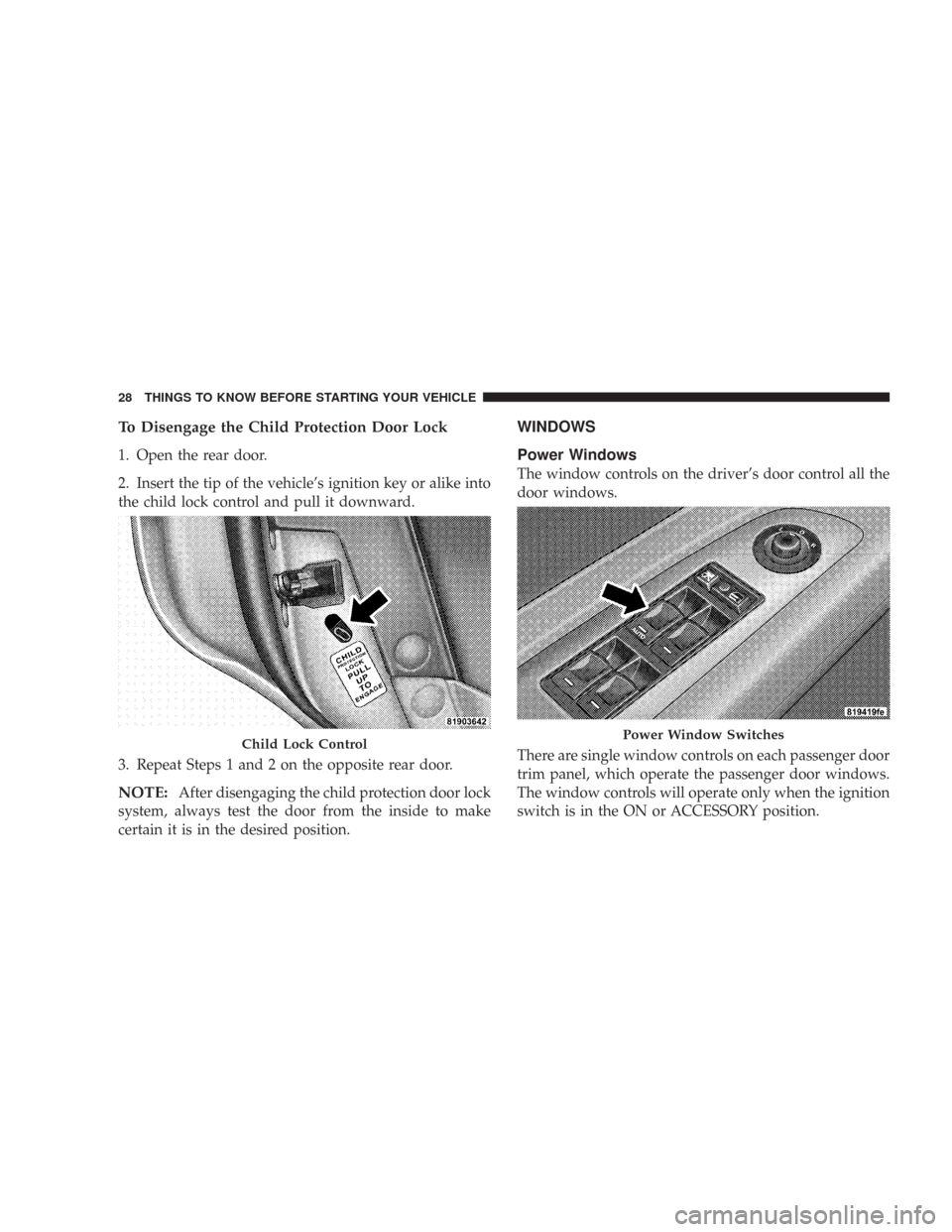
To Disengage the Child Protection Door Lock
1. Open the rear door.
2. Insert the tip of the vehicle’s ignition key or alike into
the child lock control and pull it downward.
3. Repeat Steps 1 and 2 on the opposite rear door.
NOTE:After disengaging the child protection door lock
system, always test the door from the inside to make
certain it is in the desired position.
WINDOWS
Power Windows
The window controls on the driver’s door control all the
door windows.
There are single window controls on each passenger door
trim panel, which operate the passenger door windows.
The window controls will operate only when the ignition
switch is in the ON or ACCESSORY position.
Child Lock ControlPower Window Switches
28 THINGS TO KNOW BEFORE STARTING YOUR VEHICLE
Page 29 of 384

WARNING!
Never leave children in a vehicle, with the keys in
the ignition switch. Occupants, particularly unat-
tended children, can become entrapped by the win-
dows while operating the power window switches.
Such entrapment may result in serious injury or
death.
Auto Down Feature
The driver door power window switch, and some model
passenger door power window switches have an auto
down feature. Press the window switch to the second
detent, release, and the window will go down automati-
cally.
To open the window part way, press the window switch
to the first detent and release it when you want the
window to stop.
To stop the window from going all the way down during
the auto-down operation, pull up on the switch briefly.For vehicles not equipped with the Electronic Vehicle
Information Center (EVIC), the power window switches
will remain active for 10 minutes after the ignition switch
is turned off. Opening either front door will cancel this
feature.
For vehicles equipped with the EVIC, the power window
switches will remain active for up to 60 minutes after the
ignition switch is turned off. Opening either front door
will cancel this feature. The time is programmable. For
details, refer to “Delay Power Off to Accessories Until
Exit,” under “Personal Settings (Customer Program-
mable Features),” under “Electronic Vehicle Information
Center (EVIC)” in Section 4 of this manual.
Auto Up Feature with Anti–Pinch Protection — If
Equipped
Lift the window switch to the second detent, release, and
the window will go up automatically.
To stop the window from going all the way up during the
auto-up operation, push down on the switch briefly.
THINGS TO KNOW BEFORE STARTING YOUR VEHICLE 29
2
Page 30 of 384

To close the window part way, lift the window switch to
the first detent and release it when you want the window
to stop.
For vehicles not equipped with the Electronic Vehicle
Information Center (EVIC), the power window switches
will remain active for 10 minutes after the ignition switch
is turned off. Opening either front door will cancel this
feature.
For vehicles equipped with the EVIC, the power window
switches will remain active for up to 60 minutes after the
ignition switch is turned off. Opening either front door
will cancel this feature. The time is programmable
through. For details, refer to “Delay Power Off to Acces-
sories Until Exit,” under “Personal Settings (Customer
Programmable Features),” under “Electronic Vehicle In-
formation Center (EVIC)” in Section 4 of this manual.NOTE:
•
If the window runs into any obstacle during auto-
closure, it will reverse direction and then stop. Remove
the obstacle and use the window switch again to close
the window.
•Any impact due to rough road conditions may trigger
the auto reverse function unexpectedly during auto-
closure. If this happens, pull the switch lightly to the
first detent and hold to close window manually.
WARNING!
There is no anti-pinch protection when the window
is almost closed. Be sure to clear all objects from the
window before closing.
30 THINGS TO KNOW BEFORE STARTING YOUR VEHICLE
Page 32 of 384

TRUNK LOCK AND RELEASE
The trunk lid can be released from inside the vehicle by
pressing the Trunk Release Button located on the instru-
ment panel to the left of the steering wheel.
NOTE:The transmission must be in Park before the
switch will operate.
The trunk lid can be released from outside the vehicle by
pressing the trunk button on the Remote Keyless Entry
Transmitter two times.With the ignition ON, the trunk open symbol will display
in the instrument cluster indicating that the trunk is
open. The odometer display will reappear once the trunk
is closed.
With the key in the lock position or key out, the trunk
open symbol will display until the trunk is closed.
TRUNK SAFETY WARNING
WARNING!
Do not allow children to have access to the trunk,
either by climbing into the trunk from outside, or
through the inside of the vehicle. Always close the
trunk lid when your vehicle is unattended. Once in
the trunk, young children may not be able to escape,
even if they entered through the rear seat. If trapped
in the trunk, children can die from suffocation or
heat stroke.
Trunk Release Button
32 THINGS TO KNOW BEFORE STARTING YOUR VEHICLE
Page 40 of 384

BeltAlert Programming
The Enhanced Warning System (BeltAlert) can be en-
abled or disabled by your authorized dealer or by
performing the following steps:
NOTE:DaimlerChrysler does not recommend deacti-
vating the Enhanced Warning System (BeltAlert).
1. With all doors closed, and the ignition switch in any
position except ON or START, buckle the driver’s seat
belt.
2. Turn the ignition switch to the ON/ RUN position, but
do not start the engine. Wait for the Seat Belt Reminder
Light to turn off and then proceed to the next step.
NOTE:You must perform the following steps within 60
seconds of turning the ignition switch to the ON/ RUN
position.
3. Within 60 seconds of turning the ignition switch to the
ON/ RUN position, unbuckle and then re-buckle the
driver’s seat belt at least three times within 10 seconds,
ending with the seat belt buckled.
NOTE:Watch for the Seat Belt Reminder Light to turn
on while unbuckling the seat belt and turn off while
re-buckling the seat belt. It may be necessary to retract
the seat belt.
4. Turn the ignition switch to the LOCK position. A
single chime will sound to signify that you have success-
fully completed the programming.
The Enhanced Warning System (BeltAlert) can be reacti-
vated by repeating this procedure.
NOTE:When the Enhanced Warning System (BeltAlert)
is deactivated, the Seat Belt Reminder Light will continue
to illuminate as long as the driver’s seat belt is unbuck-
led.
Automatic Locking Mode — If Equipped
In this mode, the shoulder belt is automatically pre-
locked. However, the belt will still retract to remove slack
in the shoulder belt. Use The Automatic Locking Mode
any time a child safety seat is installed in a seating
position that has a seat belt with this feature. Seat belts
that have the Automatic Locking Mode feature have a
40 THINGS TO KNOW BEFORE STARTING YOUR VEHICLE
Page 46 of 384

provide different rates of airbag inflation from direc-
tion provided by the ACM. The ACM will not detect
roll over.
•The ACM also monitors the readiness of the electronic
parts of the system whenever the ignition switch is in
the START or ON positions. These include all of the
items listed above except the knee bolster, the instru-
ment panel, and the steering wheel and column. If the
key is in the LOCK position, in the ACC position, or
not in the ignition, the airbags are not on and will not
inflate.
•The ACM also turns on the Airbag Warning
Light in the instrument panel for 6 to 8
seconds as a self-check when the ignition is
first turned on. After the self-check, the
Airbag Warning Light will turn off. If the ACM detects
a malfunction in any part of the system, it turns on the
Airbag Warning Light either momentarily or continu-
ously. A single chime will sound if the light comes on
again after initial start up.
WARNING!
Ignoring the AIRBAG Warning Light in your instru-
ment panel could mean you won’t have the airbags
to protect you in a collision. If the light does not
come on, stays on after you start the vehicle, or if it
comes on as you drive, have the airbag system
checked right away.
•TheDriver and Front Passenger Airbag/Inflator
Unitsare located in the center of the steering wheel
and the passenger side of the instrument panel. When
the ACM detects a collision requiring the airbags, it
signals the inflator units. A large quantity of nontoxic
gas is generated to inflate the front airbags. Different
airbag inflation rates may be possible based on colli-
sion severity. The steering wheel hub trim cover, and
the upper passenger side of the instrument panel
separate and fold out of the way, as the bags inflate to
their full size. The bags fully inflate in about 50 - 70
milliseconds. This is about half of the time that it takes
to blink your eyes. The bags then quickly deflate while
helping to restrain the driver and front passenger. The
46 THINGS TO KNOW BEFORE STARTING YOUR VEHICLE
Page 48 of 384
However, if you haven’t healed significantly within a
few days, or if you have any blistering, see your doctor
immediately.
•As the airbags deflate, you may see some smoke-like
particles. The particles are a normal by-product of the
process that generates the nontoxic gas used for airbag
inflation. These airborne particles may irritate the skin,
eyes, nose, or throat. If you have skin or eye irritation,
rinse the area with cool water. For nose or throat
irritation, move to fresh air. If the irritation continues,
see your doctor. If these particles settle on your
clothing, follow the garment manufacturer’s instruc-
tions for cleaning.
•It is not advisable to drive your vehicle after the
airbags have been deployed. If you are involved in
another collision, the airbags will not be in place to
protect you.
WARNING!
Deployed airbags can’t protect you in another colli-
sion. Have the airbags replaced by an authorized
dealer as soon as possible.
Enhanced Accident Response Feature
If the airbags deploy after an impact and the electrical
system remains functional, vehicles equipped with
power door locks will unlock automatically. In addition,
approximately 5 seconds after the vehicle has stopped
moving, the interior lights will illuminate to aid visibility.
NOTE:The interior lights can only be deactivated if the
key is removed from the ignition switch or the vehicle is
driven.
48 THINGS TO KNOW BEFORE STARTING YOUR VEHICLE