Page 93 of 464
The UConnect™ system can be used with any Hands-
Free Profile certified Bluetooth™ cellular phone. See
www.chrysler.com/uconnect for supported phones. If
your cellular phone supports a different profile (e.g.,
Headset Profile), you may not be able to use any UCon-
nect™ features. Refer to your cellular service provider or
the phone manufacturer for details.
The UConnect™ system is fully integrated with the
vehicle’s audio system. The volume of the UConnect™
system can be adjusted either from the radio volume
control knob, or from the steering wheel radio control
(right switch), if so equipped.
The radio display will be used for visual prompts from
the UConnect™ system such as�CELL�or caller ID on
certain radios.Operations
Voice commands can be used to operate the UConnect™
system and to navigate through the UConnect™ menu
structure. Voice commands are required after most
UConnect™ system prompts. You will be prompted for a
specific command and then guided through the available
options.
•Prior to giving a voice command, one must wait for
the voice on beep, which follows the�Ready�prompt
or another prompt.
•For certain operations, compound commands can be
used. For example, instead of saying�Setup�and then
�Phone Pairing,�the following compound command
can be said:�Setup Phone Pairing.�
•For each feature explanation in this section, only the
combined form of the voice command is given. You
can also break the commands into parts and say each
part of the command, when you are asked for it. For
UNDERSTANDING THE FEATURES OF YOUR VEHICLE 93
3
Page 99 of 464
After confirmation, the phonebook entries will be de-
leted. Note that only the phonebook in the current
language is deleted.
Delete All Entries in the UConnect™ Phonebook
•
Press the ’Phone’ button to begin.
•After the�Ready�prompt and the following beep, say
�Phonebook Erase All.�
•The UConnect™ system will ask you to verify that you
wish to delete all the entries from the phonebook.
•After confirmation, the phonebook entries will be
deleted.
List All Names in the UConnect™ Phonebook
•
Press the ’Phone’ button to begin.
•After the�Ready�prompt and the following beep, say
�Phonebook List Names.�
•The UConnect™ system will play the names of all the
phonebook entries.
•To call one of the names in the list, press the�Voice
Recognition’ button during the playing of the desired
name, and then say�Call.�NOTE: the user can also
exercise�Edit�or�Delete�operations at this point.
•The UConnect™ system will then prompt you as to
number designation you wish to call.
•The selected number will be dialed.
Phone Call Features
The following features can be accessed through the
UConnect™ system if the feature(s) are available on your
cellular service plan. For example, if your cellular service
plan provides three-way calling, this feature can be
accessed through the UConnect™ system. Check with
your cellular service provider for the features that you
have.
UNDERSTANDING THE FEATURES OF YOUR VEHICLE 99
3
Page 103 of 464
Emergency Assistance
If you are in an emergency and the mobile phone is
reachable:
•Pick up the phone and manually dial the emergency
number for your area.
If the phone is not reachable and the UConnect™ system
is operational, you may reach the emergency number as
follows:
•Press the ’Phone’ button to begin.
•After the�Ready�prompt and the following beep, say
�Emergency�and the UConnect™ system will instruct
the paired cellular phone to call the emergency num-
ber. This feature is only supported in the USA.
NOTE:The emergency number dialed is based on the
Country where the vehicle is purchased (911 for USA and
Canada and 060 for Mexico). The number dialed may not
be applicable with the available cellular service and area.The UConnect™ system does slightly lower your chances
of successfully making a phone call as to that for the cell
phone directly.
Your phone must be turned on and paired to the UCon-
nect™ system to allow use of this vehicle feature in
emergency situations when the cell phone has network
coverage and stays paired to the UConnect™ system.
Towing Assistance
If you need towing assistance,
•Press the ’Phone’ button to begin.
•After the�Ready�prompt and the following beep, say
�Towing Assistance.�
NOTE:The Towing Assistance number dialed is based
on the Country where the vehicle is purchased (1-800-
528-2069 for USA, 1-877-213-4525 for Canada, 55-14-3454
for Mexico city and 1-800-712-3040 for outside Mexico
city in Mexico).
UNDERSTANDING THE FEATURES OF YOUR VEHICLE 103
3
Page 104 of 464
Please refer to the 24-Hour “Towing Assistance” cover-
age details in the Warranty information booklet and on
the 24–Hour Towing Assistance Card.
Paging
To learn how to page, refer to�Working with Automated
Systems.�Paging works properly except for pagers of
certain companies which time-out a little too soon to
work properly with the UConnect™ system.
Voice Mail Calling
To learn how to access your voice mail, refer to�Working
with Automated Systems.�
Working with Automated Systems
This method is designed to be used in instances where
one generally has to press numbers on the cellular phone
keypad while navigating through an automated tele-
phone system.You can use your UConnect™ system to access a voice-
mail system or an automated service, such as, paging
service or automated customer service. Some services
require immediate response selection, in some instances,
that may be too quick for use of UConnect™ system.
When calling a number with your UConnect™ system
that normally requires you to enter in a touch-tone
sequence on your cellular phone keypad, you can push
the ’Voice Recognition’ button and say the sequence you
wish to enter followed by the word�Send.�For example,
if required to enter your pin number followed with a
pound3746#,youcanpressthe’Voice Recognition’
button and say�3746#Send.�Saying a number, or
sequence of numbers, followed by�Send�is also to be
used to navigate through an automated customer service
center menu structure and to leave a number on a pager.
104 UNDERSTANDING THE FEATURES OF YOUR VEHICLE
Page 106 of 464
NOTE:Certain brands of mobile phones do not send the
dial ring to the UConnect™ system to play it on the
vehicle audio system, so you will not hear it. Under this
situation, after successfully dialing a number, the user
may feel that the call did not go through even though the
call is in progress. Once your call is answered, you will
hear the audio.
Mute/Un-mute (Mute off)
When you mute the UConnect™ system, you will still be
able to hear the conversation coming from the other
party, but the other party will not be able to hear you. In
order to mute the UConnect™ system:
•Press the ’Voice Recognition’ button.
•After the�Ready�prompt and the following beep, say
�Mute.�
In order to un-mute the UConnect™ system:
•Press the ’Voice Recognition’ button.
•After the�Ready�prompt and the following beep, say
�Mute-off.�
Information Service
When using AT&T Wireless Service, dialing to phone
number�#121,�you can access voice activated automated
system to receive news, weather, stocks, traffic, etc.
related information.
Advanced Phone Connectivity
Transfer Call to and from Cellular Phone
The UConnect™ system allows on going calls to be
transferred from your cellular phone to the UConnect™
system without terminating the call. To transfer an ongo-
ing call from your UConnect™ paired cellular phone to
the UConnect™ system or vice-versa, press the ’Voice
Recognition’ button and say�Transfer Call.�
106 UNDERSTANDING THE FEATURES OF YOUR VEHICLE
Page 118 of 464
NOTE:
•If the lights in the second row heated seat switch begin
to flash when the switch is pressed, it indicates that the
heated seat is not functioning properly and that ser-
vice is required. See your authorized dealer for service.
•Once a heat setting is selected, heat will be felt within
2 to 3 minutes.
•The heated seats will turn off when the ignition switch
is turned to the OFF position.
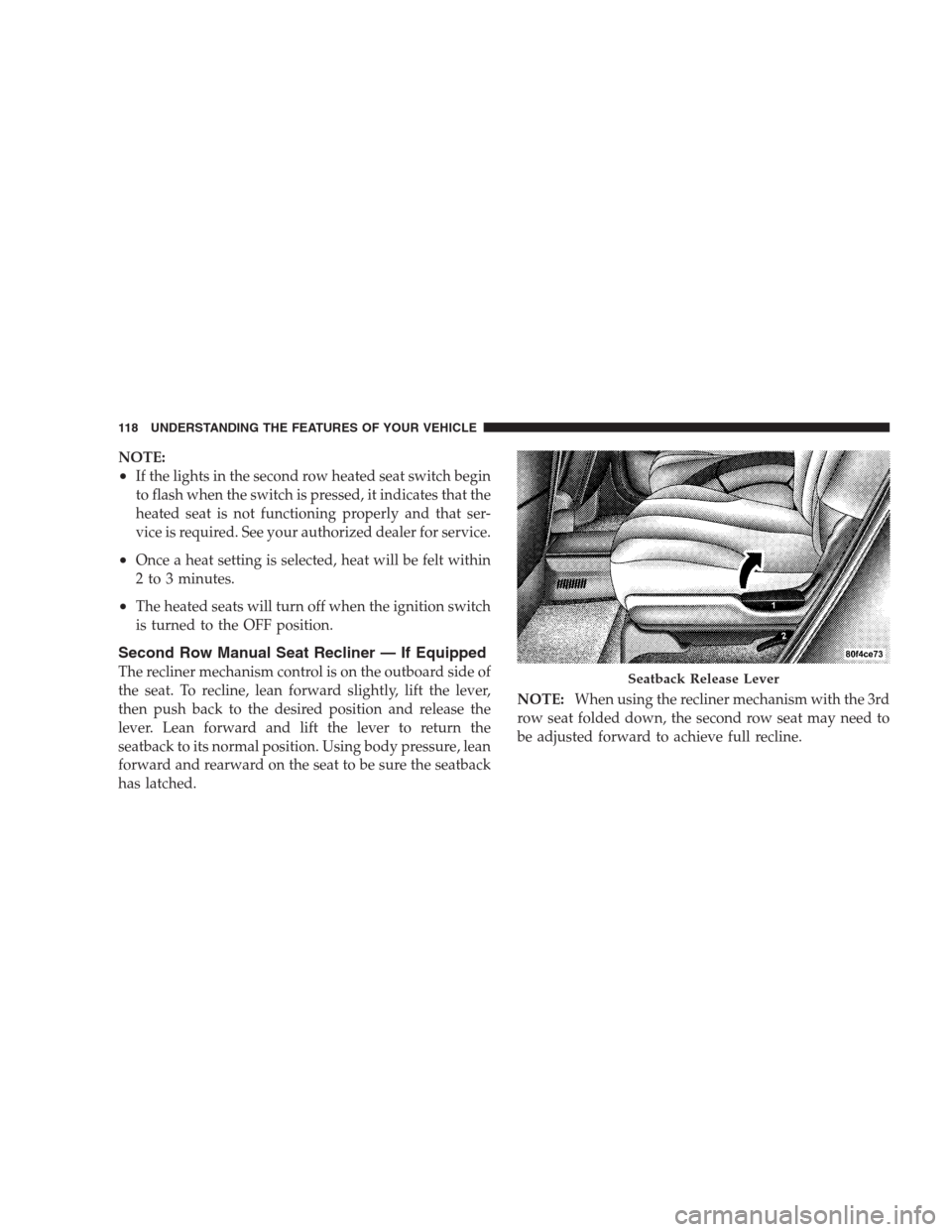
Second Row Manual Seat Recliner — If Equipped
The recliner mechanism control is on the outboard side of
the seat. To recline, lean forward slightly, lift the lever,
then push back to the desired position and release the
lever. Lean forward and lift the lever to return the
seatback to its normal position. Using body pressure, lean
forward and rearward on the seat to be sure the seatback
has latched.NOTE:When using the recliner mechanism with the 3rd
row seat folded down, the second row seat may need to
be adjusted forward to achieve full recline.Seatback Release Lever
118 UNDERSTANDING THE FEATURES OF YOUR VEHICLE
Page 146 of 464
NOTE:
•Ensure that the rear bumper is free of dirt and debris
to keep the system operating properly.
•Jackhammers, large trucks, and other vibrations could
affect the performance of the system.
If “Service Park Assist System” appears in the Electronic
Vehicle Information Center (EVIC) after making sure the
rear bumper is clean please see your authorized dealer.
REAR CAMERA — IF EQUIPPED
Vehicles with Navigation may be equipped with a Rear
Camera that allows you to see an on-screen image (on the
navigation screen) of the rear of your vehicle whenever it
is put into R (Reverse). The camera is located in the light
bar of the rear license plate.Use the following steps to access the Rear Backup Cam-
era feature:
1. Start the engine.
2. Place shift lever in R (Reverse).
3. Wait three seconds, and the camera view will display
on the Navigation Screen.
NOTE:The camera view will display only while the
vehicle is in R (Reverse).
4. Perform a visual check of the rear area.
NOTE:CHECK ENTIRE SURROUNDINGS before
backing up.
5. Backup as necessary.
6. Place the sift lever in P (Park) or D (Drive) to exit the
Rear Backup Camera system.
146 UNDERSTANDING THE FEATURES OF YOUR VEHICLE
Page 180 of 464

INSTRUMENT CLUSTER DESCRIPTIONS
1. Voltage Light
This light monitors the electrical system voltage.
The light should turn on momentarily as the
engine is started. If the light stays on or turns on while
driving, it indicates a problem with the charging system.
Immediate service should be obtained.
2. Temperature Gauge
The temperature gauge shows engine coolant tempera-
ture. Any reading within the normal range indicates that
the engine cooling system is operating satisfactorily.
The gauge pointer will likely indicate a higher tempera-
ture when driving in hot weather, up mountain grades,
or when towing a trailer. It should not be allowed to
exceed the upper limits of the normal operating range.
CAUTION!
Driving with a hot engine cooling system could
damage your vehicle. If temperature gauge reads
“H”, pull over in a safe area as soon as possible and
stop the vehicle. Idle the vehicle with the air condi-
tioner turned off until the pointer drops back into
the normal range. If the pointer remains on the “H”,
and you hear continuous chimes, turn the engine off
immediately, and call for service.
180 UNDERSTANDING YOUR INSTRUMENT PANEL