Page 163 of 464
Wind Buffeting
Wind buffeting can be described as the perception of
pressure on the ears or a helicopter type sound in the
ears. Your vehicle may exhibit wind buffeting with the
windows down, or the sunroof (if equipped) in certain
open or partially open positions. This is a normal occur-
rence and can be minimized. If the buffeting occurs with
the rear windows open, open the front and rear windows
together to minimize the buffeting. If the buffeting occurs
with the sunroof open, adjust the sunroof opening to
minimize the buffeting or open any window.
Sunroof Maintenance
Use only a non-abrasive cleaner and a soft cloth to clean
the glass panel.
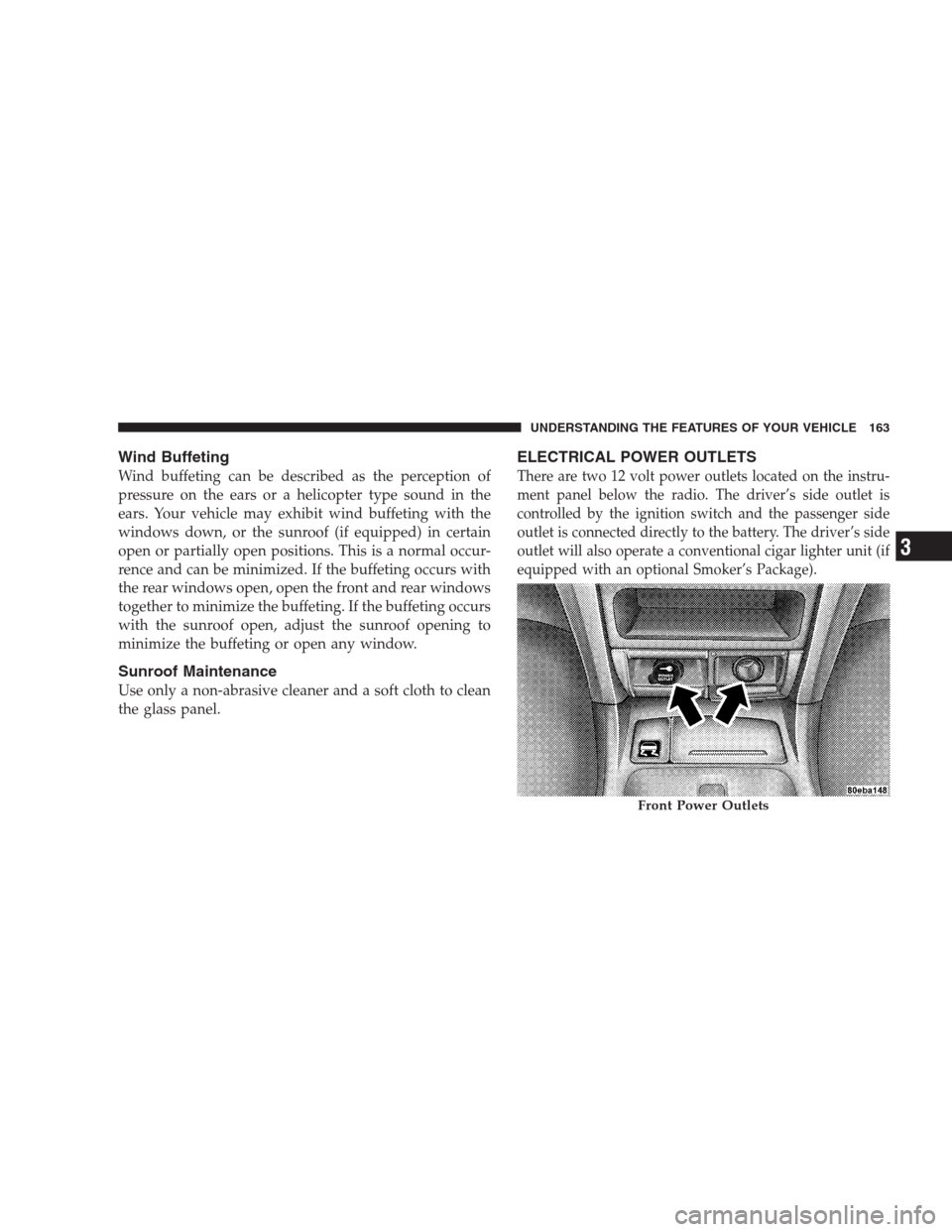
ELECTRICAL POWER OUTLETS
There are two 12 volt power outlets located on the instru-
ment panel below the radio. The driver’s side outlet is
controlled by the ignition switch and the passenger side
outlet is connected directly to the battery. The driver’s side
outlet will also operate a conventional cigar lighter unit (if
equipped with an optional Smoker’s Package).
Front Power Outlets
UNDERSTANDING THE FEATURES OF YOUR VEHICLE 163
3
Page 169 of 464
•Place as much cargo as possible in front of the rear
axle. Too much weight or improperly placed weight
over or behind the rear axle can cause the rear of the
vehicle to sway.
•Do not pile luggage or cargo higher than the top of the
seatback. This could impair visibility or become a
dangerous projectile in a sudden stop or collision.
WARNING!
To help protect against personal injury, passengers
should not be seated in the rear cargo area. The rear
cargo space is intended for load carrying purposes
only, not for passengers, who should sit in seats and
use seat belts.
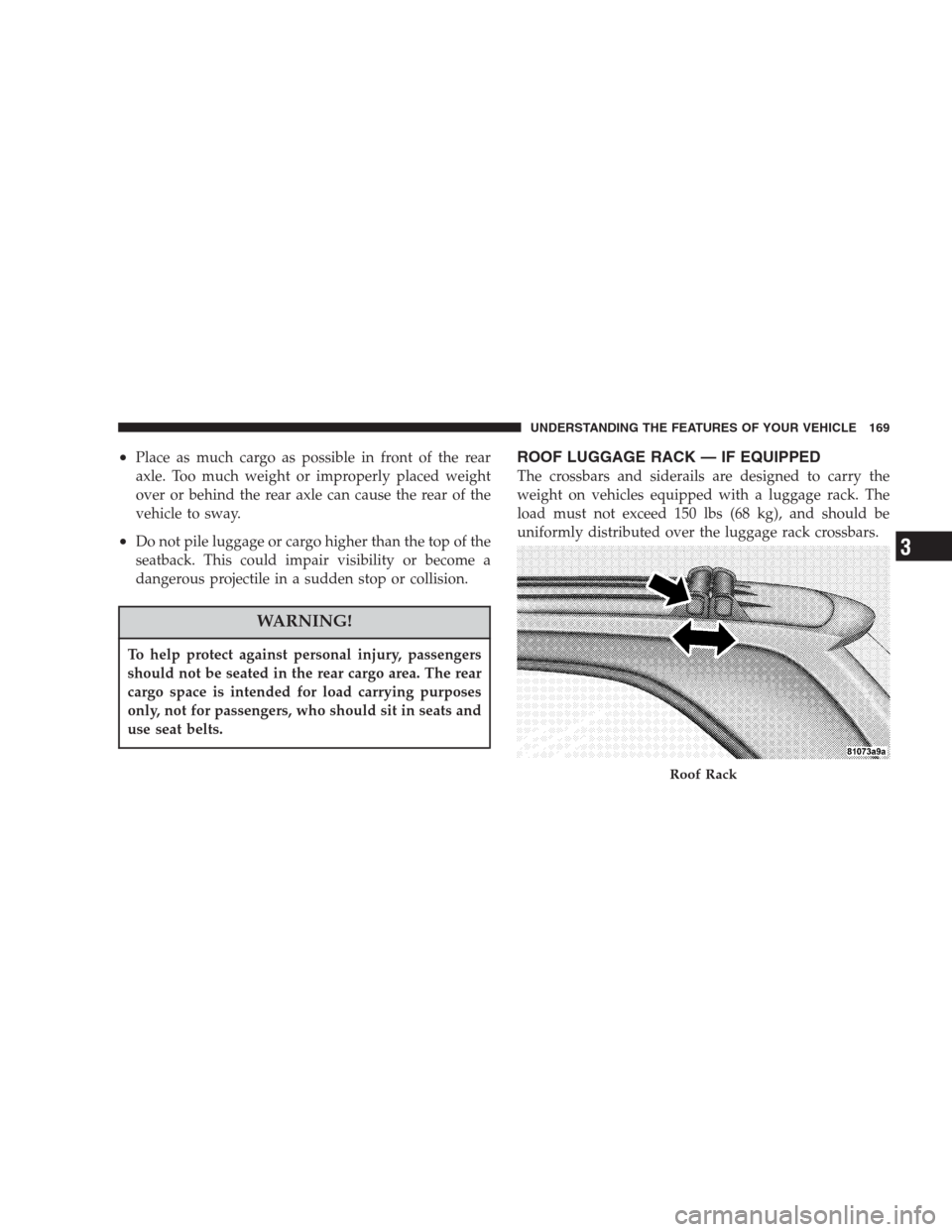
ROOF LUGGAGE RACK — IF EQUIPPED
The crossbars and siderails are designed to carry the
weight on vehicles equipped with a luggage rack. The
load must not exceed 150 lbs (68 kg), and should be
uniformly distributed over the luggage rack crossbars.
Roof Rack
UNDERSTANDING THE FEATURES OF YOUR VEHICLE 169
3
Page 170 of 464
Distribute cargo weight evenly on the roof rack crossbars.
The roof rack does not increase the total load carrying
capacity of the vehicle. Be sure the total load of cargo
inside the vehicle plus that on the external rack does not
exceed the maximum vehicle load capacity.
To move the cross bars, press the upper edge of each
cross bar button, then move the cross bar to the desired
position, keeping the crossbars parallel to the rack frame.
This is can be done with one person standing on each
side of the vehicle, moving the cross bar at the same time.
Once the cross bar is in place, press the lower edge of the
cross bar button to lock it into position.Attempt to move the crossbar again to ensure that it has
properly locked into position.
NOTE:To reduce the amount of wind noise when the
cross bars are not in use, move both cross bars next to
each other towards the rear of the vehicle in the rear most
position.
The tie down holes on the cross bar ends should always
be used to tie down the load. Check the straps frequently
to be sure that the load remains securely attached.
170 UNDERSTANDING THE FEATURES OF YOUR VEHICLE
Page 171 of 464
CAUTION!
•Crossbars should remain equally spaced or parallel at
any luggage rack position for proper function. Non-
compliance could result in damage to the luggage rack,
cargo and/or vehicle.
•To avoid damage to the roof rack and vehicle, do not
exceed the maximum roof rack load capacity of 150 lbs
(68 kg). Always distribute heavy loads as evenly as
possible and secure the load appropriately.
•Long loads which extend over the windshield, such as
wood panels or surfboards, or loads with large frontal
area should be secured to both the front and rear of the
vehicle.
•Travel at reduced speeds and turn corners carefully
when carrying large or heavy loads on the roof rack.
Wind forces, due to natural causes or nearby truck
traffic, can add sudden upward lift to loads. This is
especially true on large flat loads and may result in
damage to the cargo or your vehicle.
WARNING!
Cargo must be securely tied before driving your
vehicle. Improperly secured loads can fly off the
vehicle, particularly at high speeds, resulting in
personal injury or property damage. Follow the Roof
Rack Cautions when carrying cargo on your roof
rack.
UNDERSTANDING THE FEATURES OF YOUR VEHICLE 171
3
Page 196 of 464
Reset Service Distance (Displays Only if Service
Interval was Changed)
When this feature is selected the current accumulated
service distance can be reset to the newly selected service
interval. Pressing the STEP button when in this display
will select “Yes” or “No.”
Power Accessory Delay?
When this feature is selected, the power window
switches, radio, hands–free system, DVD video system,
power sunroof, and power outlets will remain active for
up to 45 seconds after the ignition switch has been turned
off. Opening a vehicle door or liftgate will cancel this
feature.
Easy Exit Seat? (Available with Memory Seat Only)
This feature provides automatic driver’s seat positioning
which will enhance driver mobility out of and into the
vehicle.
The Easy Entry Easy Exit feature is not enabled when the
vehicle is delivered from the factory. The Easy Entry Easy
Exit feature is enabled (or later disabled) through the
programmable features in the Electronic Vehicle Informa-
tion Center (EVIC). Pressing the STEP button when in this
display will select “Yes” or “No.” The seat will return to the
memorized seat location (if REMOTE LINK TO MEMORY
is set to YES) when the remote keyless entry transmitter is
used to unlock the door. For more information refer to
“Easy Entry/Exit Seat in the Driver Memory Seat section.
Tilt Mirrors in Reverse? (Available with Memory
Seat Only)
When this feature is selected the outside mirrors will
move slightly downward from the present position when
the vehicle is shifted into the Reverse position. The
outside mirrors will then return to the original position
when the vehicle is shifted out of Reverse position.
Pressing the STEP button when in this display will select
�Ye s�or�No�.
196 UNDERSTANDING YOUR INSTRUMENT PANEL
Page 237 of 464
Satellite Antenna
To ensure optimum reception, do not place items on the
roof around the rooftop antenna location or strap items to
the trunk lid around the trunk lid antenna (if equipped).
Metal objects placed within the line of sight of the
antenna will cause decreased performance. Larger lug-
gage items such as bikes should be placed as far rearward
as possible, within the loading design of the rack. Do not
place items directly on or above the antenna.
Reception Quality
Satellite reception may be interrupted due to one of the
following reasons.
•The vehicle is parked in an underground parking
structure or under a physical obstacle.
•Dense tree coverage may interrupt reception in the
form of short audio mutes.
•Driving under wide bridges or along tall buildings can
cause intermittent reception.
•Placing objects over or too close to the antenna can
cause signal blockage.
REMOTE SOUND SYSTEM CONTROLS
The remote sound system controls are located on the rear
surface of the steering wheel at the 3 and 9 o’clock
positions.
The right hand rocker switch has a push button in the
center and controls the volume and mode of the sound
system. Pressing the top of the rocker switch will increase
the volume and pressing the bottom of the rocker switch
will decrease the volume. Pressing the center button
changes the operation of the radio from AM to FM to
Tape or CD mode depending on which radio is in the
vehicle.
UNDERSTANDING YOUR INSTRUMENT PANEL 237
4
Page 403 of 464
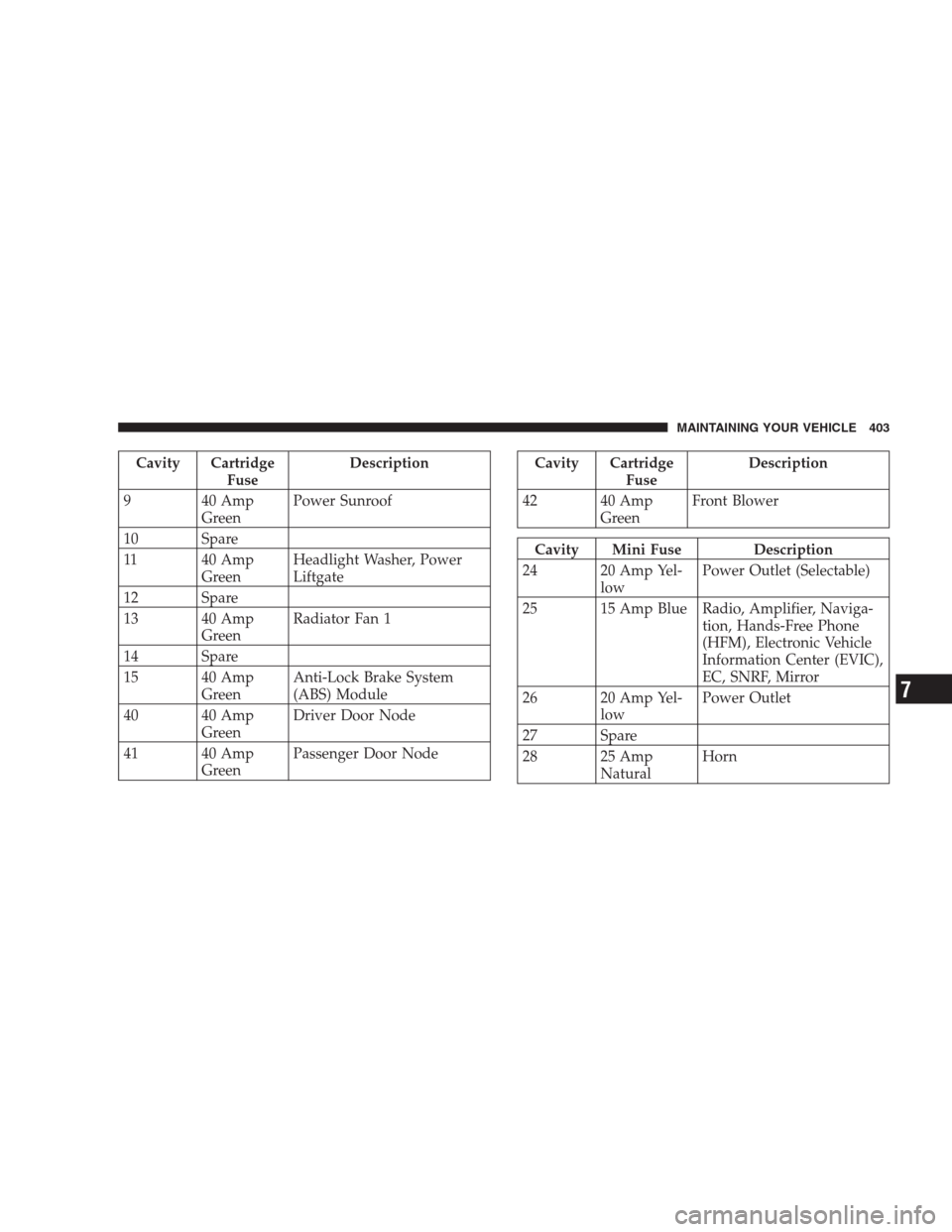
Cavity Cartridge
FuseDescription
9 40 Amp
GreenPower Sunroof
10 Spare
11 40 Amp
GreenHeadlight Washer, Power
Liftgate
12 Spare
13 40 Amp
GreenRadiator Fan 1
14 Spare
15 40 Amp
GreenAnti-Lock Brake System
(ABS) Module
40 40 Amp
GreenDriver Door Node
41 40 Amp
GreenPassenger Door NodeCavity Cartridge
FuseDescription
42 40 Amp
GreenFront Blower
Cavity Mini Fuse Description
24 20 Amp Yel-
lowPower Outlet (Selectable)
25 15 Amp Blue Radio, Amplifier, Naviga-
tion, Hands-Free Phone
(HFM), Electronic Vehicle
Information Center (EVIC),
EC, SNRF, Mirror
26 20 Amp Yel-
lowPower Outlet
27 Spare
28 25 Amp
NaturalHorn
MAINTAINING YOUR VEHICLE 403
7
Page 455 of 464
Oil Pressure.......................... 186
Park............................... 408
Reading............................. 153
Rear Servicing........................ 409
Rear Tail............................ 409
Seat Belt Reminder..................... 186
Service.............................. 406
Service Engine Soon (Malfunction Indicator) . . . 185
Side Marker.......................... 409
Turn Signal..................134,137,408,409
Voltage............................. 180
Warning (Instrument Cluster Description)..... 180
Washer Fluid......................... 189
Load Leveling System.................... 172
Loading Vehicle......................326,328
Capacities........................... 328
Tires ............................... 293
Locks
Door................................ 27Steering Wheel......................... 14
Lower Anchors and Tether for
CHildren (LATCH).....................71,74
Lubrication, Body....................... 381
Luggage Rack (Roof Rack)................. 169
Maintenance, Airbag...................... 64
Maintenance Free Battery.................. 376
Maintenance Procedures................... 369
Maintenance Schedule.................... 416
Schedule “A”......................... 430
Schedule “B”......................... 419
Maintenance, Sunroof..................... 163
Malfunction Indicator Light (Check Engine) . . 185,367
Manual, Service......................... 442
Map/Reading Lights..................... 153
Memory Feature (Memory Seat)............. 127
Memory Seat.........................91,127
Mini-Trip Computer...................... 199
INDEX 455
10