Page 215 of 464
Tone Control
The Bass and/or Treble controls sound for the desired
tone. Press the AUDIO button, select Bass or TREBLE,
then press SEEK + or SEEK�to increase or decrease
amplification of the band.
To Set The Radio Push-Button Memory
When you are receiving a station that you wish to
commit to push-button memory, press the SET button.
SET 1 will show in the display window. Select the
push-button you wish to lock onto this station and press
and release that button. If a station is not selected within
5 seconds after pressing the SET button, the station will
continue to play but will not be locked into push-button
memory.
You may add a second station to each push-button by
repeating the above procedure with this exception: Press
the SET button twice and SET 2 will show in the display
window. Each button can be set for SET 1 and SET 2 inboth AM and FM. This allows a total of 10 AM and 10 FM
stations to be locked into memory. You can recall the
stations stored in SET 2 memory by pressing the push-
button twice.
To Change From Clock To Radio Mode
Press the TIME button to change the display between
radio frequency and time.
General Information
This radio complies with Part 15 of FCC rules and with
RSS-210 of Industry Canada. Operation is subject to the
following conditions:
1. This device may not cause harmful interference,
2. This device must accept any interference received,
including interference that may cause undesired opera-
tion.
UNDERSTANDING YOUR INSTRUMENT PANEL 215
4
Page 237 of 464
Satellite Antenna
To ensure optimum reception, do not place items on the
roof around the rooftop antenna location or strap items to
the trunk lid around the trunk lid antenna (if equipped).
Metal objects placed within the line of sight of the
antenna will cause decreased performance. Larger lug-
gage items such as bikes should be placed as far rearward
as possible, within the loading design of the rack. Do not
place items directly on or above the antenna.
Reception Quality
Satellite reception may be interrupted due to one of the
following reasons.
•The vehicle is parked in an underground parking
structure or under a physical obstacle.
•Dense tree coverage may interrupt reception in the
form of short audio mutes.
•Driving under wide bridges or along tall buildings can
cause intermittent reception.
•Placing objects over or too close to the antenna can
cause signal blockage.
REMOTE SOUND SYSTEM CONTROLS
The remote sound system controls are located on the rear
surface of the steering wheel at the 3 and 9 o’clock
positions.
The right hand rocker switch has a push button in the
center and controls the volume and mode of the sound
system. Pressing the top of the rocker switch will increase
the volume and pressing the bottom of the rocker switch
will decrease the volume. Pressing the center button
changes the operation of the radio from AM to FM to
Tape or CD mode depending on which radio is in the
vehicle.
UNDERSTANDING YOUR INSTRUMENT PANEL 237
4
Page 240 of 464
CD/DVD DISC MAINTENANCE
To keep the CD/DVD discs in good condition, take the
following precautions:
1. Handle the disc by its edge; avoid touching the
surface.
2. If the disc is stained, clean the surface with a soft cloth,
wiping from center to edge.
3. Do not apply paper, paper CD labels, or tape to the
disc; avoid scratching the disc.
4. Do not use solvents such as benzine, thinner, cleaners,
or antistatic sprays.
5. Store the disc in its case after playing.
6. Do not expose the disc to direct sunlight.
7. Do not store the disc where temperatures may become
too high.
RADIO OPERATION AND CELLULAR PHONES
Under certain conditions, the cellular phone being On in
your vehicle can cause erratic or noisy performance from
your radio. This condition may be lessened or eliminated
by relocating the cellular phone antenna. This condition
is not harmful to the radio. If your radio performance
does not satisfactorily “clear” by the repositioning of the
antenna, it is recommended that the radio volume be
turned down or off during cellular phone operation.
CLIMATE CONTROLS
The Air Conditioning and Heating System is designed to
make you comfortable in all types of weather.
240 UNDERSTANDING YOUR INSTRUMENT PANEL
Page 446 of 464
Adding Fuel........................... 321
Adding Washer Fluid..................140,382
Additives, Fuel......................... 320
Adjustable Pedals....................... 148
Air Conditioner Maintenance............... 378
Air Conditioning.....................241,246
Air Conditioning Controls................. 241
Air Conditioning Filter.................259,379
Air Conditioning Refrigerant............... 378
Air Conditioning System..........241,246,249,378
Air Conditioning System, Zone Control........ 242
Air Pressure, Tires....................... 298
Airbag................................ 50
Airbag Deployment....................... 63
Airbag Light...................55,56,65,80,188
Airbag Maintenance....................... 64
Airbag, Window (Side Curtain)............... 51
Alarm (Security Alarm).................... 18
Alignment and Balance................... 305All Wheel Drive (AWD)................276,395
Alterations/Modifications, Vehicle............. 7
Antenna, Satellite Radio................... 237
Antifreeze (Engine Coolant)...........384,385,411
Disposal............................ 386
Anti-Lock Brake System (ABS).............. 279
Anti-Lock Warning Light.................. 181
Anti-Theft System........................ 18
Appearance Care........................ 396
Auto Down Power Windows................ 33
Auto Up Power Windows.................. 34
Automatic Dimming Mirror................. 88
Automatic Door Locks...................28,29
Automatic Headlights.................... 136
Automatic Temperature Control (ATC)......... 249
Automatic Transaxle....................12,270
Adding Fluid......................... 413
Interlock System.....................15,271
Reset Mode.......................... 272
446 INDEX
Page 457 of 464
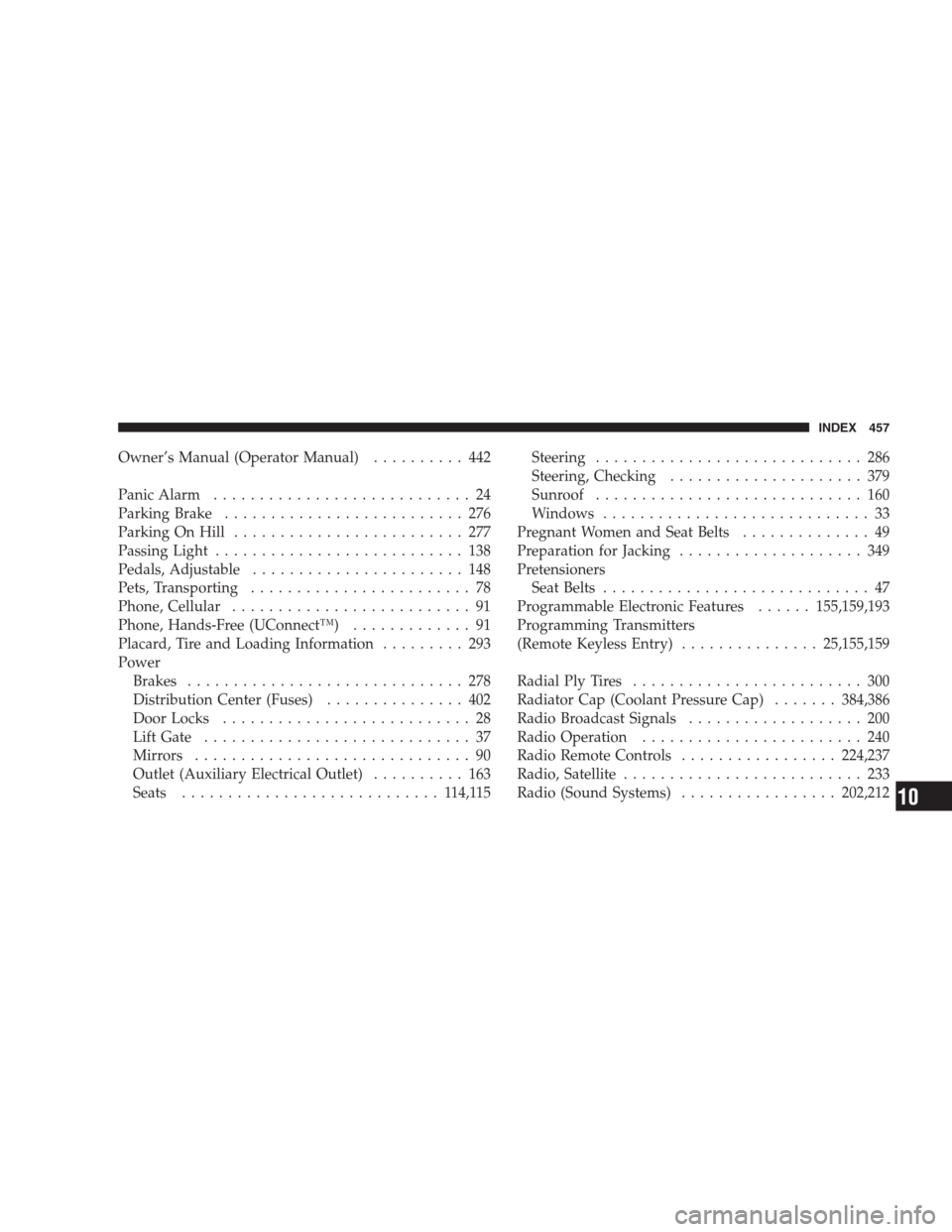
Owner’s Manual (Operator Manual).......... 442
Panic Alarm............................ 24
Parking Brake.......................... 276
Parking On Hill......................... 277
Passing Light........................... 138
Pedals, Adjustable....................... 148
Pets, Transporting........................ 78
Phone, Cellular.......................... 91
Phone, Hands-Free (UConnect™)............. 91
Placard, Tire and Loading Information......... 293
Power
Brakes.............................. 278
Distribution Center (Fuses)............... 402
Door Locks........................... 28
Lift Gate............................. 37
Mirrors.............................. 90
Outlet (Auxiliary Electrical Outlet).......... 163
Seats............................ 114,115Steering............................. 286
Steering, Checking..................... 379
Sunroof............................. 160
Windows............................. 33
Pregnant Women and Seat Belts.............. 49
Preparation for Jacking.................... 349
Pretensioners
Seat Belts............................. 47
Programmable Electronic Features......155,159,193
Programming Transmitters
(Remote Keyless Entry)...............25,155,159
Radial Ply Tires......................... 300
Radiator Cap (Coolant Pressure Cap).......384,386
Radio Broadcast Signals................... 200
Radio Operation........................ 240
Radio Remote Controls.................224,237
Radio, Satellite.......................... 233
Radio (Sound Systems).................202,212
INDEX 457
10
Page 458 of 464
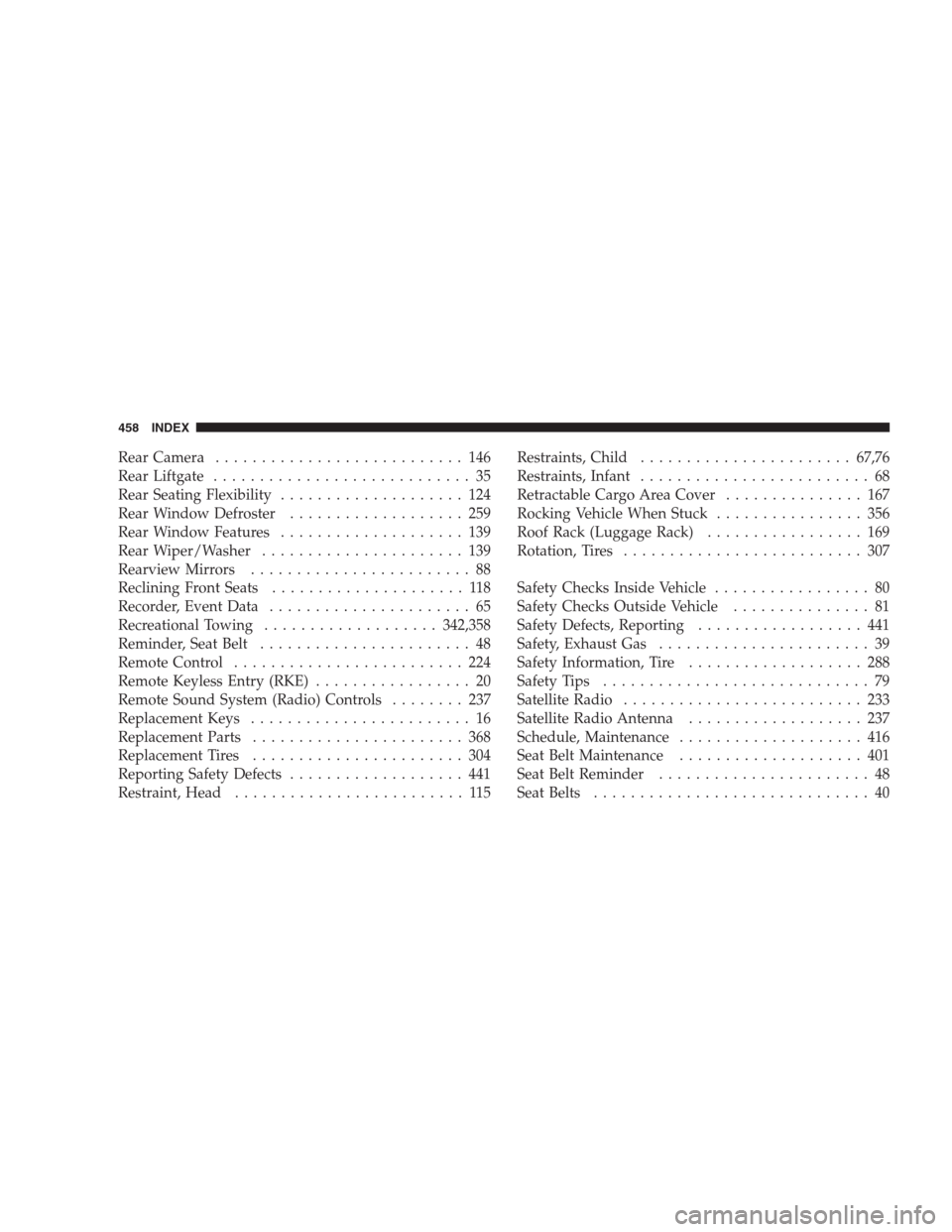
Rear Camera........................... 146
Rear Liftgate............................ 35
Rear Seating Flexibility.................... 124
Rear Window Defroster................... 259
Rear Window Features.................... 139
Rear Wiper/Washer...................... 139
Rearview Mirrors........................ 88
Reclining Front Seats..................... 118
Recorder, Event Data...................... 65
Recreational Towing...................342,358
Reminder, Seat Belt....................... 48
Remote Control......................... 224
Remote Keyless Entry (RKE)................. 20
Remote Sound System (Radio) Controls........ 237
Replacement Keys........................ 16
Replacement Parts....................... 368
Replacement Tires....................... 304
Reporting Safety Defects................... 441
Restraint, Head......................... 115Restraints, Child.......................67,76
Restraints, Infant......................... 68
Retractable Cargo Area Cover............... 167
Rocking Vehicle When Stuck................ 356
Roof Rack (Luggage Rack)................. 169
Rotation, Tires.......................... 307
Safety Checks Inside Vehicle................. 80
Safety Checks Outside Vehicle............... 81
Safety Defects, Reporting.................. 441
Safety, Exhaust Gas....................... 39
Safety Information, Tire................... 288
Safety Tips............................. 79
Satellite Radio.......................... 233
Satellite Radio Antenna................... 237
Schedule, Maintenance.................... 416
Seat Belt Maintenance.................... 401
Seat Belt Reminder....................... 48
Seat Belts.............................. 40
458 INDEX