Page 127 of 464
DRIVER MEMORY SEAT — IF EQUIPPED
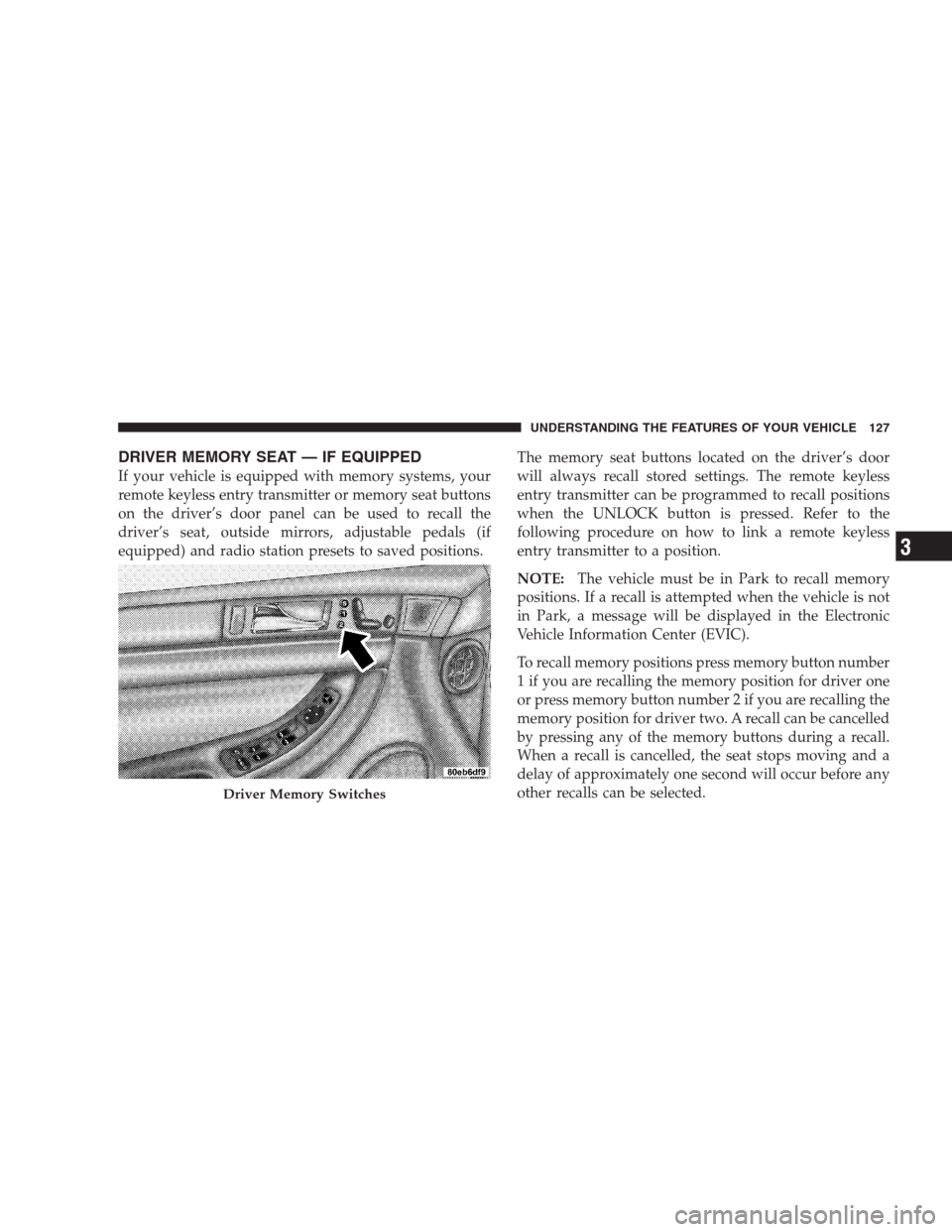
If your vehicle is equipped with memory systems, your
remote keyless entry transmitter or memory seat buttons
on the driver’s door panel can be used to recall the
driver’s seat, outside mirrors, adjustable pedals (if
equipped) and radio station presets to saved positions.The memory seat buttons located on the driver’s door
will always recall stored settings. The remote keyless
entry transmitter can be programmed to recall positions
when the UNLOCK button is pressed. Refer to the
following procedure on how to link a remote keyless
entry transmitter to a position.
NOTE:The vehicle must be in Park to recall memory
positions. If a recall is attempted when the vehicle is not
in Park, a message will be displayed in the Electronic
Vehicle Information Center (EVIC).
To recall memory positions press memory button number
1 if you are recalling the memory position for driver one
or press memory button number 2 if you are recalling the
memory position for driver two. A recall can be cancelled
by pressing any of the memory buttons during a recall.
When a recall is cancelled, the seat stops moving and a
delay of approximately one second will occur before any
other recalls can be selected.
Driver Memory Switches
UNDERSTANDING THE FEATURES OF YOUR VEHICLE 127
3
Page 128 of 464
Your vehicle has been delivered with two remote keyless
entry transmitters. One or both transmitters can be linked
to either memory position. Up to eight remote keyless
entry transmitters can be used with your vehicle. The
memory seat system can also accommodate up to eight
transmitters linked to either of the two stored seat
positions or any combination of the two positions.
To Program Memory Seat Buttons & RKE
Transmitters, Follow These Steps:
1. Turn the ignition switch to the ON position.
2. Select Remote Linked to Memory from the EVIC and
enter “Yes”.
3. Use the seat, mirror and adjustable pedal switches to
adjust the seat, recliner, side view mirrors and adjustable
pedals to the desired positions.
4. Set the radio station presets.5. Turn the ignition switch to the OFF position and
remove the key.
6. Press and release the SET (S) button located on the
driver’s door. A light in the button will flash telling you
that you are in the set memory mode. You have five
seconds to complete the next step.
7. Within 5 seconds, press and release button 1 or 2 on
the driver’s door. A chime will sound signaling you that
the driver memory has been set. A message will also be
displayed in the Electronic Vehicle Information Center
(EVIC), indicating a position has been set.
8. Within 5 seconds, press and release the LOCK button
on one of the Remote Keyless Entry Transmitters. A
chime will sound signaling you that the transmitter has
been successfully linked. A message will also be dis-
played in the Electronic Vehicle Information Center
(EVIC), indicating the transmitter has been linked.
128 UNDERSTANDING THE FEATURES OF YOUR VEHICLE
Page 136 of 464
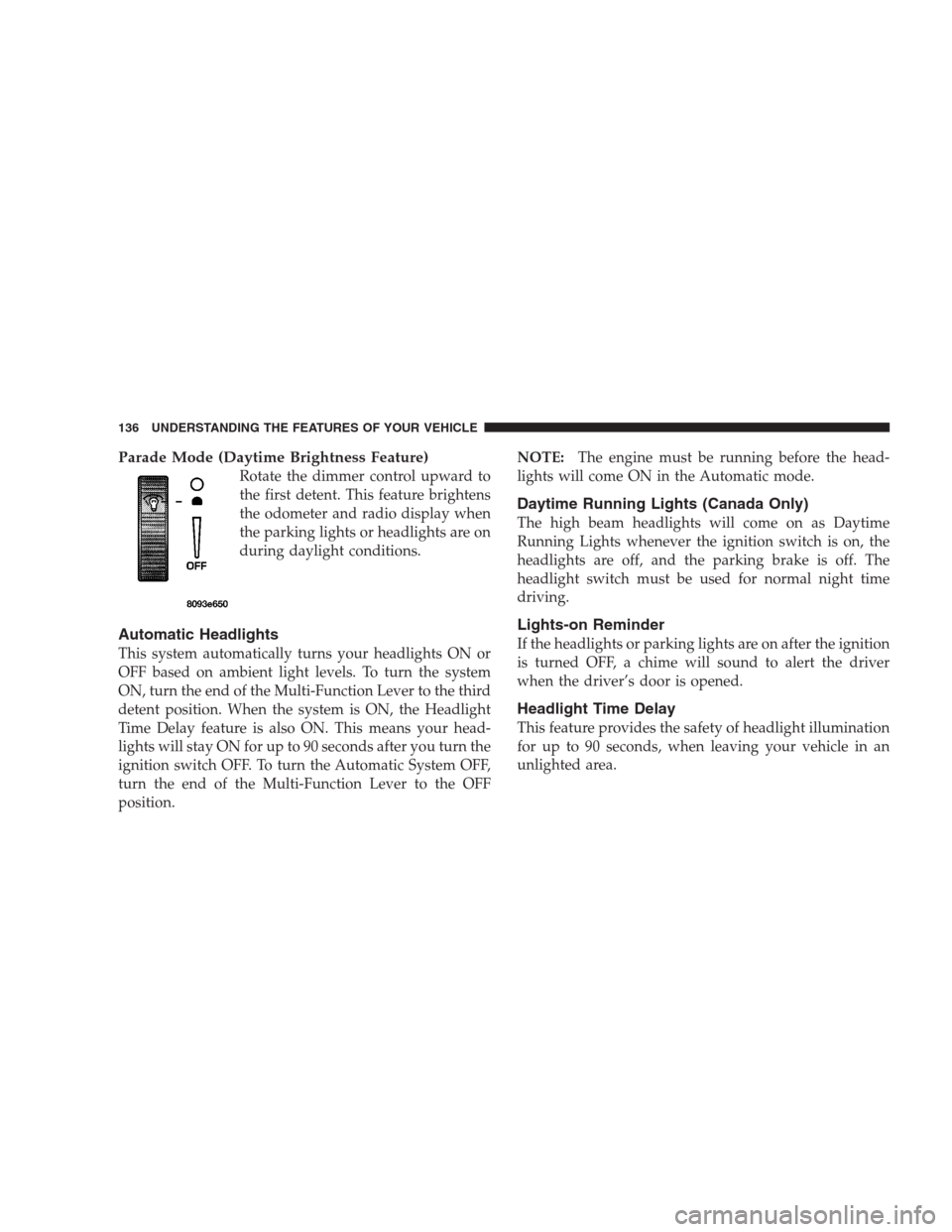
Parade Mode (Daytime Brightness Feature)
Rotate the dimmer control upward to
the first detent. This feature brightens
the odometer and radio display when
the parking lights or headlights are on
during daylight conditions.
Automatic Headlights
This system automatically turns your headlights ON or
OFF based on ambient light levels. To turn the system
ON, turn the end of the Multi-Function Lever to the third
detent position. When the system is ON, the Headlight
Time Delay feature is also ON. This means your head-
lights will stay ON for up to 90 seconds after you turn the
ignition switch OFF. To turn the Automatic System OFF,
turn the end of the Multi-Function Lever to the OFF
position.NOTE:The engine must be running before the head-
lights will come ON in the Automatic mode.
Daytime Running Lights (Canada Only)
The high beam headlights will come on as Daytime
Running Lights whenever the ignition switch is on, the
headlights are off, and the parking brake is off. The
headlight switch must be used for normal night time
driving.
Lights-on Reminder
If the headlights or parking lights are on after the ignition
is turned OFF, a chime will sound to alert the driver
when the driver’s door is opened.
Headlight Time Delay
This feature provides the safety of headlight illumination
for up to 90 seconds, when leaving your vehicle in an
unlighted area.
136 UNDERSTANDING THE FEATURES OF YOUR VEHICLE
Page 144 of 464
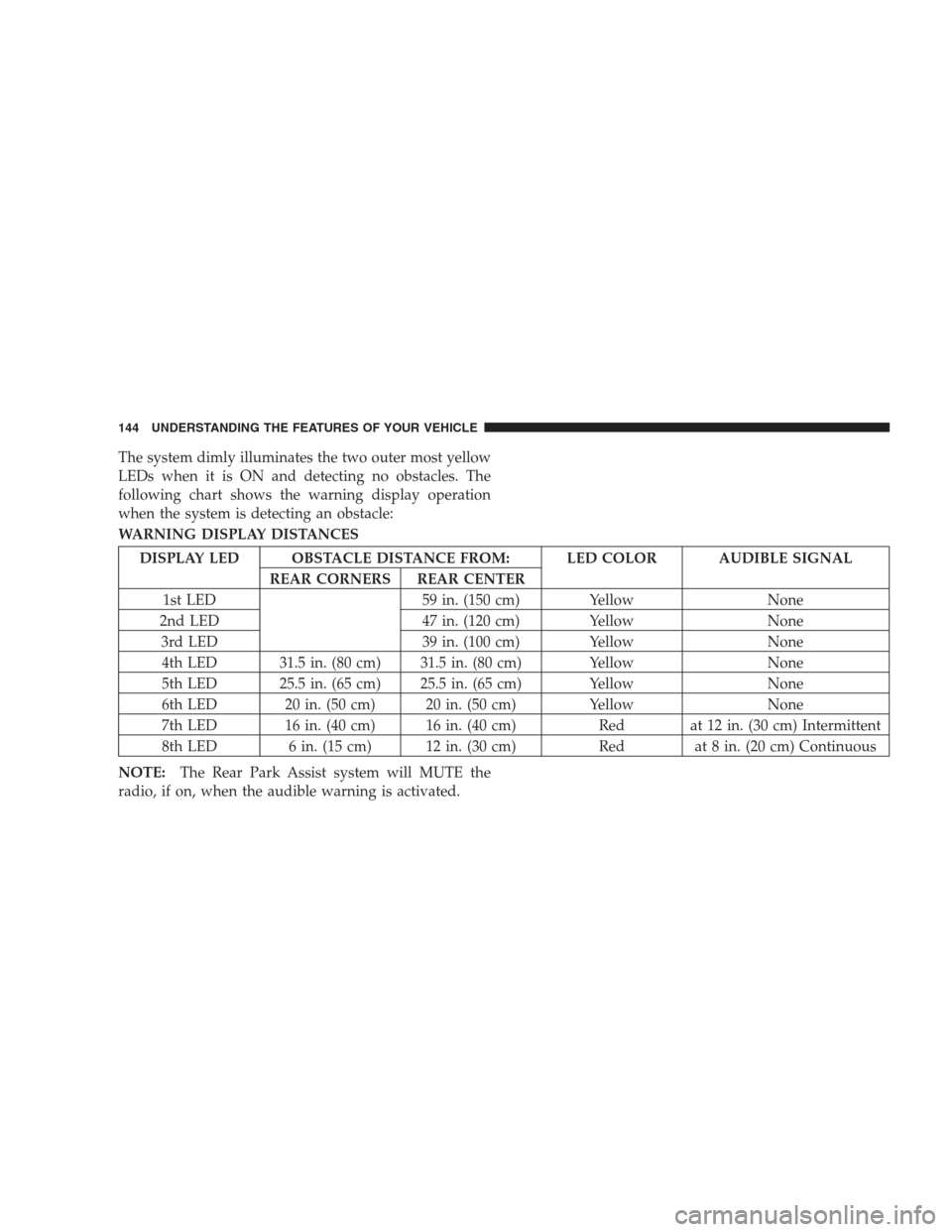
The system dimly illuminates the two outer most yellow
LEDs when it is ON and detecting no obstacles. The
following chart shows the warning display operation
when the system is detecting an obstacle:
WARNING DISPLAY DISTANCES
DISPLAY LED OBSTACLE DISTANCE FROM: LED COLOR AUDIBLE SIGNAL
REAR CORNERS REAR CENTER
1st LED 59 in. (150 cm) Yellow None
2nd LED 47 in. (120 cm) Yellow None
3rd LED 39 in. (100 cm) Yellow None
4th LED 31.5 in. (80 cm) 31.5 in. (80 cm) Yellow None
5th LED 25.5 in. (65 cm) 25.5 in. (65 cm) Yellow None
6th LED 20 in. (50 cm) 20 in. (50 cm) Yellow None
7th LED 16 in. (40 cm) 16 in. (40 cm) Red at 12 in. (30 cm) Intermittent
8th LED 6 in. (15 cm) 12 in. (30 cm) Red at 8 in. (20 cm) Continuous
NOTE:The Rear Park Assist system will MUTE the
radio, if on, when the audible warning is activated.
144 UNDERSTANDING THE FEATURES OF YOUR VEHICLE
Page 155 of 464
WARNING!
Vehicle exhaust contains carbon monoxide, a danger-
ous gas. Do not run the vehicle’s exhaust while
training the transceiver. Exhaust gas can cause seri-
ous injury or death.
WARNING!
Your motorized door or gate will open and close
while you are training the Universal Transceiver. Do
not train the transceiver if people or pets are in the
path of the door or gate. A moving door or gate can
cause serious injury or death to people and pets or
damage to objects.
Programming HomeLink
NOTE:When programming a garage door opener, it is
advised to park outside the garage. Some vehicles may
require the ignition switch to be turned to the second (or
�Accessory�) position for programming and/or operation
of HomeLink. It is also recommended that a new battery
be placed in the hand-held transmitter of the device
being programmed to HomeLink for more efficient train-
ing and accurate transmission of the radio-frequency
signal.
The Electronic Vehicle Information Center (EVIC) fea-
tures a driver-interactive display which includes
HomeLink�system messages.
1. Press and hold the two outer HomeLink buttons, and
release only when the indicator light begins to flash or
the EVIC display shows “Channels Cleared” (after 20
seconds).Do nothold the buttons for longer than 30
UNDERSTANDING THE FEATURES OF YOUR VEHICLE 155
3
Page 158 of 464
3. Return to the vehicle and firmlypress, hold for two
seconds and releasethe programmed HomeLink button.
Repeat the�press/hold/release�sequence a second time,
and, depending on the brand of the garage door opener
(or other rolling code equipped device), repeat this
sequence a third time to complete the programming.
HomeLink should now activate your rolling code
equipped device.
NOTE:To program the remaining two HomeLink but-
tons, begin with�Programming�Step Two. Do not repeat
Step One. For questions or comments, please contact
HomeLink atwww.homelink.com or 1-800-355-3515.
Canadian Programming/Gate Programming
Canadian radio-frequency laws require transmitter sig-
nals to�time-out�(or quit) after several seconds of
transmission which may not be long enough for
HomeLink to pick up the signal during programming.Similar to this Canadian law, some U.S. gate operators are
designed to�time-out�in the same manner.
If you live in Canada or you are having difficulties
programming a gate operator by using the�Program-
ming�procedures (regardless of where you live),replace
�Programming HomeLink�Step Threewith the follow-
ing:
NOTE:If programming a garage door opener or gate
operator, it is advised to unplug the device during the
�cycling�process to prevent possible overheating.
3. Continue to press and hold the HomeLink button
while youpress and release every two seconds(�cycle�)
your hand-held transmitter until the frequency signal has
successfully been accepted by HomeLink. The indicator
light will flash slowly and then rapidly and the EVIC
display will show “Channel X Trained” (where X is
Channel 1, 2, or 3). Proceed with�Programming�Step
Four to complete.
158 UNDERSTANDING THE FEATURES OF YOUR VEHICLE
Page 163 of 464
Wind Buffeting
Wind buffeting can be described as the perception of
pressure on the ears or a helicopter type sound in the
ears. Your vehicle may exhibit wind buffeting with the
windows down, or the sunroof (if equipped) in certain
open or partially open positions. This is a normal occur-
rence and can be minimized. If the buffeting occurs with
the rear windows open, open the front and rear windows
together to minimize the buffeting. If the buffeting occurs
with the sunroof open, adjust the sunroof opening to
minimize the buffeting or open any window.
Sunroof Maintenance
Use only a non-abrasive cleaner and a soft cloth to clean
the glass panel.
ELECTRICAL POWER OUTLETS
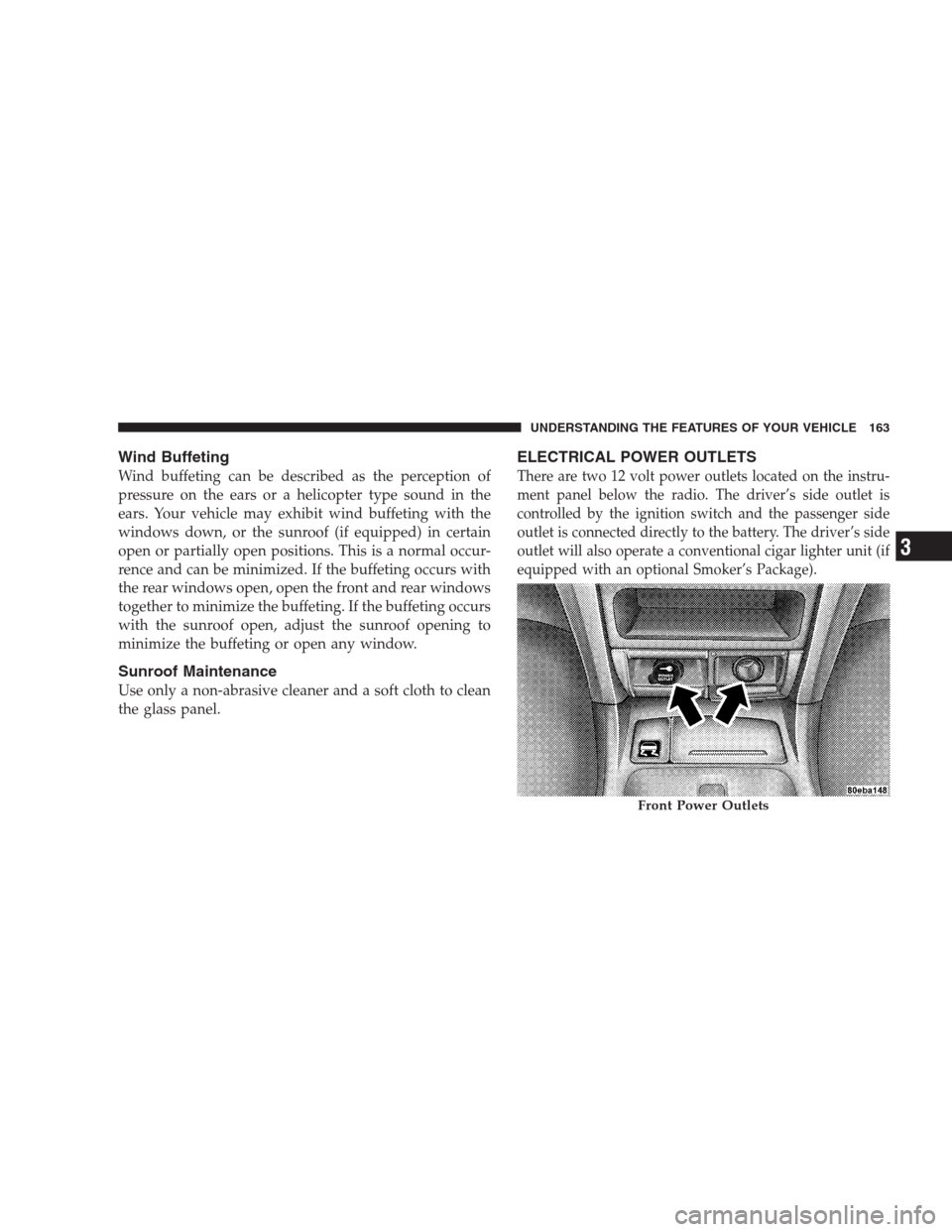
There are two 12 volt power outlets located on the instru-
ment panel below the radio. The driver’s side outlet is
controlled by the ignition switch and the passenger side
outlet is connected directly to the battery. The driver’s side
outlet will also operate a conventional cigar lighter unit (if
equipped with an optional Smoker’s Package).
Front Power Outlets
UNDERSTANDING THE FEATURES OF YOUR VEHICLE 163
3
Page 173 of 464
UNDERSTANDING YOUR INSTRUMENT PANEL
CONTENTS
�Instrument Panel And Controls.............177
�Base Instrument Cluster..................178
�Premium Instrument Cluster...............179
�Instrument Cluster Descriptions............180
�Electronic Vehicle Information Center (EVIC) —
If Equipped...........................191
▫Customer Programmable Features —
If Equipped.........................193
▫Compass Display — If Equipped..........197
▫Mini-Trip Functions — If Equipped........199�Setting The Analog Clock.................199
�Electronic Digital Clock..................200
▫Clock Setting Procedure.................200
�Radio General Information................200
▫Radio Broadcast Signals.................200
▫Two Types Of Signals..................200
▫Electrical Disturbances..................201
▫AM Reception.......................201
▫FM Reception........................2014