Page 127 of 464
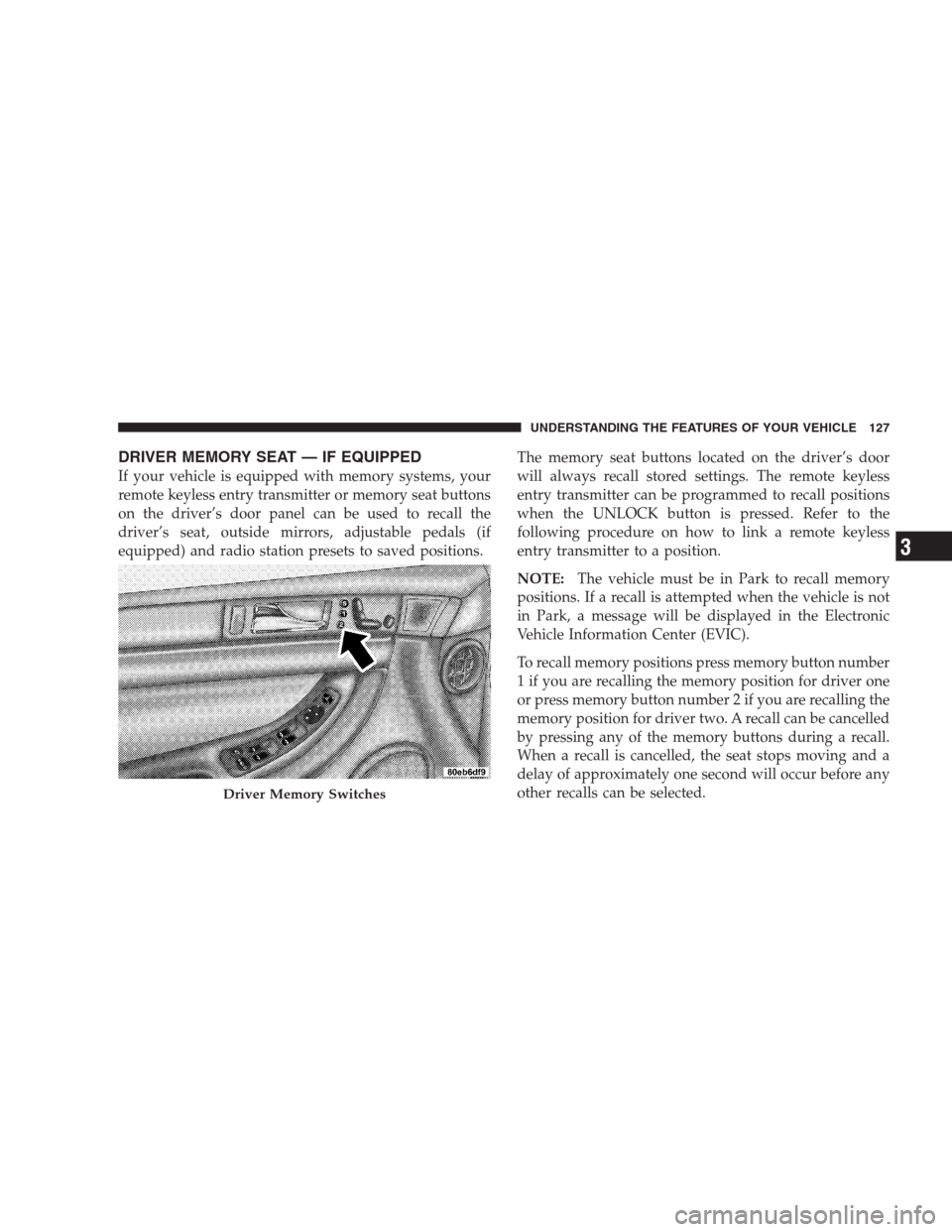
DRIVER MEMORY SEAT — IF EQUIPPED
If your vehicle is equipped with memory systems, your
remote keyless entry transmitter or memory seat buttons
on the driver’s door panel can be used to recall the
driver’s seat, outside mirrors, adjustable pedals (if
equipped) and radio station presets to saved positions.The memory seat buttons located on the driver’s door
will always recall stored settings. The remote keyless
entry transmitter can be programmed to recall positions
when the UNLOCK button is pressed. Refer to the
following procedure on how to link a remote keyless
entry transmitter to a position.
NOTE:The vehicle must be in Park to recall memory
positions. If a recall is attempted when the vehicle is not
in Park, a message will be displayed in the Electronic
Vehicle Information Center (EVIC).
To recall memory positions press memory button number
1 if you are recalling the memory position for driver one
or press memory button number 2 if you are recalling the
memory position for driver two. A recall can be cancelled
by pressing any of the memory buttons during a recall.
When a recall is cancelled, the seat stops moving and a
delay of approximately one second will occur before any
other recalls can be selected.
Driver Memory Switches
UNDERSTANDING THE FEATURES OF YOUR VEHICLE 127
3
Page 128 of 464
Your vehicle has been delivered with two remote keyless
entry transmitters. One or both transmitters can be linked
to either memory position. Up to eight remote keyless
entry transmitters can be used with your vehicle. The
memory seat system can also accommodate up to eight
transmitters linked to either of the two stored seat
positions or any combination of the two positions.
To Program Memory Seat Buttons & RKE
Transmitters, Follow These Steps:
1. Turn the ignition switch to the ON position.
2. Select Remote Linked to Memory from the EVIC and
enter “Yes”.
3. Use the seat, mirror and adjustable pedal switches to
adjust the seat, recliner, side view mirrors and adjustable
pedals to the desired positions.
4. Set the radio station presets.5. Turn the ignition switch to the OFF position and
remove the key.
6. Press and release the SET (S) button located on the
driver’s door. A light in the button will flash telling you
that you are in the set memory mode. You have five
seconds to complete the next step.
7. Within 5 seconds, press and release button 1 or 2 on
the driver’s door. A chime will sound signaling you that
the driver memory has been set. A message will also be
displayed in the Electronic Vehicle Information Center
(EVIC), indicating a position has been set.
8. Within 5 seconds, press and release the LOCK button
on one of the Remote Keyless Entry Transmitters. A
chime will sound signaling you that the transmitter has
been successfully linked. A message will also be dis-
played in the Electronic Vehicle Information Center
(EVIC), indicating the transmitter has been linked.
128 UNDERSTANDING THE FEATURES OF YOUR VEHICLE
Page 131 of 464

Tilt Mirrors in Reverse (Available with Memory
Seat Only) — If Equipped
This additional feature provides automatic outside mir-
ror positioning which will aid the driver’s view of the
ground rearward of the front doors. The outside mirrors
will move slightly downward from the present position
when the vehicle is shifted into the Reverse position. The
outside mirrors will then return to the original position
when the vehicle is shifted out of Reverse position. Each
stored memory setting will have an associated Tilt Mir-
rors in Reverse position.
NOTE:The Tilt Mirrors in Reverse feature is not en-
abled when delivered from the factory. The Tilt Mirrors in
Reverse feature can be enabled or disabled through the
customer programmable features in the Electronic Ve-
hicle Information Center (EVIC), refer to “Tilt Mirrors in
Reverse?” under “Use Factory Settings”.
TO OPEN AND CLOSE THE HOOD
To open the hood, two latches must be released. First pull
the hood release lever located under the left side of the
instrument panel.
Hood Release Lever
UNDERSTANDING THE FEATURES OF YOUR VEHICLE 131
3
Page 143 of 464

NOTE:
•The Traction Control Indicator comes on each time the
ignition switch is turned ON. This will occur even if
you used the switch to turn the system OFF.
•The Traction Control system will make buzzing or
clicking sounds when in operation.
REAR PARK ASSIST SYSTEM — IF EQUIPPED
This system is used to help drivers determine if an
obstacle is in the way of the vehicle while it is backing up
in addition to the use of inside rearview and outside
mirrors.
When the driver selects Reverse the system scans for
objects behind the vehicle using four sensors located in
the rear bumper. Objects can be detected from up to 59
inches (150 cm). A warning display above the rear
window provides both visible and audible warnings
indicating the distance of the object.The warning display contains two sets of yellow and red
LEDs, one set to warn of obstacles behind the left rear of
the vehicle and the other set to warn of obstacles behind
the right rear of the vehicle. The driver can view the LEDs
either through the rear view mirror or by looking at the
display above the rear window.
Rear Park Assist Indicator
UNDERSTANDING THE FEATURES OF YOUR VEHICLE 143
3
Page 194 of 464
Display U.S. or Metric?
Pressing the US/M button will change the EVIC, odom-
eter, navigation system and A/C Control units from US
to Metric.
Use factory Settings?
When in this display you may select to use the factory
settings and no programmable features will be offered.
Auto Door Locks?
When this feature is selected, all doors and the liftgate
lock automatically when the speed of the vehicle reaches
15 mph (25 km/h). Pressing the STEP button when in this
display will select “Yes” or “No.”
Auto Unlock On Exit?
When this feature is selected all the vehicle’s doors will
unlock when the driver’s door is opened if the vehicle is
stopped and the transmission is in P (Park) or N (Neu-
tral) position. Pressing the STEP button when in this
display will select “Yes” or “No.”
Remote Unlock Driver’s Door 1st?
When this feature is selected only the driver’s door will
unlock on the first press of the remote keyless entry unlock
button and require a second press to unlock the remaining
locked doors and liftgate. WhenREMOTE UNLOCK ALL
DOORSis selected all of the doors and the liftgate will
unlock at the first press of the remote keyless entry unlock
button. Pressing the STEP button when in this display will
select DRIVER’S DOOR 1ST or ALL DOORS.
Remote Linked To Memory? (Available with
Memory Seat Only)
When this feature is selected the memory seat, mirror,
and radio settings will return to the memory set position
when the remote keyless entry “Unlock” button is
pressed. If this feature is not selected then the memory
seat, mirror, and radio settings can only return to the
memory set position using the door mounted switch.
Pressing the STEP button when in this display will select
“Yes” or “No.”
194 UNDERSTANDING YOUR INSTRUMENT PANEL
Page 196 of 464
Reset Service Distance (Displays Only if Service
Interval was Changed)
When this feature is selected the current accumulated
service distance can be reset to the newly selected service
interval. Pressing the STEP button when in this display
will select “Yes” or “No.”
Power Accessory Delay?
When this feature is selected, the power window
switches, radio, hands–free system, DVD video system,
power sunroof, and power outlets will remain active for
up to 45 seconds after the ignition switch has been turned
off. Opening a vehicle door or liftgate will cancel this
feature.
Easy Exit Seat? (Available with Memory Seat Only)
This feature provides automatic driver’s seat positioning
which will enhance driver mobility out of and into the
vehicle.
The Easy Entry Easy Exit feature is not enabled when the
vehicle is delivered from the factory. The Easy Entry Easy
Exit feature is enabled (or later disabled) through the
programmable features in the Electronic Vehicle Informa-
tion Center (EVIC). Pressing the STEP button when in this
display will select “Yes” or “No.” The seat will return to the
memorized seat location (if REMOTE LINK TO MEMORY
is set to YES) when the remote keyless entry transmitter is
used to unlock the door. For more information refer to
“Easy Entry/Exit Seat in the Driver Memory Seat section.
Tilt Mirrors in Reverse? (Available with Memory
Seat Only)
When this feature is selected the outside mirrors will
move slightly downward from the present position when
the vehicle is shifted into the Reverse position. The
outside mirrors will then return to the original position
when the vehicle is shifted out of Reverse position.
Pressing the STEP button when in this display will select
�Ye s�or�No�.
196 UNDERSTANDING YOUR INSTRUMENT PANEL
Page 259 of 464
A/C Air Filter — If Equipped
On vehicles equipped with Automatic Temperature Con-
trol (ATC), the climate control system filters out dust and
pollen from the air. Refer to section 7 “Air Conditioning”
for filter replacement instructions.
Outside Temperature Display
The outside temperature can be shown in the ATC
display by pressing the�OUTSIDE TEMP�button. After
pressing this button, the front seat passenger’s tempera-
ture setting display will be replaced with the current
outside temperature. Press the�OUTSIDE TEMP�button
again or press the passenger’s�TEMP�button to return
the display to the passenger’s temperature setting.
Electric Rear Window Defroster
Press this button to turn on the rear window
defroster and the heated side mirrors. A light inthe button will illuminate to indicate the rear window
defroster is ON. The defroster automatically turns off
after about 10 minutes of operation.
CAUTION!
To avoid damaging the electrical conductors of the
rear window defroster, do not use scrapers, sharp
instruments, or abrasive window cleaners on the
interior surface of the window.
Labels can be peeled off after soaking with warm
water.
UNDERSTANDING YOUR INSTRUMENT PANEL 259
4
Page 266 of 464
STARTING PROCEDURES
Before starting your vehicle, adjust your seat, adjust both
inside and outside mirrors, and fasten your seat belts.WARNING!
•Be sure to turn off the engine if you want to rest or
sleep in your car. Accidents can be caused by
inadvertently moving the gear selection lever or by
pressing the accelerator pedal. This may cause ex-
cessive heat in the exhaust system, resulting in
overheating and vehicle fire which may cause seri-
ous or fatal injuries.
•NEVER leave children alone in a vehicle. Leaving
children in a vehicle unattended is dangerous for a
number of reasons. A child or others could be
seriously or fatally injured. Don’t leave the keys in
the ignition. A child could operate power windows,
other controls, or move the vehicle
•Do not leave children or animals inside parked
vehicles in hot weather. Interior heat build up may
cause serious injury or death.
266 STARTING AND OPERATING