Page 69 of 472
Installing Child Restraints Using the Vehicle Seat
Belt
The second and third row seats have either cinching latch
plates or automatic locking retractors which are designed
to keep the lap portion tight around the child restraint so
that it is not necessary to use a locking clip. If the seat belt
has a cinching latch plate, pulling up on the shoulder
portion of the lap/shoulder belt will tighten the belt. The
cinching latch plate will keep the belt tight, however, any
seat belt system will loosen with time, so check the belt
occasionally and pull it tight if necessary. If the seat belt
has a automatic locking retractor, it will have a distinctive
label. Pull the belt from the retractor until there is enough
to allow you to pass through the child restraint and slide
the latch plate into the buckle. Then, pull the belt until it
is all extracted from the retractor. Allow the belt to return
to the retractor, pulling on the excess webbing to tighten
the lap portion about the child restraint. Refer to�Auto-
matic Locking Mode�earlier in this section.
Child Restraints in Third Row Seating (If
Equipped)
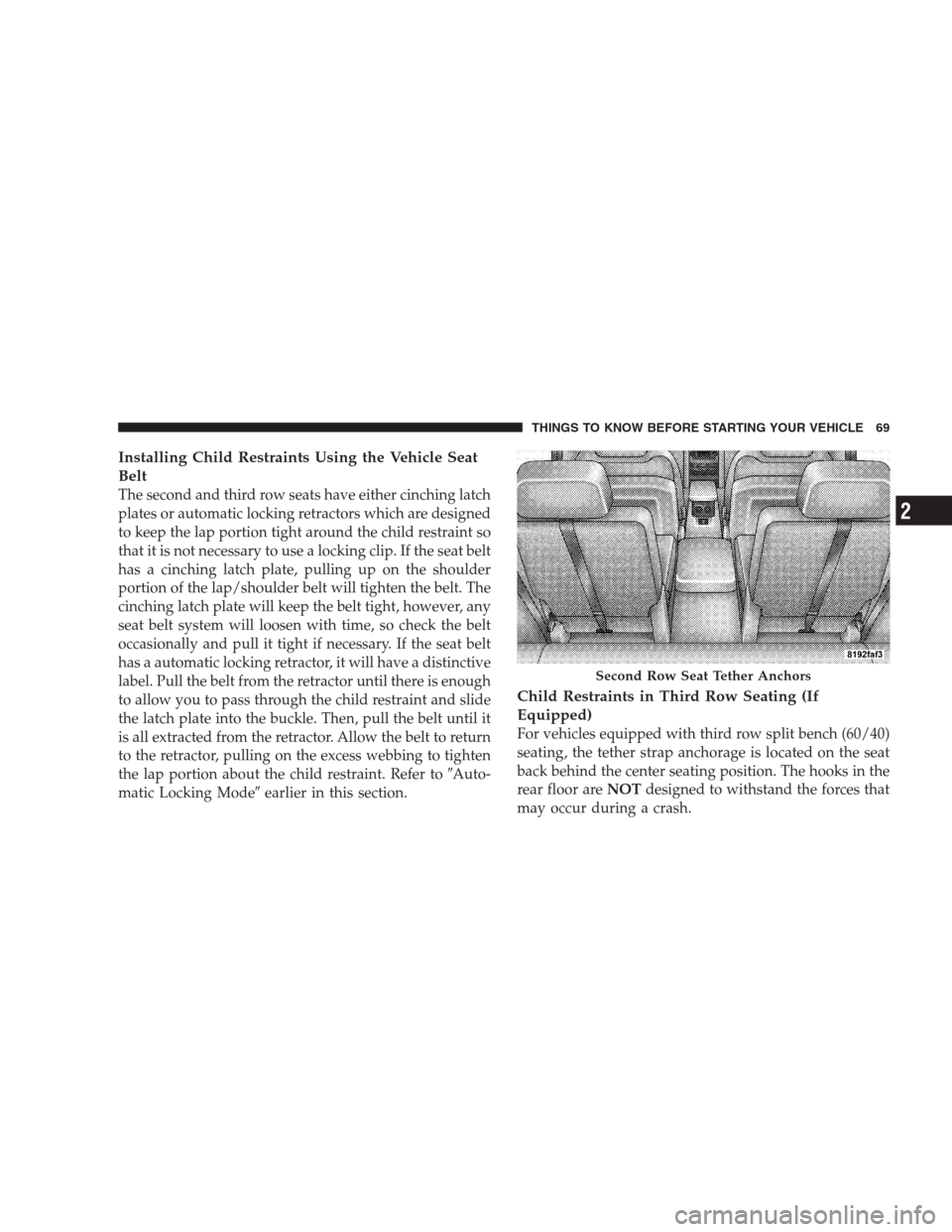
For vehicles equipped with third row split bench (60/40)
seating, the tether strap anchorage is located on the seat
back behind the center seating position. The hooks in the
rear floor areNOTdesigned to withstand the forces that
may occur during a crash.
Second Row Seat Tether Anchors
THINGS TO KNOW BEFORE STARTING YOUR VEHICLE 69
2
Page 74 of 472
Lights
Check the operation of all exterior lights. Check turn
signal and high beam indicator lights on the instrument
panel.
Door Latches
Check for positive closing, latching and locking.
Fluid Leaks
Check area under vehicle after overnight parking for fuel,
water, oil, or other fluid leaks. Also, if fuel fumes are
detected the cause should be located and corrected.
74 THINGS TO KNOW BEFORE STARTING YOUR VEHICLE
Page 108 of 472
mobile
mute
mute off
new entry
no
pager
pair a phone
phone pairing pairing
phonebook phone book
previous
record again
redial
return to main menu return or main menu
select phone select
send
set up phone settings or phone
set uptowing assistance
transfer call
try again
voice training
work
yes
SEATS
Front Seat Manual Seat Adjustment
The adjusting lever is at the front of the seat, near the
floor. Lift the lever and move the seat to the desired
position. Release the bar to lock the seat into position.
Using body pressure, move forward and rearward on the
seat to be sure the seat adjusters have latched.
108 UNDERSTANDING THE FEATURES OF YOUR VEHICLE
Page 109 of 472
WARNING!
Adjusting a seat while the vehicle is moving is
dangerous. The sudden movement of the seat could
cause you to lose control. The seat belt might not be
properly adjusted and you could be injured. Adjust
any seat only while the vehicle is parked.
Front Seats Manual Seat Recliners
The bucket seats are equipped with recliners. The reclin-
ing mechanism is operated by a lever located on the right
side of the passenger’s seat and the left side of the driver
seat. To recline, lean forward slightly before lifting the
lever, then push back to the desired position and release
the lever. Lean forward and lift the lever to return the
seatback to its normal position. Using body pressure, lean
forward and rearward on the seat to be sure the seatback
is locked.
Manual Seat Adjuster
UNDERSTANDING THE FEATURES OF YOUR VEHICLE 109
3
Page 118 of 472
Second row leather seats have seatback recliners at the
40% seating positions. Raising the lever allows the seat-
back to be reclined an additional 11 degrees.
To Fold the 40% seatbacks fully raise the lever on the side
of the seat to release the seatback. The seatback can nowbe folded into the down position for use as a cargo floor,
or the seat can now be tumbled forward to allow access
to the rear of the vehicle.
To fold the 20% seatback, pull the strap forward to release
the seatback. Fold the seatback down for use as an
armrest or to carry cargo. When returning the seatback to
the upright position, push the seatback rearward to latch
the seatback. Pull the seatback forward to ensure that it is
locked in the upright position.
WARNING!
The 20% seatback contains the center shoulder belt.
A 20% seatback that is not fully latched in the
upright position will not protect you properly.
Fold, Tumble, and Recline Lever
118 UNDERSTANDING THE FEATURES OF YOUR VEHICLE
Page 125 of 472
DRIVER MEMORY SYSTEM — IF EQUIPPED
Once programmed, the memory buttons 1 and 2 on the
driver’s door panel can be used to recall the driver’s seat
position, driver’s outside mirror position, adjustable
brake and accelerator pedals position, Automatic Tem-
perature Control (ATC) temperature and radio stationpreset settings. Your Remote Keyless Entry transmitters
can also be programmed to recall the same positions
when the UNLOCK button is pressed.
Your vehicle was delivered with two Remote Keyless
Entry transmitters. One or both transmitters can be
linked to either memory position. The memory system
can accommodate up to two transmitters, each transmit-
ter linked to either of the two memory positions.
Third Row Seat Return Pull Strap
UNDERSTANDING THE FEATURES OF YOUR VEHICLE 125
3
Page 126 of 472

Setting Memory Positions and Linking Remote
Keyless Entry Transmitter to Memory
NOTE:Each time the SET (S) button and a numbered
button (1 or 2) are pressed, you erase the memory settings
for that button and store new settings.
1. Adjust the driver’s seat, recliner, and both side view
mirrors to the desired positions.
NOTE:Not all motors may be moved at one time.
Please refer to the 8-way power seat description.
2. Adjust the brake and accelerator pedals to the desired
positions.
3. Turn on the radio and set the radio station presets (up
to 10 AM and 10 FM stations can be set).
4. Adjust the Automatic Temperature Control (ATC)
while the ATC is in Auto mode.5. Press and release the SET (S) button located on the
driver’s door.
6. Within 5 seconds, press and release memory button 1
or 2 on the driver’s door. The next step must be per-
formed within 10 seconds if you desire to also use a
Remote Keyless Entry transmitter to recall memory po-
sitions.
7. Press and release the LOCK button on one of the
transmitters.
8. Insert the ignition key and turn the ignition switch to
the ON position.
9. Repeat the above steps to set the next memory posi-
tion using the other numbered memory button or to link
another Remote Keyless Entry transmitter to memory.
NOTE:A chime sound may be heard if Setting Memory
was inhibited for any reason.
126 UNDERSTANDING THE FEATURES OF YOUR VEHICLE
Page 127 of 472

Memory Position Recall
NOTE:
•The driver’s seat belt must be unbuckled to recall
memory positions.
•The vehicle must be in Park to recall memory posi-
tions.
•Not all motors may be moved at one time. Please refer
to the 8-way power seat description.
To recall the memory settings for driver one, press
memory button number 1 on the driver’s door or the
Unlock button on the Remote Keyless Entry transmitter
linked to memory position 1.
To recall the memory setting for driver two, press
memory button number 2 on the driver’s door or the
Unlock button on the Remote Keyless Entry transmitter
linked to memory position 2.A recall can be cancelled by pressing any of the memory
buttons on the drivers door during a recall (S, 1, or 2), or
pressing any one of the power seat buttons, or pressing
the adjustable pedals button, or pressing either the LOCK
or UNLOCK button on the remote keyless entry trans-
mitter when not in the ignition switch. When a recall is
cancelled, the driver’s seat, and the pedals stop moving.
A delay of one second will occur before another recall can
be selected.
NOTE:A chime sound may be heard if Setting Memory
was inhibited for any reason.
To Disable A Transmitter Linked to Memory
1. Turn the ignition switch to the OFF position and
remove the key.
2. Press and release the memory SET (S) button located
on the driver’s door.
UNDERSTANDING THE FEATURES OF YOUR VEHICLE 127
3