2007 CHRYSLER 300 SRT warning light
[x] Cancel search: warning lightPage 124 of 360
Settings (Customer Programmable Features),” under
“Electronic Vehicle Information Center (EVIC)” in Sec-
tion 4 of this manual.
Sunroof Fully Closed
Press the switch forward and release to ensure that the
sunroof is fully closed.
ELECTRICAL POWER OUTLETS
There are two 12-volt electrical outlets on this vehicle.
Both of the outlets are protected by a fuse.
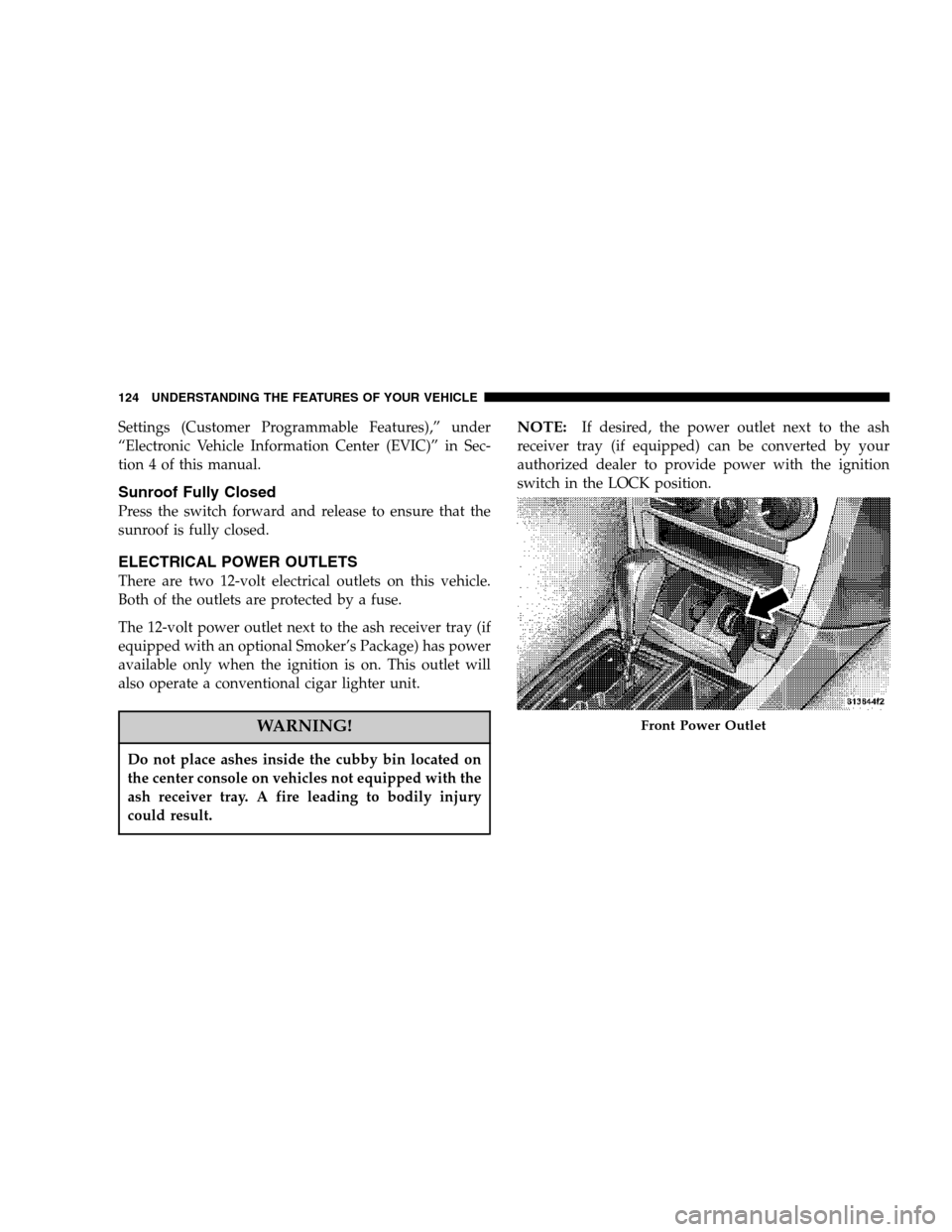
The 12-volt power outlet next to the ash receiver tray (if
equipped with an optional Smoker’s Package) has power
available only when the ignition is on. This outlet will
also operate a conventional cigar lighter unit.
WARNING!
Do not place ashes inside the cubby bin located on
the center console on vehicles not equipped with the
ash receiver tray. A fire leading to bodily injury
could result.
NOTE:If desired, the power outlet next to the ash
receiver tray (if equipped) can be converted by your
authorized dealer to provide power with the ignition
switch in the LOCK position.
Front Power Outlet
124 UNDERSTANDING THE FEATURES OF YOUR VEHICLE
Page 137 of 360

7. Tachometer
The red segments indicate the maximum permissible
engine revolutions-per-minute (r.p.m. x 1000) for each
gear range. Ease up on the accelerator before reaching the
red area.
8. Engine Temperature Warning Light
This light will turn on and a single chime will
sound to warn of an overheated engine condi-
tion. When this light turns on, the engine tem-
perature is critically hot. The vehicle should be turned
off immediately and serviced as soon as possible. (See
page 256 for more information.)
9. Anti-Lock Brake Light
This light monitors the Anti-Lock Brake System.
The light will turn on when the ignition switch
is turned to the ON position and may stay on for as
long as four seconds.
If the ABS light remains on or turns on while driving,
then the Anti-Lock portion of the brake system is not
functioning and service is required. However, the con-
ventional brake system will continue to operate normally
if the BRAKE warning light is not on.If the ABS light is on, the brake system should be serviced
as soon as possible to restore the benefits of Anti-Lock
brakes. If the ABS light does not turn on when the
Ignition switch is turned to the ON position, have the
light inspected by an authorized dealer. (See page 211 for
more information.)
10. Electronic Stability Program (ESP) / Brake
Assist System (BAS) Malfunction Indicator Light
The yellow ESP/BAS malfunction indicator
light will turn on when the key in the
ignition switch is turned to the “ON” posi-
tion. The light should go out with the engine
running. If the light remains on after several ignition
cycles, and the vehicle has been driven several miles at
speeds greater than 30 mph (48 km/h), see your
authorized dealer as soon as possible to have the
problem diagnosed and corrected. (See page 214 for
more information.)
11. Airbag Warning Light
This light will turn on for 6 to 8 seconds as a
bulb check when the ignition switch is first
turned ON. If the light is either not on
UNDERSTANDING YOUR INSTRUMENT PANEL 137
4
Page 138 of 360

during starting, or stays on, or turns on while driving,
then have the system inspected at your authorized
dealer as soon as possible. (See page 46 for more
information.)
12. Brake System Warning Light
This light monitors various brake functions,
including brake fluid level and parking
brake application. If the brake light turns on,
it may indicate that the parking brake is
applied, that the brake fluid level is low, or that there
is a problem with the anti-lock brake system.
The dual brake system provides a reserve braking capac-
ity to a portion of the hydraulic system in the event of a
failure. Failure of either half of the dual brake system is
indicated by the Brake Warning Light, which will turn on
when the brake fluid level in the master cylinder drops
below a specified level.
The light will remain on until the cause is corrected.
NOTE:The light may flash momentarily during sharp
cornering maneuvers due to a change in fluid level. If so,
the vehicle should have service performed and the brake
fluid level checked.
Immediate repair is necessary if brake failure is indicated.
WARNING!
Driving a vehicle with the brake light on is danger-
ous. Part of the brake system may have failed. It will
take longer to stop the vehicle. You could have an
accident. Have the vehicle checked immediately.
Vehicles equipped with Anti-Lock brakes (ABS) are also
equipped with Electronic Brake Force Distribution (EBD).
Both the Brake Warning Light and the ABS Light will
turn on in the event of an EBD failure. Immediate repair
of the ABS system is required in the event of an EBD
failure.
138 UNDERSTANDING YOUR INSTRUMENT PANEL
Page 139 of 360

The operation of the Brake Warning Light can be checked
by turning the ignition switch from the OFF position to
the ON position. The light should turn on for approxi-
mately two seconds and then turn off. The light will
remain on if the parking brake is applied or if a brake
fault is detected. If the parking brake is not applied and
the light remains on, or if the light does not turn on, have
the light inspected by an authorized dealer.
NOTE:The light will turn on when the ignition switch
in the ON position and the parking brake is applied. This
light shows only that the parking brake is applied. It does
not show the degree of brake application. (See page 211
for more information.)
13. Electronic Stability Program (ESP)/Traction
Control System (TCS) Indicator Light
If this indicator light flashes during accelera-
tion, ease up on the accelerator and apply as
little throttle as possible. Adapt your speed
and driving to the prevailing road condi-
tions, and do not switch off the ESP. (See page 214 for
more information.)14. Temperature Gauge
The temperature gauge shows engine coolant tempera-
ture. Any reading within the normal range indicates that
the engine cooling system is operating satisfactorily.
The gauge pointer will likely indicate a higher tempera-
ture when driving in hot weather, up mountain grades,
or when towing a trailer. It should not be allowed to
exceed the upper limits of the normal operating range.
CAUTION!
Driving with a hot cooling system could damage
your vehicle. If temperature gauge reads 240°F
(116°C) or greater, pull over and stop the vehicle. Idle
the vehicle with the air conditioner turned off until
the pointer drops back into the normal range 200–
230°F (93–110°C). If the pointer remains at 240°F
(116°C) or greater and you hear a chime, turn the
engine off immediately, and call for service.
UNDERSTANDING YOUR INSTRUMENT PANEL 139
4
Page 140 of 360

WARNING!
A hot engine cooling system is dangerous. You or
others could be badly burned by steam or boiling
coolant. You may want to call a service center if your
vehicle overheats. If you decide to look under the
hood yourself, see Section 7 of this manual. Follow
the warnings under the Cooling System Pressure
Cap paragraph.
15. Trip Odometer Button
Press this button to change the display from odometer to
either of two trip odometer settings. The letter “A” or “B”
will appear when in the trip odometer mode. Push in and
hold the button for two seconds to reset the trip odometer
to 0 miles (kilometers). The odometer must be in trip
mode to reset it.
16. High Beam Light
This light will turn on when the high beam
headlights are ON. Push the Multi-Functionlever away from the steering wheel to switch the
headlights to high beam. (See page 98 for more
information.)
17. Transmission Range Indicator
This display indicator shows the automatic transmission
gear selection.
18. Seat Belt Reminder Light
This light will turn on for 5 to 8 seconds as a
bulb check when the ignition switch is first
turned ON. A chime will sound if the driver’s
seat belt is unbuckled during the bulb check. The Seat
Belt Warning Light will flash or remain on continu-
ously if the driver’s seat belt remains unbuckled after
the bulb check or when driving. (See page 35 for more
information.)
19. Vehicle Security Alarm (VSA) Indicator Light —
If Equipped
The VSA indicator Light flashes rapidly when the VSA is
arming, and slowly when the VSA is armed. (See page 15
for more information.)
140 UNDERSTANDING YOUR INSTRUMENT PANEL
Page 142 of 360

Please note that the TPMS is not a substitute for proper
tire maintenance, and it is the driver ’s responsibility to
maintain correct tire pressure, even if under-inflation has
not reached the level to trigger illumination of the TPMS
low tire pressure telltale.
The Tire Pressure Monitoring Telltale Light will illumi-
nate in the instrument cluster, and an audible chime will
be activated when one or more tire pressures is low. The
Tire Pressure Monitoring Telltale Light will flash on and
off for 60 seconds when a system fault is detected. The
flash cycle will repeat every ten minutes or until the fault
condition is removed and reset. (See page 239 for more
information.)CAUTION!
The TPMS has been optimized for the original
equipment tires and wheels. TPMS pressures and
warning have been established for the tire size
equipped on your vehicle. Undesirable system op-
eration or sensor damage may result when using
replacement equipment that is not of the same size,
type, and/or style. After-market wheels can cause
sensor damage. Do not use tire sealant from a can, or
balance beads if your vehicle is equipped with a
TPMS, as damage to the sensors may result.
23. Voltage Light
This light monitors the electrical system volt-
age. The light should turn on momentarily as
the engine is started. If the light stays on or turns on
while driving, it indicates a problem with the charging
system. Immediate service should be obtained.
142 UNDERSTANDING YOUR INSTRUMENT PANEL
Page 143 of 360

24. Malfunction Indicator Light
This light is part of an onboard diagnostic
system called OBD. The OBD system monitors
engine and automatic transmission control sys-
tems. The light will turn on when the key is in the ON
position before engine start. If the light does not come
on when turning the key from OFF to ON, have the
condition checked promptly.
Certain conditions such as a loose or missing gas cap,
poor fuel quality, etc. may illuminate the light after
engine start. The vehicle should be serviced if the light
stays on through several of your typical driving cycles. In
most situations, the vehicle will drive normally and will
not require towing.The Malfunction Indicator Light flashes to alert you to
serious conditions that could lead to immediate loss of
power or severe catalytic converter damage. The vehicle
should be serviced as soon as possible if this occurs. (See
page 272 for more information.)
25. Oil Pressure Warning Light
This light shows low engine oil pressure. The
light should turn on momentarily when the
engine is started. If the light turns on while driving,
stop the vehicle, and shut off the engine as soon as
possible. A single chime will sound when this light
turns on.
Do not operate the vehicle until the cause is corrected.
This light does not show how much oil is in the engine.
The engine oil level must be checked using the procedure
shown in section 7. (See page 275 for more information.)
UNDERSTANDING YOUR INSTRUMENT PANEL 143
4
Page 145 of 360

Press the FUNCTION SELECT button to accept
a selection. The FUNCTION SELECT button
also advances the radio to the next preset
station, changes the side of the tape being
played (if so equipped), or changes the current
CD track being played (if so equipped) when
the EVIC is in the Compass/Temp/Audio
screen.
Press the SCROLL button to scroll through Trip
Functions, Navigation (if equipped), System
Status Messages, and Personal Settings (Cus-
tomer Programmable Features). The SCROLL
button also seeks up and down the radio
stations, CD track numbers (if so equipped), or
satellite radio channels (if so equipped) when the EVIC is
in the Compass/Temp/Audio screen.
Press the AUDIO MODE button to select the
Compass/Temp/Audio screen. This screen
displays radio station frequencies, any one of
twelve radio station preset frequencies, CD
disc number, CD track number, tape, or any
one of 200 Satellite radio channels depending
on which radio is in the vehicle.If Compass/Temp/Audio is already displayed when the
AUDIO MODE button is pressed, then the radio mode
will change from AM to FM, to Tape, to CD, or to Satellite
(SAT) accordingly.
Electronic Vehicle Information Center (EVIC)
Displays
When the appropriate conditions exist, the Electronic
Vehicle Information Center (EVIC) displays the following
messages:
•Turn Signal On (with a continuous warning chime if
the vehicle is driven more than 1 mile [1.6 km] with
either turn signal on)
•Left Front Turn Signal Light Out (with a single chime)
•Left Rear Turn Signal Light Out (with a single chime)
•Right Front Turn Signal Light Out (with a single
chime)
•Right Rear Turn Signal Light Out (with a single chime)
•RKE Battery Low (with a single chime)
•Memory #1/#2 Profile Set
FUNC-
TION
SELECT
Button
SCROLL
Button
AUDIO
MODE
Button
UNDERSTANDING YOUR INSTRUMENT PANEL 145
4