2007 CHEVROLET TRAIL BLAZER key
[x] Cancel search: keyPage 226 of 574
ENGINE COOLANT HOT/ENGINE
OVERHEATED
Notice:If you drive your vehicle while the
engine is overheating, severe engine damage
may occur. If an overheat warning appears
on the instrument panel cluster and/or
DIC, stop the vehicle as soon as possible.
Do not increase the engine speed above
normal idling speed. SeeEngine Overheating
on page 418for more information.
This message displays and a chime sounds if the
cooling system temperature gets hot. SeeEngine
Overheating on page 418for the proper course of
action. This message clears when the coolant
temperature drops to a safe operating temperature.
FUEL LEVEL LOW
This message displays and a chime sounds if the
fuel level is low in the vehicle’s fuel tank. Refuel as
soon as possible. Press any of the DIC buttons, or
the trip stem, to acknowledge this message and
clear it from the DIC display. SeeLow Fuel Warning
Light on page 219,Filling the Tank on page 391,
andFuel on page 388for more information.
ICE POSSIBLE
This message may display if the outside
temperature reaches a level where ice could form
on the roadway. If the temperature rises to a safe
level, the message clears. This message clears
itself after 10 seconds, or you can press any of the
DIC buttons, or the trip stem, to acknowledge this
message and clear it from the DIC display.
KEY FOB # BATTERY LOW
This message displays if a Remote Keyless
Entry (RKE) transmitter battery is low. Replace
the battery in the transmitter. See “Battery
Replacement” underRemote Keyless Entry (RKE)
System Operation on page 96. Press any of the
DIC buttons, or the trip stem, to acknowledge
this message and clear it from the DIC display.
LEFT REAR DOOR AJAR
This message displays and a chime sounds if the
driver’s side rear door is not fully closed. Stop and
turn off the vehicle, check the door for obstructions,
and close the door again. Check to see if the
message still appears on the DIC. Press any of the
DIC buttons, or the trip stem, to acknowledge this
message and clear it from the DIC display.
226
Page 232 of 574
Unlock Doors
Press the customization button until UNLOCK
DOORS: IN PARK appears in the display.
To select your preference for automatic unlocking,
press the select button while UNLOCK DOORS:
IN PARK is displayed on the DIC. Pressing
the select button will scroll through the
following choices:
UNLOCK DOORS: IN PARK (default):All of
the doors will unlock when the vehicle is shifted
into PARK (P).
UNLOCK DRIVER: IN PARK:The driver’s door
will be unlocked when the vehicle is shifted
into PARK (P).
UNLOCK DOORS: KEY OUT:All of the doors will
unlock when the key is taken out of the ignition.
UNLOCK DOORS: MANUALLY:The doors will
not be unlocked automatically.
Choose one of the available options and press the
customization button while it is displayed on the
DIC to select it and move on to the next feature.
For more information on automatic door locks, see
Programmable Automatic Door Locks on page 100.
Lock Feedback
Press the customization button until LOCK
FEEDBACK: BOTH appears in the display.
To select your preference for the feedback you
receive when locking the vehicle with the Remote
Keyless Entry (RKE) transmitter, press the
select button while LOCK FEEDBACK: BOTH
is displayed on the DIC. Pressing the select button
will scroll through the following choices:
LOCK FEEDBACK: BOTH (default):The parking
lamps will ash each time you press the button
with the lock symbol on the RKE transmitter
and the horn will chirp the second time you press
the lock button.
LOCK FEEDBACK: OFF:There will be no
feedback when locking the vehicle.
LOCK FEEDBACK: LAMPS:The parking lamps
will ash each time you press the button with
the lock symbol on the RKE transmitter.
LOCK FEEDBACK: HORN:The horn will chirp
the second time you press the button with the lock
symbol on the RKE transmitter.
232
Page 233 of 574
Choose one of the available options and press the
customization button while it is displayed on the
DIC to select it and move on to the next feature.
Unlock Feedback
Press the customization button until UNLOCK
FEEDBACK: LAMPS appears in the display.
To select your preference for the feedback you
will receive when unlocking the vehicle with the
Remote Keyless Entry (RKE) transmitter, press the
select button while UNLOCK FEEDBACK: LAMPS
is displayed on the DIC. Pressing the select button
will scroll through the following choices:
UNLOCK FEEDBACK: LAMPS (default):
The parking lamps will ash each time you
press the button with the unlock symbol on the
RKE transmitter.
UNLOCK FEEDBACK: HORN:The horn will
chirp the second time you press the button with
the unlock symbol on the RKE transmitter.
UNLOCK FEEDBACK: BOTH:The parking lamps
will ash each time you press the button with
the unlock symbol on the RKE transmitter and
the horn will chirp the second time you press the
unlock button.UNLOCK FEEDBACK: OFF:There will be no
feedback when unlocking the vehicle.
Choose one of the available options and press the
customization button while it is displayed on the
DIC to select it and move on to the next feature.
Headlamp Delay
Press the customization button until HEADLAMP
DELAY: 10 SEC appears in the display. To select
your preference for how long the headlamps will
stay on when you turn off the vehicle, press the
select button while HEADLAMP DELAY: 10 SEC
is displayed on the DIC. Pressing the select button
will scroll through the following choices:
HEADLAMP DELAY: 10 SEC (Seconds)
(default)
HEADLAMP DELAY: 20 SEC
HEADLAMP DELAY: 40 SEC
HEADLAMP DELAY: 1 MIN (Minute)
HEADLAMP DELAY: 2 MIN
HEADLAMP DELAY: 3 MIN
HEADLAMP DELAY: OFF
233
Page 234 of 574
The amount of time you choose will be the amount
of time that the headlamps stay on after you turn off
the vehicle. If you choose OFF, the headlamps will
turn off as soon as you turn off the vehicle.
Choose one of the available options and press the
customization button while it is displayed on the
DIC to select it and move on to the next feature.
Perimeter Lights
Press the customization button until PERIMETER
LIGHTS: ON appears in the display. To select
your preference for perimeter lighting, press
the select button while PERIMETER LIGHTS: ON
is displayed on the DIC. Pressing the select
button will scroll through the following choices:
PERIMETER LIGHTS: ON (default):The
headlamps and back-up lamps will come on for
40 seconds, if it is dark enough outside, when you
unlock the vehicle with the Remote Keyless
Entry (RKE) transmitter.
PERIMETER LIGHTS: OFF:The perimeter lights
will not come on when you unlock the vehicle
with the RKE transmitter.Choose one of the available options and press the
customization button while it is displayed on the
DIC to select it and move on to the next feature.
Easy Exit Seat
Press the customization button until EASY EXIT
SEAT: OFF appears in the display. To select your
preference for seat position exit, press the
select button while EASY EXIT SEAT: OFF is
displayed on the DIC. Pressing the select button
will scroll through the following choices:
EASY EXIT SEAT: OFF (default):No seat exit
recall will occur.
EASY EXIT SEAT: ON:The driver’s seat will
move to the exit position when the key is removed
from the ignition.
Choose one of the available options and press the
customization button while it is displayed on the
DIC to select it and move on to the next feature.
For more information on seat position exit, see
“Easy Exit Seat” underMemory Seat, Mirrors, and
Pedals on page 12.
234
Page 235 of 574
Seat Recall
Press the customization button until SEAT
RECALL: OFF appears in the display. To select
your preference for recall of the driver’s memory
seat, mirrors, and adjustable pedals, if your
vehicle has this feature, press the select button
while SEAT RECALL: OFF is displayed on
the DIC. Pressing the select button will scroll
through the following choices:
SEAT RECALL: OFF (default):The driver’s
memory seat, mirrors, and adjustable pedals
position you saved will only be recalled when
the memory button 1 or 2 is pressed.
SEAT RECALL: AT KEY IN:The driver’s
memory seat, mirrors, and adjustable pedals
position you saved will be recalled when you
put the key in the ignition.SEAT RECALL: ON REMOTE:The driver’s
memory seat, mirrors, and adjustable pedals
position you saved will be recalled when
you unlock the vehicle with the Remote
Keyless Entry (RKE) transmitter.
Choose one of the available options and press
the customization button while it is displayed
on the DIC to select it and move on to the next
feature. For more information on the memory
seat feature, seeMemory Seat, Mirrors, and
Pedals on page 12.
235
Page 293 of 574
z(Set-up Menu):Press thezbutton to adjust
the color, tint, brightness, contrast, display
mode, and dynamic range compression. The
dynamic range compression feature can be used
to reduce loud audio and increase low audio
produced by some DVDs.
e(Audio):Press theebutton to display a menu
that only appears when a DVD is being played.
The format and content of this function varies
for each disc.
r(Fast Reverse):Press therbutton to fast
reverse the DVD or CD. To stop fast reversing,
press the
rbutton again. This button might not
work when the DVD is playing the copyright
information or the previews.
SRCE (Source):Press this button to switch
between the DVD player and an auxiliary source.
c(Stop):Press thecbutton to stop playing,
rewinding, or fast forwarding a DVD or CD.
Press the
cbutton twice to return to the
beginning of the DVD.
t(Previous Track/Chapter):Press thetbutton
to return to the start of the current track or chapter.
Press the
tbutton again to return to the previous
track or chapter. This button might not work when
the DVD is playing the copyright information or
the previews.
1 through 0 (Numeric Keypad):The numeric
keypad provides you with the capability of
direct chapter, title, and track number selection.
}10 (Double Digit Entries):Press the}button
to select chapter, title, and track numbers
greater than 9. Press the
}button before
inputting the number.
\(Clear):Press the\button within three
seconds after inputting a number to clear
the number(s).
P(Illumination):Press thePbutton to turn the
remote control backlight on. The backlight times
out after about 7 to 10 seconds if no other button
is pressed while the backlight is on.
293
Page 308 of 574
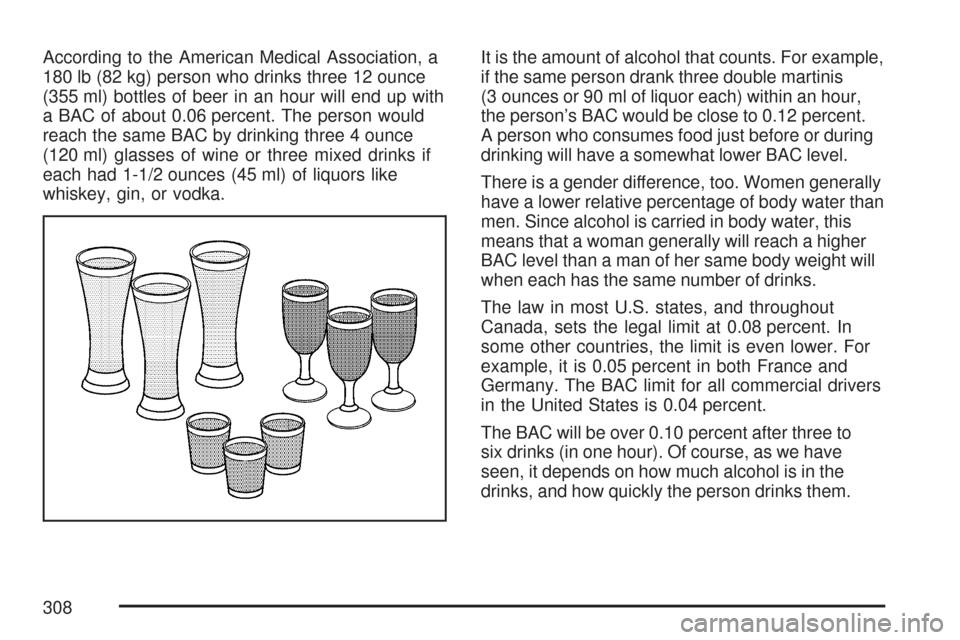
According to the American Medical Association, a
180 lb (82 kg) person who drinks three 12 ounce
(355 ml) bottles of beer in an hour will end up with
a BAC of about 0.06 percent. The person would
reach the same BAC by drinking three 4 ounce
(120 ml) glasses of wine or three mixed drinks if
each had 1-1/2 ounces (45 ml) of liquors like
whiskey, gin, or vodka.It is the amount of alcohol that counts. For example,
if the same person drank three double martinis
(3 ounces or 90 ml of liquor each) within an hour,
the person’s BAC would be close to 0.12 percent.
A person who consumes food just before or during
drinking will have a somewhat lower BAC level.
There is a gender difference, too. Women generally
have a lower relative percentage of body water than
men. Since alcohol is carried in body water, this
means that a woman generally will reach a higher
BAC level than a man of her same body weight will
when each has the same number of drinks.
The law in most U.S. states, and throughout
Canada, sets the legal limit at 0.08 percent. In
some other countries, the limit is even lower. For
example, it is 0.05 percent in both France and
Germany. The BAC limit for all commercial drivers
in the United States is 0.04 percent.
The BAC will be over 0.10 percent after three to
six drinks (in one hour). Of course, as we have
seen, it depends on how much alcohol is in the
drinks, and how quickly the person drinks them.
308
Page 327 of 574
Controlling your vehicle is the key to successful
off-road driving. One of the best ways to control
your vehicle is to control your speed. Here are
some things to keep in mind. At higher speeds:
You approach things faster and you have less
time to scan the terrain for obstacles.
You have less time to react.
You have more vehicle bounce when you drive
over obstacles.
You will need more distance for braking,
especially since you are on an unpaved
surface.
{CAUTION:
When you are driving off-road, bouncing
and quick changes in direction can easily
throw you out of position. This could
cause you to lose control and crash. So,
whether you are driving on or off the road,
you and your passengers should wear
safety belts.
Scanning the Terrain
Off-road driving can take you over many different
kinds of terrain. You need to be familiar with
the terrain and its many different features. Here
are some things to consider.
Surface Conditions:Off-roading can take you
over hard-packed dirt, gravel, rocks, grass, sand,
mud, snow, or ice. Each of these surfaces
affects the steering, acceleration, and braking of
your vehicle in different ways. Depending upon the
kind of surface you are on, you may experience
slipping, sliding, wheel spinning, delayed
acceleration, poor traction, and longer braking
distances.
327