Page 233 of 574
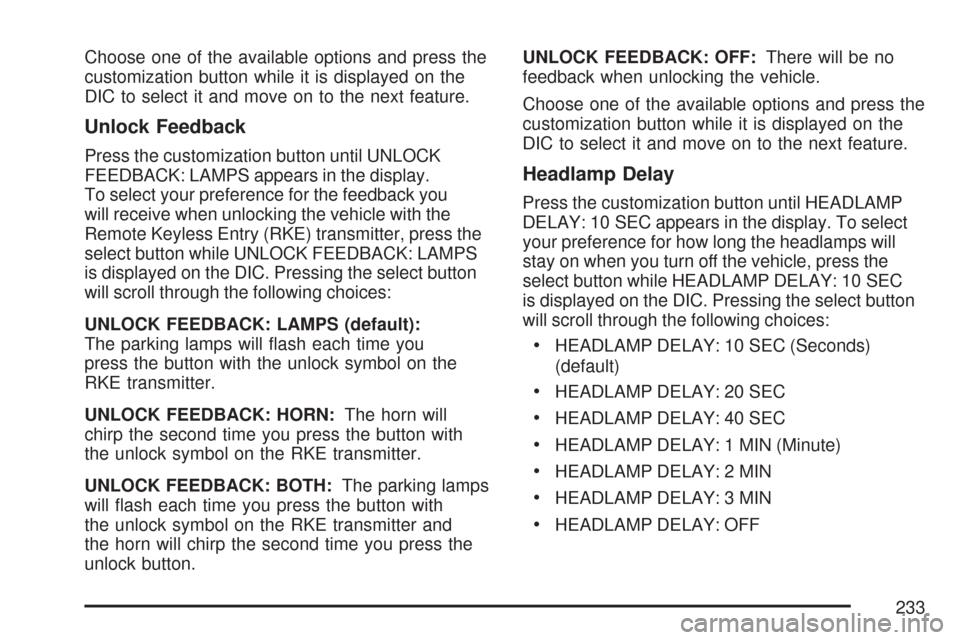
Choose one of the available options and press the
customization button while it is displayed on the
DIC to select it and move on to the next feature.
Unlock Feedback
Press the customization button until UNLOCK
FEEDBACK: LAMPS appears in the display.
To select your preference for the feedback you
will receive when unlocking the vehicle with the
Remote Keyless Entry (RKE) transmitter, press the
select button while UNLOCK FEEDBACK: LAMPS
is displayed on the DIC. Pressing the select button
will scroll through the following choices:
UNLOCK FEEDBACK: LAMPS (default):
The parking lamps will ash each time you
press the button with the unlock symbol on the
RKE transmitter.
UNLOCK FEEDBACK: HORN:The horn will
chirp the second time you press the button with
the unlock symbol on the RKE transmitter.
UNLOCK FEEDBACK: BOTH:The parking lamps
will ash each time you press the button with
the unlock symbol on the RKE transmitter and
the horn will chirp the second time you press the
unlock button.UNLOCK FEEDBACK: OFF:There will be no
feedback when unlocking the vehicle.
Choose one of the available options and press the
customization button while it is displayed on the
DIC to select it and move on to the next feature.
Headlamp Delay
Press the customization button until HEADLAMP
DELAY: 10 SEC appears in the display. To select
your preference for how long the headlamps will
stay on when you turn off the vehicle, press the
select button while HEADLAMP DELAY: 10 SEC
is displayed on the DIC. Pressing the select button
will scroll through the following choices:
HEADLAMP DELAY: 10 SEC (Seconds)
(default)
HEADLAMP DELAY: 20 SEC
HEADLAMP DELAY: 40 SEC
HEADLAMP DELAY: 1 MIN (Minute)
HEADLAMP DELAY: 2 MIN
HEADLAMP DELAY: 3 MIN
HEADLAMP DELAY: OFF
233
Page 236 of 574
Curb View
Press the customization button until CURB
VIEW: OFF appears in the display. To select
your preference for curb view, press the select
button while CURB VIEW: OFF is displayed on
the DIC. Pressing the select button will scroll
through the following choices:
CURB VIEW: OFF (default):The passenger’s
outside mirror will not be tilted down when
the vehicle is shifted into REVERSE (R).
CURB VIEW: PASSENGER:The passenger’s
outside mirror will be tilted down when the vehicle
is shifted into REVERSE (R).
When the vehicle is placed in PARK (P) or in any
forward gear, the mirror will return to the normal
driving position, following a short delay.
Choose one of the available options and press the
customization button while it is displayed on the
DIC to select it and move on to the next feature.
For more information on tilt mirror in reverse,
seeOutside Curb View Assist Mirror on page 144.
Alarm Warning
Press the customization button until ALARM
WARNING: BOTH appears in the display.
To select your preference for alarm warning,
press the select button while ALARM WARNING:
BOTH is displayed on the DIC. Pressing the select
button will scroll through the following choices:
ALARM WARNING: BOTH (default):
The headlamps will ash and the horn will chirp
when the alarm is active.
ALARM WARNING: HORN:The horn will chirp
when the alarm is active.
ALARM WARNING: LAMPS:The headlamps will
ash when the alarm is active.
ALARM WARNING: OFF:There will be no alarm
warning on activation.
Choose one of the available options and press the
customization button while your choice is displayed
on the DIC to select it and move on to the next
feature. For more information on alarm warning
type, seeContent Theft-Deterrent on page 108.
236
Page 330 of 574
Driving Uphill
Once you decide you can safely drive up the hill,
you need to take some special steps.
Use a low gear and get a rm grip on the
steering wheel.
Get a smooth start up the hill and try to
maintain your speed. Do not use more power
than you need, because you do not want
the wheels to start spinning or sliding.
{CAUTION:
Turning or driving across steep hills can
be dangerous. You could lose traction,
slide sideways, and possibly roll over.
You could be seriously injured or killed.
When driving up hills, always try to go
straight up.
Try to drive straight up the hill if at all possible.
If the path twists and turns, you might want to
nd another route.
Ease up on your speed as you approach the
top of the hill.
Attach a ag to the vehicle to make you more
visible to approaching traffic on trails or hills.
Sound the horn as you approach the top of the
hill to let opposing traffic know you are there.
Use your headlamps even during the
day. They make your vehicle more visible to
oncoming traffic.
{CAUTION:
Driving to the top (crest) of a hill at full
speed can cause an accident. There could
be a drop-off, embankment, cliff, or even
another vehicle. You could be seriously
injured or killed. As you near the top of a
hill, slow down and stay alert.
330
Page 462 of 574
TPMS Sensor Identication Codes
Each TPMS sensor has a unique identication
code. Any time you replace one or more of
the TPMS sensors or rotate the vehicle’s tires,
the identication codes will need to be matched to
the new tire/wheel position. The sensors are
matched to the tire/wheel positions in the following
order: driver’s side front tire, passenger’s side
front tire, passenger’s side rear tire, and driver’s
side rear tire using a TPMS diagnostic tool.
See your dealer for service.
The TPMS sensors may also be matched to each
tire/wheel position by increasing or decreasing
the tire’s air pressure. When increasing the tire’s
pressure, do not exceed the maximum ination
pressure indicated on the tire’s sidewall.You will have two minutes to match the rst
tire/wheel position, and ve minutes overall to
match all four tire/wheel positions. If it takes longer
than two minutes, to match the rst tire and wheel,
or more than ve minutes to match all four tire
and wheel positions the matching process
stops and you will need to start over.
The TPMS sensor matching process is
outlined below:
1. Set the parking brake.
2. Turn the ignition switch to RUN with the
engine off.
3. Turn the headlamp control from off to parking
lamps four times within three seconds.
A double horn chirp will sound and the TPMS
low tire warning light will begin to ash.
The double horn chirp and ashing TPMS
warning light indicate that the TPMS matching
process has started. The TPMS warning
light should continue ashing throughout the
matching procedure.
462
Page 463 of 574
4. Start with the driver’s side front tire.
5. Remove the valve cap from the valve cap
stem. Activate the TPMS sensor by
increasing or decreasing the tire’s air pressure
for 10 seconds, then stop and listen for a
single horn chirp. The single horn chirp should
sound within 15 seconds, conrming that
the sensor identication code has been
matched to this tire and wheel position. If you
do not hear the conrming single horn
chirp, you will need to start over with step
number one. To let air-pressure out of a tire
you can use the pointed end of the valve cap,
a pencil-style air pressure gage, or a key.
6. Proceed to the passenger’s side front tire, and
repeat the procedure in Step 5.
7. Proceed to the passenger’s side rear tire, and
repeat the procedure in Step 5.
8. Proceed to the driver’s side rear tire, and
repeat the procedure in Step 5.9. After hearing the conrming horn chirp for the
driver’s side rear tire, check to see if the
TPMS warning light is still ashing. If yes,
turn the ignition switch to LOCK to exit
the sensor matching process. If the TPMS
warning light is not ashing, the ve minute
time limit has passed and you will need
to start the process over beginning with
Step 1.
10. Set all four tires to the recommended air
pressure level as indicated on the Tire
and Loading Information label.
11. Put the valve caps back on the valve stems
The spare tire does not have a TPMS sensor.
If you replace one of the road tires with the spare,
the SERVICE TIRE MONITOR message will be
displayed on the DIC screen. This message should
go off once you re-install the road tire containing
the TPMS sensor.
463
Page 505 of 574
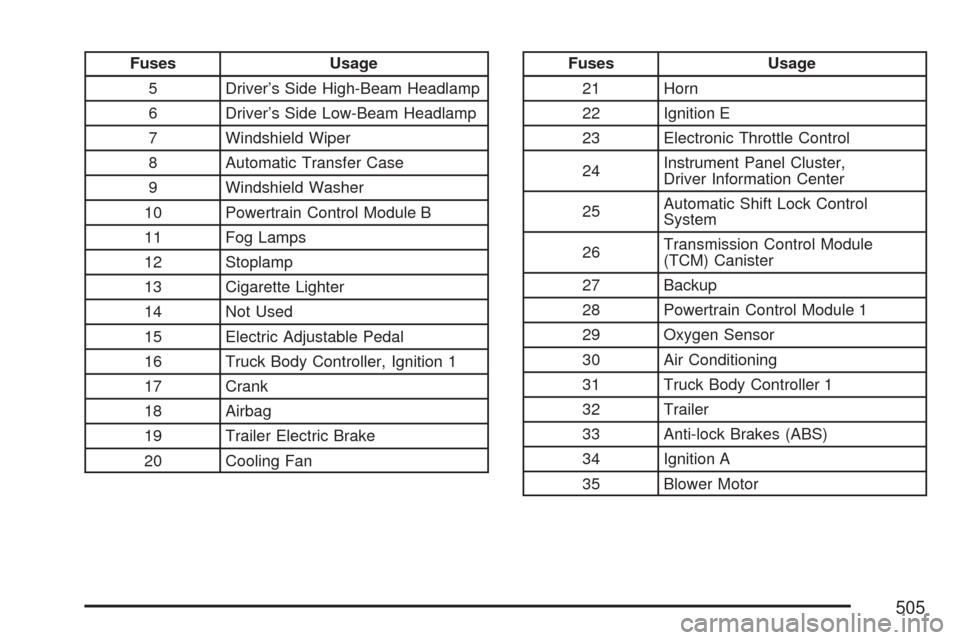
Fuses Usage
5 Driver’s Side High-Beam Headlamp
6 Driver’s Side Low-Beam Headlamp
7 Windshield Wiper
8 Automatic Transfer Case
9 Windshield Washer
10 Powertrain Control Module B
11 Fog Lamps
12 Stoplamp
13 Cigarette Lighter
14 Not Used
15 Electric Adjustable Pedal
16 Truck Body Controller, Ignition 1
17 Crank
18 Airbag
19 Trailer Electric Brake
20 Cooling FanFuses Usage
21 Horn
22 Ignition E
23 Electronic Throttle Control
24Instrument Panel Cluster,
Driver Information Center
25Automatic Shift Lock Control
System
26Transmission Control Module
(TCM) Canister
27 Backup
28 Powertrain Control Module 1
29 Oxygen Sensor
30 Air Conditioning
31 Truck Body Controller 1
32 Trailer
33 Anti-lock Brakes (ABS)
34 Ignition A
35 Blower Motor
505
Page 506 of 574
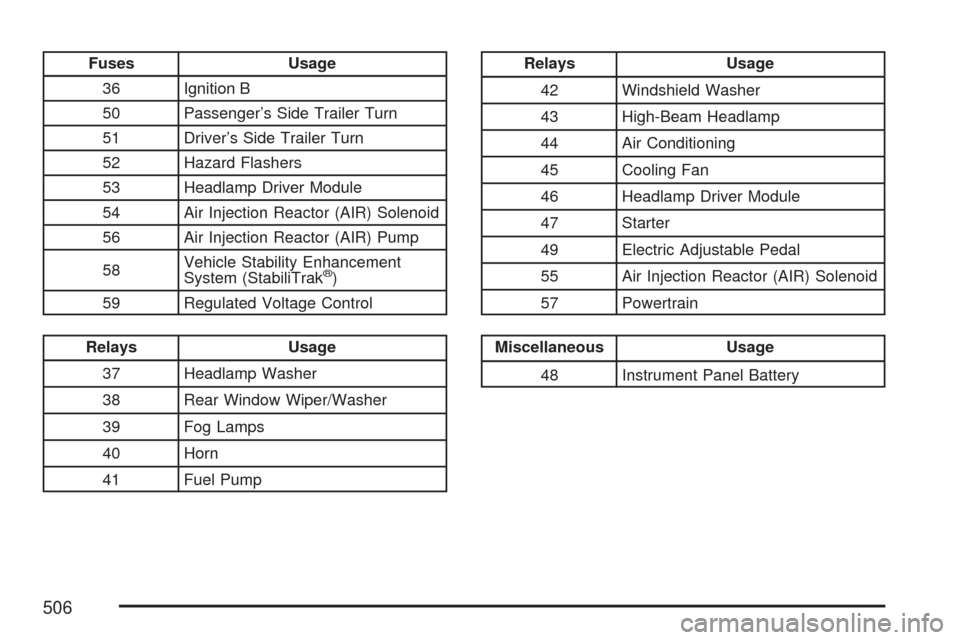
Fuses Usage
36 Ignition B
50 Passenger’s Side Trailer Turn
51 Driver’s Side Trailer Turn
52 Hazard Flashers
53 Headlamp Driver Module
54 Air Injection Reactor (AIR) Solenoid
56 Air Injection Reactor (AIR) Pump
58Vehicle Stability Enhancement
System (StabiliTrak
®)
59 Regulated Voltage Control
Relays Usage
37 Headlamp Washer
38 Rear Window Wiper/Washer
39 Fog Lamps
40 Horn
41 Fuel Pump
Relays Usage
42 Windshield Washer
43 High-Beam Headlamp
44 Air Conditioning
45 Cooling Fan
46 Headlamp Driver Module
47 Starter
49 Electric Adjustable Pedal
55 Air Injection Reactor (AIR) Solenoid
57 Powertrain
Miscellaneous Usage
48 Instrument Panel Battery
506
Page 508 of 574
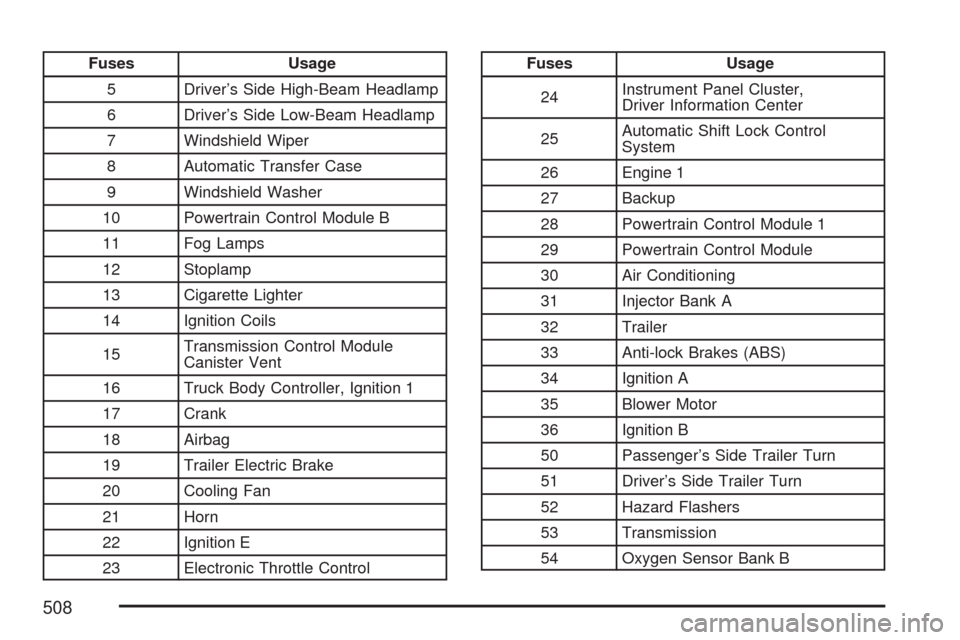
Fuses Usage
5 Driver’s Side High-Beam Headlamp
6 Driver’s Side Low-Beam Headlamp
7 Windshield Wiper
8 Automatic Transfer Case
9 Windshield Washer
10 Powertrain Control Module B
11 Fog Lamps
12 Stoplamp
13 Cigarette Lighter
14 Ignition Coils
15Transmission Control Module
Canister Vent
16 Truck Body Controller, Ignition 1
17 Crank
18 Airbag
19 Trailer Electric Brake
20 Cooling Fan
21 Horn
22 Ignition E
23 Electronic Throttle ControlFuses Usage
24Instrument Panel Cluster,
Driver Information Center
25Automatic Shift Lock Control
System
26 Engine 1
27 Backup
28 Powertrain Control Module 1
29 Powertrain Control Module
30 Air Conditioning
31 Injector Bank A
32 Trailer
33 Anti-lock Brakes (ABS)
34 Ignition A
35 Blower Motor
36 Ignition B
50 Passenger’s Side Trailer Turn
51 Driver’s Side Trailer Turn
52 Hazard Flashers
53 Transmission
54 Oxygen Sensor Bank B
508