2007 CHEVROLET SUBURBAN radio
[x] Cancel search: radioPage 201 of 634
Audio System(s)......................................... 290
Setting the Time (MP3 Radio with
a Single CD Player)............................... 291
Setting the Time (MP3 Radio with
a CD and DVD Player).......................... 292
Setting the Time (MP3 Radio with
a Six-Disc CD Player)............................ 293
Radio with CD (MP3)................................ 294
Radio with CD and DVD (MP3)................. 305
Using an MP3 (Radio with CD or
Six-Disc CD Player)............................... 321
Using an MP3 (Radio with CD
and DVD Player).................................... 327XM Radio Messages ................................. 335
Navigation/Radio System........................... 337
Rear Seat Entertainment System............... 337
Rear Seat Audio (RSA)............................. 348
Theft-Deterrent Feature............................. 350
Audio Steering Wheel Controls.................. 351
Radio Reception........................................ 352
Care of Your CDs and DVDs.................... 353
Care of the CD and DVD Player............... 353
Rear Side Window Antenna....................... 354
XM™ Satellite Radio Antenna System....... 354
Section 3 Instrument Panel
201
Page 217 of 634
Automatic Headlamp System
When it is dark enough outside, the automatic
headlamp system will turn on the headlamps at the
normal brightness, along with the taillamps,
sidemarker, parking lamps, and the instrument
panel lights. The radio lights will also be dim.
To turn off the automatic headlamp system, turn
the exterior lamps switch to the off position
and then release. For vehicles rst sold in Canada,
the transaxle must be in the PARK (P) position,
before the automatic headlamp system can
be turned off.
The vehicle has a light sensor located on the top
of the instrument panel in the defroster grille
that regulates when the automatic headlamps turn
on. Be sure it is not covered, or the headlamps
will come on whenever the ignition is on.
The system may also turn on the headlamps when
driving through a parking garage, heavy overcast
weather, or a tunnel. This is normal.There is a delay in the transition between the
daytime and nighttime operation of the Daytime
Running Lamps (DRL) and the automatic headlamp
systems so that driving under bridges or bright
overhead street lights does not affect the system.
The DRL and automatic headlamp system will only
be affected when the light sensor detects a change
in lighting lasting longer than the delay.
If you start your vehicle in a dark garage, the
automatic headlamp system will come on
immediately. Once you leave the garage, it will
take approximately one minute for the automatic
headlamp system to change to DRL if it is
bright enough outside. During that delay, your
instrument panel cluster may not be as bright as
usual. Make sure your instrument panel brightness
control is in the full bright position. SeeInstrument
Panel Brightness on page 219.
Your headlamps will also stay on after you exit the
vehicle. You can program this feature using the
Driver Information Center (DIC). SeeDIC Vehicle
Customization (With DIC Buttons) on page 280.
As with any vehicle, you should turn on the regular
headlamp system when needed.
217
Page 219 of 634
For further information on roof mount emergency
lamp installation, please visit the GM Uptter
website at www.gmuptters.com or contact your
dealer.
If your vehicle has this button, your vehicle may
have the snow plow prep package. For further
information seeAdding a Snow Plow or Similar
Equipment on page 412.
Instrument Panel Brightness
D(Instrument Panel Brightness):This feature
controls the brightness of the instrument panel
lights.
The knob for this feature is located next to the
headlamp control.
Turn the knob clockwise or counterclockwise to
adjust the brightness of the instrument panel lights.
Turn the knob clockwise to return the instrument
panel cluster or radio display to full brightness
when the headlamps or parking lamps are on. To
turn on the dome lamps, turn the knob to the
farthest clockwise position.
Dome Lamps
The dome lamps come on when a door is opened.
The dome lamps can also be turned on by
turning the knob, located next to the exterior lamps
control, clockwise to the farthest position. In this
position, the dome lamps will remain on whether a
door is opened or closed.
Dome Lamp Override
E(Dome Lamp Override):Press the dome
override button, located next to the exterior lamps
control, to keep the dome lamps off when a
door is open. To set the lamps to the automatic
operation, press the button again so that it is
extended. With the button in this position,
the dome lamps will come on when a door is
opened.
219
Page 223 of 634
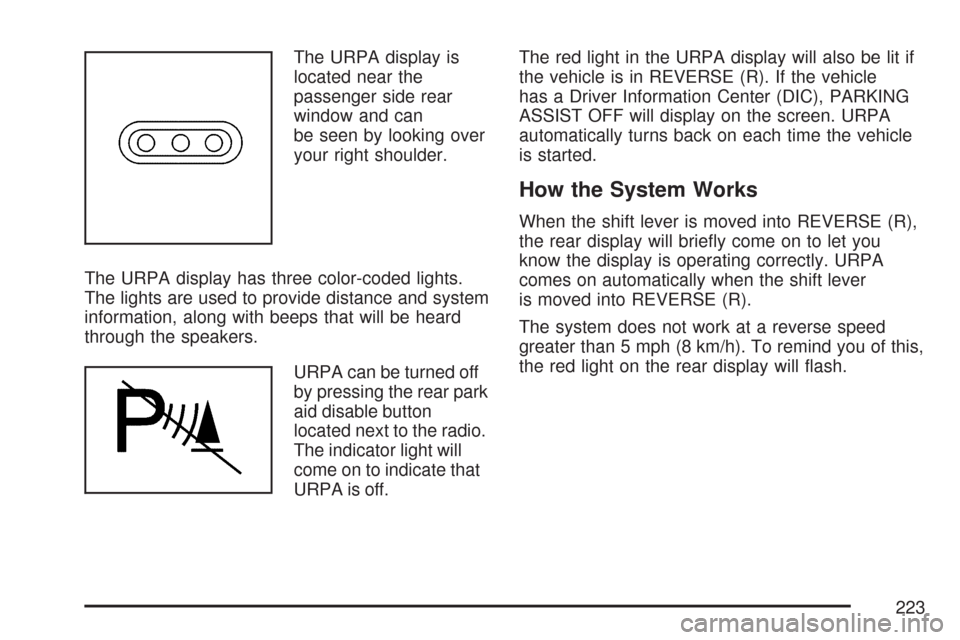
The URPA display is
located near the
passenger side rear
window and can
be seen by looking over
your right shoulder.
The URPA display has three color-coded lights.
The lights are used to provide distance and system
information, along with beeps that will be heard
through the speakers.
URPA can be turned off
by pressing the rear park
aid disable button
located next to the radio.
The indicator light will
come on to indicate that
URPA is off.The red light in the URPA display will also be lit if
the vehicle is in REVERSE (R). If the vehicle
has a Driver Information Center (DIC), PARKING
ASSIST OFF will display on the screen. URPA
automatically turns back on each time the vehicle
is started.
How the System Works
When the shift lever is moved into REVERSE (R),
the rear display will briey come on to let you
know the display is operating correctly. URPA
comes on automatically when the shift lever
is moved into REVERSE (R).
The system does not work at a reverse speed
greater than 5 mph (8 km/h). To remind you of this,
the red light on the rear display will ash.
223
Page 225 of 634

The ultrasonic sensors are not kept clean. So,
be sure to keep your vehicle’s rear bumper
free of mud, dirt, snow, ice, and slush.
For cleaning instructions, seeWashing Your
Vehicle on page 557. If the DIC still displays
the PARKING ASSIST OFF message
after cleaning the bumper and driving forward
at a speed of at least 15 mph (25 km/h),
see your dealer.
Other conditions that may affect system
performance include vibrations from a
jackhammer or the compression of air brakes
on a very large truck or other mechanical
devices that interfere with URPA performance.
When URPA is disabled without driver
action and the driver attempts to turn URPA
back on by pressing the rear park aid
button, the indicator light will ash for
3 seconds and then stay lit to indicate that
URPA is off.
As always, drivers should use care when backing
up a vehicle. Always look behind you, being
sure to check for other vehicles, obstructions and
blind spots.For Driver Information Center messages related to
URPA, seeDIC Warnings and Messages on
page 270.
If the vehicle bumper is damaged, the URPA
system may not work properly. Take the vehicle to
your dealer to repair the system.
Accessory Power Outlet(s)
Accessory power outlets can be used to
connect auxiliary electrical equipment, such as a
cellular telephone or CB radio. The outlet can
accept electrical equipment up to a maximum of
20 amperes.
There are four accessory power outlets. There are
two under the climate controls, one on the back
of the oor console and a additional accessory
power outlet in the rear cargo area on the
passenger side.
225
Page 248 of 634

If, after several seconds, all status indicator lights
remain on, or if there are no lights at all, there
may be a problem with the lights or the passenger
sensing system. See your dealer for service.
{CAUTION:
If the off indicator and the airbag
readiness light ever come on together, it
means that something may be wrong with
the airbag system. If this ever happens,
have the vehicle serviced promptly,
because an adult-size person sitting in the
right front passenger seat may not have
the protection of the frontal airbag. See
Airbag Readiness Light on page 245.
Charging System Light
The charging system
light will come on briey
when you turn on the
ignition, but the engine is
not running, as a check
to show you it is working.
It should go out once the engine is running. If it
stays on, or comes on while you are driving,
you may have a problem with the charging system.
It could indicate that you have problems with the
generator, the generator drive belt, or another
electrical problem. Have it checked right away.
Driving while this light is on could drain your
battery.
When this light comes on, the Driver Information
Center (DIC) will also display the SERVICE
BATTERY NOT CHARGING SYSTEM message.
SeeDIC Warnings and Messages on page 270for
more information.
If you must drive a short distance with the light on,
be certain to turn off all your accessories, such as
the radio and air conditioner, to reduce the drain on
your battery.
248
Page 290 of 634

Audio System(s)
Determine which radio your vehicle has and then
read the pages following to familiarize yourself
with its features.
Driving without distraction is a necessity for a
safer driving experience. SeeDefensive Driving on
page 356. By taking a few moments to read this
manual and get familiar with your vehicle’s
audio system, you can use it with less effort, as
well as take advantage of its features. While your
vehicle is parked, set up your audio system by
presetting your favorite radio stations, setting the
tone and adjusting the speakers. Then, when
driving conditions permit, you can tune to
your favorite stations using the presets and
steering wheel controls if the vehicle has them.{CAUTION:
This system provides you with a far greater
access to audio stations and song listings.
Giving extended attention to entertainment
tasks while driving can cause a crash and
you or others can be injured or killed.
Always keep your eyes on the road and
your mind on the drive — avoid engaging
in extended searching while driving.
Keeping your mind on the drive is important for
safe driving. Here are some ways in which you can
help avoid distraction while driving.
290
Page 291 of 634

While your vehicle is parked:
Familiarize yourself with all of its controls.
Familiarize yourself with its operation.
Set up your audio system by presetting your
favorite radio stations, setting the tone, and
adjusting the speakers. Then, when driving
conditions permit, you can tune to your favorite
radio stations using the presets and steering
wheel controls if the vehicle has them.
Notice:Before adding any sound equipment to
your vehicle, such as an audio system, CD
player, CB radio, mobile telephone, or two-way
radio, make sure that it can be added by
checking with your dealer/retailer. Also, check
federal rules covering mobile radio and
telephone units. If sound equipment can be
added, it is very important to do it properly.
Added sound equipment can interfere with the
operation of your vehicle’s engine, radio, or
other systems, and even damage them. Your
vehicle’s systems can interfere with the
operation of sound equipment that has been
added.Your vehicle has a feature called Retained
Accessory Power (RAP). With RAP, the audio
system can be played even after the ignition
is turned off. SeeRetained Accessory Power
(RAP) on page 141for more information.
Setting the Time (MP3 Radio with a
Single CD Player)
If your vehicle has a radio with a single CD, the
radio has a clock button for setting the time
and date.
To set the time and date, follow the instructions:
1. Press the clock button and the HR, MIN, MM,
DD, YYYY (hour, minute, month, day, and
year) displays.
2. Press the pushbutton located under any one
of the labels that you want to change. Every
time the pushbutton is pressed again, the time
or the date if selected, increases by one.
Another way to increase the time or date, is
to press the right SEEK arrow or the FWD
(forward) button.
291