2007 CHEVROLET SUBURBAN battery
[x] Cancel search: batteryPage 140 of 634
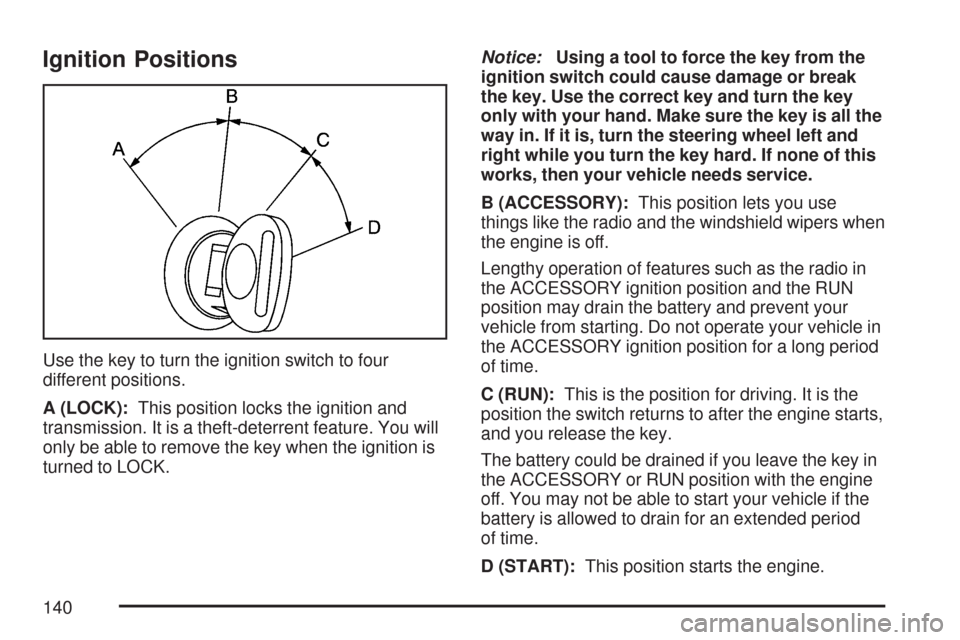
Ignition Positions
Use the key to turn the ignition switch to four
different positions.
A (LOCK):This position locks the ignition and
transmission. It is a theft-deterrent feature. You will
only be able to remove the key when the ignition is
turned to LOCK.Notice:Using a tool to force the key from the
ignition switch could cause damage or break
the key. Use the correct key and turn the key
only with your hand. Make sure the key is all the
way in. If it is, turn the steering wheel left and
right while you turn the key hard. If none of this
works, then your vehicle needs service.
B (ACCESSORY):This position lets you use
things like the radio and the windshield wipers when
the engine is off.
Lengthy operation of features such as the radio in
the ACCESSORY ignition position and the RUN
position may drain the battery and prevent your
vehicle from starting. Do not operate your vehicle in
the ACCESSORY ignition position for a long period
of time.
C (RUN):This is the position for driving. It is the
position the switch returns to after the engine starts,
and you release the key.
The battery could be drained if you leave the key in
the ACCESSORY or RUN position with the engine
off. You may not be able to start your vehicle if the
battery is allowed to drain for an extended period
of time.
D (START):This position starts the engine.
140
Page 141 of 634
Key In the Ignition
Never leave your vehicle with the keys inside, as it
is an easy target for joy riders or thieves. If you
leave the key in the ignition and park your vehicle, a
chime will sound, when you open the driver’s door.
Always remember to remove your key from the
ignition and take it with you. This will lock your
ignition and transmission. Also, always remember
to lock the doors.
The battery could be drained if you leave the key in
the ignition while your vehicle is parked. You may
not be able to start your vehicle after it has been
parked for an extended period of time.
Retained Accessory Power (RAP)
Your vehicle has a Retained Accessory Power
(RAP) feature which will allow certain features on
your vehicle to continue to work up to 10 minutes
after the ignition key is turned to LOCK.
The radio, power windows, and if the vehicle has a
sunroof and the OnStar
®System, will work when
the ignition key is in RUN or ACCESSORY. Once
the key is turned from RUN to LOCK, the windows
and sunroof will continue to work until a door is
opened. The radio will continue to work for up to
10 minutes or until the driver’s door is opened.
Starting the Engine
To place the transmission in the proper gear:
Move your shift lever to PARK (P) or
NEUTRAL (N). Your engine will not start in
any other position -- this is a safety feature. To
restart when you are already moving, use
NEUTRAL (N) only.
Starting Procedure
1. With your foot off the accelerator pedal, turn
the ignition key to START. When the engine
starts, let go of the key. The idle speed will go
down as your engine gets warm. Do not
race the engine immediately after starting it.
Operate the engine and transmission gently to
allow the oil to warm up and lubricate all
moving parts.
Your vehicle has a Computer-Controlled
Cranking System. This feature assists
in starting the engine and protects
components. If the ignition key is turned to the
START position, and then released when
the engine begins cranking, the engine
will continue cranking for a few seconds or
until the vehicle starts.
141
Page 142 of 634
If the engine does not start and the key is
held in START for many seconds, cranking will
be stopped after 15 seconds to prevent
cranking motor damage. To prevent gear
damage, this system also prevents cranking if
the engine is already running. Engine
cranking can be stopped by turning the ignition
switch to the ACCESSORY or LOCK
position.
Notice:Cranking the engine for long periods
of time, by returning the key to the START
position immediately after cranking has ended,
can overheat and damage the cranking
motor, and drain the battery. Wait at least
15 seconds between each try, to allow
the cranking motor to cool down.2. If the engine does not start after 5-10 seconds,
especially in very cold weather (below 0°F or
−18°C), it could be ooded with too much
gasoline. Try pushing the accelerator pedal all
the way to the oor and holding it there as
you hold the key in START for up to a
maximum of 15 seconds. Wait at least
15 seconds between each try, to allow the
cranking motor to cool down. When the engine
starts, let go of the key and accelerator. If
the vehicle starts briey but then stops again,
do the same thing. This clears the extra
gasoline from the engine. Do not race the
engine immediately after starting it. Operate
the engine and transmission gently until the oil
warms up and lubricates all moving parts.
Notice:Your engine is designed to work with
the electronics in your vehicle. If you add
electrical parts or accessories, you could
change the way the engine operates. Before
adding electrical equipment, check with your
dealer. If you do not, your engine might not
perform properly. Any resulting damage would
not be covered by your vehicle’s warranty.
142
Page 149 of 634
Tow/Haul Mode
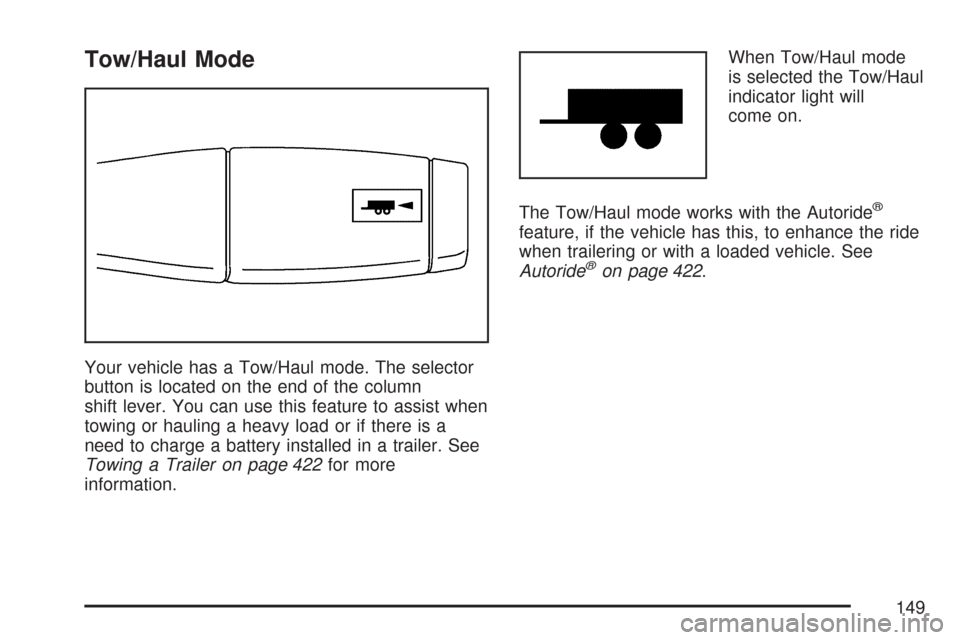
Your vehicle has a Tow/Haul mode. The selector
button is located on the end of the column
shift lever. You can use this feature to assist when
towing or hauling a heavy load or if there is a
need to charge a battery installed in a trailer. See
Towing a Trailer on page 422for more
information.When Tow/Haul mode
is selected the Tow/Haul
indicator light will
come on.
The Tow/Haul mode works with the Autoride
®
feature, if the vehicle has this, to enhance the ride
when trailering or with a loaded vehicle. See
Autoride
®on page 422.
149
Page 176 of 634
How OnStar®Service Works
In order to provide you with OnStar®services, your
vehicle’s OnStar®system has the capability of
recording and transmitting vehicle information. This
information is automatically sent to an OnStar
®Call
Center at the time of an OnStar®button press,
Emergency button press or if your airbags or AACN
system deploys. The vehicle information usually
includes your GPS location and, in the event of a
crash, additional information regarding the accident
that your vehicle has been involved in (e.g. the
direction from which your vehicle was hit). When
you use the Virtual Advisor feature of OnStar
®
Hands-Free Calling, your vehicle also sends
OnStar®your GPS location so that we can provide
you with location-based services.
OnStar
®service cannot work unless your vehicle is
in a place where OnStar®has an agreement with a
wireless service provider for service in that area.
OnStar
®service also cannot work unless you are in
a place where the wireless service provider
OnStar
®has hired for that area has coverage,
network capacity and reception when the service is
needed, and technology that is compatible with the
OnStar
®service.Not all services are available everywhere,
particularly in remote or enclosed areas, or at
all times.
OnStar
®service that involves location information
about your vehicle cannot work unless GPS
satellite signals are unobstructed and available in
that place as well.
Your vehicle must have a working electrical system
(including adequate battery power) for the OnStar
®
equipment to operate. There are other problems
OnStar®cannot control that may prevent OnStar®
from providing OnStar®service to you at any
particular time or place. Some examples are
damage to important parts of your vehicle in an
accident, hills, tall buildings, tunnels, weather or
wireless phone network congestion.
Your Responsibility
You may need to increase the volume of your radio
to hear the OnStar®advisor. If the light next to the
OnStar®buttons is red, this means that your system
is not functioning properly and should be checked
by your dealer/retailer. If the light appears clear (no
light is appearing), your OnStar
®subscription has
expired. You can always press the OnStar®button
to conrm that your OnStar®equipment is active.
176
Page 179 of 634

Keep the original hand-held transmitter for use in
other vehicles as well as for future Universal
Home Remote programming. It is also
recommended that upon the sale of the vehicle,
the programmed Universal Home Remote buttons
should be erased for security purposes. See
“Erasing Universal Home Remote Buttons” later in
section.
When programming a garage door, it is advised to
park outside of the garage. Be sure that people
and objects are clear of the garage door or
gate operator you are programming.
It is recommended that a new battery be installed
in your hand-held transmitter for quicker and
more accurate transmission of the radio-frequency
signal.Programming the Universal Home
Remote System
Follow these steps to program up to three devices:
1. Press and hold down the two outside Universal
Home Remote buttons, releasing only when
the Universal Home Remote indicator light
begins to ash, after 20 seconds. Do not hold
down the buttons for longer than 30 seconds
and do not repeat this step to program a
second and/or third hand-held transmitter to
the remaining two Universal Home Remote
buttons.
2. Hold the end of your hand-held transmitter
about 1 to 3 inches (3 to 8 cm) away from the
Universal Home Remote buttons while keeping
the indicator light in view.
3. At the same time, press and hold both the
desired Universal Home Remote button and
the hand-held transmitter button. Do not
release the buttons until Step 4 has been
completed.
Some entry gates and garage door openers
may require you to substitute Step 3 with
the procedure noted in “Gate Operator and
Canadian Programming” later in this section.
179
Page 186 of 634

Follow these steps to program up to three devices:
1. To verify if you have a Fixed Code garage
door opener, remove the battery cover on
your hand held transmitter supplied by
the manufacturer of your garage door opener
motor. If you see a row of dip switches
similar to the graphic above, you have a Fixed
Code garage door opener. If you do not see
a row of dip switches, return to the previous
section for Programming Universal Home
Remote – Rolling Code.
Example of Eight Dip Switches with Two Positions
186
Page 199 of 634

Instrument Panel Overview........................ 202
Hazard Warning Flashers.......................... 204
Other Warning Devices............................. 204
Horn.......................................................... 204
Tilt Wheel.................................................. 204
Turn Signal/Multifunction Lever.................. 205
Turn and Lane-Change Signals................. 206
Headlamp High/Low-Beam Changer.......... 207
Flash-to-Pass............................................ 207
Windshield Wipers..................................... 207
Rainsense™ II Wipers............................... 208
Windshield Washer.................................... 209
Rear Window Wiper/Washer...................... 210
Cruise Control........................................... 211
Exterior Lamps.......................................... 215
Headlamps on Reminder........................... 216
Daytime Running Lamps (DRL)................. 216
Automatic Headlamp System..................... 217
Fog Lamps................................................ 218
Auxiliary Roof Mounted Lamp.................... 218Instrument Panel Brightness...................... 219
Dome Lamps............................................. 219
Dome Lamp Override................................ 219
Entry Lighting............................................ 220
Exit Lighting.............................................. 220
Reading Lamps......................................... 220
Electric Power Management...................... 220
Battery Run-Down Protection..................... 221
Ultrasonic Rear Parking
Assist (URPA)........................................ 222
Accessory Power Outlet(s)........................ 225
Ashtray(s) and Cigarette Lighter................ 227
Climate Controls......................................... 227
Climate Control System............................. 227
Dual Automatic Climate Control System.... 231
Outlet Adjustment...................................... 238
Rear Air Conditioning and Heating
System.................................................. 239
Rear Air Conditioning and Heating System
and Electronic Climate Controls............... 240
Section 3 Instrument Panel
199