2007 CHEVROLET SILVERADO buttons
[x] Cancel search: buttonsPage 369 of 684
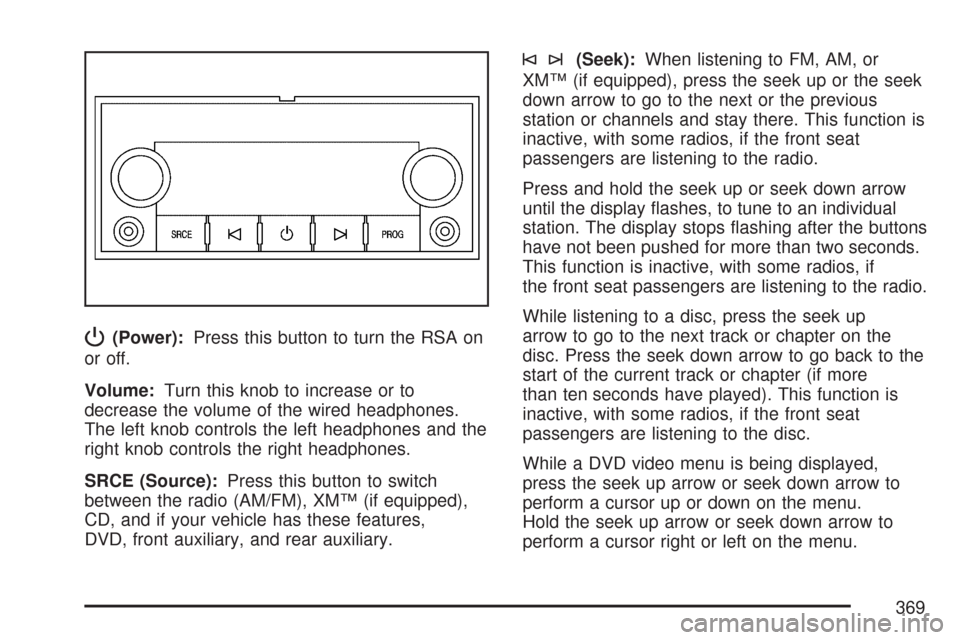
P(Power):Press this button to turn the RSA on
or off.
Volume:Turn this knob to increase or to
decrease the volume of the wired headphones.
The left knob controls the left headphones and the
right knob controls the right headphones.
SRCE (Source):Press this button to switch
between the radio (AM/FM), XM™ (if equipped),
CD, and if your vehicle has these features,
DVD, front auxiliary, and rear auxiliary.
©¨(Seek):When listening to FM, AM, or
XM™ (if equipped), press the seek up or the seek
down arrow to go to the next or the previous
station or channels and stay there. This function is
inactive, with some radios, if the front seat
passengers are listening to the radio.
Press and hold the seek up or seek down arrow
until the display ashes, to tune to an individual
station. The display stops ashing after the buttons
have not been pushed for more than two seconds.
This function is inactive, with some radios, if
the front seat passengers are listening to the radio.
While listening to a disc, press the seek up
arrow to go to the next track or chapter on the
disc. Press the seek down arrow to go back to the
start of the current track or chapter (if more
than ten seconds have played). This function is
inactive, with some radios, if the front seat
passengers are listening to the disc.
While a DVD video menu is being displayed,
press the seek up arrow or seek down arrow to
perform a cursor up or down on the menu.
Hold the seek up arrow or seek down arrow to
perform a cursor right or left on the menu.
369
Page 469 of 684
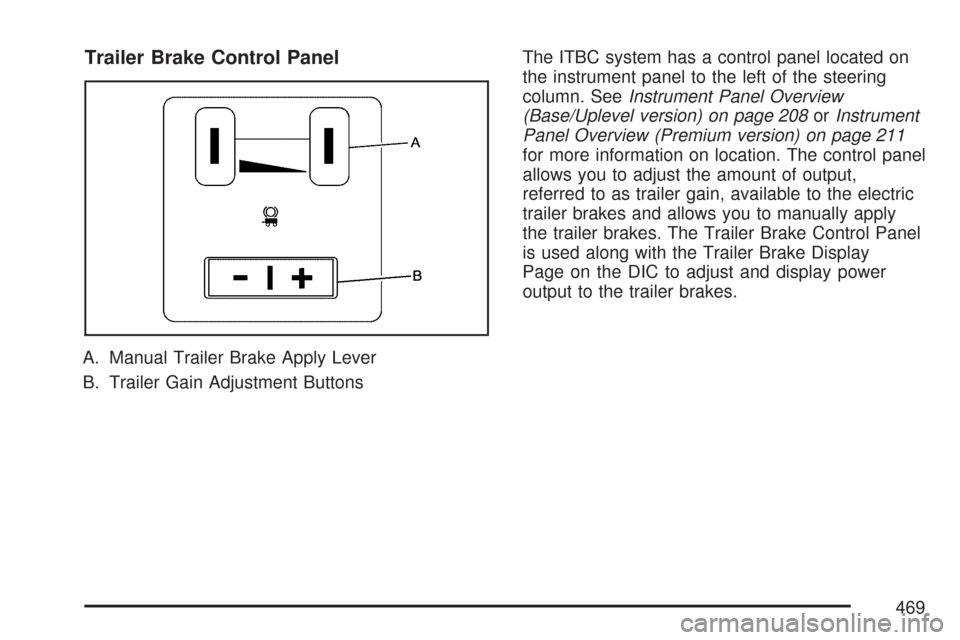
Trailer Brake Control Panel
A. Manual Trailer Brake Apply Lever
B. Trailer Gain Adjustment ButtonsThe ITBC system has a control panel located on
the instrument panel to the left of the steering
column. SeeInstrument Panel Overview
(Base/Uplevel version) on page 208orInstrument
Panel Overview (Premium version) on page 211
for more information on location. The control panel
allows you to adjust the amount of output,
referred to as trailer gain, available to the electric
trailer brakes and allows you to manually apply
the trailer brakes. The Trailer Brake Control Panel
is used along with the Trailer Brake Display
Page on the DIC to adjust and display power
output to the trailer brakes.
469
Page 470 of 684
Trailer Brake DIC Display Page
The ITBC system displays messages into the
vehicle’s Driver Information Center (DIC). SeeDIC
Warnings and Messages on page 281for more
information.
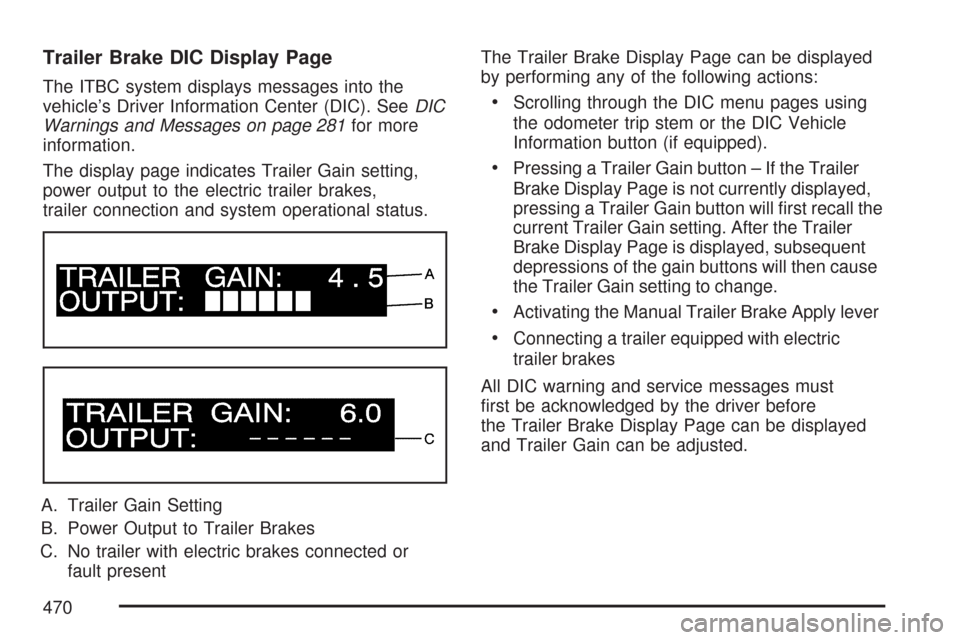
The display page indicates Trailer Gain setting,
power output to the electric trailer brakes,
trailer connection and system operational status.
A. Trailer Gain Setting
B. Power Output to Trailer Brakes
C. No trailer with electric brakes connected or
fault presentThe Trailer Brake Display Page can be displayed
by performing any of the following actions:Scrolling through the DIC menu pages using
the odometer trip stem or the DIC Vehicle
Information button (if equipped).
Pressing a Trailer Gain button – If the Trailer
Brake Display Page is not currently displayed,
pressing a Trailer Gain button will rst recall the
current Trailer Gain setting. After the Trailer
Brake Display Page is displayed, subsequent
depressions of the gain buttons will then cause
the Trailer Gain setting to change.
Activating the Manual Trailer Brake Apply lever
Connecting a trailer equipped with electric
trailer brakes
All DIC warning and service messages must
rst be acknowledged by the driver before
the Trailer Brake Display Page can be displayed
and Trailer Gain can be adjusted.
470
Page 471 of 684
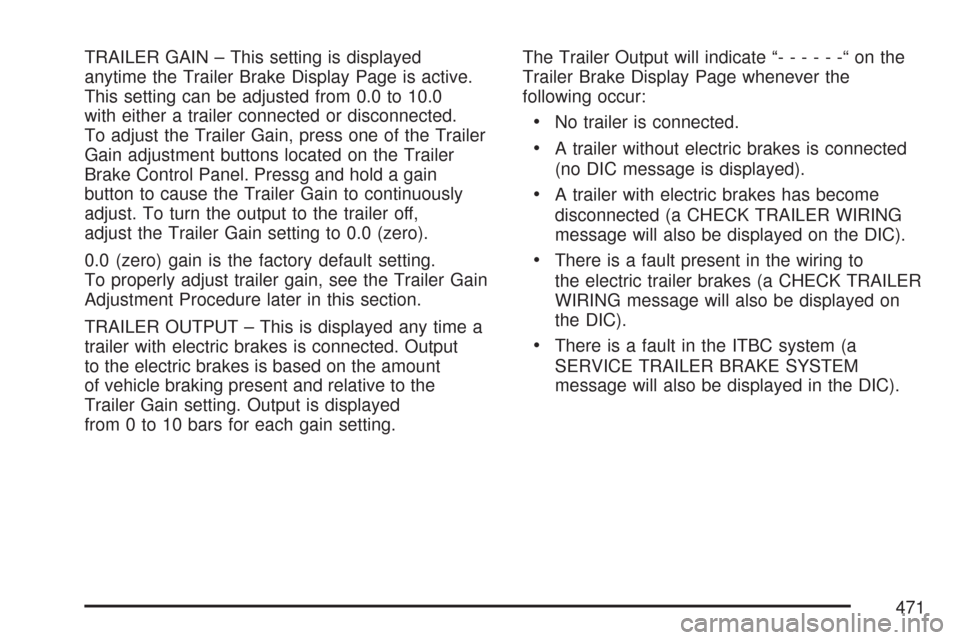
TRAILER GAIN – This setting is displayed
anytime the Trailer Brake Display Page is active.
This setting can be adjusted from 0.0 to 10.0
with either a trailer connected or disconnected.
To adjust the Trailer Gain, press one of the Trailer
Gain adjustment buttons located on the Trailer
Brake Control Panel. Pressg and hold a gain
button to cause the Trailer Gain to continuously
adjust. To turn the output to the trailer off,
adjust the Trailer Gain setting to 0.0 (zero).
0.0 (zero) gain is the factory default setting.
To properly adjust trailer gain, see the Trailer Gain
Adjustment Procedure later in this section.
TRAILER OUTPUT – This is displayed any time a
trailer with electric brakes is connected. Output
to the electric brakes is based on the amount
of vehicle braking present and relative to the
Trailer Gain setting. Output is displayed
from 0 to 10 bars for each gain setting.The Trailer Output will indicate “------“onthe
Trailer Brake Display Page whenever the
following occur:
No trailer is connected.
A trailer without electric brakes is connected
(no DIC message is displayed).
A trailer with electric brakes has become
disconnected (a CHECK TRAILER WIRING
message will also be displayed on the DIC).
There is a fault present in the wiring to
the electric trailer brakes (a CHECK TRAILER
WIRING message will also be displayed on
the DIC).
There is a fault in the ITBC system (a
SERVICE TRAILER BRAKE SYSTEM
message will also be displayed in the DIC).
471
Page 473 of 684
4. Adjust the Trailer Gain by using the gain
adjustment (+ / -) buttons on the Trailer
Brake Control Panel.
5. Drive the vehicle with the trailer attached on a
level road surface representative of the towing
condition and free of traffic at about 20 to
25 mph (32 to 40 km/h) and fully apply
the Manual Trailer Brake Apply lever.
Adjusting trailer gain at speeds lower than
20 to 25 mph (32 to 40 km/h) may result in an
incorrect gain setting.
6. Adjust the Trailer Gain to just below the point
of trailer wheel lock-up, indicated by trailer
wheel squeal or puffs of tire smoke when
a trailer wheel locks.
Trailer wheel lock-up may not occur if towing
a heavily loaded trailer. In this case, adjust
the Trailer Gain to the highest allowable
setting for the towing condition.
7. Re-adjust Trailer Gain any time vehicle
loading, trailer loading or road surface
conditions change or if you notice trailer wheel
lock-up at any time while you are towing.Other ITBC Related DIC Messages
In addition to displaying TRAILER GAIN and
TRAILER OUTPUT through the DIC, trailer
connection and ITBC system status is displayed in
the DIC.
TRAILER CONNECTED – This message will be
briey displayed when a trailer with electric brakes
is rst connected to the vehicle. This message
will automatically turn off in about ten seconds.
The driver can also acknowledge this message
before it automatically turns off.
CHECK TRAILER WIRING – This message will be
displayed if:
1. The ITBC system rst determines connection
to a trailer with electric brakes and then the
trailer harness becomes disconnected
from the vehicle.
If the disconnect occurs while the vehicle is
stationary, this message will automatically turn
off in about thirty seconds. This message
will also turn off if the driver acknowledges this
message off or if the trailer harness is
re-connected.
473
Page 506 of 684
How to Reset the Engine Oil Life
System
The Engine Oil Life System calculates when to
change your engine oil and lter based on vehicle
use. Anytime your oil is changed, reset the
system so it can calculate when the next oil
change is required. If a situation occurs where you
change your oil prior to a CHANGE ENGINE
OIL SOON message coming on, reset the system.
Always reset the engine oil life to 100% after
every oil change. It will not reset itself. To reset
the Engine Oil Life System, do the following:
1. Display the OIL LIFE REMAINING on the DIC.
If your vehicle does not have DIC buttons, the
vehicle must be in PARK (P) to access this
display. SeeDIC Operation and Displays (With
DIC Buttons) on page 270orDIC Operation
and Displays (Without DIC Buttons) on
page 277.
2. Press and hold the SET/RESET button on the
DIC, or the trip odometer reset stem if your
vehicle does not have DIC buttons, for more
than ve seconds. The oil life will change
to 100%.If the CHANGE ENGINE OIL SOON message
comes back on when you start your vehicle, the
Engine Oil Life System has not reset. Repeat
the procedure.
What to Do with Used Oil
Used engine oil contains certain elements that
may be unhealthy for your skin and could
even cause cancer. Do not let used oil stay on
your skin for very long. Clean your skin and nails
with soap and water, or a good hand cleaner.
Wash or properly dispose of clothing or rags
containing used engine oil. See the manufacturer’s
warnings about the use and disposal of oil
products.
Used oil can be a threat to the environment. If you
change your own oil, be sure to drain all the oil from
the lter before disposal. Never dispose of oil by
putting it in the trash, pouring it on the ground, into
sewers, or into streams or bodies of water. Instead,
recycle it by taking it to a place that collects used
oil. If you have a problem properly disposing of
used oil, ask your dealer, a service station, or a
local recycling center for help.
506
Page 563 of 684

{CAUTION:
If you operate your vehicle with a tire that
is badly underinated, the tire can
overheat. An overheated tire can lose air
suddenly or catch re. You or others
could be injured. Be sure all tires
(including the spare) are properly inated.
SeeInation - Tire Pressure on page 561, for
information on proper tire ination.
Tire Pressure Monitor System
The Tire Pressure Monitor System (TPMS) uses
radio and sensor technology to check tire pressure
levels. If your vehicle has this feature, sensors
are mounted on each tire and wheel assembly,
except the spare tire. The TPMS sensors monitor
the air pressure in your vehicle’s tires and
transmit tire pressure readings to a receiver
located in the vehicle.The TPMS is designed to alert the driver, if a low
tire pressure condition exists. If your vehicle has the
Driver Information Center (DIC), the driver may also
check tire pressure levels using the DIC.
When a low tire pressure condition is detected,
the TPMS will illuminate the low tire pressure
warning symbol located on the instrument panel
cluster. If your vehicle has the DIC feature, a
message to check the pressure in a specic tire
will also appear on the DIC display. The low
tire pressure warning symbol on the instrument
panel cluster and the CHECK TIRE PRESSURE
warning message on the DIC display will appear at
each ignition cycle until the tires are inated to
the correct ination pressure. For additional
information and details about the DIC operation
and displays seeDIC Operation and Displays
(With DIC Buttons) on page 270orDIC Operation
and Displays (Without DIC Buttons) on page 277
andDIC Warnings and Messages on page 281.
563
Page 566 of 684

Resetting the TPMS Identication Codes
Each TPMS sensor has a unique identication
code. Any time you rotate your vehicle’s tires or
replace one or more of the TPMS sensors,
the identication codes will need to be matched to
the new tire/wheel position. The sensors are
matched to the tire/wheel positions in the following
order: driver’s side front tire, passengers side
front tire, passengers side rear tire, and driver’s
side rear tire using a TPMS diagnostic tool.
See your GM dealer for service.
The TPMS sensors may also be matched to each
tire/wheel position by increasing or decreasing
the tire’s air pressure. If increasing the tire’s
air pressure, do not exceed the maximum ination
pressure indicated on the tire’s sidewall.
You will have two minutes to match the rst
tire/wheel position, and ve minutes overall to
match all four tire/wheel positions. If it takes longer
than two minutes, to match the rst tire and
wheel, or more than ve minutes to match all four
tire and wheel positions the matching process
stops and you will need to start over.The TPMS sensor matching process is outlined
below:
1. Set the parking brake.
2. Turn the ignition switch to RUN with the
engine off.
3. Using the DIC, press the vehicle information
button until the RELEARN TIRE POSITIONS
message displays. If your vehicle does not
have the DIC buttons, press the trip odometer
reset stem located on the instrument panel
cluster until the RELEARN TIRE POSITIONS
message displays.
4. If your vehicle has the DIC buttons, press the
set/reset button. The horn will sound twice to
indicate the TPMS receiver is ready, and
the TIRE LEARNING ACTIVE message will
display. If your vehicle does not have the DIC
buttons, press and hold the trip odometer
reset stem until the horn chirps twice and the
TIRE LEARNING ACTIVE message is
displayed.
566