2007 CHEVROLET OPTRA 5 time
[x] Cancel search: timePage 197 of 422

All of the CD functions work the same while
playing an MP3/WMA, except for those listed here.
See “Playing a CD” earlier for more information.
SCROLL (MP3/WMA Mode Only):Press
the SOUND button for longer than two seconds.
The song title or other available information
of a song scrolls on/off. The offset is scroll on.
The scroll mode can be changed only when
the SOUND button is pressed for longer than
two seconds.
DIR (Directory):Press this button to repeat the
tracks in the current directory. DIR displays.
Press this button again to repeat the tracks in all
of the directories. ALL displays.
Press this button again to turn off repeat play.
¦¥SEEK (Previous/Next Folder)
(in MP3/WMA Mode):Press the up or down
arrows to change the folder. If CD-R does not have
any folder, “ROOT” flashes on the display for a
short time.
()TUNE (Previous/Next Track):Press the
down arrows to go to the start of the current
track or press the up arrows to go to the next track.
The track number displays. The player continues
moving backward or forward through the CD
with each press of the up or down arrows.
INFO/DISP (Information/Display):Press this
button to display additional text information related
to the current MP3/WMA song. A choice of
additional information such as: Song Title, Album
Title, and Artist. Bit rate might also display.
When information is not available, No Info
(information) displays.
Press this button for longer than two seconds to
change display mode.
197
Page 200 of 422

Playing an MP3/WMA
While the ignition is on, insert a CD partway into
the slot, label side up. The player pulls it in,
Loading, then Filecheck, and then MP3 or WMA
displays. The CD should begin playing. A CD plays
only while the ignition is on or ACC (accessory).
As each new track starts to play, the track number,
and the song name displays.
If the ignition or radio is turned off with a CD in
the player, it stays in the player. When a CD is in
the player and the ignition is turned on, the
radio must be turned on before the CD starts
playback. When the ignition and radio are turned
on, the CD starts playing where it stopped, if it
was the last selected audio source.
The CD player can play the smaller 3 inch (8 cm)
single CDs with an adapter ring. Full-size CDs
and the smaller CDs are loaded in the same
manner.
If playing a CD-R, the sound quality can be reduced
due to CD-R quality, the method of recording, the
quality of the music that has been recorded, and the
way the CD-R has been handled. There can be an
increase in skipping, difficulty in finding tracks,and/or difficulty in loading and ejecting. If these
problems occur, check the bottom surface of the
CD. If the surface of the CD is damaged, such as
cracked, broken, or scratched, the CD will not play
properly. If the surface of the CD is soiled, seeCare
of Your CDs on page 203for more information.
If there is no apparent damage, try a known
good CD.
Do not add any label to a CD, it could get caught
in the CD player. If a CD is recorded on a
personal computer and a description label is
needed, try labeling the top of the recorded CD
with a marking pen.
Notice:If a label is added to a CD, or more
than one CD is inserted into the slot at a time,
or an attempt is made to play scratched or
damaged CDs, the CD player could be
damaged. While using the CD player, use only
CDs in good condition without any label,
load one CD at a time, and keep the CD player
and the loading slot free of foreign materials,
liquids, and debris.
If an error displays, see “CD Messages” later in
this section.
200
Page 201 of 422
All of the CD functions work the same while
playing an MP3/WMA, except for those listed here.
See “Playing a CD” earlier for more information.
SCROLL (MP3/WMA Mode Only):Press
the SOUND button for longer than two seconds.
The song title and other available information
of the song scrolls on/off. The offset is scroll on.
The scroll mode can be changed only when
the SOUND button is pressed for longer than
two seconds.
1 DIR (Directory):Press this button to repeat the
tracks in the current directory. DIR displays.
Press this button again to repeat the tracks in all
of the directories. ALL displays.
Press this button again to turn off repeat play.
¦¥SEEK (Previous/Next Folder)
(in MP3/WMA Mode):Press the up or down
arrows to change the folder. If CD-R does not have
any folder, “ROOT” flashes on the display for a
short time.
()TUNE (Previous/Next Track):Press the
down arrows to go to the start of the current
track or press the up arrows to go to the next track.
The track number displays. The player continues
moving backward or forward through the CD
with each press of the up or down arrows.
INFO/DISP (Information/Display):Press this
button to display additional text information related
to the current MP3/WMA song. A choice of
additional information such as: Song Title, Album
Title, and Artist. Bit rate might also display.
When information is not available, No Info
(information) displays.
Press this button for longer than two seconds to
change display mode.
201
Page 202 of 422
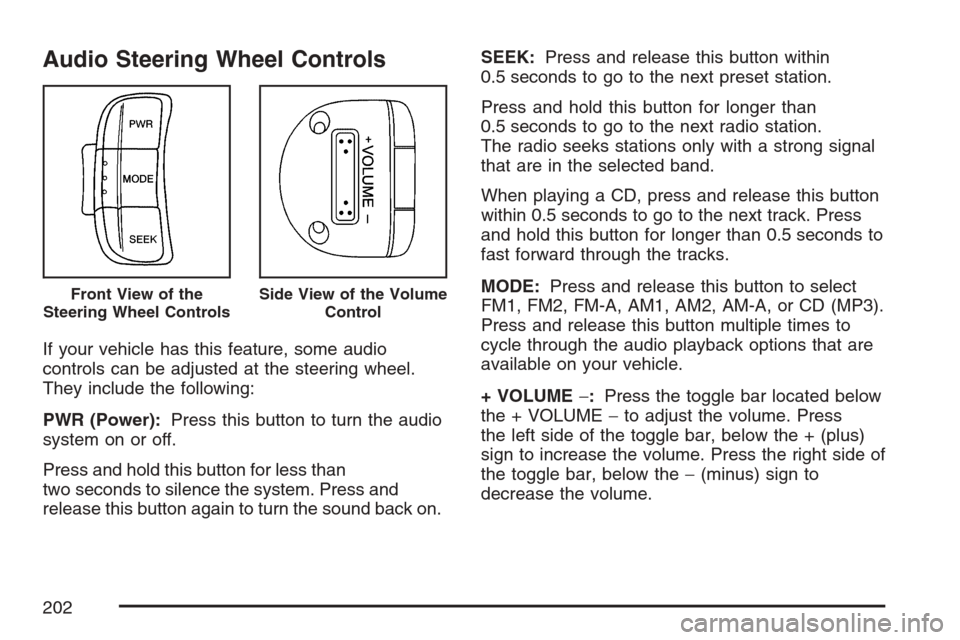
Audio Steering Wheel Controls
If your vehicle has this feature, some audio
controls can be adjusted at the steering wheel.
They include the following:
PWR (Power):Press this button to turn the audio
system on or off.
Press and hold this button for less than
two seconds to silence the system. Press and
release this button again to turn the sound back on.SEEK:Press and release this button within
0.5 seconds to go to the next preset station.
Press and hold this button for longer than
0.5 seconds to go to the next radio station.
The radio seeks stations only with a strong signal
that are in the selected band.
When playing a CD, press and release this button
within 0.5 seconds to go to the next track. Press
and hold this button for longer than 0.5 seconds to
fast forward through the tracks.
MODE:Press and release this button to select
FM1, FM2, FM-A, AM1, AM2, AM-A, or CD (MP3).
Press and release this button multiple times to
cycle through the audio playback options that are
available on your vehicle.
+ VOLUME−:Press the toggle bar located below
the + VOLUME−to adjust the volume. Press
the left side of the toggle bar, below the + (plus)
sign to increase the volume. Press the right side of
the toggle bar, below the−(minus) sign to
decrease the volume.
Front View of the
Steering Wheel ControlsSide View of the Volume
Control
202
Page 207 of 422
Drunken Driving
Death and injury associated with drinking and
driving is a national tragedy. It is the number one
contributor to the highway death toll, claiming
thousands of victims every year.
Alcohol affects four things that anyone needs to
drive a vehicle:
•Judgment
•Muscular Coordination
•Vision
•Attentiveness
Police records show that almost half of all motor
vehicle-related deaths involve alcohol. In most
cases, these deaths are the result of someone who
was drinking and driving. In recent years, more
than 16,000 annual motor vehicle-related deaths
have been associated with the use of alcohol,
with more than 300,000 people injured.Many adults — by some estimates, nearly half the
adult population — choose never to drink alcohol,
so they never drive after drinking. For persons
under 21, it is against the law in every U.S. state
to drink alcohol. There are good medical,
psychological, and developmental reasons for
these laws.
The obvious way to eliminate the leading highway
safety problem is for people never to drink
alcohol and then drive. But what if people do?
How much is “too much” if someone plans
to drive? It is a lot less than many might think.
Although it depends on each person and situation,
here is some general information on the problem.
The Blood Alcohol Concentration (BAC) of
someone who is drinking depends upon
four things:
•The amount of alcohol consumed
•The drinker’s body weight
•The amount of food that is consumed before
and during drinking
•The length of time it has taken the drinker to
consume the alcohol
207
Page 209 of 422

But the ability to drive is affected well below a
BAC of 0.10 percent. Research shows that
the driving skills of many people are impaired at a
BAC approaching 0.05 percent, and that the
effects are worse at night. All drivers are impaired
at BAC levels above 0.05 percent. Statistics
show that the chance of being in a collision
increases sharply for drivers who have a BAC of
0.05 percent or above. A driver with a BAC level of
0.06 percent has doubled his or her chance of
having a collision. At a BAC level of 0.10 percent,
the chance of this driver having a collision is
12 times greater; at a level of 0.15 percent, the
chance is 25 times greater!
The body takes about an hour to rid itself of the
alcohol in one drink. No amount of coffee or
number of cold showers will speed that up.
“I will be careful” is not the right answer.
What if there is an emergency, a need to take
sudden action, as when a child darts into the
street? A person with even a moderate BAC
might not be able to react quickly enough to avoid
the collision.There is something else about drinking and driving
that many people do not know. Medical research
shows that alcohol in a person’s system can make
crash injuries worse, especially injuries to the
brain, spinal cord, or heart. This means that when
anyone who has been drinking — driver or
passenger — is in a crash, that person’s chance
of being killed or permanently disabled is
higher than if the person had not been drinking.
{CAUTION:
Drinking and then driving is very
dangerous. Your reexes, perceptions,
attentiveness, and judgment can be
affected by even a small amount of
alcohol. You can have a serious — or even
fatal — collision if you drive after drinking.
Please do not drink and drive or ride with a
driver who has been drinking. Ride home in
a cab; or if you are with a group, designate
a driver who will not drink.
209
Page 210 of 422

Control of a Vehicle
You have three systems that make your vehicle
go where you want it to go. They are the brakes,
the steering, and the accelerator. All three systems
have to do their work at the places where the
tires meet the road.
Sometimes, as when you are driving on snow or
ice, it is easy to ask more of those control systems
than the tires and road can provide. That means
you can lose control of your vehicle.
Adding non-GM accessories can affect your
vehicle’s performance. SeeAccessories and
Modifications on page 249.
Braking
SeeBrake System Warning Light on page 168.
Braking action involves perception time and
reaction time.
First, you have to decide to push on the brake
pedal. That is perception time. Then you have to
bring up your foot and do it. That is reaction time.
Average reaction time is about three-fourths of a
second. But that is only an average. It might
be less with one driver and as long as two or
three seconds or more with another. Age, physical
condition, alertness, coordination, and eyesight
all play a part. So do alcohol, drugs, and
frustration. But even in three-fourths of a second,
a vehicle moving at 60 mph (100 km/h) travels
66 feet (20 m). That could be a lot of distance in an
emergency, so keeping enough space between
your vehicle and others is important.
And, of course, actual stopping distances vary
greatly with the surface of the road, whether it is
pavement or gravel; the condition of the road,
whether it is wet, dry, or icy; tire tread; the
condition of the brakes; the weight of the vehicle;
and the amount of brake force applied.
210
Page 211 of 422

Avoid needless heavy braking. Some people drive
in spurts — heavy acceleration followed by
heavy braking — rather than keeping pace with
traffic. This is a mistake. The brakes may not have
time to cool between hard stops. The brakes
will wear out much faster if you do a lot of heavy
braking. If you keep pace with the traffic and
allow realistic following distances, you will
eliminate a lot of unnecessary braking. That means
better braking and longer brake life.
If your vehicle’s engine ever stops while you are
driving, brake normally but do not pump the
brakes. If you do, the pedal may get harder to
push down. If the engine stops, you will still have
some power brake assist. But you will use it
when you brake. Once the power assist is used
up, it may take longer to stop and the brake pedal
will be harder to push.
Adding non-GM accessories can affect your
vehicle’s performance. SeeAccessories and
Modifications on page 249.Anti-Lock Brake System (ABS)
Your vehicle may have the Anti-Lock Brake
System (ABS), an advanced electronic braking
system that will help prevent a braking skid.
If your vehicle has ABS,
this warning light on the
instrument panel will
come on briefly
when you start your
vehicle.
211