2007 CHEVROLET IMPALA radio controls
[x] Cancel search: radio controlsPage 148 of 460
Tire Pressure Light.................................... 184
Malfunction Indicator Lamp........................ 185
Oil Pressure Light..................................... 188
Security Light............................................ 189
Fog Lamp Light......................................... 189
Cruise Control Light.................................. 189
Highbeam On Light................................... 189
Fuel Gage................................................. 190
Driver Information Center (DIC).................. 190
DIC Operation and Displays...................... 191
DIC Compass............................................ 197
DIC Warnings and Messages.................... 199
DIC Vehicle Customization........................ 208Audio System(s)......................................... 215
Setting the Time........................................ 216
Radio with CD (Base)............................... 219
Radio with CD (MP3)................................ 225
Using an MP3........................................... 236
XM Radio Messages................................. 241
Theft-Deterrent Feature............................. 243
Audio Steering Wheel Controls.................. 243
Radio Reception........................................ 244
Care of Your CDs..................................... 245
Care of the CD Player.............................. 245
Backglass Antenna.................................... 246
XM™ Satellite Radio Antenna System....... 246
Section 3 Instrument Panel
148
Page 215 of 460
Audio System(s)
Determine which radio your vehicle has and then
read the pages following to familiarize yourself
with its features.
Driving without distraction is a necessity for a
safer driving experience. SeeDefensive Driving on
page 248. By taking a few moments to read this
manual and get familiar with your vehicle’s
audio system, you can use it with less effort, as
well as take advantage of its features. While your
vehicle is parked, set up your audio system by
presetting your favorite radio stations, setting the
tone and adjusting the speakers. Then, when
driving conditions permit, you can tune to
your favorite stations using the presets and
steering wheel controls if the vehicle has them.{CAUTION:
This system provides you with a far greater
access to audio stations and song listings.
Giving extended attention to entertainment
tasks while driving can cause a crash and
you or others can be injured or killed.
Always keep your eyes on the road and
your mind on the drive — avoid engaging
in extended searching while driving.
Keeping your mind on the drive is important for
safe driving. Here are some ways in which you can
help avoid distraction while driving.
While your vehicle is parked:
Familiarize yourself with all of its controls.
Familiarize yourself with its operation.
215
Page 216 of 460
Set up your audio system by presetting your
favorite radio stations, setting the tone, and
adjusting the speakers. Then, when driving
conditions permit, you can tune to your favorite
radio stations using the presets and steering
wheel controls if the vehicle has them.
Notice:Before adding any sound equipment to
your vehicle, such as an audio system, CD
player, CB radio, mobile telephone, or two-way
radio, make sure that it can be added by
checking with your dealer/retailer. Also, check
federal rules covering mobile radio and
telephone units. If sound equipment can be
added, it is very important to do it properly.
Added sound equipment may interfere with the
operation of your vehicle’s engine, radio, or
other systems, and even damage them. Your
vehicle’s systems may interfere with the
operation of sound equipment that has
been added.
Your vehicle has a feature called Retained
Accessory Power (RAP). With RAP, the audio
system can be played even after the ignition
is turned off. SeeRetained Accessory Power
(RAP) on page 113for more information.Setting the Time
Without Date Display
AM/FM Base Radio with a Single CD
Player
This type of radio has aH(clock) button for
setting the time. You can set the time by following
these steps:
1. Press the
Hbutton until the hour begins
ashing on display. Press this button a
second time and the minutes begin ashing
on display.
2. While either the hour or the minutes are
ashing, turn the
f(tune) knob, located
on the upper right side of the radio, clockwise
or counterclockwise to increase or decrease
the time. Instead of using the tune knob,
you can also press the SEEK arrows,
\FWD (forward), orsREV (reverse)
buttons to adjust the time.
216
Page 227 of 460
4(Information) (XM™ Satellite Radio Service,
MP3, and RDS Features):Press this button
to display additional text information related to the
current FM-RDS or XM™ station, or MP3 song.
A choice of additional information such as:
Channel, Song, Artist, and CAT (category) can
appear. Continue pressing this button to highlight
the desired label, or press the pushbutton
positioned under any one of the labels and
the information about that label displays.
While information is not available, No Info displays.
Storing a Radio Station as a Favorite
Drivers are encouraged to set up their radio station
favorites while the vehicle is in PARK (P). Tune
to your favorite stations using the presets, favorites
button, and steering wheel controls if the vehicle
has this feature. SeeDefensive Driving on
page 248.FAV (Favorites):A maximum of 36 stations
can be programmed as favorites using the
six pushbuttons positioned below the radio station
frequency labels and by using the radio favorites
page button (FAV button). Press the FAV button to
go through up to six pages of favorites, each having
six favorite stations available per page. Each page
of favorites can contain any combination of AM, FM,
or XM™ (if equipped) stations. To store a station as
a favorite, perform the following steps:
1. Tune to the desired radio station.
2. Press the FAV button to display the page
where you want the station stored.
3. Press and hold one of the six pushbuttons
until a beep sounds. When that pushbutton
is pressed and released, the station that was
set, returns.
4. Repeat the steps for each pushbutton radio
station you want stored as a favorite.
227
Page 228 of 460
The number of favorites pages can be setup using
the MENU button. To setup the number of
favorites pages, perform the following steps:
1. Press the MENU button to display the radio
setup menu.
2. Press the pushbutton located below the
FAV 1-6 label.
3. Select the desired number of favorites pages
by pressing the pushbutton located below the
displayed page numbers.
4. Press the FAV button, or let the menu time out,
to return to the original main radio screen
showing the radio station frequency labels and
to begin the process of programming your
favorites for the chosen amount of numbered
pages.
Setting the Tone
(Bass/Midrange/Treble)
BASS/MID/TREB (Bass, Midrange, or
Treble):To adjust bass, midrange, or treble,
press the
fknob until the tone control labels
display. Continue pressing to highlight the desired
label, or press the pushbutton positioned under
the desired label.Turn the
fknob clockwise or counterclockwise to
adjust the highlighted setting. The highlighted
setting can also be adjusted by pressing either
SEEK arrow,
\FWD (forward), orsREV
(reverse) button until the desired levels are
obtained. If a station’s frequency is weak,
or has static, decrease the treble.
To quickly adjust bass, midrange, or treble to the
middle position, press the pushbutton positioned
under the BASS, MID (midrange), or TREB (treble)
label for more than two seconds. A beep sounds
and the level adjusts to the middle position.
To quickly adjust all tone and speaker controls to
the middle position, press the
fknob for more than
two seconds until a beep sounds.
EQ (Equalization):Press this button to select
preset equalization settings.
To return to the manual mode, press the EQ
button until Manual displays or start to manually
adjust the bass, midrange, or treble by
pressing the
fknob.
228
Page 229 of 460
Adjusting the Speakers (Balance/Fade)
BAL/FADE (Balance/Fade):To adjust balance
or fade, press the
fknob until the speaker control
labels display. Continue pressing to highlight the
desired label, or press the pushbutton positioned
under the desired label. Turn the
fknob
clockwise or counterclockwise to adjust the
highlighted setting. The highlighted setting can
also be adjusted by pressing either SEEK arrow,
\FWD, orsREV until the desired levels
are obtained.
To quickly adjust balance or fade to the middle
position, press the pushbutton positioned under the
BAL or FADE label for more than two seconds.
A beep sounds and the level adjusts to the
middle position.
To quickly adjust all speaker and tone controls to
the middle position, press the
fknob for more
than two seconds until a beep sounds.
Finding a Category (CAT) Station
CAT (Category):The CAT button is used to nd
XM™ stations while the radio is in the XM™
mode. To nd XM™ channels within a desired
category, perform the following:
1. Press the BAND button until the XM™
frequency displays. Press the CAT button to
display the category labels on the radio
display. Continue pressing the CAT button
until the desired category name displays.
2. Press either of the two buttons below the
desired category label to immediately tune
to the rst XM™ station associated with that
category.
3. Turn the
fknob, press the buttons below the
right or left arrows displayed, or press the
SEEK arrows to go to the previous or to the
next XM™ station within the selected
category.
4. To exit the category search mode, press the
FAV button or BAND button to display your
favorites again.
229
Page 243 of 460
Theft-Deterrent Feature
THEFTLOCK®is designed to discourage theft
of your vehicle’s radio. The feature works
automatically by learning a portion of the Vehicle
Identication Number (VIN). If the radio is moved to
a different vehicle, it does not operate and LOCKED
displays.
With THEFTLOCK
®activated, the radio cannot
operate if stolen.
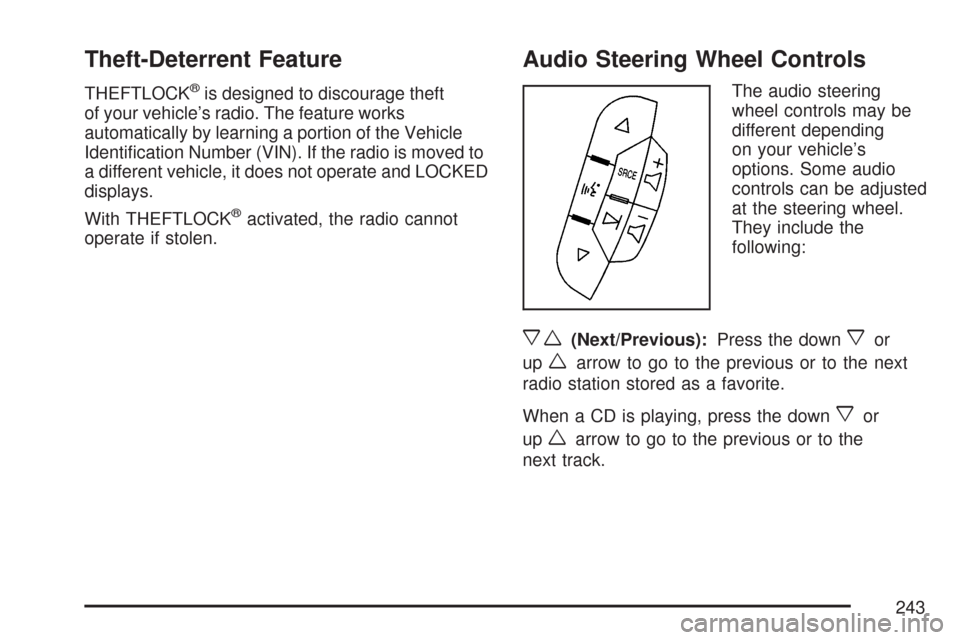
Audio Steering Wheel Controls
The audio steering
wheel controls may be
different depending
on your vehicle’s
options. Some audio
controls can be adjusted
at the steering wheel.
They include the
following:
xw(Next/Previous):Press the downxor
up
warrow to go to the previous or to the next
radio station stored as a favorite.
When a CD is playing, press the down
xor
up
warrow to go to the previous or to the
next track.
243
Page 446 of 460

Audio System.............................................. 215
Audio Steering Wheel Controls................. 243
Backglass Antenna................................... 246
Care of Your CD Player........................... 245
Care of Your CDs.................................... 245
Radio with CD................................219, 225
Setting the Time...................................... 216
Theft-Deterrent Feature............................ 243
Understanding Radio Reception............... 244
XM™ Satellite Radio Antenna System...... 246
Automatic Door Lock................................... 100
Automatic Transaxle
Fluid........................................................ 317
Operation................................................. 116
B
Backglass Antenna...................................... 246
Battery........................................................ 337
Electric Power Management..................... 165
Run-Down Protection............................... 166
Before Leaving on a Long Trip.................... 269Brake
Emergencies............................................ 255
Parking.................................................... 120
Brakes........................................................ 334
System Warning Light.............................. 181
Braking....................................................... 252
Braking in Emergencies............................... 255
Break-In, New Vehicle................................. 111
Bulb Replacement....................................... 343
Halogen Bulbs......................................... 344
Headlamp Aiming..................................... 343
Headlamps, Front Turn Signal,
Sidemarker, and Parking Lamps........... 344
License Plate Lamps................................ 348
Replacement Bulbs.................................. 349
Taillamps, Turn Signal, Sidemarker,
Stoplamps, and Back-Up Lamps........... 346
Buying New Tires........................................ 366
446