2007 CHEVROLET IMPALA buttons
[x] Cancel search: buttonsPage 191 of 460
If your vehicle has these features, the DIC also
displays the compass direction and the outside
air temperature when viewing the trip and fuel
information. The compass direction appears on the
top right corner of the DIC display. The outside air
temperature automatically appears in the bottom
right corner of the DIC display. If there is a problem
with the system that controls the temperature
display, the numbers will be replaced with dashes.
If this occurs, have the vehicle serviced by your
dealer.
The DIC also allows some features to be
customized. SeeDIC Vehicle Customization on
page 208for more information.
DIC Operation and Displays
The DIC has different displays which can be
accessed by pressing the DIC buttons located
on the instrument panel, to the right of the
instrument panel cluster.
DIC Buttons
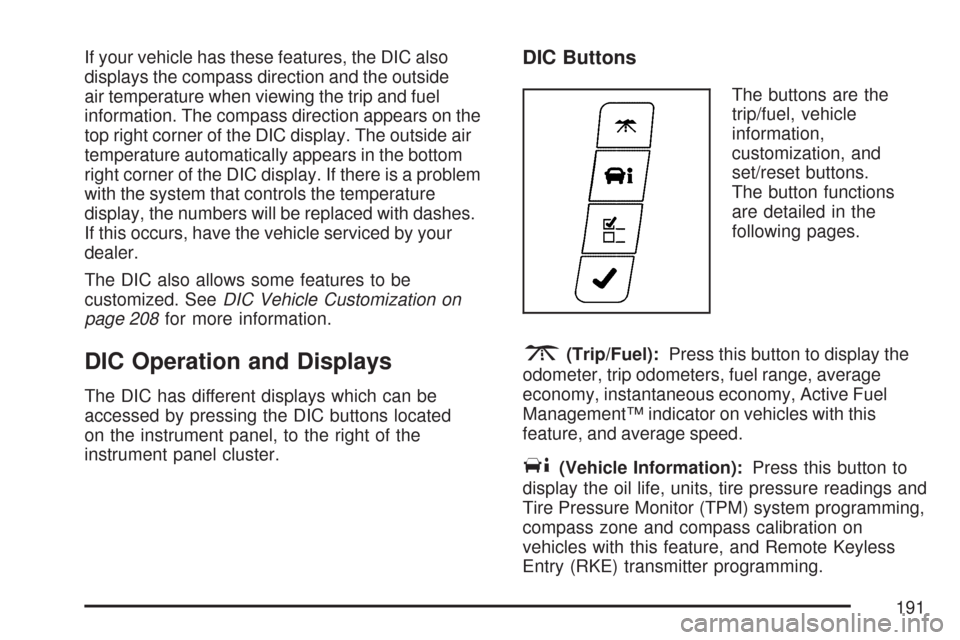
The buttons are the
trip/fuel, vehicle
information,
customization, and
set/reset buttons.
The button functions
are detailed in the
following pages.
3(Trip/Fuel):Press this button to display the
odometer, trip odometers, fuel range, average
economy, instantaneous economy, Active Fuel
Management™ indicator on vehicles with this
feature, and average speed.
T(Vehicle Information):Press this button to
display the oil life, units, tire pressure readings and
Tire Pressure Monitor (TPM) system programming,
compass zone and compass calibration on
vehicles with this feature, and Remote Keyless
Entry (RKE) transmitter programming.
191
Page 197 of 460
3. Press and hold the lock and unlock buttons
on the rst transmitter at the same time for
about 15 seconds.
A chime will sound indicating that the
transmitter is matched.
4. To match additional transmitters at this time,
repeat Step 3.
Each vehicle can have a maximum of
eight transmitters matched to it.
5. To exit the programming mode, you must
cycle the key to OFF.
Blank Display
This display shows no information.
Customization Menu Items
U
(Customization):Press this button to enter the
feature settings menu. This display allows you
to customize the feature settings on your vehicle.
SeeDIC Vehicle Customization on page 208
for more information.
DIC Compass
Your vehicle may have a compass in the Driver
Information Center (DIC).
Compass Zone
Under certain circumstances, such as during a
long distance cross-country trip, it will be
necessary to compensate for compass variance
and reset the zone through the DIC.
Compass variance is the difference between the
earth’s magnetic north and true geographic
north. If not adjusted to account for compass
variance, the compass in the vehicle could give
false readings.
In order to do this, the compass must be set or
calibrated to the variance zone in which the vehicle
is traveling.
197
Page 199 of 460
To calibrate the compass, use the following
procedure:
Compass Calibration Procedure
1. Before calibrating the compass, make sure
the compass zone is set to the variance
zone in which the vehicle is traveling. See
“Compass Variance Procedure” earlier in
this section.
2. Press the vehicle information button until the
PRESS
VTO CALIBRATE COMPASS
screen is displayed.
3. Press the set/reset button to start the compass
calibration.
4. The DIC will display CALIBRATING: DRIVE
IN CIRCLES. Drive the vehicle in circles at
less than 5 mph (8 km/h) to complete
the calibration. The DIC will display
CALIBRATION COMPLETE when the
calibration is complete.
DIC Warnings and Messages
Messages are displayed on the DIC to notify the
driver that the status of the vehicle has changed
and that some action may be needed by the driver
to correct the condition. Multiple messages may
appear one after another. Some messages
may not require immediate action, but you can
press the set/reset button to acknowledge that you
received the message and clear it from the DIC
display. Pressing any of the DIC buttons also
acknowledges and clears any messages. Some
messages cannot be cleared from the DIC display
because they are more urgent. These messages
require action before they can be cleared.
You should take any messages that appear on the
display seriously and remember that clearing
the messages will only make the messages
disappear, not correct the problem. The following
are the possible messages that can be displayed
and some information about them.
199
Page 214 of 460
FACTORY SETTINGS
This feature allows you to set all of the
customization features back to their factory
default settings.
Press the customization button until FACTORY
SETTINGS appears on the DIC display. Press the
set/reset button to access the settings for this
feature. Then press the customization button to
scroll through the following choices:
RESTORE ALL (default):The customization
features will be set to their factory default settings.
DO NOT RESTORE:The customization features
will not be set to their factory default settings.
Select one of the available choices and press the
set/reset button while it is displayed on the
DIC to select it.
EXIT FEATURE SETTINGS
This feature allows you to exit the FEATURE
SETTINGS menu.
Press the customization button until FEATURE
SETTINGS PRESS
VTO EXIT appears in
the DIC display. Press the set/reset button to exit
the menu.
If you do not exit, pressing the customization
button again will return you to the beginning of the
FEATURE SETTINGS menu.
Exiting the Feature Settings Menu
The feature settings menu will be exited when any
of the following occurs:
The vehicle is shifted out of PARK (P).
The vehicle is no longer in RUN.
The trip/fuel or vehicle information DIC buttons
are pressed.
The end of the feature settings menu is
reached and exited.
A 40 second time period has elapsed with no
selection made.
214
Page 216 of 460
Set up your audio system by presetting your
favorite radio stations, setting the tone, and
adjusting the speakers. Then, when driving
conditions permit, you can tune to your favorite
radio stations using the presets and steering
wheel controls if the vehicle has them.
Notice:Before adding any sound equipment to
your vehicle, such as an audio system, CD
player, CB radio, mobile telephone, or two-way
radio, make sure that it can be added by
checking with your dealer/retailer. Also, check
federal rules covering mobile radio and
telephone units. If sound equipment can be
added, it is very important to do it properly.
Added sound equipment may interfere with the
operation of your vehicle’s engine, radio, or
other systems, and even damage them. Your
vehicle’s systems may interfere with the
operation of sound equipment that has
been added.
Your vehicle has a feature called Retained
Accessory Power (RAP). With RAP, the audio
system can be played even after the ignition
is turned off. SeeRetained Accessory Power
(RAP) on page 113for more information.Setting the Time
Without Date Display
AM/FM Base Radio with a Single CD
Player
This type of radio has aH(clock) button for
setting the time. You can set the time by following
these steps:
1. Press the
Hbutton until the hour begins
ashing on display. Press this button a
second time and the minutes begin ashing
on display.
2. While either the hour or the minutes are
ashing, turn the
f(tune) knob, located
on the upper right side of the radio, clockwise
or counterclockwise to increase or decrease
the time. Instead of using the tune knob,
you can also press the SEEK arrows,
\FWD (forward), orsREV (reverse)
buttons to adjust the time.
216
Page 220 of 460
Setting Preset Stations
Up to 18 stations (six FM1, six FM2, and six AM),
can be programmed on the six numbered
pushbuttons, by performing the following steps:
1. Turn the radio on.
2. Press BAND to select FM1, FM2, or AM.
3. Tune in the desired station.
4. Press and hold one of the six numbered
pushbuttons for three seconds until a beep
sounds. When that pushbutton is pressed and
released, the station that was set, returns.
5. Repeat the Steps 2 through 4 for each
pushbutton.
Setting the Tone (Bass/Treble)
BASS/TREB (Bass/Treble):To adjust the bass or
treble, press the
fknob or the pushbuttons located
under the BASS/TREB (treble) display, until the
desired tone control label displays. Turn the
fknob
clockwise or counterclockwise to increase or
decrease the setting. Adjust the setting by
pressing either SEEK arrow,
\FWD (forward),
or
sREV (reverse) buttons. The current bass or
treble level displays. If a station’s frequency is
weak, or has static, decrease the treble.EQ (Equalization):Press this button to select
preset equalization settings.
To return to the manual mode, press the EQ button
until Manual displays or starts to manually adjust
the bass or treble by pressing the
fknob.
Adjusting the Speakers (Balance/Fade)
`
BAL/FADE (Balance/Fade):To adjust the
balance or fade, press the
`button or thefknob
until the desired speaker control label displays.
Turn the
fknob clockwise or counterclockwise to
adjust the setting. The setting can also be adjusted
by pressing either SEEK arrow,
\FWD,
or
sREV buttons.
Radio Messages
Calibration Error:The audio system has been
calibrated for your vehicle from the factory. If
Calibration Error displays, it means that the radio
has not been congured properly for your
vehicle and it must be returned to your
dealer/retailer for service.
220
Page 227 of 460
4(Information) (XM™ Satellite Radio Service,
MP3, and RDS Features):Press this button
to display additional text information related to the
current FM-RDS or XM™ station, or MP3 song.
A choice of additional information such as:
Channel, Song, Artist, and CAT (category) can
appear. Continue pressing this button to highlight
the desired label, or press the pushbutton
positioned under any one of the labels and
the information about that label displays.
While information is not available, No Info displays.
Storing a Radio Station as a Favorite
Drivers are encouraged to set up their radio station
favorites while the vehicle is in PARK (P). Tune
to your favorite stations using the presets, favorites
button, and steering wheel controls if the vehicle
has this feature. SeeDefensive Driving on
page 248.FAV (Favorites):A maximum of 36 stations
can be programmed as favorites using the
six pushbuttons positioned below the radio station
frequency labels and by using the radio favorites
page button (FAV button). Press the FAV button to
go through up to six pages of favorites, each having
six favorite stations available per page. Each page
of favorites can contain any combination of AM, FM,
or XM™ (if equipped) stations. To store a station as
a favorite, perform the following steps:
1. Tune to the desired radio station.
2. Press the FAV button to display the page
where you want the station stored.
3. Press and hold one of the six pushbuttons
until a beep sounds. When that pushbutton
is pressed and released, the station that was
set, returns.
4. Repeat the steps for each pushbutton radio
station you want stored as a favorite.
227
Page 229 of 460
Adjusting the Speakers (Balance/Fade)
BAL/FADE (Balance/Fade):To adjust balance
or fade, press the
fknob until the speaker control
labels display. Continue pressing to highlight the
desired label, or press the pushbutton positioned
under the desired label. Turn the
fknob
clockwise or counterclockwise to adjust the
highlighted setting. The highlighted setting can
also be adjusted by pressing either SEEK arrow,
\FWD, orsREV until the desired levels
are obtained.
To quickly adjust balance or fade to the middle
position, press the pushbutton positioned under the
BAL or FADE label for more than two seconds.
A beep sounds and the level adjusts to the
middle position.
To quickly adjust all speaker and tone controls to
the middle position, press the
fknob for more
than two seconds until a beep sounds.
Finding a Category (CAT) Station
CAT (Category):The CAT button is used to nd
XM™ stations while the radio is in the XM™
mode. To nd XM™ channels within a desired
category, perform the following:
1. Press the BAND button until the XM™
frequency displays. Press the CAT button to
display the category labels on the radio
display. Continue pressing the CAT button
until the desired category name displays.
2. Press either of the two buttons below the
desired category label to immediately tune
to the rst XM™ station associated with that
category.
3. Turn the
fknob, press the buttons below the
right or left arrows displayed, or press the
SEEK arrows to go to the previous or to the
next XM™ station within the selected
category.
4. To exit the category search mode, press the
FAV button or BAND button to display your
favorites again.
229