2007 CHEVROLET EQUINOX air condition
[x] Cancel search: air conditionPage 200 of 492
CHECK TIRE PRESSURE
This message displays when the tire pressure
in one of the tires needs to be checked. This
message also displays LEFT FRONT, RIGHT
FRONT, LEFT REAR, or RIGHT REAR to indicate
which tire needs to be checked. You can receive
more than one tire pressure message at a time.
To read the other messages that may have
been sent at the same time, press the set/reset
button. If a tire pressure message appears on
the DIC, stop as soon as you can. Have the tire
pressures checked and set to those shown on
the Tire Loading Information label. SeeTires on
page 382,Loading Your Vehicle on page 315, and
Ination - Tire Pressure on page 390. The DIC
display also shows the tire pressure values for
the front and rear tires by pressing the vehicle
information button. SeeDIC Operation and
Displays on page 193. If the tire pressure is low,
the low tire pressure warning light comes on.
SeeTire Pressure Light on page 182.
DRIVER DOOR OPEN
This message displays when the driver’s door is
not closed properly. When this message appears,
make sure that the driver’s door is closed
completely.
ENGINE HOT A/C
(Air Conditioning) OFF
This message displays when the engine coolant
becomes hotter than the normal operating
temperature. To avoid added strain on a hot
engine, the air conditioning compressor is
automatically turned off. When the coolant
temperature returns to normal, the A/C operation
automatically resumes. You can continue to
drive your vehicle.
200
Page 202 of 492
HOOD OPEN
This message displays on some vehicles when
the hood is not closed properly. When this
message appears, make sure that the hood
is closed completely. SeeHood Release
on page 340.
ICE POSSIBLE DRIVE WITH CARE
This message displays when the outside air
temperature is cold enough to create icy road
conditions. Adjust your driving accordingly.
LIFTGATE OPEN
This message displays when the liftgate is not
closed completely. Make sure that the liftgate is
closed completely. SeeLiftgate on page 107.
OIL PRSSURE (Pressure) LOW STOP
ENGINE
Notice:If you drive your vehicle while the
engine oil pressure is low, severe engine
damage may occur. If a low oil pressure
warning appears on the Driver Information
Center (DIC), stop the vehicle as soon as
possible. Do not drive the vehicle until the
cause of the low oil pressure is corrected. See
Engine Oil on page 344for more information.
This message displays when the vehicle’s
engine oil pressure is low. The oil pressure light
also appears on the instrument panel cluster.
SeeOil Pressure Light on page 186.
Stop the vehicle immediately, as engine damage
can result from driving a vehicle with low oil
pressure. Have the vehicle serviced by your dealer
as soon as possible when this message is
displayed.
202
Page 203 of 492
PASSENGER DOOR
FRONT/REAR OPEN
This message displays when one or more of the
passenger’s doors are not closed properly.
When this message appears, make sure that all
passenger doors are closed completely.
REMOTE KEY LEARNING ACTIVE
This message displays while you are matching
a Remote Keyless Entry (RKE) transmitter to
your vehicle. See “LEARN REMOTE KEY” under
DIC Operation and Displays on page 193for
more information.
SERVICE A/C (Air Conditioning)
SYSTEM
This message displays when there is a problem
detected in the air conditioning system. Have
the vehicle serviced by your dealer.
SERVICE AIR BAG
This message displays when there is a problem
with the airbag system. Have your vehicle serviced
by your dealer immediately. SeeAirbag Readiness
Light on page 174for more information.
SERVICE ALL WHEEL DRIVE
If your vehicle has the All-Wheel Drive (AWD)
system, this message displays along with
the service all-wheel drive light if a problem occurs
with this system. SeeService All-Wheel Drive
Light on page 189. If this message appears, stop
as soon as possible and turn off the vehicle.
Restart the vehicle and check for the message on
the DIC display. If the message is still displayed
or appears again when you begin driving, the AWD
system needs service. See your dealer.
SERVICE BATTERY CHARGING
SYSTEM
This message displays when there is a problem
with the generator and battery charging systems.
Driving with this problem could drain the
vehicle’s battery. Turn off all unnecessary
accessories. Stop and turn off the vehicle as soon
as it is safe to do so. Have the electrical system
checked by your dealer immediately.
Connecting a battery charger to your vehicle while
the ignition is in any position other than LOCK
may cause this message to appear. If you need to
charge your vehicle, make sure that the key is
in LOCK or out of the ignition during charging.
203
Page 267 of 492
XM Radio Messages
Radio Display Message Condition Action Required
XL (Explicit Language
Channels)XL on the radio display,
after the channel name,
indicates content with
explicit language.These channels, or any others, can be blocked at a
customer’s request, by calling 1-800-852-XMXM (9696).
XM Updating Updating encryption code The encryption code in the receiver is being updated, and
no action is required. This process should take no longer
than 30 seconds.
No XM Signal Loss of signal The system is functioning correctly, but the vehicle is in a
location that is blocking the XM™ signal. When you move
into an open area, the signal should return.
Loading XM Acquiring channel audio
(after four second delay)The audio system is acquiring and processing audio and
text data. No action is needed. This message should
disappear shortly.
Channel Off Air Channel not in service This channel is not currently in service. Tune to another
channel.
Channel Unavail Channel no
longer availableThis previously assigned channel is no longer assigned.
Tune to another station. If this station was one of the
presets, choose another station for that preset button.
No Artist Info Artist Name/Feature
not availableNo artist information is available at this time on this channel.
The system is working properly.
No Title Info Song/Program Title
not availableNo song title information is available at this time on this
channel. The system is working properly.
267
Page 300 of 492
If your vehicle starts to slide, ease your foot off
the accelerator pedal and quickly steer the
way you want the vehicle to go. If you start
steering quickly enough, your vehicle may
straighten out. Always be ready for a second
skid if it occurs.
Of course, traction is reduced when water, snow,
ice, gravel, or other material is on the road.
For safety, you will want to slow down and adjust
your driving to these conditions. It is important
to slow down on slippery surfaces because
stopping distance will be longer and vehicle
control more limited.
While driving on a surface with reduced traction,
try your best to avoid sudden steering, acceleration,
or braking, including reducing vehicle speed by
shifting to a lower gear. Any sudden changes could
cause the tires to slide. You may not realize the
surface is slippery until your vehicle is skidding.
Learn to recognize warning clues — such as
enough water, ice, or packed snow on the road
to make a mirrored surface — and slow down
when you have any doubt.
Remember: Any Anti-Lock Brake System (ABS)
helps avoid only the braking skid.Driving at Night
Night driving is more dangerous than day driving.
One reason is that some drivers are likely to
be impaired — by alcohol or drugs, with night
vision problems, or by fatigue.
Here are some tips on night driving.
Drive defensively.
Do not drink and drive.
Adjust the inside rearview mirror to reduce the
glare from headlamps behind you.
Since you cannot see as well, you may need
to slow down and keep more space between
you and other vehicles.
Slow down, especially on higher speed roads.
Your vehicle’s headlamps can light up only so
much road ahead.
In remote areas, watch for animals.
If you are tired, pull off the road in a safe
place and rest.
300
Page 336 of 492
California Fuel
If your vehicle is certied to meet California
Emissions Standards, it is designed to operate on
fuels that meet California specications. See
the underhood emission control label. If this fuel is
not available in states adopting California
emissions standards, your vehicle will operate
satisfactorily on fuels meeting federal
specications, but emission control system
performance may be affected. The malfunction
indicator lamp may turn on and your vehicle may
fail a smog-check test. SeeMalfunction Indicator
Lamp on page 183. If this occurs, return to
your authorized GM dealer for diagnosis. If it is
determined that the condition is caused by the type
of fuel used, repairs may not be covered by
your warranty.
Additives
To provide cleaner air, all gasolines in the United
States are now required to contain additives that
will help prevent engine and fuel system deposits
from forming, allowing your emission control system
to work properly.In most cases, you should not have to add anything
to your fuel. However, some gasolines contain only
the minimum amount of additive required to meet
U.S. Environmental Protection Agency regulations.
To help keep fuel injectors and intake valves clean,
or if your vehicle experiences problems due to dirty
injectors or valves, look for gasoline that is
advertised as TOP TIER Detergent Gasoline. Also,
your dealer has additives that will help correct and
prevent most deposit-related problems.
Gasolines containing oxygenates, such as ethers
and ethanol, and reformulated gasolines may
be available in your area. General Motors
recommends that you use these gasolines if they
comply with the specications described earlier.
However, E85 (85% ethanol) and other fuels
containing more than 10% ethanol must not be
used in vehicles that were not designed for
those fuels.
Notice:Your vehicle was not designed for
fuel that contains methanol. Do not use
fuel containing methanol. It can corrode metal
parts in your fuel system and also damage
the plastic and rubber parts. That damage
would not be covered under your warranty.
336
Page 349 of 492
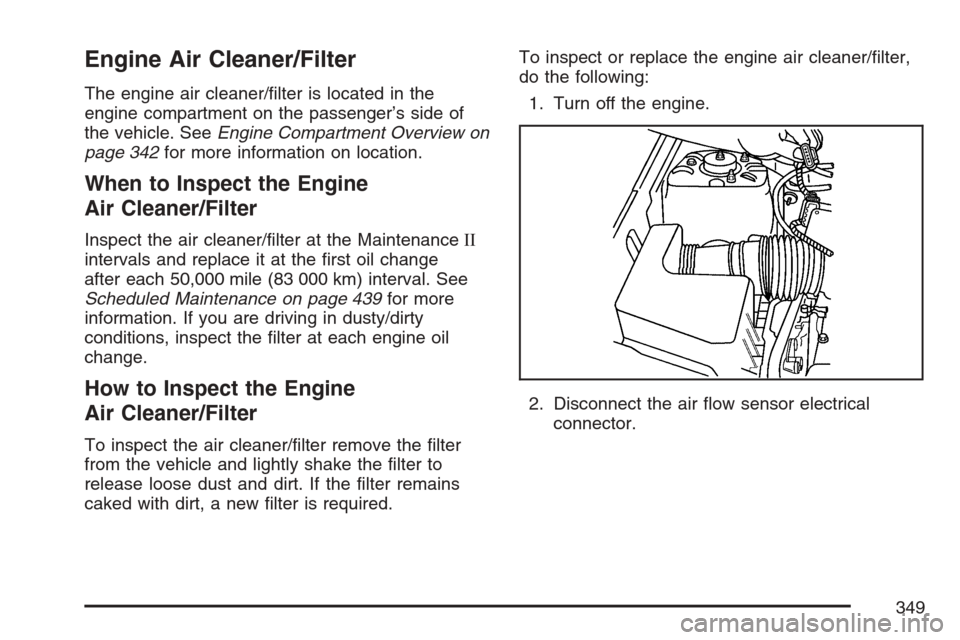
Engine Air Cleaner/Filter
The engine air cleaner/lter is located in the
engine compartment on the passenger’s side of
the vehicle. SeeEngine Compartment Overview on
page 342for more information on location.
When to Inspect the Engine
Air Cleaner/Filter
Inspect the air cleaner/lter at the MaintenanceII
intervals and replace it at the rst oil change
after each 50,000 mile (83 000 km) interval. See
Scheduled Maintenance on page 439for more
information. If you are driving in dusty/dirty
conditions, inspect the lter at each engine oil
change.
How to Inspect the Engine
Air Cleaner/Filter
To inspect the air cleaner/lter remove the lter
from the vehicle and lightly shake the lter to
release loose dust and dirt. If the lter remains
caked with dirt, a new lter is required.To inspect or replace the engine air cleaner/lter,
do the following:
1. Turn off the engine.
2. Disconnect the air ow sensor electrical
connector.
349
Page 357 of 492
If you get the overheat warning with no sign of
steam, try this for a minute or so:
1. If the air conditioner is on, turn it off.
2. Turn on your heater to full hot at the highest fan
speed and open the windows as necessary.
3. Try to minimize engine load. If you are in a
traffic jam, shift to NEUTRAL (N); otherwise,
shift to the highest gear while driving.
If you no longer have the overheat warning, you
can drive. Just to be safe, drive slower for
about ten minutes. If the warning does not come
back on, you can drive normally.
If the warning continues and you have not stopped,
pull over, stop, and park your vehicle right away.
If there is still no sign of steam, you can idle the
engine for three minutes while you are parked.
If you still have the warning, turn off the engine
and get everyone out of the vehicle until it
cools down. Also, see “Overheated Engine
Protection Operating Mode” later in this section.
You may decide not to lift the hood but to get
service help right away.Overheated Engine Protection
Operating Mode
This emergency operating mode lets your vehicle
be driven to a safe place in an emergency situation.
If an overheated engine condition exists, an
overheat protection mode which alternates ring
groups of cylinders helps prevent engine damage.
In this mode, there is a signicant loss in power and
engine performance. The temperature gage
indicates an overheat condition exists. Driving
extended miles (km) and/or towing a trailer in the
overheat protection mode should be avoided.
Notice:After driving in the overheated engine
protection operating mode, to avoid engine
damage, allow the engine to cool before
attempting any repair. The engine oil will be
severely degraded. Repair the cause of coolant
loss, change the oil and reset the oil life system.
SeeEngine Oil on page 344.
357