Page 137 of 496
Shifting Out of Park (P)
(Automatic Transmission)
Your vehicle has an automatic transmission shift
lock control system which locks the shift lever
in PARK (P) when the ignition is in the LOCK
position. In addition, you have to fully apply the
regular brakes before you can shift from PARK (P)
when the ignition is in ON. SeeAutomatic
Transmission Operation on page 124.
If you cannot shift out of PARK (P), ease pressure
on the shift lever by pushing the shift lever all
the way into PARK (P) as you maintain brake
application. Then, move the shift lever into
the gear you want.
If you ever hold the brake pedal down but still
cannot shift out of PARK (P), try this:
1. Turn the key to ACC. There is no shift
interlock in this key position.
2. Apply and hold the brake until the end of
Step 4.3. Shift the transmission to NEUTRAL (N).
4. Start the vehicle and then shift to the gear
you want.
5. Have the system xed as soon as you can.
Parking Your Vehicle
(Manual Transmission)
Your vehicle has a manual transmission.
Before you get out of your vehicle, move the
shift lever into REVERSE (R), and rmly apply
the parking brake. Once the shift lever has
been placed into REVERSE (R) with the clutch
pedal pressed in, turn the ignition key to LOCK,
remove the key and release the clutch.
If you are parking on a hill, or if your vehicle is
pulling a trailer, seeTowing a Trailer on page 306.
137
Page 143 of 496

If the display reads CAL, the compass needs
to be calibrated. For more information, see
“Compass Calibration” following.
To adjust between Fahrenheit and Celsius:
1. Press and hold the on/off button for
approximately four seconds until either
a ashing F or C appears.
2. Press the button again to change the display
to the desired unit of measurement. After
approximately four seconds of inactivity,
the new unit will be locked in and the
compass/temperature display will return.
If an abnormal temperature reading is displayed
for an extended period of time, see your
dealer/retailer. Under certain circumstances, a
delay in updating the temperature is normal.
Automatic Dimming Mirror Operation
The automatic dimming mirror comes on each time
the ignition is turned to start. To turn the automatic
dimming feature off or back on, press the on/off
button. The indicator light on the mirror is lit when
the automatic dimming feature is on.
Compass Calibration
The compass may need calibration if one of the
following occurs:
After approximately ve seconds, the display
does not show a compass heading, N for
North, for example, there may be a strong
magnetic eld interfering with the compass.
Such interference may be caused by a
magnetic antenna mount, magnetic note
pad holder, or a similar magnetic item.
The compass does not display the correct
heading and the compass zone variance
is set correctly.
In order to calibrate, CAL must be displayed
in the mirror compass windows. If CAL is
not displayed, push the on/off button for
approximately 12 seconds or until CAL is
displayed.
The compass can be calibrated by driving the
vehicle in circles at 5 mph (8 km/h) or less until
the display reads a direction.
143
Page 144 of 496
Compass Variance
The mirror is set in zone eight upon leaving the
factory. It will be necessary to adjust the compass
to compensate for compass variance if the
vehicle is outside of zone eight. Under certain
circumstances, as during a long distance
cross-country trip, it will be necessary to adjust
for compass variance. Compass variance is
the difference between earth’s magnetic north and
true geographic north. If not adjusted to account
for compass variance, the compass could
give false readings.
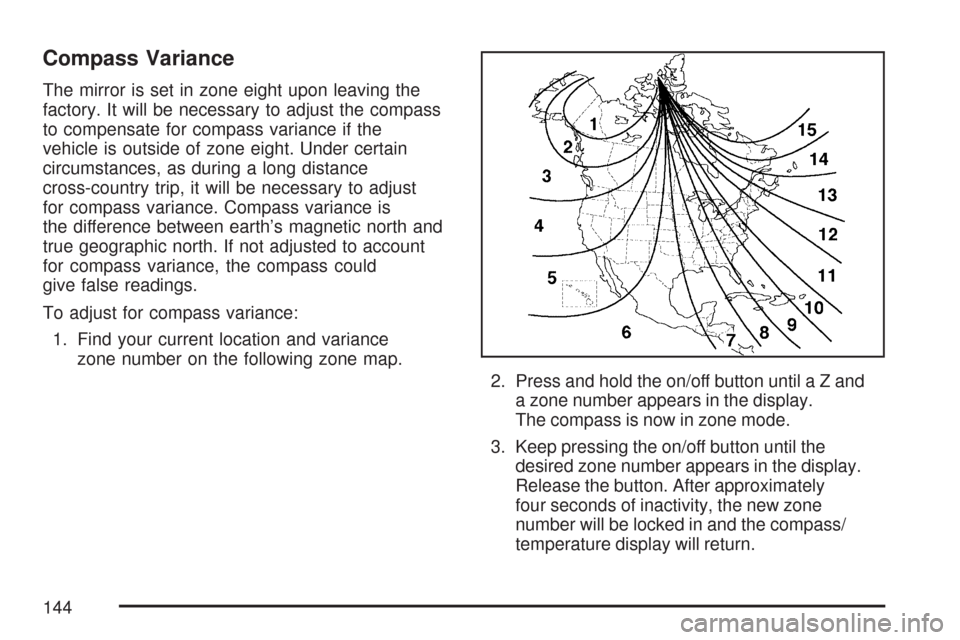
To adjust for compass variance:
1. Find your current location and variance
zone number on the following zone map.
2. Press and hold the on/off button untilaZand
a zone number appears in the display.
The compass is now in zone mode.
3. Keep pressing the on/off button until the
desired zone number appears in the display.
Release the button. After approximately
four seconds of inactivity, the new zone
number will be locked in and the compass/
temperature display will return.
144
Page 149 of 496

OnStar®System
OnStar®uses several innovative technologies and
live advisors to provide you with a wide range
of safety, security, information, and convenience
services. If your airbags deploy, the system is
designed to make an automatic call to OnStar
®
Emergency advisors who can request emergency
services be sent to your location. If you lock
your keys in the vehicle, call OnStar
®at
1-888-4-ONSTAR and they can send a signal
to unlock your doors. If you need roadside
assistance, press the OnStar
®button and
they can contact Roadside Service for you.OnStar
®service is provided to you subject
to the OnStar®Terms and Conditions. You
may cancel your OnStar®service at any time
by contacting OnStar®as provided below.
A complete OnStar®Owner’s Guide and the
OnStar®Terms and Conditions are included
in the vehicle’s OnStar®Subscriber glove box
literature. For more information, visit onstar.com
or onstar.ca, contact OnStar
®at 1-888-4-ONSTAR
(1-888-466-7827) or TTY 1-877-248-2080, or
press the OnStar
®button to speak with an
OnStar®advisor 24 hours a day, 7 days a week.
Not all OnStar
®features are available on all
vehicles. To check if your vehicle is equipped to
provide the services described below, or for a
full description of OnStar
®services and system
limitations, see the OnStar®Owner’s Guide in
your glove box or visit onstar.com.
149
Page 150 of 496

OnStar®Services
For new vehicles equipped with OnStar®, the Safe
& Sound Plan, or the Directions & Connections®
Plan is included for one year from the date of
purchase. You can extend this plan beyond
the rst year, or upgrade to the Directions &
Connections
®Plan. For more information, press
the OnStar®button to speak with an advisor.
Some OnStar®services (such as Remote Door
Unlock or Stolen Vehicle Location Assistance) may
not be available until you register with OnStar
®.
Available Services with
Safe & Sound®Plan
Automatic Notication of Airbag Deployment
Advanced Automatic Crash Notication
(AACN) (If equipped)
Link to Emergency Services
Roadside Assistance
Stolen Vehicle Location Assistance
AccidentAssist
Remote Door Unlock/Vehicle Alert
OnStar®Vehicle Diagnostics
GM®Goodwrench®On Demand Diagnostics
OnStar®Hands-Free Calling with
30 complimentary minutes
OnStar®Virtual Advisor (U.S. Only)
Available Services included with
Directions & Connections®Plan
All Safe and Sound Plan Services
Driving Directions - Advisor delivered
or OnStar®Turn-by-Turn Navigation
(If equipped)
RideAssist
Information and Convenience Services
150
Page 158 of 496

Brake System Warning Light..................... 189
Anti-Lock Brake System Warning Light...... 190
Engine Coolant Temperature Gage............ 191
Tire Pressure Light.................................... 191
Malfunction Indicator Lamp........................ 192
Oil Pressure Light..................................... 195
Security Light............................................ 196
Cruise Control Light.................................. 196
Highbeam On Light................................... 196
Daytime Running Lamps (DRL)
Indicator Light........................................ 197
Fuel Gage................................................. 197
Driver Information Center (DIC).................. 198
DIC Controls and Displays........................ 198
DIC Warnings and Messages.................... 202Audio System(s)......................................... 206
Setting the Time........................................ 208
AM-FM Radio............................................ 209
Radio with CD (MP3)................................ 212
Radio with Six-Disc CD............................. 222
Using an MP3........................................... 234
XM Radio Messages................................. 240
Theft-Deterrent Feature............................. 242
Radio Reception........................................ 242
Care of Your CDs..................................... 243
Care of the CD Player.............................. 243
Fixed Mast Antenna.................................. 244
XM™ Satellite Radio Antenna System....... 244
Chime Level Adjustment............................ 244
Section 3 Instrument Panel
158
Page 163 of 496
The tilt lever is located on the left side of the
steering column, under the turn signal lever.
To tilt, hold the steering wheel and pull the tilt lever
toward you. Move the wheel to a comfortable
level, then release the tilt lever to lock the wheel
in place.
Do not adjust the steering wheel while driving.
Turn Signal/Multifunction Lever
The lever on the left side of the steering column
includes the following:
GTurn and Lane Change Signals. SeeTurn
Signal/Multifunction Lever on page 163.
53Headlamp High/Low-Beam Changer.
SeeHeadlamp High/Low-Beam Changer on
page 165.
Flash-to-Pass. SeeFlash-to-Pass on page 165.
NWindshield Wipers. SeeWindshield Wipers
on page 165.
LWindshield Washer. SeeWindshield
Washer on page 166.
JCruise Control. SeeCruise Control on
page 166.
163
Page 166 of 496
6(Low Speed):For steady wiping at low
speed, turn the band away from you to the
rst solid position past the delay settings.
1(High Speed):For high-speed wiping,
turn the band to the second solid position past
the delay settings.
9(Off):To stop the wipers, move the band to off.
Be sure to clear ice and snow from the wiper
blades before using them. If they’re frozen to
the windshield, carefully loosen or thaw them.
If your blades do become worn or damaged,
get new blades or blade inserts.
Windshield Washer
{CAUTION:
In freezing weather, do not use your
washer until the windshield is warmed.
Otherwise the washer uid can form ice
on the windshield, blocking your vision.
QL(Washer Fluid):There is a paddle marked
with the windshield washer symbol at the top
of the multifunction lever. To spray washer uid on
the windshield, push the paddle. The wipers will
clear the window and then either stop or return to
your preset speed.
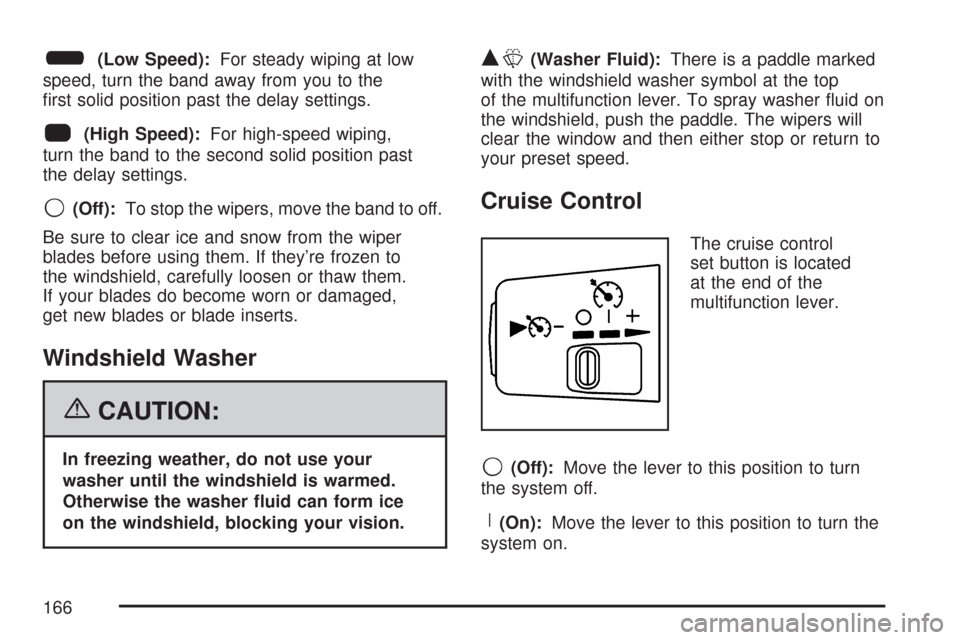
Cruise Control
The cruise control
set button is located
at the end of the
multifunction lever.
9(Off):Move the lever to this position to turn
the system off.
R(On):Move the lever to this position to turn the
system on.
166