Page 188 of 496

If the word OFF or the off symbol is lit on the
airbag status indicator, it means that the
passenger sensing system has turned off the right
front passenger’s frontal airbag. SeePassenger
Sensing System on page 88for more on this,
including important safety information.
If, after several seconds, all status indicator lights
remain on, or if there are no lights at all, there
may be a problem with the lights or the passenger
sensing system. See your dealer for service.
{CAUTION:
If the off indicator and the airbag
readiness light ever come on together,
it means that something may be wrong
with the airbag system. If this ever
happens, have the vehicle serviced
promptly, because an adult-size person
sitting in the right front passenger seat
may not have the protection of the frontal
airbag. SeeAirbag Readiness Light
on page 185.
Battery Warning Light
This light will come
on briey when you
start the vehicle,
as a check to show
you it is working;
then it should go out.
If it stays on, or comes on while you are driving,
you may have a problem with the electrical
charging system. Have it checked right away.
Driving while this light is on could drain your
battery and result in a vehicle that may stall.
SeeDIC Warnings and Messages on page 202
for more information.
If you must drive a short distance with the light on,
be certain to turn off all your accessories, such
as the radio and climate control system.
188
Page 206 of 496

TRACTION FAULT
If your vehicle has the Traction Control System
(TCS), this message may display if there is
a problem with the TCS. Check the TCS as soon
as possible and have your vehicle serviced by
your dealer. SeeTraction Control System (TCS)
on page 253for more information. Press and
release the reset stem to acknowledge the
message and clear it from the display.
TURN SIGNAL
This message displays when the turn signal is
on for about 0.75 miles (1.2 km) of travel. Press
and release the reset stem to acknowledge
the message and clear it from the display.
Audio System(s)
Determine which radio your vehicle has and then
read the pages following to familiarize yourself
with its features.
Driving without distraction is a necessity for a
safer driving experience. SeeDefensive Driving
on page 246. By taking a few moments to read
this manual and get familiar with your vehicle’s
audio system, you can use it with less effort,
as well as take advantage of its features.
While your vehicle is parked, set up your audio
system by presetting your favorite radio stations,
setting the tone and adjusting the speakers.
Then, when driving conditions permit, you can
tune to your favorite stations using the presets and
steering wheel controls if the vehicle has them.
206
Page 207 of 496

{CAUTION:
This system provides you with a far greater
access to audio stations and song listings.
Giving extended attention to entertainment
tasks while driving can cause a crash
and you or others can be injured or killed.
Always keep your eyes on the road and
your mind on the drive — avoid engaging
in extended searching while driving.
Keeping your mind on the drive is important for
safe driving. Here are some ways in which you
can help avoid distraction while driving.
While your vehicle is parked:
Familiarize yourself with all of its controls.
Familiarize yourself with its operation.
Set up your audio system by presetting your
favorite radio stations, setting the tone, and
adjusting the speakers. Then, when driving
conditions permit, you can tune to your favorite
radio stations using the presets and steering
wheel controls if the vehicle has them.Notice:Before adding any sound equipment
to your vehicle, such as an audio system,
CD player, CB radio, mobile telephone,
or two-way radio, make sure that it can be
added by checking with your dealer/retailer.
Also, check federal rules covering mobile radio
and telephone units. If sound equipment can
be added, it is very important to do it properly.
Added sound equipment may interfere with
the operation of your vehicle’s engine, radio,
or other systems, and even damage them.
Your vehicle’s systems may interfere with
the operation of sound equipment that
has been added.
Notice:The chime signals related to safety
belts, parking brake, and other functions
of your vehicle operate through the radio/
entertainment system. If that equipment
is replaced or additional equipment is added
to your vehicle, the chimes may not work.
Make sure that replacement or additional
equipment is compatible with your vehicle
before installing it. SeeAccessories and
Modifications on page 324.
207
Page 208 of 496
Setting the Time
Radios without Radio Data
Systems (RDS)
Press and hold HR (hour) until the correct
hour displays. Press and hold MIN (minute)
until the correct minute displays. There is an
initial two-second delay before the clock goes
into time-set mode. Display the time with the
ignition off, by pressing RCL (recall), HR,
or MIN.
Radios with Radio Data
Systems (RDS)
The radio could have a button marked
with an H or HR to represent hours and
an M or MN to represent minutes.Press and hold the hour button until the
correct hour displays. Press and hold the
minute button until the correct minute displays.
The time can be set with the ignition on or off.
To synchronize the time with an FM station
broadcasting Radio Data System (RDS)
information, press and hold the hour and minute
buttons at the same time until RDS TIME displays.
To accept this time, press and hold the hour
and minute buttons, at the same time, for another
two seconds. If the time is not available from
the station, NO UPDAT (update) displays.
RDS time is broadcast once a minute. After
tuning to an RDS broadcast station, it could take
a few minutes for the time to update.
208
Page 209 of 496

AM-FM Radio
Playing the Radio
PWR (Power):Press this knob to turn the system
on and off.
VOL (Volume):Turn this knob clockwise or
counterclockwise to increase or to decrease the
volume.
RCL (Recall):Press this knob to switch the
display between the radio station frequency, band,
and the time. When the ignition is off, press this
knob to display the time.
Finding a Station
AM FM:Press this button to switch between FM1,
FM2, or AM. The selection displays.
TUNE:Turn this knob to select radio stations.
oSEEKp:Press the SEEK arrows to go to the
previous or to the next station and stay there.
To scan stations, press and hold either SEEK
arrow for two seconds until a beep sounds. The
radio goes to a station, plays for a few seconds,
then goes to the next station. Press either
SEEK arrow again to stop scanning.
To scan preset stations, press and hold either
SEEK arrow for more than four seconds until
two beeps sound. The radio goes to the rst preset
station stored on the pushbuttons, plays for a
few seconds, then goes to the next preset station.
Press either SEEK arrow again to stop scanning
presets.
The radio only seeks and scans stations with
a strong signal that are in the selected band.
209
Page 210 of 496
Setting Preset Stations
Up to 18 stations (six FM1, six FM2, and six AM)
can be programmed on the six numbered
pushbuttons, by performing the following steps:
1. Turn the radio on.
2. Press AM FM to select FM1, FM2, or AM.
3. Tune in the desired station.
4. Press and hold one of the six numbered
pushbuttons until a beep sounds. When
that numbered pushbutton is pressed,
the station that was set, returns.
5. Repeat Steps 2 through 4 for each
pushbutton.
Setting the Tone (Bass/Treble)
AUDIO:To adjust bass or treble, press and
release AUDIO until BAS (bass) or TRE (treble)
displays. Then press and hold the
wxarrows to
increase or to decrease the tone. If a station is
weak or has static, decrease the treble.
To adjust bass or treble to the middle position,
select BAS (bass) or TRE (treble). Then press and
hold AUDIO for more than two seconds until a
beep sounds. B (balance) and a zero or T (treble)
and a zero displays.
To adjust both tone controls and both speaker
controls to the middle position, rst exit out
of audio mode by pressing another button,
causing the radio to perform that function or
wait ve seconds for the display to return to
time of day. Then press and hold AUDIO for
more than two seconds until a beep sounds.
CEN (center) displays.
210
Page 211 of 496

Adjusting the Speakers (Balance/Fade)
AUDIO:To adjust the balance between the
right and the left speakers, press and release
AUDIO until BAL (balance) displays. Then press
and hold the
wxarrows to move the sound
toward the right or the left speakers.
To adjust the fade between the front and the
rear speakers, press and release AUDIO until
FAD (fade) displays. Then press and hold
the
wxarrows to move the sound toward the
front or the rear speakers.
To adjust balance or fade to the middle position,
select BAL or FAD. Then press and hold
AUDIO for more than two seconds until a beep
sounds. B (balance) and a zero or F (fade) and
a zero displays.
To adjust both tone controls and both speaker
controls to the middle position, rst exit out
of audio mode by pressing another button,
causing the radio to perform that function or wait
ve seconds for the display to return to time of day.Then press and hold AUDIO for more than
two seconds until a beep sounds. CEN (center)
displays.
Fade might not be available if the vehicle is a
regular cab model.
Radio Messages
CAL (Calibrated):The audio system has been
calibrated for your vehicle from the factory.
If CAL displays it means that the radio has not
been congured properly for your vehicle and must
be returned to your dealer/retailer for service.
LOC (Locked):This message is displayed
when the THEFTLOCK
®system has locked up.
Take the vehicle to your dealer/retailer for service.
If any error occurs repeatedly or if an error
cannot be corrected, contact your dealer/retailer.
211
Page 212 of 496
Radio with CD (MP3)
Radio Data System (RDS)
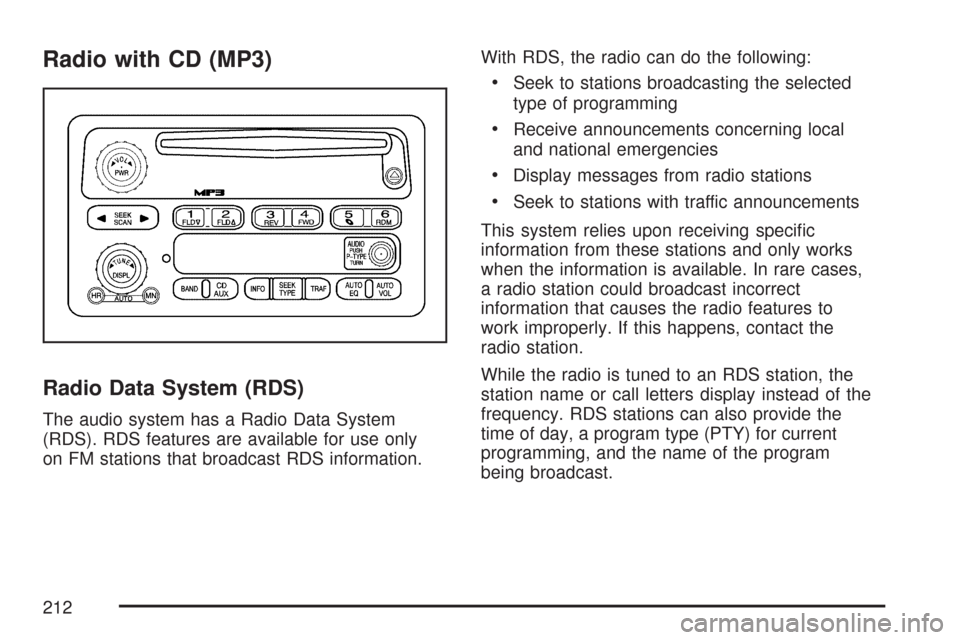
The audio system has a Radio Data System
(RDS). RDS features are available for use only
on FM stations that broadcast RDS information.With RDS, the radio can do the following:
Seek to stations broadcasting the selected
type of programming
Receive announcements concerning local
and national emergencies
Display messages from radio stations
Seek to stations with traffic announcements
This system relies upon receiving specic
information from these stations and only works
when the information is available. In rare cases,
a radio station could broadcast incorrect
information that causes the radio features to
work improperly. If this happens, contact the
radio station.
While the radio is tuned to an RDS station, the
station name or call letters display instead of the
frequency. RDS stations can also provide the
time of day, a program type (PTY) for current
programming, and the name of the program
being broadcast.
212