2007 CHEVROLET AVEO auxiliary
[x] Cancel search: auxiliaryPage 147 of 436
Dome Lamp
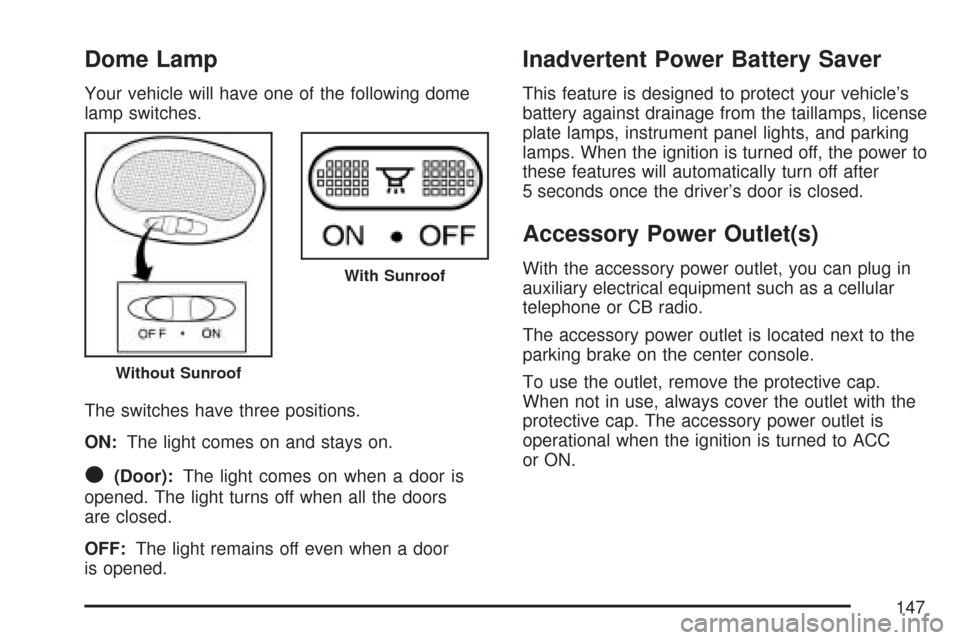
Your vehicle will have one of the following dome
lamp switches.
The switches have three positions.
ON:The light comes on and stays on.
O(Door):The light comes on when a door is
opened. The light turns off when all the doors
are closed.
OFF:The light remains off even when a door
is opened.
Inadvertent Power Battery Saver
This feature is designed to protect your vehicle’s
battery against drainage from the taillamps, license
plate lamps, instrument panel lights, and parking
lamps. When the ignition is turned off, the power to
these features will automatically turn off after
5 seconds once the driver’s door is closed.
Accessory Power Outlet(s)
With the accessory power outlet, you can plug in
auxiliary electrical equipment such as a cellular
telephone or CB radio.
The accessory power outlet is located next to the
parking brake on the center console.
To use the outlet, remove the protective cap.
When not in use, always cover the outlet with the
protective cap. The accessory power outlet is
operational when the ignition is turned to ACC
or ON.
Without Sunroof
With Sunroof
147
Page 192 of 436
To adjust the fade between the front and the rear
speakers, press this button until FAD appears
on the display. Turn the power/volume knob
to increase or to decrease the fade between the
front and the rear speakers. The display will
show the fade level. When finished making the
selection, press this button to select the fade level.
Setting the EQ (Equalization)
SOUND (Equalization):Press this button until
EQ OFF appears on the display to select
customized equalization settings designed for
classic, dance, rock, jazz, pop, voice, and techno.
Turn the power/volume knob until the desired
equalization setting appears on the display. When
finished making the selection, press the SOUND
button to select the equalization setting.
To cancel an equalization setting, press the
SOUND button until EQ OFF appears on the
display, turn the power/volume knob until OFF
appears on the display, then press the SOUND
button again to select the equalization setting.
Order of Sound Function
The order for displayed sound function is EQ OFF,
CLASSIC, DANCE, ROCK, JAZZ, POP, VOICE,
TECHNO, and EQ OFF.
Using the Auxiliary Input Jack
AUX IN (Auxiliary Input):Your radio system has
an auxiliary input jack located on the lower right
side of the faceplate. This is not an audio
output; do not plug the headphone set into the
front auxiliary input jack. You can however,
connect an external audio device such as an iPod,
laptop computer, MP3 player, CD changer, or
XM™ receiver, etc. to the auxiliary input jack for
use as another source for audio listening.
The auxiliary input jack will also accept cell phone
connectors. Plug the cell phone connector into
the auxiliary input jack to hear the other side of a
cell phone’s conversation through the vehicle
sound system.
192
Page 193 of 436
Drivers are encouraged to set up any auxiliary
device while the vehicle is in park (P). See
Defensive Driving on page 220for more
information on driver distraction.
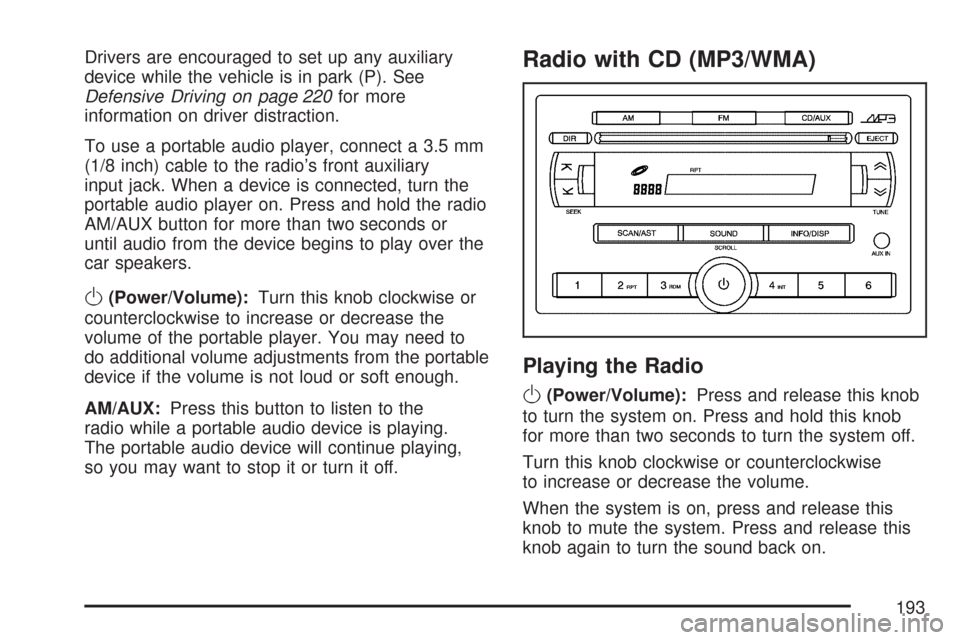
To use a portable audio player, connect a 3.5 mm
(1/8 inch) cable to the radio’s front auxiliary
input jack. When a device is connected, turn the
portable audio player on. Press and hold the radio
AM/AUX button for more than two seconds or
until audio from the device begins to play over the
car speakers.
O(Power/Volume):Turn this knob clockwise or
counterclockwise to increase or decrease the
volume of the portable player. You may need to
do additional volume adjustments from the portable
device if the volume is not loud or soft enough.
AM/AUX:Press this button to listen to the
radio while a portable audio device is playing.
The portable audio device will continue playing,
so you may want to stop it or turn it off.
Radio with CD (MP3/WMA)
Playing the Radio
O
(Power/Volume):Press and release this knob
to turn the system on. Press and hold this knob
for more than two seconds to turn the system off.
Turn this knob clockwise or counterclockwise
to increase or decrease the volume.
When the system is on, press and release this
knob to mute the system. Press and release this
knob again to turn the sound back on.
193
Page 199 of 436
Using the Auxiliary Input Jack
The radio system has an auxiliary input jack
located on the lower right side of the faceplate.
This is not an audio output. Do not plug the
headphone set into the front auxiliary input jack.
An external audio device such as an iPod,
laptop computer, MP3 player, CD changer, or
cassette tape player, etc. can be connected to the
auxiliary input jack for use as another source
for audio listening.
The auxiliary input jack also accepts cell phone
connectors. Plug the cell phone connector into the
auxiliary input jack to hear a person speaking
on a cell phone during conversation through the
vehicle sound system.
Drivers are encouraged to set up any auxiliary
device while the vehicle is in PARK (P). See
Defensive Driving on page 220for more
information on driver distraction.To use a portable audio player, connect a 3.5 mm
(1/8 inch) cable to the radio’s front auxiliary
input jack. While a device is connected, turn the
portable audio player on and press the radio
CD/AUX button to hear audio from the device over
the vehicle speakers.
CD/AUX (CD/Auxiliary):Press this button once
to play a CD while a portable audio device is
playing. Press this button a second time for the
system to begin playing audio from the connected
portable audio player. Once in this mode,
“Auxinput” appears on the display. If the auxiliary
jack does not detect the presence of an output
jack, the auxiliary mode does not display.
O(Power/Volume):Turn theOknob clockwise
or counterclockwise to increase or decrease the
volume of the portable player. Additional
adjustments on a portable device might be needed
to get the desired volume.
199
Page 206 of 436
If the CD is not playing correctly, for any other
reason, try a known good CD.
If any error occurs repeatedly or if an error cannot
be corrected, contact your dealer/retailer. If the
radio displays an error message, write it down and
provide it to your dealer/retailer when reporting
the problem.
Using the Auxiliary Input Jack
AUX IN (Auxiliary Input):The radio system has
an auxiliary input jack located on the lower
right side of the faceplate. This is not an audio
output. Do not plug the headphone set into
the front auxiliary input jack. An external audio
device such as an iPod, laptop computer,
MP3 player, CD changer, or XM™ receiver, etc.
can be connected to the auxiliary input jack for use
as another source for audio listening.
The auxiliary input jack also accepts cell phone
connectors. Plug the cell phone connector into the
auxiliary input jack to hear a person speck on a
cell phone during a conversation through the
vehicle sound system.Drivers are encouraged to set up any auxiliary
device while the vehicle is in PARK (P). See
Defensive Driving on page 220for more
information on driver distraction.
To use a portable audio player, connect a 3.5 mm
(1/8 inch) cable to the radio’s front auxiliary
input jack. While a device is connected, turn the
portable audio player on and press the radio
CD/AUX button to hear audio from the device over
the vehicle speakers.
O(Power/Volume):Turn theOknob clockwise
or counterclockwise to increase or decrease the
volume of the portable player. Additional
adjustments on a portable device might be needed
to get the desired volume.
CD/AUX (CD/Auxiliary):Press this button once
to play a CD while a portable audio device is
playing. Press this button a second time for the
system to begin playing audio from the connected
portable audio player. Once in this mode,
“Auxinput” displays. If the auxiliary jack does not
detect the presence of an output jack, the auxiliary
mode does not display.
206
Page 358 of 436
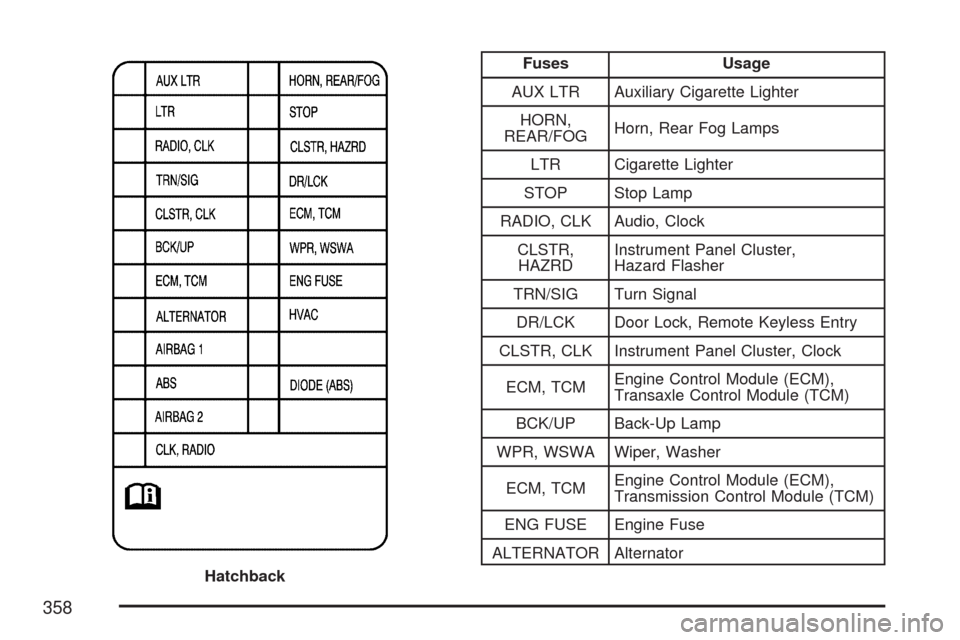
Fuses Usage
AUX LTR Auxiliary Cigarette Lighter
HORN,
REAR/FOGHorn, Rear Fog Lamps
LTR Cigarette Lighter
STOP Stop Lamp
RADIO, CLK Audio, Clock
CLSTR,
HAZRDInstrument Panel Cluster,
Hazard Flasher
TRN/SIG Turn Signal
DR/LCK Door Lock, Remote Keyless Entry
CLSTR, CLK Instrument Panel Cluster, Clock
ECM, TCMEngine Control Module (ECM),
Transaxle Control Module (TCM)
BCK/UP Back-Up Lamp
WPR, WSWA Wiper, Washer
ECM, TCMEngine Control Module (ECM),
Transmission Control Module (TCM)
ENG FUSE Engine Fuse
ALTERNATOR Alternator
Hatchback
358
Page 360 of 436
Fuses Usage
EMS1Engine Room Fuse Block, Rear
HO2S, Transaxle Control Module,
VSS, Fuel Pump
STOP LAMP Brake Switch
CIGARCigarette Lighter, Auxiliary
Power Outlet
AUDIO/CLOCK Radio, Clock
OBD On-Board Diagnostics, Immobilizer
ROOM LAMPTrunk Lamp, Trunk Open Switch,
Cluster, Dome Lamp
DEFOGGER Rear Defogger
SUNROOF Sunroof Module (Option)
DRL Daytime Running LampsFuses Usage
DOOR LOCK Door Lock/Unlock
B/UP LAMP Back-up Lamps
HORN Horn
ELEC MIRRORMirror Control Switch, Dome Lamp,
Air Conditioning Switch
AUDIO/RKERadio, Remote Keyless Entry,
Clock, Power Mirror Unit,
Anti-Theft Module
DEFOG
MIRRORPower Mirror Unit, Air
Conditioning Switch
BLANK Not Used
BLANK Not Used
BLANK Not Used
360