2007 CADILLAC XLR V center console
[x] Cancel search: center consolePage 212 of 512
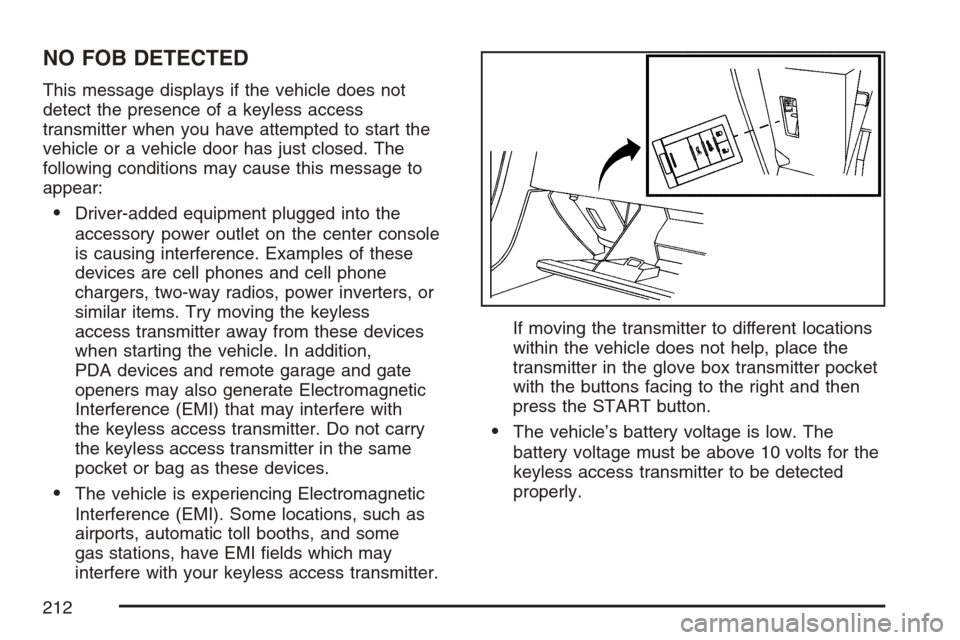
NO FOB DETECTED
This message displays if the vehicle does not
detect the presence of a keyless access
transmitter when you have attempted to start the
vehicle or a vehicle door has just closed. The
following conditions may cause this message to
appear:
Driver-added equipment plugged into the
accessory power outlet on the center console
is causing interference. Examples of these
devices are cell phones and cell phone
chargers, two-way radios, power inverters, or
similar items. Try moving the keyless
access transmitter away from these devices
when starting the vehicle. In addition,
PDA devices and remote garage and gate
openers may also generate Electromagnetic
Interference (EMI) that may interfere with
the keyless access transmitter. Do not carry
the keyless access transmitter in the same
pocket or bag as these devices.
The vehicle is experiencing Electromagnetic
Interference (EMI). Some locations, such as
airports, automatic toll booths, and some
gas stations, have EMI elds which may
interfere with your keyless access transmitter.If moving the transmitter to different locations
within the vehicle does not help, place the
transmitter in the glove box transmitter pocket
with the buttons facing to the right and then
press the START button.
The vehicle’s battery voltage is low. The
battery voltage must be above 10 volts for the
keyless access transmitter to be detected
properly.
212
Page 330 of 512

This warning light will
come on to let you
know if there is
a problem with your
traction control system.
SeeTraction Control System (TCS) Warning Light
on page 194. When this warning light is on, the
system will not limit wheel spin. Adjust your driving
accordingly.
The traction control system automatically comes
on whenever you start your vehicle. To limit wheel
spin, especially in slippery road conditions, you
should always leave the system on. But you
can turn the traction control system off if you ever
need to. You should turn the system off if your
vehicle ever gets stuck in sand, mud or snow and
rocking the vehicle is required. SeeRocking
Your Vehicle to Get It Out on page 354andIf Your
Vehicle is Stuck in Sand, Mud, Ice, or Snow on
page 353for more information.To turn the system off,
press the front part of
the traction control
button located on the
center console.
The TRACTION SYSTEM OFF message will
display on the DIC and the traction control system
warning light will come on. If the system is
limiting wheel spin when you press the button,
the TRACTION SYSTEM OFF message will
display – but the system will not turn off right away.
It will wait until there is no longer a current need
to limit wheel spin.
You can turn the system back on at any time by
pressing the button again. The TRACTION
SYSTEM ON message should display briey on
the Driver Information Center. SeeDIC Warnings
and Messages on page 206for more information.
Adding non-GM accessories can affect your
vehicle’s performance. SeeAccessories and
Modications on page 363for more information.
330
Page 501 of 512

Center Console Storage Area...................... 122
Chains, Tire................................................. 435
Charging System Light................................ 191
Check
Engine Light............................................ 196
Checking Things Under the Hood................ 372
Chemical Paint Spotting.............................. 450
Child Restraints
Child Restraint Systems............................. 35
Infants and Young Children........................ 31
Lower Anchors and Tethers for Children..... 39
Older Children........................................... 28
Securing a Child Restraint in the
Passenger Seat Position......................... 40
Cigarette Lighter.......................................... 178
Cleaning
Aluminum or Chrome-Plated Wheels........ 448
Exterior Lamps/Lenses............................. 446
Fabric/Carpet........................................... 443
Finish Care.............................................. 447
Inside of Your Vehicle.............................. 441
Instrument Panel, Vinyl, and Other Plastic
Surfaces............................................... 444
Leather.................................................... 444
Speaker Covers....................................... 445
Tires........................................................ 449
Underbody Maintenance........................... 449Cleaning (cont.)
Washing Your Vehicle .............................. 446
Weatherstrips........................................... 445
Windshield and Wiper Blades................... 447
Wood Panels........................................... 445
Climate Control System
Air Filter, Passenger Compartment........... 184
Dual......................................................... 178
Outlet Adjustment..................................... 184
Collision Damage Repair............................. 492
Competitive Driving, Racing or Other........... 338
Control of a Vehicle..................................... 326
Convenience Net......................................... 123
Coolant
Engine Temperature Gage........................ 195
Surge Tank Pressure Cap........................ 388
Cooled Seats.................................................. 9
Cooling System........................................... 391
Courtesy Lamps.......................................... 170
Cruise Control............................................. 147
Cruise Control, Adaptive .............................. 150
Cupholder(s)................................................ 122
Customer Assistance Information
Courtesy Transportation........................... 488
Customer Assistance for Text Telephone
(TTY) Users.......................................... 485
Customer Assistance Offices.................... 485
501
Page 510 of 512

Service........................................................ 363
Accessories and Modications.................. 363
Adding Equipment to the Outside of Your
Vehicle................................................. 365
California Proposition 65 Warning............. 364
Doing Your Own Work............................. 364
Engine Soon Light................................... 196
Publications Ordering Information............. 497
Servicing Your Airbag-Equipped Vehicle......... 58
Setup Menu................................................ 243
Sheet Metal Damage................................... 449
Shifting Into Park (P)..................................... 99
Shifting Out of Park (P)............................... 100
Signals, Turn and Lane-Change.................. 142
Six-Disc CD Changer.................................. 302
Specications, Capacities............................ 458
Speedometer............................................... 187
StabiliTrak
®System..................................... 331
Starting Your Engine..................................... 89
Steering...................................................... 333
Steering Wheel Controls, Audio................... 227
Steering Wheel Controls, Memory................. 10
Steering Wheel, Power Tilt Wheel and
Telescopic Steering Column..................... 141
Storage Areas
Center Console Storage Area................... 122
Convenience Net..................................... 123Storage Areas (cont.)
Cupholder(s)............................................ 122
Glove Box................................................ 121
Map Pocket............................................. 122
Rear Storage Area................................... 123
Stuck in Sand, Mud, Ice, or Snow............... 353
Sun Visors.................................................... 84
Symbols...................................................... 275
System Needs Service, If............................ 283
System Overview
Overview, Navigation System................... 232
T
Tachometer................................................. 187
TCS Warning Light...................................... 194
Telescopic Steering Column, Power Tilt
Wheel...................................................... 141
Theft-Deterrent, Radio................................. 226
Theft-Deterrent System.................................. 84
Theft-Deterrent Systems................................ 84
Tire
Pressure Light.......................................... 196
Tires........................................................... 413
Aluminum or Chrome-Plated Wheels,
Cleaning............................................... 448
Buying New Tires..................................... 428
Chains..................................................... 435
510