2007 CADILLAC STS V instrument cluster
[x] Cancel search: instrument clusterPage 194 of 560

If you apply your brakes, the cruise control will
shut off.
{CAUTION:
Cruise control can be dangerous where
you cannot drive safely at a steady speed.
So, do not use your cruise control on
winding roads or in heavy traffic.
Cruise control can be dangerous on
slippery roads. On such roads, fast
changes in tire traction can cause
excessive wheel slip, and you could lose
control. Do not use cruise control on
slippery roads.
If your vehicle is in cruise control when the
Traction Control System (TCS) begins to limit
wheel spin, the cruise control will automatically
disengage. SeeTraction Control System (TCS) on
page 323andStabiliTrak
®System on page 326.
When road conditions allow you to safely use
it again, you may turn the cruise control back on.
Setting Cruise Control
{CAUTION:
If you leave your cruise control on when
you are not using cruise, you might hit a
button and go into cruise when you do not
want to. You could be startled and even
lose control. Keep the cruise control switch
off until you want to use cruise control.
1. Move the cruise control switch to on.
2. Get up to the speed desired.
3. Press in the set button at the end of the lever
and release it.
4. Take your foot off the accelerator pedal.
This light on the
instrument panel cluster
will come on while
cruise control is on.
194
Page 213 of 560

IntelliBeam™ Intelligent High-Beam
Headlamp Control System
If your vehicle has this feature, be sure to read
this entire section before using it.
IntelliBeam™ is an enhancement to the vehicle’s
headlamp system. Using a digital light sensor
located on the back of the rearview mirror,
this system turns the high-beam headlamps on
and off according to surrounding traffic conditions.
The IntelliBeam™ system turns the high-beam
headlamps on when it is dark enough, there is no
other traffic present, and the IntelliBeam™
system is enabled.
Turning On and Enabling IntelliBeam™
AUTO3(IntelliBeam™ On/Off):Press
and release the IntelliBeam™ button on the inside
rear view mirror. The IntelliBeam™ indicator on
the mirror turns on. Once the system has
been turned on, it remains on each time the
vehicle is started. Additionally, the IntelliBeam™
system must be enabled.
To enable the IntelliBeam™ System, turn the
exterior lamp control to AUTO, with the turn
signal/multifunction lever in its neutral position.The High-Beam On Light appears on the
instrument panel cluster when the high-beams are
on. SeeHighbeam On Light on page 257. Your
vehicle has variable intensity high-beams.
The high-beam indicator on the instrument panel
cluster comes on as soon as the high-beams
start to come on, and remains on until the
high-beams have completely turned off. All
vehicles that have IntelliBeam™, however, quickly
turn off the high-beams if the system detects
the sudden presence of vehicle lights ahead.
Driving with IntelliBeam™
IntelliBeam™ only activates the high-beams when
driving over 20 mph (32 km/h).
The high-beam headlamps remain on, under the
control of IntelliBeam™, until any of the following
situations occur:
The system detects an approaching vehicle’s
headlamps.
The system detects a preceding vehicle’s
taillamps.
The outside light is bright enough that
high-beam headlamps are not required.
213
Page 216 of 560

Headlamps on Reminder
A warning chime will sound if the exterior lamp
control is left on in either the headlamp or parking
lamp position and the driver’s door is opened
with the ignition off. SeeLights On Reminder on
page 256for additional information.
Daytime Running Lamps (DRL)
Daytime Running Lamps (DRL) can make it easier
for others to see the front of your vehicle during
the day. DRL can be helpful in many different
driving conditions, but they can be especially
helpful in the short periods after dawn and before
sunset. Fully functional daytime running lamps
are required on all vehicles rst sold in Canada.
The DRL system will make the turn signal lamps
come on when the following conditions are met:
It is still daylight and the ignition is on,
the automatic lights are enabled, and
the transmission is not in PARK (P).
When DRL are on, only your front turn signal
lamps will be on. No other exterior lamps will be
on when the DRL are being used. Your instrument
panel will not be lit.When the automatic lights are enabled and it is dark
enough outside, the DRL will turn off and the
low-beam headlamps will turn on. When it is bright
enough outside, the low-beam headlamps will go
off, and the DRL will turn back on. If you start your
vehicle in a dark garage, the automatic headlamp
system will come on immediately. Once you leave
the garage, it will take about one minute for the
automatic headlamp system to change to DRL if it
is light outside. During that delay, your instrument
panel cluster may not be as bright as usual. Make
sure your instrument panel brightness lever is in the
full bright position. SeeInstrument Panel Brightness
on page 220.
To operate your vehicle with the DRL off, turn the
exterior lamp control off and then do one of the
following:
Turn the exterior lamp control to the parking
lamp position.
Turn the exterior lamp control to the headlamp
position.
Turn the exterior lamp control from AUTO to
off and back to AUTO.
216
Page 218 of 560

Twilight Sentinel®
Twilight Sentinel®can turn your lamps on and off
for you.
A light sensor on top of the instrument panel
makes the Twilight Sentinel
®work, so be sure it is
not covered.With Twilight Sentinel
®the following will happen:
When it is dark enough outside, the front
turn signal lamps (DRL) will go off, and
the headlamps and parking lamps will come
on. The other lamps that come on with
headlamps will also come on.
When it is bright enough outside, the
headlamps will go off, and the front turn signal
lamps (DRL) will come on, as long as the
exterior lamp switch is in the off position.
If you start your vehicle in a dark garage, the
automatic headlamp system will come on
immediately. Once you leave the garage, it will
take about one minute for the automatic headlamp
system to change to DRL if it is light outside.
During that delay, the instrument panel cluster
might not be as bright as usual. Make sure
the instrument panel brightness control is in full
bright position. SeeInstrument Panel Brightness
on page 220for more information.
You can idle the vehicle with the lamps off, even
when it is dark outside. First set the parking
brake while the ignition is in OFF/ACCESSORY.
Then start the vehicle. The lamps will stay off until
the parking brake is released.
218
Page 223 of 560

Head-Up Display (HUD)
{CAUTION:
If the HUD image is too bright, or too high
in your eld of view, it may take you more
time to see things you need to see when it
is dark outside. Be sure to keep the HUD
image dim and placed low in your eld
of view.
If equipped, the Head-Up Display (HUD) allows
you to see some of the driver information that
appears on your instrument panel cluster on the
windshield.
The information may be displayed in English or
metric units and appears as an image focused out
toward the front of your vehicle. To change
from English to metric units, seeDIC Controls and
Displays on page 258.
The HUD consists of the following information:
Speedometer
Turn Signal Indicators
High-Beam Indicator Symbol
Driver Shift Control Transmission Feature,
seeAutomatic Transmission Operation on
page 116
Check Gages Icon
Adaptive Cruise Control Features and
Indicators (If Equipped), seeAdaptive Cruise
Control on page 197
Forward Collision Alert Features and
Indicators (If Equipped), seeForward Collision
Alert (FCA) System on page 184
Radio Features
United States version shown, Canada similar
223
Page 224 of 560

Be sure to continue scanning your displays,
controls and driving environment just as you would
in a vehicle without HUD. If you never look at your
instrument panel cluster, you may not see
something important, such as a warning light.
Under important warning conditions, the CHECK
GAGES message will display in the HUD. View
your Driver Information Center (DIC) for more
information.
The HUD controls are
located to the left of the
steering wheel on the
DIC control panel.
~(Head-Up Display):Press this button to
change the position of the HUD on the windshield.
Press the top part of the button to move the
HUD image up. Press the bottom part of the button
to move the HUD image down.You can also adjust the brightness of the HUD
image. Press the knob on the center of the
DIC control panel in until it pops out and then pull
the knob until is completely extended. Turn the
knob clockwise or counter-clockwise to increase or
decrease the brightness. If you turn the knob all
the way to the left, the HUD image will turn off.
To adjust the HUD so you can see it properly,
do the following:
1. Adjust the seat to a comfortable driving
position. If you change your seat position later,
you may have to re-adjust your HUD.
2. Start your engine and press the top or bottom
of the HUD button to center the HUD image in
your view.
The HUD image can only be adjusted up and
down, not side-to-side.
3. Turn the knob on the DIC control panel to
adjust the brightness of the HUD image.
The brightness of the HUD image is determined
by the light conditions in the direction your vehicle
is facing and where you have the HUD set.
If you are facing a dark object or a heavily shaded
area, your HUD may anticipate that you are
entering a dark area and may begin to dim.
224
Page 242 of 560
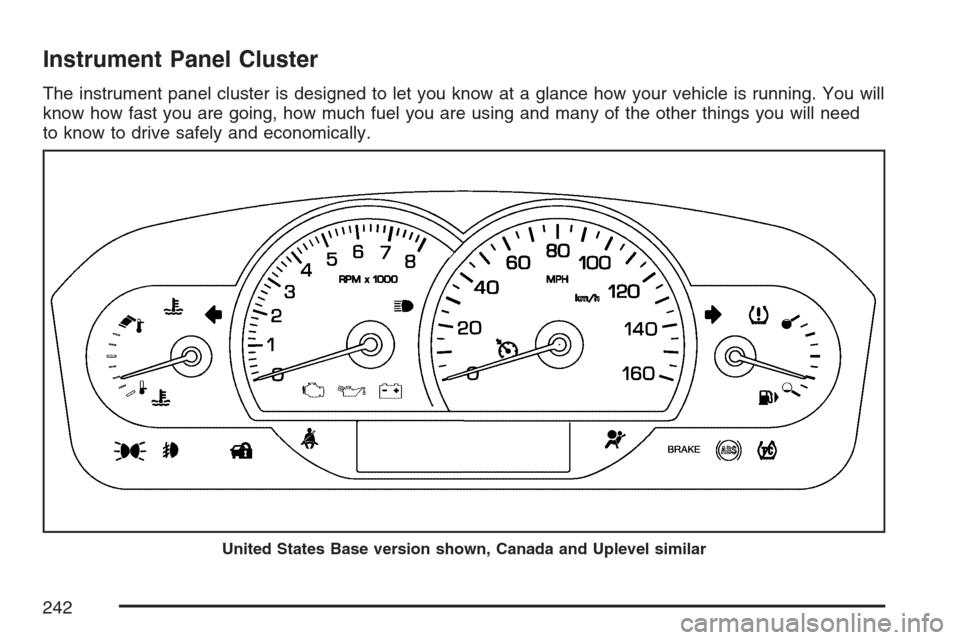
Instrument Panel Cluster
The instrument panel cluster is designed to let you know at a glance how your vehicle is running. You will
know how fast you are going, how much fuel you are using and many of the other things you will need
to know to drive safely and economically.
United States Base version shown, Canada and Uplevel similar
242
Page 258 of 560

Driver Information Center (DIC)
The Driver Information Center (DIC) gives you the
status of many of your vehicle’s systems. The DIC
is also used to display warning/status messages.
All messages will appear in the DIC display located
at the bottom of the instrument panel cluster, below
the tachometer and speedometer. The DIC buttons
are located on the instrument panel, to the left of
the steering wheel.
The DIC comes on when the ignition is on. After a
short delay, the DIC will display the current
driver and the information that was last displayed
before the engine was turned off.
The top line of the DIC display shows the vehicle
system information and the warning/status
messages. The bottom line of the DIC display
shows either the odometer, the trip odometer A or
the trip odometer B information on the left side.
Only one odometer can appear at a time. See “Trip
Information” underDIC Controls and Displays
on page 258for information on changing the
display to show the odometer or trip odometer
information. The bottom line of the DIC display
also shows the outside temperature on the
right side and the shift lever position indicator inthe center. SeeAutomatic Transmission Operation
on page 116for more information on the shift
lever positions.
When the sport mode is active, an S will appear
next to the shift position indicator on the center of
the DIC display. When the manual mode is
active, an M will appear on the DIC display. When
the normal mode is active, only the shift position
indicator will appear. While the Driver Shift
Control (DSC) feature is active, the DIC will
change to show the selected gear. See “Driver
Shift Control (DSC)” underAutomatic Transmission
Operation on page 116for more information.
If a problem is detected, a warning message will
appear on the display. Be sure to take any
message that appears on the display seriously and
remember that clearing the message will only make
the message disappear, not correct the problem.
DIC Controls and Displays
The Driver Information Center (DIC) has different
modes which can be accessed by pressing
the four DIC buttons located on the instrument
panel, to the left of the steering wheel.
258