2007 CADILLAC SRX tire pressure reset
[x] Cancel search: tire pressure resetPage 219 of 522

UNITS
This display allows you to select between English
or Metric units of measurement. Once in this
display, press the set/reset button to select
between ENGLISH or METRIC units.
PARKING ASSIST
If your vehicle has the Ultrasonic Rear Parking
Assist (URPA) system, this display allows
the system to be turned on or off. Once in this
display, press the set/reset button to select
between ON or OFF. If you choose ON, the
system will be turned on. If you choose OFF, the
system will be turned off. The URPA system
automatically turns back on after each vehicle
start. When the URPA system is turned off and the
vehicle is shifted out of PARK (P), the DIC will
display the PARKING ASSIST OFF message as a
reminder that the system has been turned off.
SeeDIC Warnings and Messages on page 220
andUltrasonic Rear Parking Assist (URPA)
on page 184for more information.
FRONT TIRES or REAR TIRES
If your vehicle has a Tire Pressure Monitor (TPM)
system, the pressure for each tire can be
viewed in the DIC. The tire pressure will be shown
in either pounds per square inch (psi) or
kilopascals (kPa). Press the vehicle information
button until the DIC shows the tire pressure for the
front tires. Press the vehicle information button
again to view the pressure for the rear tires.
If a low or high tire pressure condition is detected
by the system while driving, a message advising
you to check the pressure in a specic tire
will appear in the display. SeeInation - Tire
Pressure on page 407andDIC Warnings
and Messages on page 220for more information.
RELEARN TIRE POSITIONS
If your vehicle has a Tire Pressure Monitor (TPM)
system, after rotating the tires or after replacing
a tire or sensor, the system must re-learn the tire
positions. To re-learn the tire positions, see
Tire Pressure Monitor System on page 410. See
Tire Inspection and Rotation on page 414andDIC
Warnings and Messages on page 220for more
information.
219
Page 221 of 522

AUTOMATIC LIGHT CONTROL OFF
This message displays when the automatic
headlamps are turned off.
AUTOMATIC LIGHT CONTROL ON
This message displays when the automatic
headlamps are turned on.
BATTERY SAVER ACTIVE
This message displays when the system detects
that the battery voltage is dropping below expected
levels. The battery saver system starts reducing
certain features of the vehicle that you may be able
to notice. At the point that the features are disabled,
this message is displayed. It means that the vehicle
is trying to save the charge in the battery.
Turn off all unnecessary accessories to allow the
battery to recharge.
The normal battery voltage range is
11.5 to 15.5 volts. You can monitor battery voltage
on the Driver Information Center (DIC) by
pressing the trip/fuel button until BATTERY
VOLTAGE is displayed.
CHANGE ENGINE OIL SOON
When this message displays, it means that service
is required for your vehicle. See your dealer.
SeeEngine Oil on page 360andScheduled
Maintenance on page 471for more information.
When you reset the CHANGE ENGINE OIL SOON
message by clearing it from the display, you still
must reset the engine oil life system separately.
For more information on resetting the engine oil life
system, seeEngine Oil Life System on page 363.
CHECK TIRE PRESSURE
If your vehicle has a Tire Pressure Monitor (TPM)
system, this message displays when the tire
pressure in one of the tires needs to be checked.
This message also displays LEFT FRONT,
RIGHT FRONT, LEFT REAR, or RIGHT REAR to
indicate which tire needs to be checked. You
can receive more than one tire pressure message
at a time. To read the other messages that
may have been sent at the same time, press the
set/reset button. If a tire pressure message
appears on the DIC, stop as soon as you can.
Have the tire pressures checked and set to those
shown on the Tire Loading Information label.
221
Page 227 of 522

SERVICE STABILITRAK
This message displays if there has been a
problem detected with the StabiliTrak®system.
If this message comes on while you are driving,
pull off the road as soon as possible and stop
carefully. Try resetting the system by turning the
ignition off then back on. If this message still stays
on or comes back on again while you are
driving, your vehicle needs service. Have the
StabiliTrak
®system inspected by your dealer as
soon as possible. SeeStabiliTrak®System
on page 283for more information.
SERVICE SUSPENSION SYS (System)
This message displays when the magnetic
ride control or automatic leveling control system is
not operating properly. Have your vehicle
serviced by your dealer.
SERVICE THEFT DETERRENT SYSTEM
This message displays when there is a problem
with the theft-deterrent system programmed in the
key. A fault has been detected in the system
which means that the system is disabled and it is
not protecting the vehicle. The vehicle usually
restarts; however, you may want to take the
vehicle to your dealer before turning off the engine.
SeePASS-Key
®III+ Operation on page 114for
more information.
SERVICE TIRE MONITOR SYSTEM
If your vehicle has a Tire Pressure Monitor (TPM)
system, this message displays if a part on the
system is not working properly. If you drive your
vehicle while any of the four sensors are
missing or inoperable, the warning comes on in
about 10 minutes. A sensor would be missing, for
example, if you put different wheels on your
vehicle without transferring the sensors. If the
warning comes on and stays on, there may be a
problem with the TPM. See your dealer.
227
Page 413 of 522

The TPM matching process is outlined below:
1. Set the parking brake.
2. Turn the ignition switch to ON with the
engine off.
3. Using the DIC, press the vehicle information
button until the PRESS
VTO RELEARN
TIRE POSITIONS message displays.
4. Press the Set/Reset button. The horn sounds
twice to indicate the TPMS receiver is ready,
and the TIRE LEARNING ACTIVE message
displays. The TPMS low tire warning light
ashes throughout the matching procedure.
5. Start with the driver’s side front tire.
6. Remove the valve cap from the valve stem.
Activate the TPM sensor by increasing or
decreasing the tire’s air pressure for
10 seconds, or until a horn chirp sounds. The
horn chirp, which may take up to 30 seconds to
sound, conrms that the sensor identication
code has been matched to this tire position. To
decrease the tire’s air-pressure use the pointed
end of the valve cap, a pencil-style air pressure
gage, or a key.7. Proceed to the passenger’s side front tire, and
repeat the procedure in Step 6.
8. Proceed to the passenger’s side rear tire, and
repeat the procedure in Step 6.
9. Proceed to the driver’s side rear tire, and
repeat the procedure in Step 6.
10. After hearing the conrming horn chirp, for
the driver’s side rear tire, the horn sounds
two more times to signal the tire learning
model is no longer active. Turn the ignition
switch to OFF.
11. Set all four tires to the recommended air
pressure level as indicated on the tire and
loading information label.
12. Put the valve caps back on the valve stems.
The spare tire does not have a TPMS sensor.
If you replace one of the road tires with the spare,
the SERVICE TIRE MONITOR SYSTEM
message displays on the DIC screen. This
message should go off once you re-install the
road tire containing the TPMS sensor.
413
Page 415 of 522

The purpose of regular rotation is to achieve more
uniform wear for all tires on the vehicle. The
rst rotation is the most important. SeeScheduled
Maintenance on page 471.
When rotating P255/50R20 size tires, always use
the correct rotation pattern shown here.
Do not include the compact spare tire in the tire
rotation.
After the tires have been rotated, adjust the front
and rear ination pressures as shown on the
Tire and Loading Information label.Vehicles that have the Tire Pressure Monitor
System (TPMS) will need to have the TPMS
sensors reset after a tire rotation, seeTire
Pressure Monitor System on page 410.
Make certain that all wheel nuts are properly
tightened. See “Wheel Nut Torque” under
Capacities and Specications on page 464.
{CAUTION:
Rust or dirt on a wheel, or on the parts to
which it is fastened, can make wheel nuts
become loose after time. The wheel could
come off and cause an accident. When
you change a wheel, remove any rust or
dirt from places where the wheel attaches
to the vehicle. In an emergency, you can
use a cloth or a paper towel to do this;
but be sure to use a scraper or wire brush
later, if needed, to get all the rust or dirt
off. SeeChanging a Flat Tire on page 424.
415
Page 472 of 522
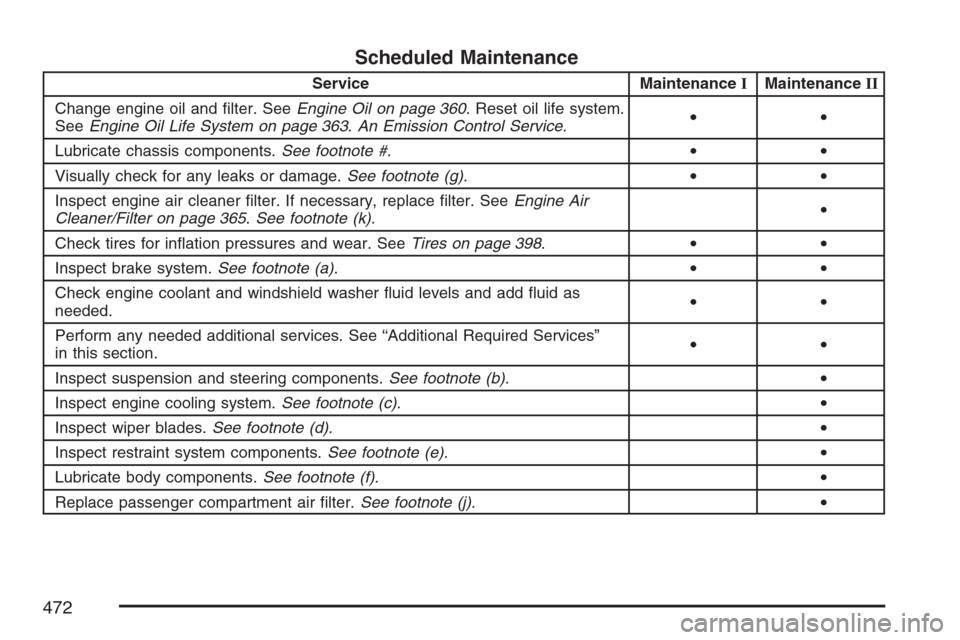
Scheduled Maintenance
Service MaintenanceIMaintenanceII
Change engine oil and lter. SeeEngine Oil on page 360. Reset oil life system.
SeeEngine Oil Life System on page 363.An Emission Control Service.••
Lubricate chassis components.See footnote #.••
Visually check for any leaks or damage.See footnote (g).••
Inspect engine air cleaner lter. If necessary, replace lter. SeeEngine Air
Cleaner/Filter on page 365.See footnote (k).•
Check tires for ination pressures and wear. SeeTires on page 398.••
Inspect brake system.See footnote (a).••
Check engine coolant and windshield washer uid levels and add uid as
needed.••
Perform any needed additional services. See “Additional Required Services”
in this section.••
Inspect suspension and steering components.See footnote (b).•
Inspect engine cooling system.See footnote (c).•
Inspect wiper blades.See footnote (d).•
Inspect restraint system components.See footnote (e).•
Lubricate body components.See footnote (f).•
Replace passenger compartment air lter.See footnote (j).•
472